

- Free Edition
- Quick Links
- Active Directory Auditing
- Active Directory auditor
- Active Directory monitoring
- Account lockout analyzer
- Login monitoring software
- Active Directory change notifier
- User logon audit reports
- AD logon logoff tracker
- User logon failure auditing
- Login history tracking tool
- AD change auditor
- Insider threat detection software
- Permissions change auditing
- Entra ID reporting
- Privileged user monitoring
- User behavior analytics tool
- Active Directory security monitoring
- Group Policy auditing tool
- GPO change auditor
- Entra ID auditing
- Audit user account management
- OU change auditor
- Audit group membership changes
- Active Directory auditing and reporting tool
- GPO reporting tool
- Remote desktop monitoring software
- PowerShell logging and auditing
- Azure password protection auditing
- Azure sign-in risk detection
- File Server Auditing
- Windows Server Auditing
- Employee Tracking
- Workstations Auditing
- Compliance Auditing
- Other features
- SIEM Integration
- Windows DNS - Schema Auditing
- Windows security event log monitoring
- SIEM audit solution
- Schedule Active Directory change reports
- Reports from Archived Data
- Aggregated summary reports
- AD new/old attribute changes
- Audit trail
- Audit Active Directory LAPS
- Scheduled Reports & Alerts
- Account lockout examiner
- Industry
- Documents
- Success Stories
- Related Products
- Log360 (On-Premise | Cloud) Comprehensive SIEM and UEBA
- ADManager Plus Active Directory Management & Reporting
- ADAudit Plus Real-time Active Directory Auditing and UBA
- ADSelfService Plus Identity security with MFA, SSO, and SSPR
- DataSecurity Plus File server auditing & data discovery
- Exchange Reporter Plus Exchange Server Auditing & Reporting
- M365 Manager Plus Microsoft 365 Management & Reporting Tool
- RecoveryManager Plus Enterprise backup and recovery tool
- SharePoint Manager Plus SharePoint Reporting and Auditing
- AD360 Integrated Identity & Access Management
- AD Free Tools Active Directory FREE Tools
File and folder change monitoring with ADAudit Plus
Get real-time visibility into every file change and know the who, what, when, and where of every file and folder event across your environment.
Track every file system operation
ADAudit Plus captures every read, write, create, delete, move, rename, and copy-paste event across Windows file servers and several NAS device types. Each event records the user, machine, IP address, file path, and the process that performed the operation.
Audit folder permission changes
Every NTFS permission change, SACL modification, and folder ownership transfer is captured with before-and-after values. You can trace exactly what changed, who changed it, and when, across every monitored server from a single console.
Detect ransomware and anomalous file activity
ADAudit Plus applies machine learning to each user's baseline file activity volume. A sudden spike in file modifications or deletions triggers an alert automatically, before a ransomware spreads to other servers or data destruction is complete.
Audit 13+ file server and NAS types
Windows File Server, NetApp, EMC Isilon, Synology NAS, Amazon FSx, Azure File Share, Nutanix Files, Qumulo NAS, and more are audited. Every platform feeds into the same audit console, so you never have isolated coverage gaps.
Real-time alerts on critical file events
Alert profiles fire the moment a high-risk file event—such as bulk deletions, permission changes on sensitive folders, or failed access attempts by accounts that should not be reaching a resource— occur. Alerts can be configured to trigger email, text message, or a service ticket.
Pre-configured compliance reports
Out-of-the-box file audit reports map directly to SOX, HIPAA, PCI-DSS, GDPR, FISMA, GLBA, and ISO 27001 requirements. Custom report profiles let you combine specific users, file paths, and operation types into saved views for recurring compliance workflows.
Process-level file audit trail
Beyond the user identity, ADAudit Plus captures which process performed each file operation. This matters when a legitimate user account is being used by malicious software, because the process name reveals what native user-level logging cannot.
Failed access attempt monitoring
Every denied read, write, and delete attempt is logged with the user, machine, and target file. Patterns of repeated failures against the same path, or across multiple paths, surface quickly in pre-configured reports.
The need for file and folder change monitoring
Every file server accumulates hundreds of changes each day. Most are routine, but a small number need immediate attention: a permission change on a high-value share, a bulk deletion of finance records, a renamed executable dropped into a system folder.
Without a structured audit trail, there is no reliable way to separate the two.
File and folder change monitoring captures every create, modify, delete, move, rename, copy, and permission-change event across file storage, recording the user identity, the source machine, and the exact time of each action. When a file goes missing or a folder permission is silently widened, that audit trail lets you reconstruct what happened and who was responsible.
ADAudit Plus monitors file and folder activity across Windows file servers and multiple NAS device types from a single console. Every event is captured in real time, tied to a user identity and machine, and available through pre-configured reports that require no custom scripting.
Track every file and folder change in real time
ADAudit Plus' file change monitoring reports capture every file system operation in your environment as it happens. Each record identifies the user, machine, IP address, file path, and operation type without requiring you to log into individual servers or parse raw event logs. This allows you to:
- Aggregate file operations by process, user, and server to make investigations and analysis easier.
- Use advanced report filters to drill down data to a specific share, so you can investigate activity on a sensitive folder without sorting through unrelated events.
- When a backup agent, sync tool, or unknown executable is responsible for unusual file writes or deletions, you can identify it quickly and proceed with remediation steps.
- You can also detect files that have not been accessed or modified for extended periods using the builtin file metadata analysis capabilty.
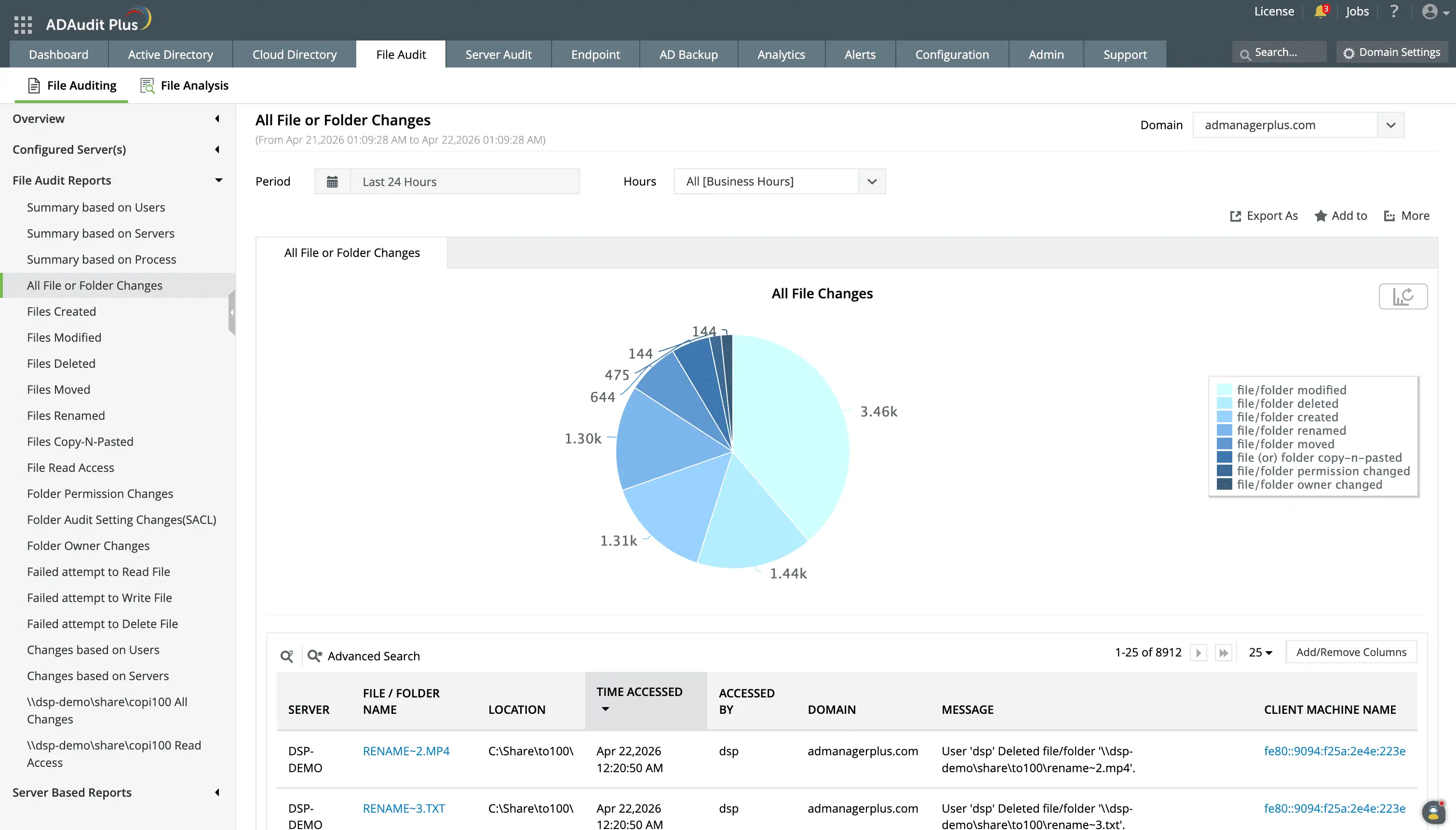
Enable real-time tracking of file creations, modifications, deletions, and permission changes across Windows and NAS file servers.
Identify the specific user, source machine, and timestamp for every file action to maintain a secure audit trail.
Audit folder permission changes
A permission change that widens access to a risky share can expose data to users who should never have had access, and often goes unnoticed for weeks. ADAudit Plus captures every DACL and SACL change on monitored folders, recording old and new permission values so you can see exactly what access was granted or removed. The permission change reports inform you of:
- Every discretionary ACL modification with the previous and updated permission values
- Modifications to audit policies applied to folders, so you know if someone has disabled auditing on a sensitive path
- Ownership transfers, identifying the previous owner and the new one
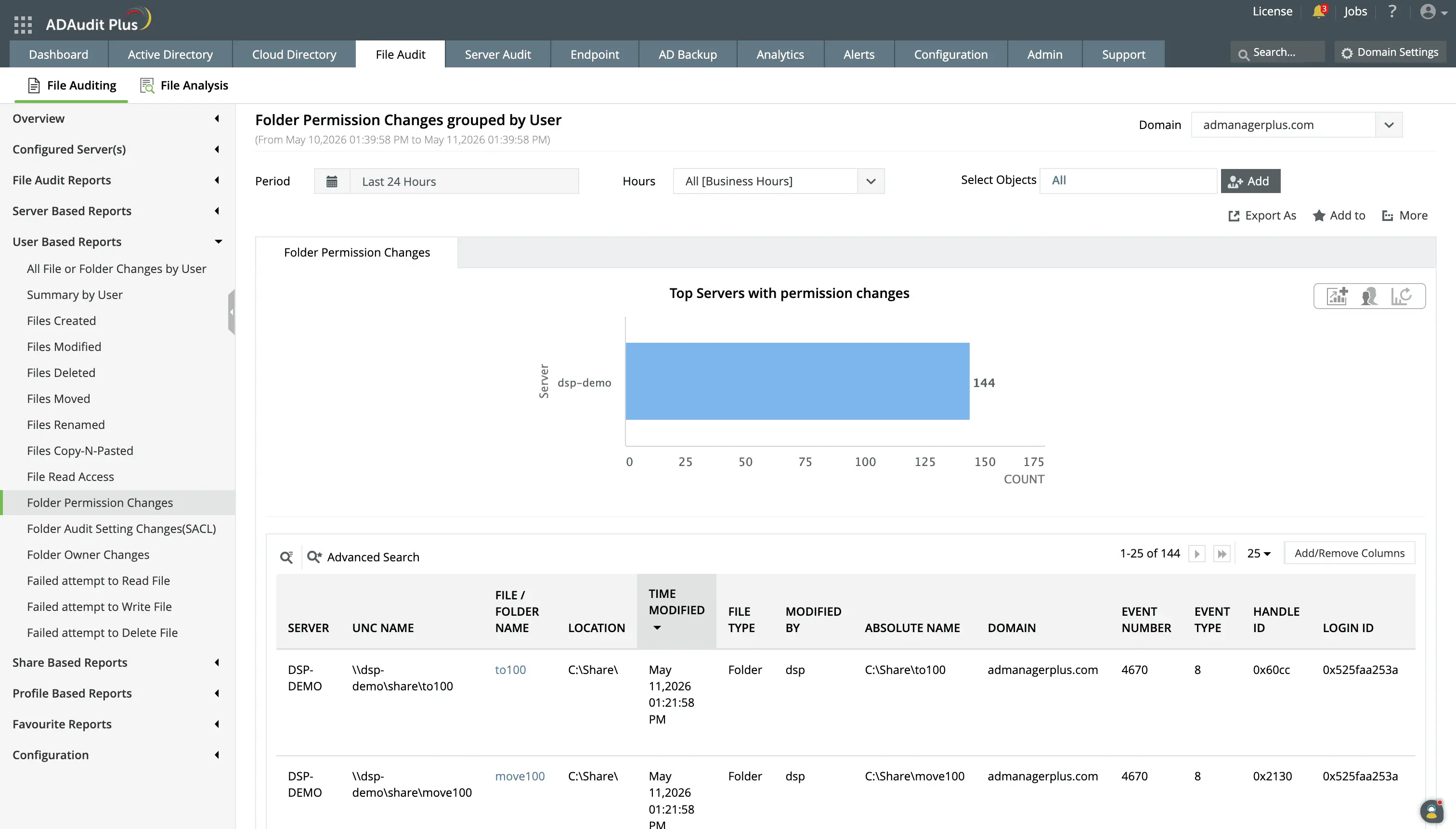
Track users modifying permissions to be aware of who is performing risky actions such as providing elevated access to business-critical folders.
Monitor file access and denied attempts
Patterns in access activity, such as a user reading hundreds of files in a short window or the same account repeatedly failing to reach a restricted folder, often precede a data breach or insider threat incident. ADAudit Plus captures both successful read access and denied access attempts in the same reporting interface. ADAudit Plus monitors:
- Attempts to read, write, or delete files that result in a "permission denied" error, which could indicate unauthorized access attempts.
- Unauthorized attempts to delete high-risk files or folders.
- Attempts to modify or append data (e.g., create files/write data, create folders/append data) without proper permissions.
- Monitor failed changes or access attempts to critical system files.
- Files that have excessive permissions such as Full Control access to users.
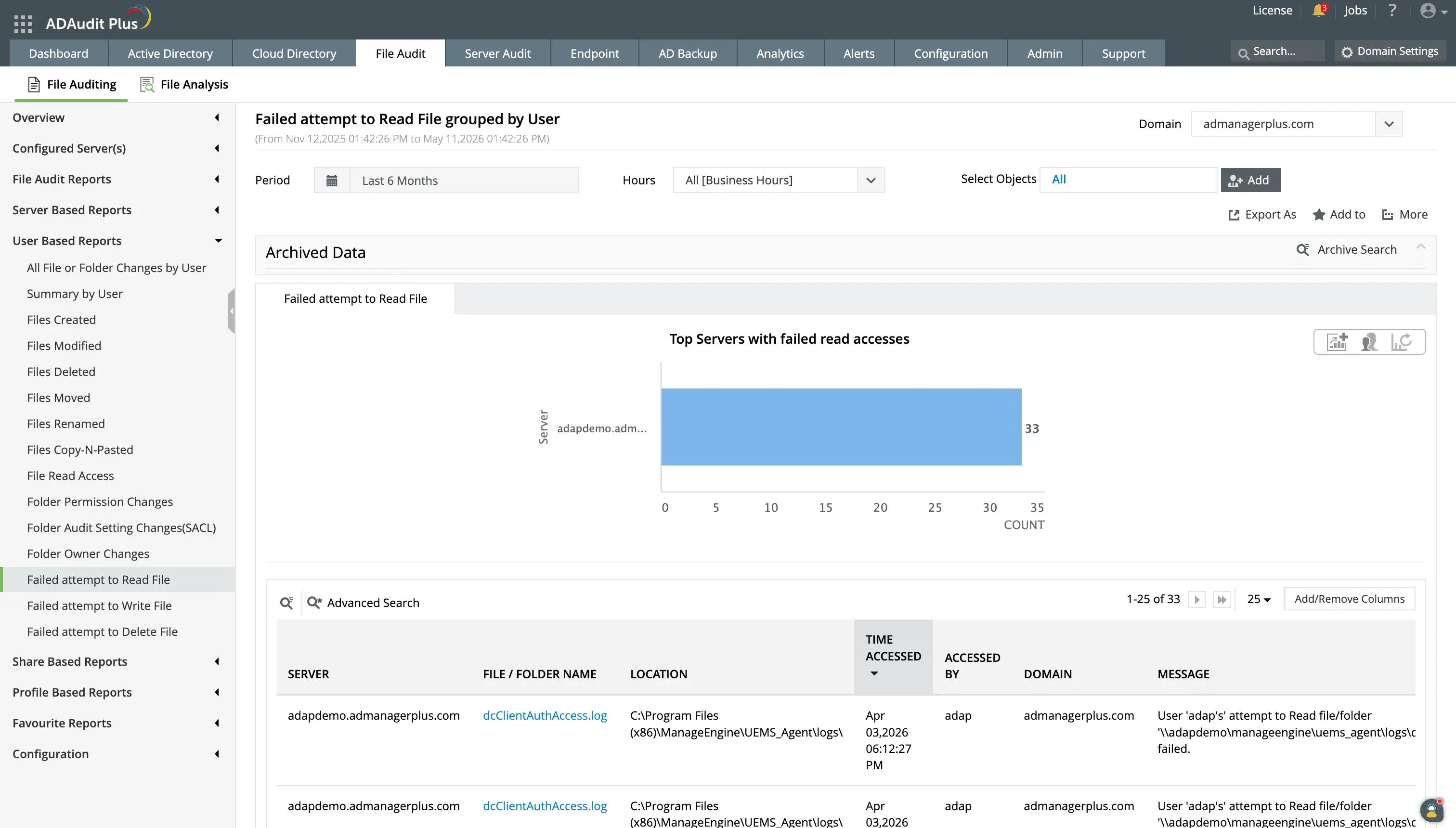
Repeated failed attempts to read files can indicate malicious intent. To aid in detecting these actions quickly, ADAudit Plus provides dedicated reports for failed attempts to read files.
You can also create a custom report to track failed read, write, or delete attempts on high-value folders.
Detect anomalous file activity
A user deleting 800 files in 30 minutes might be a routine archive cleanup, or it might be ransomware. Without a per-user baseline, there is no reliable way to tell. ADAudit Plus applies machine learning to establish what normal file activity looks like for each individual user and flags deviations automatically.
The following detections are available:
- File deletion spikes above the per-user baseline, a reliable early indicator of deliberate data destruction.
- Modification spikes that deviate from the user's learned pattern, indicating ransomware-related write activity before encryption completes.
- Users or accounts generating abnormal numbers of access failures, a strong signal of unauthorized access attempts.
- File operations outside the hours that user normally works, surfacing after-hours access to sensitive data.
These detections are powered by the user behavior analytics engine, which builds individual baselines per user rather than applying static thresholds.
Apart from UBA, ADAudit Plus also has builtin detection logic for over twenty five well-known Active Directory attacks through its Attack Surface Analyzer capability.
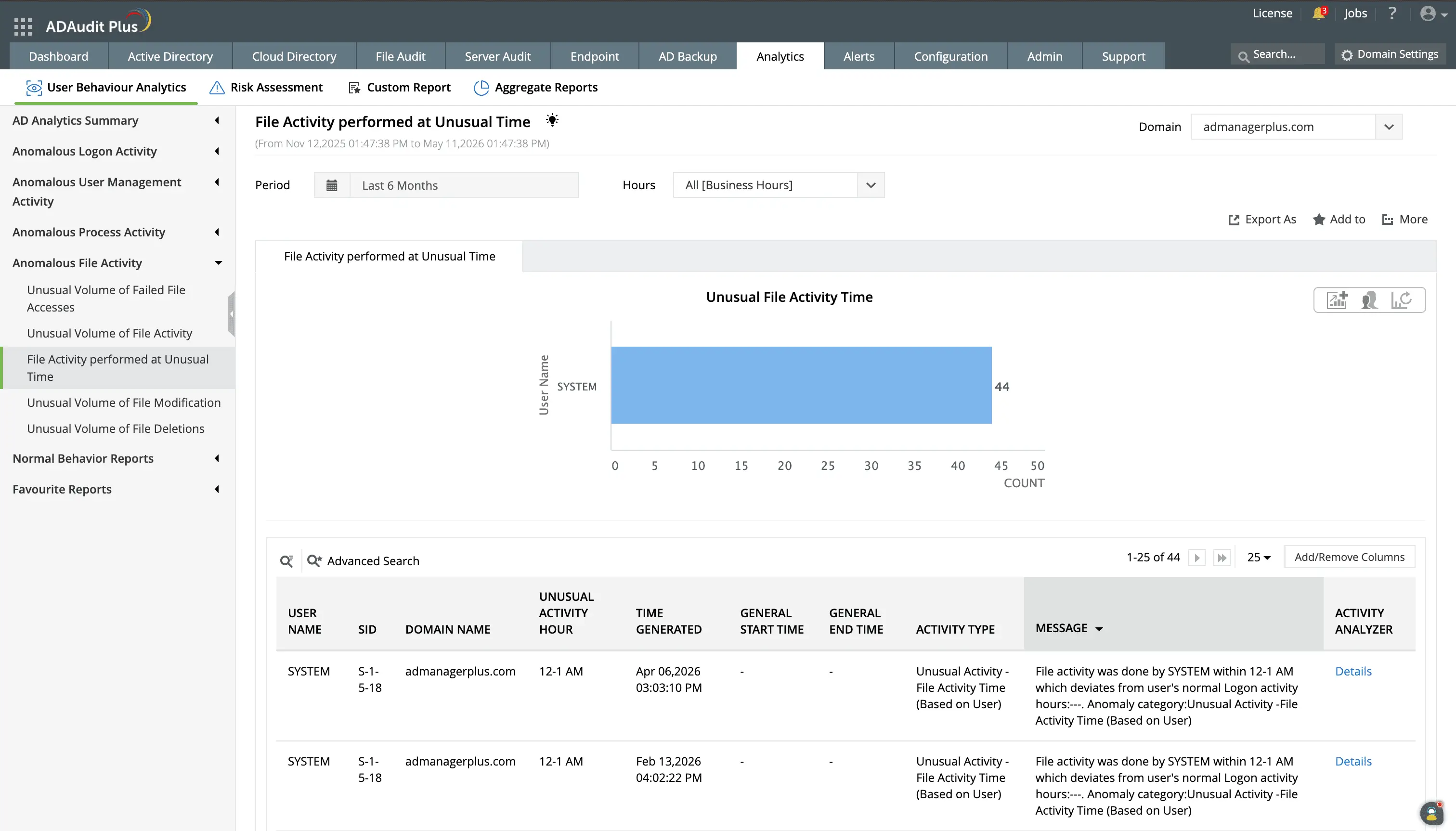
ADAudit Plus sets dynamic behavioral baselines for users and flags deviations from this baseline in terms of time and volume.
Get real-time alerts on critical file events
Audit reports tell you what happened. Alerts let you act before the damage compounds. ADAudit Plus ships with pre-configured alert profiles for the file events that matter most.
The following alert configurations are available by default for file changes:
- When a folder permission change occurs on a risky share, the responsible team is notified immediately, so widened access is caught and reviewed before unauthorized users can exploit it.
- When a file deletion spike exceeds the configured threshold, you get an alert with the user, machine, and file count, giving you what you need to determine whether it is ransomware or a routine cleanup before acting.
- When a denied access pattern crosses the alert threshold, your security team is notified with the full context of the failure events, so unauthorized probing is caught before it becomes a successful breach.
When an alert fires, ADAudit Plus can automatically create a ticket in ServiceNow, Jira, Freshservice, or ManageEngine ServiceDesk Plus, routing the incident to the right team without manual intervention.
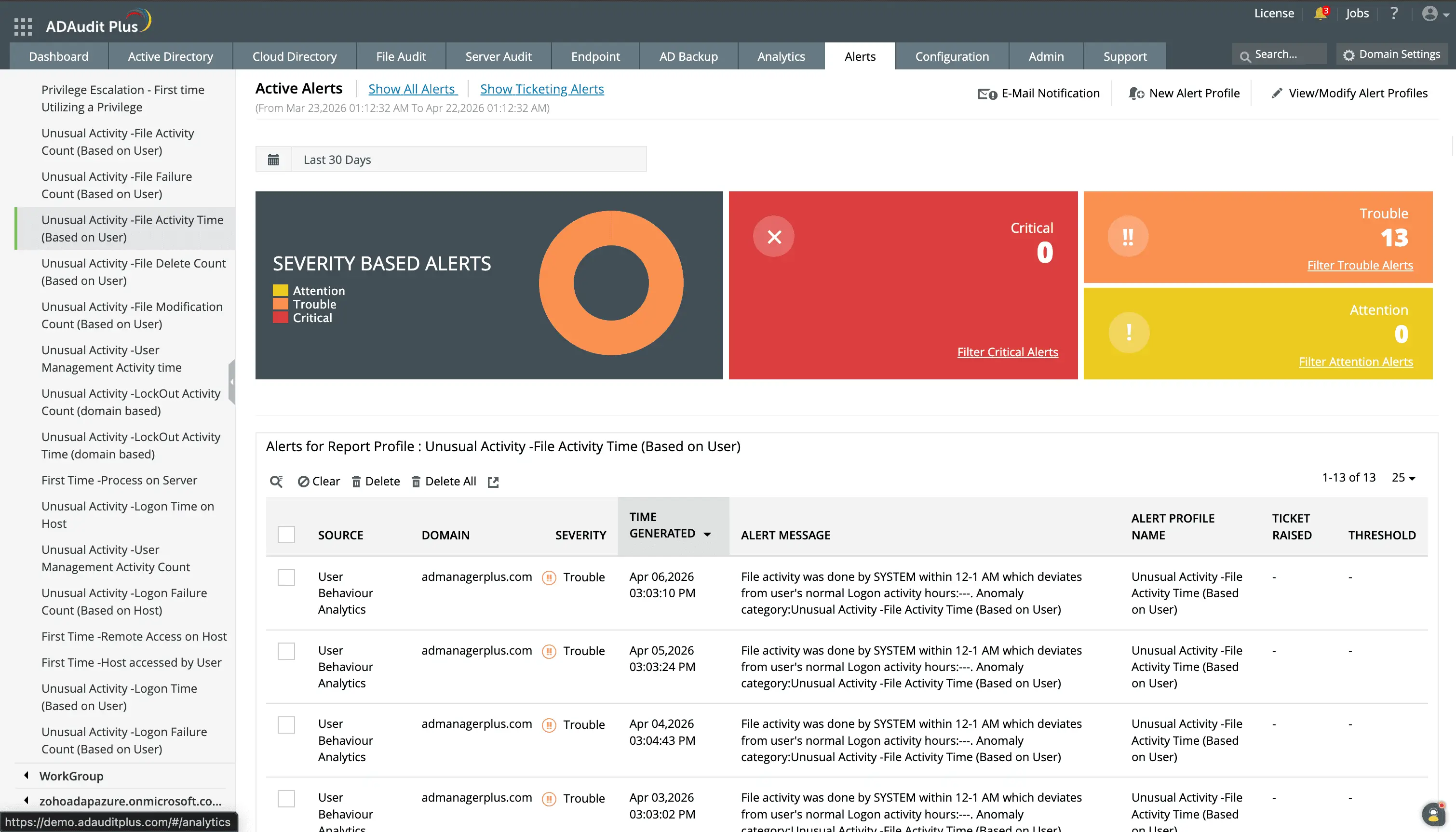
Investigate alerts based on severity to ensure that the most critical events are prioritized.
You can customize alerts for events that are important to your organization.
Extend monitoring to NAS devices and cloud file storage
ADAudit Plus monitors several NAS device types alongside Windows file servers from the same console. Every file operation is captured using the same report structure regardless of the underlying storage platform, and Azure File Share activity appears alongside on-premises events without switching consoles or correlating separate log sources.
Supported storage platforms: Windows file servers and failover clusters, NetApp (7-Mode and C-Mode), EMC Isilon, Hitachi NAS, Huawei OceanStor, EMC VNX, Synology NAS, QNAP NAS, CTERA Edge Filers, Nutanix Files, Qumulo NAS, Amazon FSx, and Azure File Share
Meet compliance requirements with file audit reports
SOX, HIPAA, PCI-DSS, GDPR, FISMA, GLBA, and ISO 27001 all require demonstrable controls over who accessed and modified sensitive data and how long those records are retained. ADAudit Plus ships with pre-configured compliance reports for all seven standards, each mapping file activity events to the relevant regulatory requirements.
- Reports export to CSV, PDF, HTML, and XLSX for auditors and can be scheduled for automatic delivery to external recipients without requiring them to log into the product
- Customizable report profiles combine a specific user, file path, and operation type into a saved view that runs on demand or on a schedule.
Why native tools fall short for file and folder monitoring
Windows Security Event Log auditing can capture file events, but only on servers where the correct audit policies have been manually configured, and only as long as the security log has not been overwritten. In environments with more than a handful of servers, this creates gaps.
- Security event logs are stored locally on each server. Correlating file activity across multiple file servers requires collecting and parsing logs from every machine individually, with no consolidated view.
- Native auditing does not surface before-and-after values for permission changes. You can see that a folder permission changed, but not what it changed from or to.
- There is no built-in alerting mechanism for file events. Detecting a bulk deletion or a permission change requires either a manual log review or a custom PowerShell script that runs periodically, not in real time.
- Audit policy configuration is error-prone. A single misconfigured policy on one server creates a blind spot that is invisible until you need the data for an incident investigation.
ADAudit Plus addresses each of these gaps with centralized collection, real-time alerting, and pre-configured reports that work without manual audit policy management on individual servers.
4 compelling reasons to choose ADAudit Plus
Widely recognized
ADAudit Plus has been recognized as a Gartner Peer Insights Customers' Choice for Security Incident & Event Management (SIEM) for four consecutive years.
Easy deployment
Go from downloading ADAudit Plus to receiving predefined reports and alerts in under 30 minutes, without any professional help.
Competitive pricing
ADAudit Plus is licensed per-server, unlike other IT auditors which are licensed per-user. With per-server licensing, even with a growing number of users each year, you can continue to ingest log data without additional costs.
Unified visibility
ADAudit Plus consolidates auditing, security, and compliance across Active Directory, Entra ID, Windows servers, workstations, and file servers into a single pane of glass, eliminating the need to juggle multiple tools.
Frequently asked questions
ADAudit Plus captures file creates, modifications, deletions, moves, renames, copy-paste events, read access, denied access attempts, and folder permission changes across Windows file servers and several NAS device types including NetApp, EMC Isilon, Synology, Amazon FSx, Azure File Share, Nutanix, and Qumulo.
Every file event record includes the user account that performed the action, the source machine name, the client IP address, and the exact timestamp. For folder permission changes, the Professional edition captures the old and new permission values so you can see precisely what access was granted or removed.
Yes. The user behavior analytics engine establishes a per-user baseline for file modification and deletion volume. When activity deviates significantly from that baseline, an alert fires automatically. This detects ransomware-related encryption patterns, and can execute response actions to mitigate damage even before stakeholders are aware of it.
ADAudit Plus includes pre-configured file audit report sets for SOX, HIPAA, PCI-DSS, GDPR, FISMA, GLBA, and ISO 27001, each mapping file change events to that standard's specific control requirements. Reports can be scheduled for automatic delivery to auditors in CSV, PDF, HTML, or XLSX format.
Yes. ADAudit Plus performs NAS auditing alongside Windows file servers, all from a single console. Supported platforms include NetApp, EMC Isilon, Synology, QNAP, Hitachi NAS, Huawei OceanStor, Amazon FSx, Azure File Share, Nutanix Files, Qumulo NAS, and CTERA Edge Filers.
You can track that a folder permission changed in both editions. The Professional edition is required to see the old and new permission values, the before-and-after detail that makes a permission change audit useful for compliance, security investigations, and access governance reviews.