

- Free Edition
- Quick Links
- Active Directory Auditing
- Active Directory auditor
- Active Directory monitoring
- Account lockout analyzer
- Login monitoring software
- Active Directory change notifier
- User logon audit reports
- AD logon logoff tracker
- User logon failure auditing
- Login history tracking tool
- AD change auditor
- Insider threat detection software
- Permissions change auditing
- Entra ID reporting
- Privileged user monitoring
- User behavior analytics tool
- Active Directory security monitoring
- Group Policy auditing tool
- GPO change auditor
- Entra ID auditing
- Audit user account management
- OU change auditor
- Audit group membership changes
- Active Directory auditing and reporting tool
- GPO reporting tool
- Remote desktop monitoring software
- PowerShell logging and auditing
- Azure password protection auditing
- Azure sign-in risk detection
- File Server Auditing
- Windows Server Auditing
- Employee Tracking
- Workstations Auditing
- Compliance Auditing
- Other features
- SIEM Integration
- Windows DNS - Schema Auditing
- Windows security event log monitoring
- SIEM audit solution
- Schedule Active Directory change reports
- Reports from Archived Data
- Aggregated summary reports
- AD new/old attribute changes
- Audit trail
- Audit Active Directory LAPS
- Scheduled Reports & Alerts
- Account lockout examiner
- Industry
- Documents
- Success Stories
- Related Products
- Log360 (On-Premise | Cloud) Comprehensive SIEM and UEBA
- ADManager Plus Active Directory Management & Reporting
- ADAudit Plus Real-time Active Directory Auditing and UBA
- ADSelfService Plus Identity security with MFA, SSO, and SSPR
- DataSecurity Plus File server auditing & data discovery
- Exchange Reporter Plus Exchange Server Auditing & Reporting
- M365 Manager Plus Microsoft 365 Management & Reporting Tool
- RecoveryManager Plus Enterprise backup and recovery tool
- SharePoint Manager Plus SharePoint Reporting and Auditing
- AD360 Integrated Identity & Access Management
- AD Free Tools Active Directory FREE Tools
Login monitoring with ADAudit Plus
Track successful and failed logon events
Every logon attempt, success or failure, is captured with the originating machine, source IP address, and failure reason. You get the complete picture without searching individual domain controller (DC) event logs.
Correlate logon data across every Windows surface
DC, member server, workstation, Remote Desktop Gateway, Remote Authentication Dial-In User Service (RADIUS)/Network Policy Server (NPS), and Active Directory Federation Services (AD FS) logon events are all collected.
Extend coverage to hybrid environments
On-premises AD logon events and Microsoft Entra ID (previously known as Azure AD) sign-ins appear in a single correlated view. You don't need to pivot between two consoles to follow a user's authentication footprint.
Detect logon-based anomalies and threats
Machine learning baselines each user's normal logon behavior and flags anomalous behavior. The Attack Surface Analyzer detects 25+ AD attacks in real time.
Meet compliance requirements with ready-made reports
Pre-configured reports for SOX, HIPAA, PCI DSS, FISMA, GLBA, GDPR, and ISO 27001 map logon audit data to the controls auditors actually ask for, with no custom scripting required.
Automate actions for critical logon events
When a configured alert fires, ADAudit Plus can create a ticket in your ITSM tool, send email or SMS to the responsible team, and log the full event for review, all without manual intervention.
What is login monitoring software?
Login monitoring software collects, centralizes, and analyzes logon and authentication activities so security teams can identify threats, investigate incidents, and demonstrate compliance without manually combing through event logs on individual systems.
ADAudit Plus is a user behavior analytics (UBA) driven login monitoring and AD auditing solution that captures every logon event across your Windows environment and surfaces the context needed to act on it.
Key logon activities ADAudit Plus captures across your environment
| Logon activity | What ADAudit Plus captures |
|---|---|
| DC authentication | All authentication events per DC, with originating machine, source IP, and failure reason. |
| Member server logons | Interactive, network, and remote logon events on member servers with session duration. |
| Workstation logons | Local and domain logon events per workstation, including first and last logon times. |
| Remote Desktop Services | RDP session connections, disconnections, with source IP. |
| Remote Desktop Gateway | Gateway-brokered RDP connections with user, source, and target system. |
| RADIUS/NPS logons | Failed and successful NPS authentication attempts with server and failure reason. |
| AD FS authentication | Successful and failed federation logon events and extranet lockout events. |
| Concurrent multi-machine sessions | Users with active sessions on more than one machine simultaneously. |
| Microsoft Entra ID sign-ins | Successful and failed Entra ID sign-in events, including legacy authentication sign-ins, risk detections, and Conditional Access outcomes. |
Track every successful and failed logon event
DC, member server, and workstation logon events are reported separately and in aggregate.
- Every failed attempt surfaces the originating machine and IP address so you can trace the source without logging into individual DCs.
- The Currently Logged On Users report shows who has an active session at any given moment, across which machines.
- Users logged into multiple computers surfaces concurrent sessions that may indicate credential sharing or a compromised account.
- First and last logon times per user per workstation give you the attendance and access trail auditors regularly request.
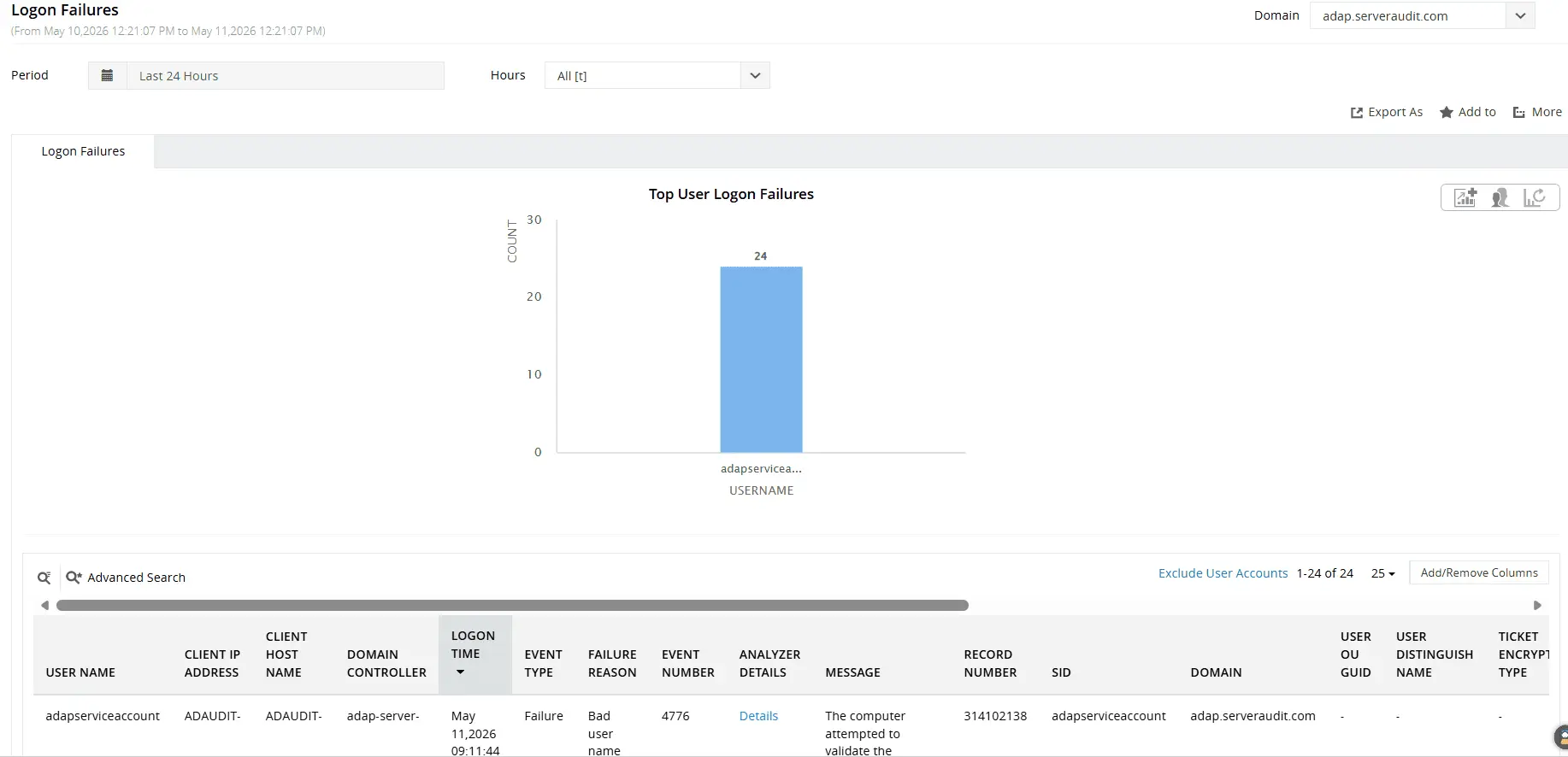
Get detailed insights into failed logon attempts across your domain, including user name, client IP, client host, DC, logon time, and failure reason.
Correlate logon data across Windows surfaces
Track logon activities across DCs, member servers, workstations, Remote Desktop Gateways, RADIUS/NPS servers, and AD FS.
- Sessions routed through Remote Desktop Gateway are tracked at the gateway level, giving you a record of external connections even when the endpoint is not domain-joined.
- Every RDP connection and disconnection event is recorded, including source IP and client machine name.
- Successful network authentications are recorded with user identity, source IP, and NPS server; failed RADIUS authentications appear separately with the failure reason.
- AD FS logon successes, failures, and extranet lockout events are recorded separately, giving you visibility into federated authentication activity that does not pass through your DCs.
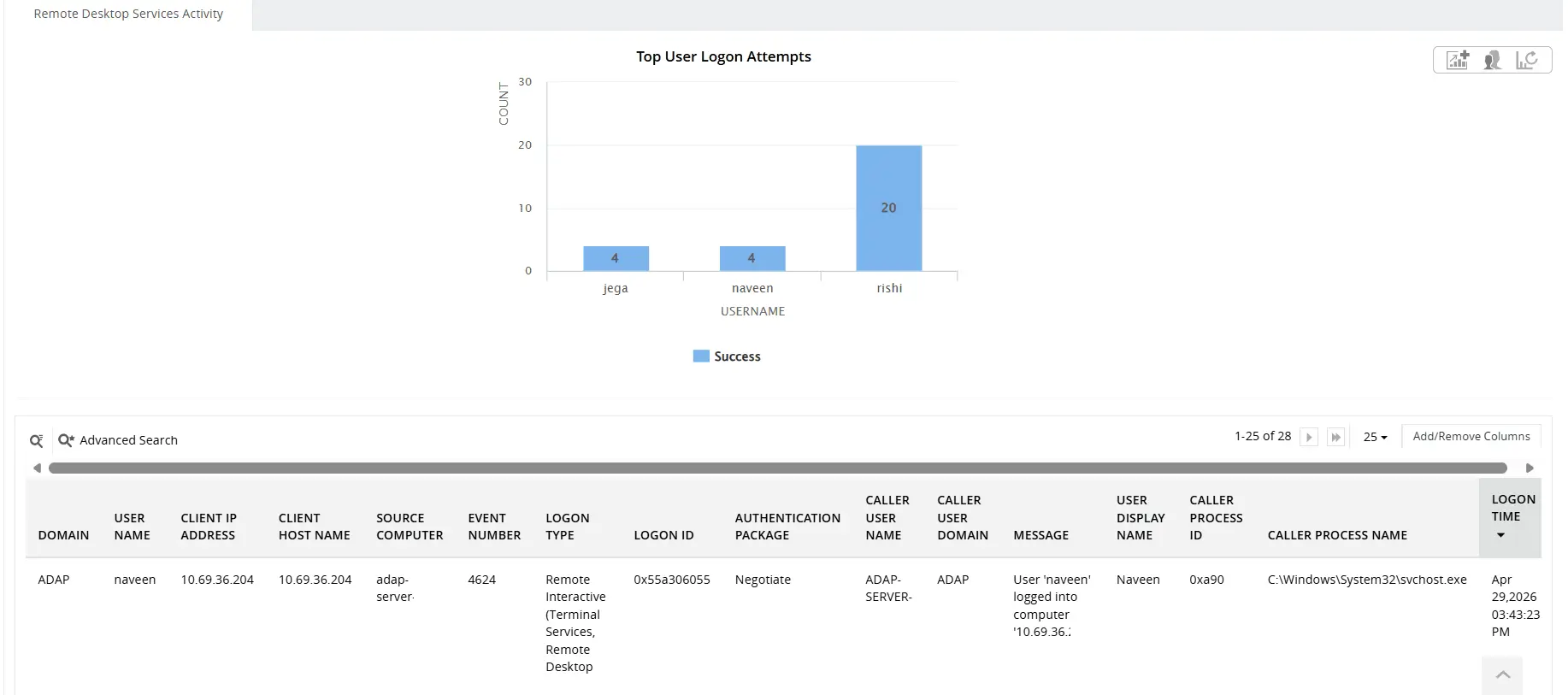
Track remote logons with details on who logged in, when the logon occurred, which computer was accessed, and the source of the connection.
Extend login monitoring to cloud environments
Monitor both on-premises AD and Microsoft Entra ID logons from a single console with ADAudit Plus. Employee sign-ins through Entra ID are displayed alongside traditional domain logons in a unified reporting view.
- Capture every Entra ID sign-in event with details such as user identity, source IP address, geo-location, device information, and MFA status.
- The Hybrid Logon Activity report correlates logon events across on-premises AD and Entra ID environments.
- Dedicated reports help identify legacy authentication sign-ins that use older protocols capable of bypassing MFA.
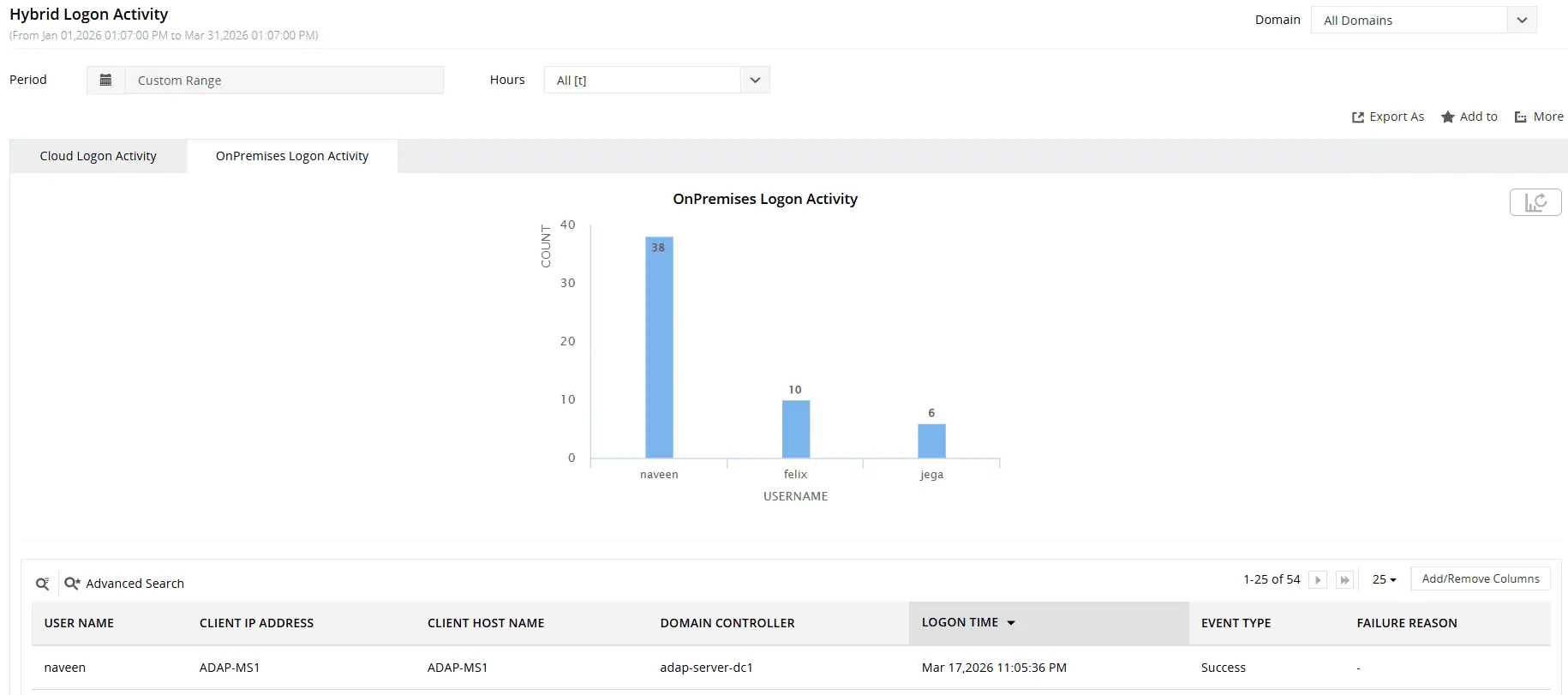
Get an overview of logon activity across your AD and Entra ID environments.
Detect anomalies with UBA and threats with Attack Surface Analyzer
The Attack Surface Analyzer detects 25+ named AD attacks in real time, including brute-force, password spray, pass-the-hash, pass-the-ticket, Golden Ticket attacks, and Kerberoasting.
ADAudit Plus uses machine learning to establish a behavioral baseline for each user based on patterns such as typical logon times, frequently accessed machines, and authentication activity. Any deviation from this baseline is automatically flagged in the Analytics tab without the need for manual threshold configuration.
- Unusual Logon Activity Time flags logons that occur outside a user's typical working hours based on their historical behavior baseline.
- First Time Host Accessed by User identifies when a user logs on to a machine they have never accessed before, potentially indicating lateral movement or a new work location.
- Unusual Volume of Logon Failure detects spikes in failed authentication attempts beyond a user's normal baseline, helping identify brute-force attacks or credential compromise.
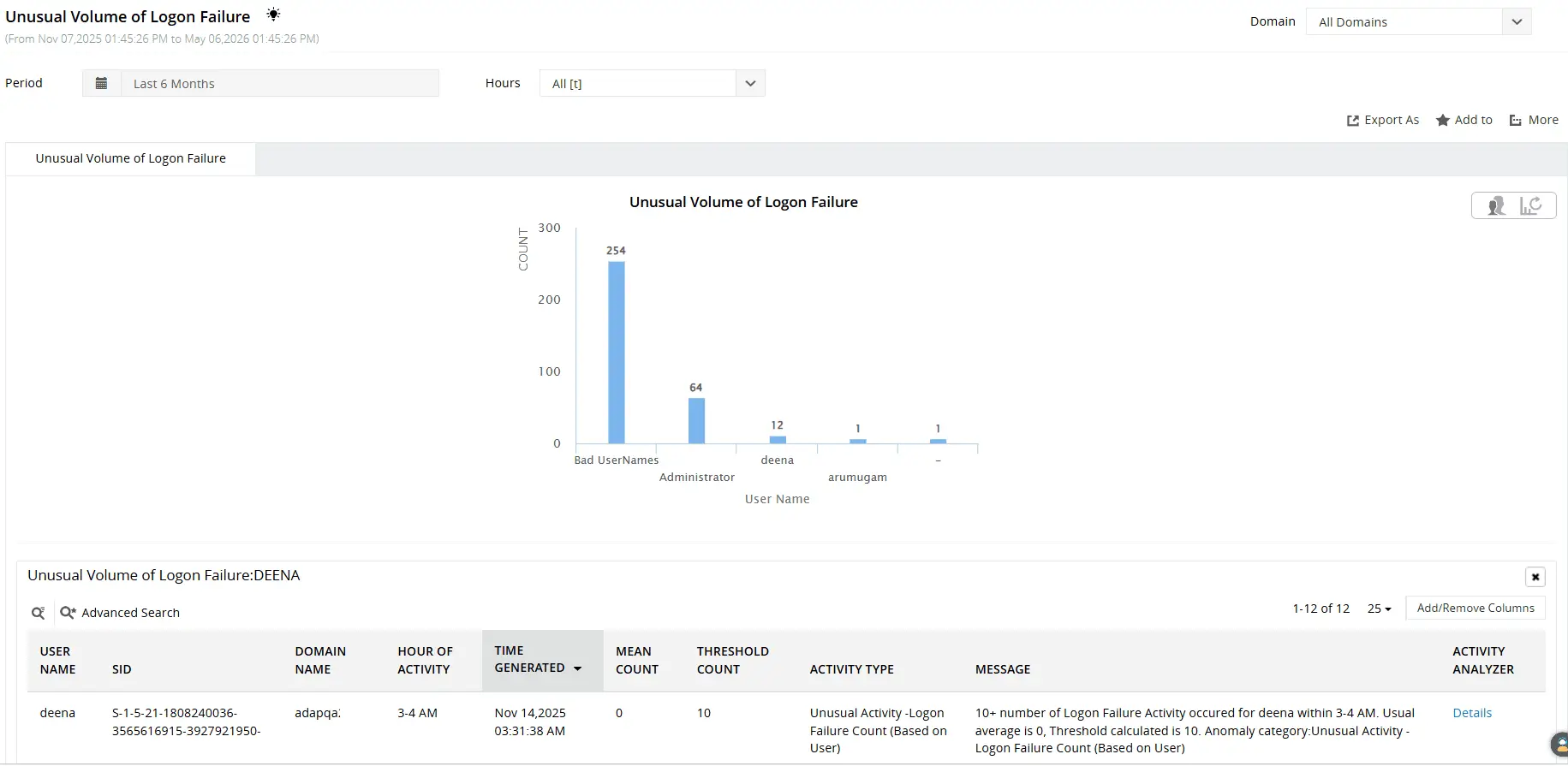
Leverage machine learning to detect unusual volumes of logon failures, abnormal logon activity times, first-time host access, and more.
Get real-time alerts on critical logon events
ADAudit Plus ships with default alert profiles covering the logon events that matter most. Every alert can trigger an automated response: a ticket created in ServiceNow, Freshservice, Jira, ManageEngine Service Desk Plus, or Zendesk, or a forwarded event to your SIEM via SIEM integration.
- When an account lockout occurs, your team is notified immediately so the root cause can be investigated before the user calls the help desk a second time.
- When a Kerberos replay attack is detected, the event surfaces in real time so the affected session can be reviewed and terminated if necessary.
- When RADIUS authentication failures spike, the team responsible for network access is notified before the underlying issue compounds.
Meet login monitoring requirements for compliance
Logon activity is one of the most frequently audited areas across every major compliance framework. Access control, authentication events, and failed logon tracking all appear as explicit requirements in SOX, HIPAA, PCI DSS, FISMA, GLBA, GDPR, and ISO 27001.
ADAudit Plus ships with pre-configured compliance report sets for all seven frameworks, mapped to the specific controls that cover logon auditing. Reports can be scheduled for automatic delivery to auditors by email, on a daily, weekly, or monthly cadence, so compliance requests don't require manual extraction each time.
Custom report profiles let you go further: combine specific users, audit actions, and time filters into saved views that you can run on demand. If your auditor asks for all privileged account logon activity for a specific server over the last 90 days, you build that profile once and run it in seconds whenever it's needed, without re-configuring a report from scratch.
Why native tools fall short for login monitoring
Windows Security event logs are stored locally on each DC. Investigating a single failed logon event across a multi-DC environment means logging into each DC individually, filtering the Security log manually, and correlating the results yourself. No native tool aggregates this data centrally with failure reason breakdown and source IP in a single view.
- Event Viewer has no built-in search across multiple DCs, no failure reason categorization, and no retention policy beyond what the local log size allows before events are overwritten.
- PowerShell scripts can query event logs remotely, but they return raw event data with no grouping, no anomaly detection, no alerting, and no audit trail of who ran the query.
- Compliance reporting against seven frameworks using native tools requires custom scripting that must be maintained with every policy change.
ADAudit Plus replaces this manual process with centralized collection, pre-configured reports, and automated alerting, all verified against the event data from every DC in scope.
4 compelling reasons to choose ADAudit Plus
Widely recognized
ADAudit Plus has been recognized as a Gartner Peer Insights Customers' Choice for Security Incident & Event Management (SIEM) for four consecutive years.
Easy deployment
Go from downloading ADAudit Plus to receiving predefined reports and alerts in under 30 minutes, without any professional help.
Competitive pricing
ADAudit Plus is licensed per-server, unlike other IT auditors which are licensed per-user. With per-server licensing, even with a growing number of users each year, you can continue to ingest log data without additional costs.
Unified visibility
ADAudit Plus consolidates auditing, security, and compliance across Active Directory, Entra ID, Windows servers, workstations, and file servers into a single pane of glass, eliminating the need to juggle multiple tools.
Frequently asked questions
ADAudit Plus captures interactive, remote interactive (RDP), network, batch, service, and unlock logon types, each recorded with the event ID, workstation name, source IP, and user account. Logon type filters in reports let you isolate specific patterns such as all interactive DC logons or failed network authentications.
The Account Lockout Analyzer identifies the exact source of an account lockout: scheduled tasks with stale credentials, mapped drives, mobile devices, or service accounts. It surfaces the originating machine, source IP, and recent logon history so your team can fix the root cause rather than simply unlocking the account.
You can configure any pre-built or custom login report in ADAudit Plus for automatic delivery on a daily, weekly, or monthly schedule. Reports export in PDF, CSV, HTML, or XLSX format and are emailed to designated recipients, covering logon activity, failure summaries, etc.
ADAudit Plus applies two detection mechanisms. The UBA engine baselines logon behavior per user and flags spikes in failure volume as anomalies. The Attack Surface Analyzer applies rule-based detection for named techniques including brute-force and password spray attacks. Both operate in near real time and trigger automated alert responses.