Accelerate troubleshooting with Monitor AI Insight
Monitoring used to mean checking that your dashboards looked fine and starting to troubleshoot when something broke. That approach is outdated.
Today, the health of your applications directly affects your business. A slow checkout page, a lagging database, or an unresponsive server costs you customers, revenue, and trust. A problem that once took hours to identify and fix is no longer acceptable.
This is where AIOps comes in. AIOps means using AI to help IT teams understand problems faster, so they spend less time searching and more time fixing.
Monitor AI Insight is one of the latest AIOps-driven features in ManageEngine Applications Manager. It begins to work once you integrate Applications Manager with an LLM (using the AI provider of your choice). After that, you can open any monitor, whether it's an application, a server or anything else in your stack, and gain insights in plain language.
What do you actually receive?
AI Insight features act like your assistant who's already completed the first round of homework for you. By clicking AI Insight on a monitor, you receive a clear, readable breakdown of what's going on:
Health summary: How the monitor is doing right now, in plain language
Active alarms, explained: Which alarms are firing and how they connect to what the metrics are showing
Operational risk: How serious things are, and what could go wrong if nobody acts
Threshold review: Whether your alert limits make sense, with better values suggested
Root cause: The most likely reason behind the problem
Prioritized actions: Recommended actions
The real value is that all of this arrives together. Normally, an engineer would have to check the alarms in one place, read the graphs in another, and compare everything against the alert settings. But with AI Insight, the picture comes already assembled, so you can spot the cause and start fixing it instead of spending your time searching.
What does this mean for your team?
Consider an example, where one of your on-call junior engineers receives an alert at 3am. As a junior engineer, he may need support but as it is the middle of the night, connecting with a senior engineer who is likely asleep might not be possible.
Normally, this is where the stress starts. The engineer would open the monitor, scroll through multiple graphs, check which alarms are firing and try to work out whether they're related. All the while, the application is slow and users are affected.
With Monitor AI Insight, the engineer opens the monitor and clicks AI Insight. In a few moments, they'll see:
A short summary of the database's health
The alarms that are active, explained alongside the metrics that triggered them
A probable cause, such as a resource under unusual pressure
A ranked list of actions, so they know exactly where to start
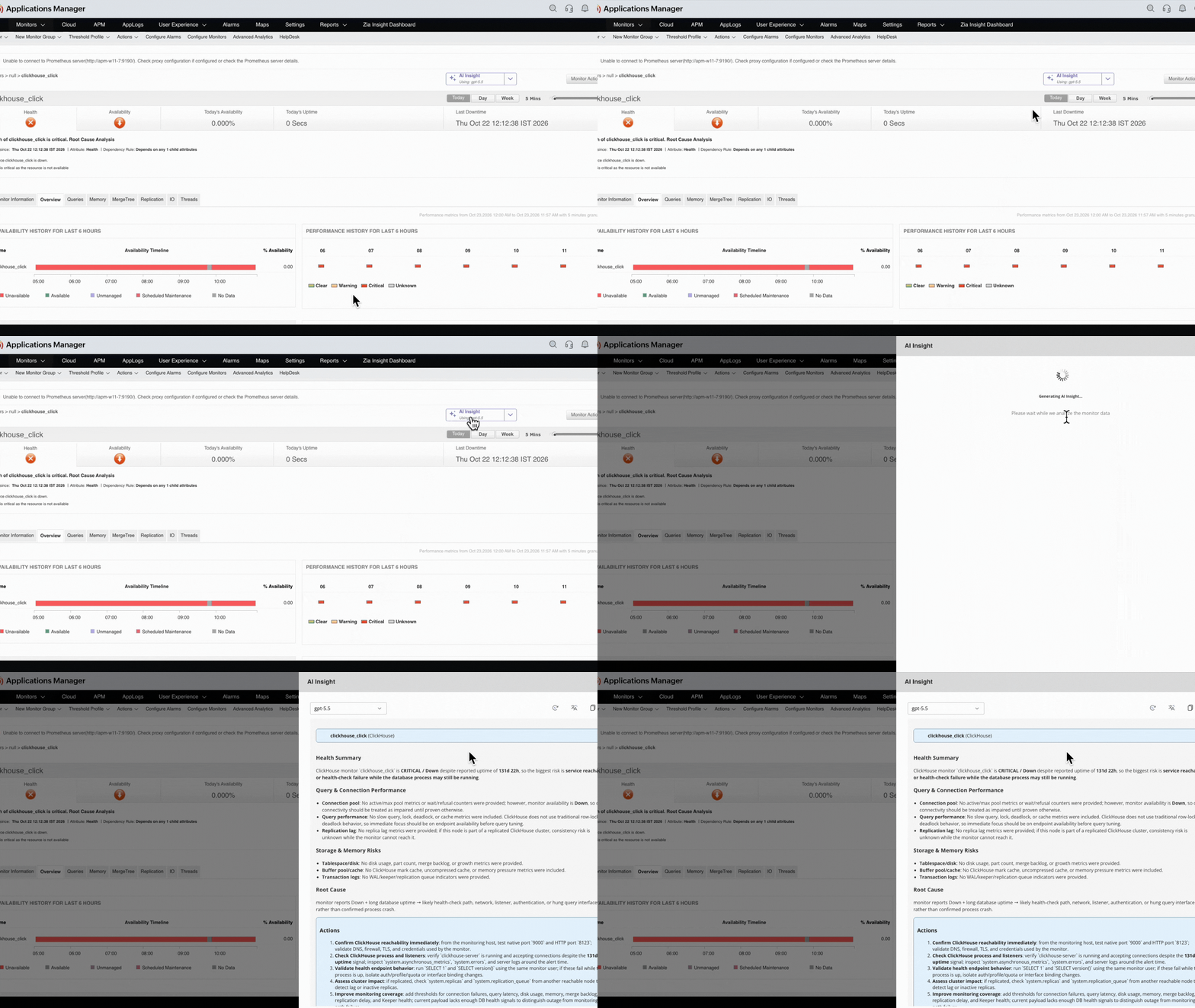
Instead of spending the first half hour just understanding the problem, the engineer can begin fixing it right away. If they do need to escalate, they can hand over a clear explanation instead of "something is wrong with the database."
As with any AI-generated analysis, it's meant to guide the investigation. Your engineers should review it before acting.
Built for teams worldwide
Incidents don't wait for convenient time zones or a shared language. That's why Monitor AI Insight lets you translate the analysis into any of 38 supported languages.
This matters because, during an incident, clarity is everything. Reading a technical explanation in your own language means less confusion and fewer misunderstandings. It also helps global teams, where engineers in different regions can work from the same insight. And it makes it easier to share findings with colleagues and managers who may not be comfortable in English.
AIOps powered monitoring for your entire app-stack
Applications Manager enables you to oversee your entire app-stack from a unified console. It enables you monitor:
Applications and application servers
Databases
Servers and operating systems
Cloud services
Containers and virtualization
Middleware, web services and more
Because everything sits under one roof, the same AI-powered analysis is available no matter which part of your stack is having trouble.
Monitor AI Insight is part of a growing set of AIOps capabilities. Other recent additions include:
AI Alarm Summary: A plain-language summary of alarms to help you understand alerts quickly.
GenAI integrations: Connect the AI provider of your choice, including locally hosted models, so you stay in control of your data.
Ready to see it in action? Configure a GenAI integration, open any monitor and click AI Insight. Or schedule a demo to see how Applications Manager can help your team move from alert to action faster.