- How does autonomous endpoint management work?
- AEM vs. traditional endpoint management
- Core features to look for in an AEM solution
- Key benefits of autonomous endpoint management
- How AEM works across industries
- Challenges and considerations of AEM
Share this article




Summary
Autonomous endpoint management (AEM) replaces reactive, manual IT workflows with continuous monitoring, intelligent detection, and automated remediation. Unlike traditional tools, AEM detects and fixes issues before employees notice them, keeps devices patched and compliant around the clock, and scales without growing IT headcount. ManageEngine Endpoint Central delivers the full AEM lifecycle through a single agent and console, covering patch management, vulnerability detection, DEX monitoring, application control, privilege management, and more.
What’s in the article?
- What is autonomous endpoint management?
- How does autonomous endpoint management work?
- AEM vs. traditional endpoint management
- Core features to look for in an AEM solution
- ManageEngine Endpoint Central for autonomous endpoint management
- Key benefits of autonomous endpoint management
- How AEM works across industries
- Challenges and considerations of AEM
- Frequently asked questions
Today, every device in a distributed fleet represents a potential vulnerability, a productivity bottleneck, or a compliance risk waiting to happen. Traditional endpoint management tools put the burden on IT administrators to manually patch, scan, configure, and respond, a reactive cycle that does not scale.
Unified endpoint management (UEM) brought devices under one roof, but still left humans in the loop for every critical action.
What is autonomous endpoint management?
Autonomous Endpoint Management (AEM) is an AI-powered approach to managing every device in your organization’s fleet, automatically monitoring, securing, and resolving issues without waiting for human intervention.
Powered by real-time telemetry, machine learning, and self-correcting workflows, AEM detects threats, enforces compliance, deploys updates, and optimizes performance proactively and at scale, the moment an issue arises, not after it becomes a problem.
At its core, AEM works across three operating principles:
Continuous monitoring: Persistent collection of endpoint telemetry, including system performance, application health, configuration state, patch status, and security posture.
Intelligent detection: Correlation of telemetry data to surface anomalies, identify root causes, and prioritize issues by their impact on security and employee productivity.
Automated action: Execution of remediation workflows, patch deployments, configuration corrections, and access controls without requiring manual IT intervention for each event.
Unlike traditional endpoint management, autonomous endpoint management catches issues before employees notice them, closes vulnerabilities before attackers exploit them, and keeps endpoints compliant.
How does autonomous endpoint management work?
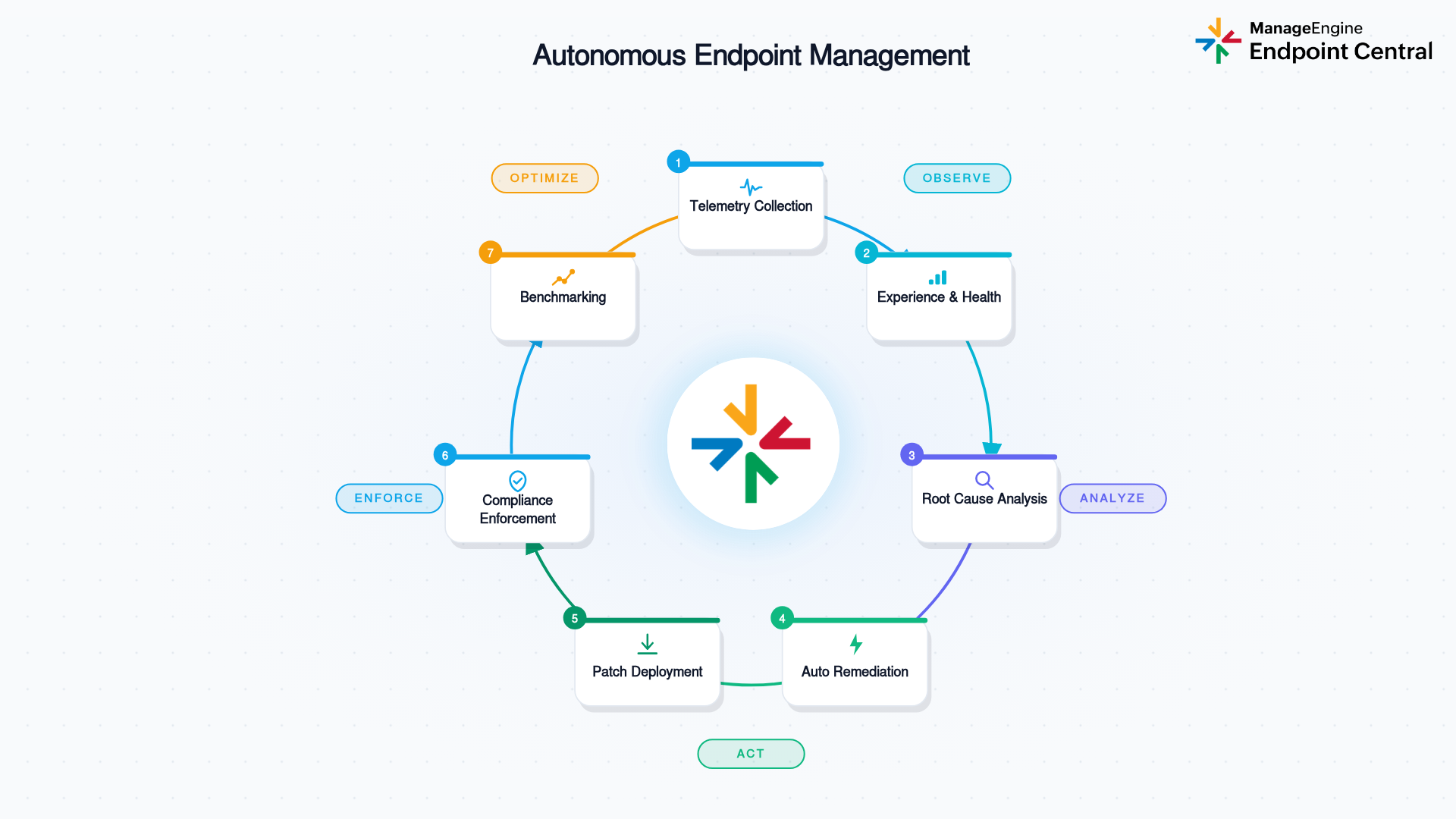
AEM runs as a closed-loop cycle, where each stage feeds into the next. Here is how it works end to end:
Telemetry collection
Agents on each managed endpoint collect a steady stream of data covering CPU usage, memory, GPU load, disk health, battery state, boot time, logon time, application crashes, and more. This telemetry is the raw material for everything that follows.
Experience and health monitoring
The platform measures incoming telemetry against configurable thresholds and baselines. When something shifts, say, boot times spiking across a device model, a wave of application crashes in one department, or CPU contention linked to a recent software update, those deviations are flagged for deeper review.
Root cause analysis (RCA)
Rather than surfacing a flood of individual alerts, the system groups and correlates signals across devices, locations, and software versions to identify what is actually driving the problem. Smart prioritization keeps IT teams and automated workflows focused on the issues that matter most.
Automated remediation
Once a root cause is identified, pre-built or customized no-code workflows take action: deploying the missing patch, pushing the corrected configuration, running a remediation script, or restarting a service. In many cases, problems are fixed across the entire fleet before a single support ticket is submitted.
Patch and update deployment
Patch management pipelines scan for missing OS and third-party application updates across Windows, Mac, and Linux endpoints and apply them automatically, following defined schedules and administrator-set approval policies.
Compliance enforcement
Configuration management pushes organizational security baselines and policy settings on an ongoing basis. Endpoints that fall out of compliance are either remediated automatically or surfaced for administrator review.
Benchmarking and optimization
Experience scores are tracked across the device fleet over time. Performance is measured against established baselines, giving IT the data they need to make informed decisions about hardware refresh cycles, application rollouts, and configuration adjustments.
What makes this different from traditional management is that the cycle runs without waiting for a human to start it. The gap between when a problem appears and when it is resolved shrinks from days to minutes, and that gap closes whether or not anyone on the IT team is watching the dashboard.
AEM vs. traditional endpoint management
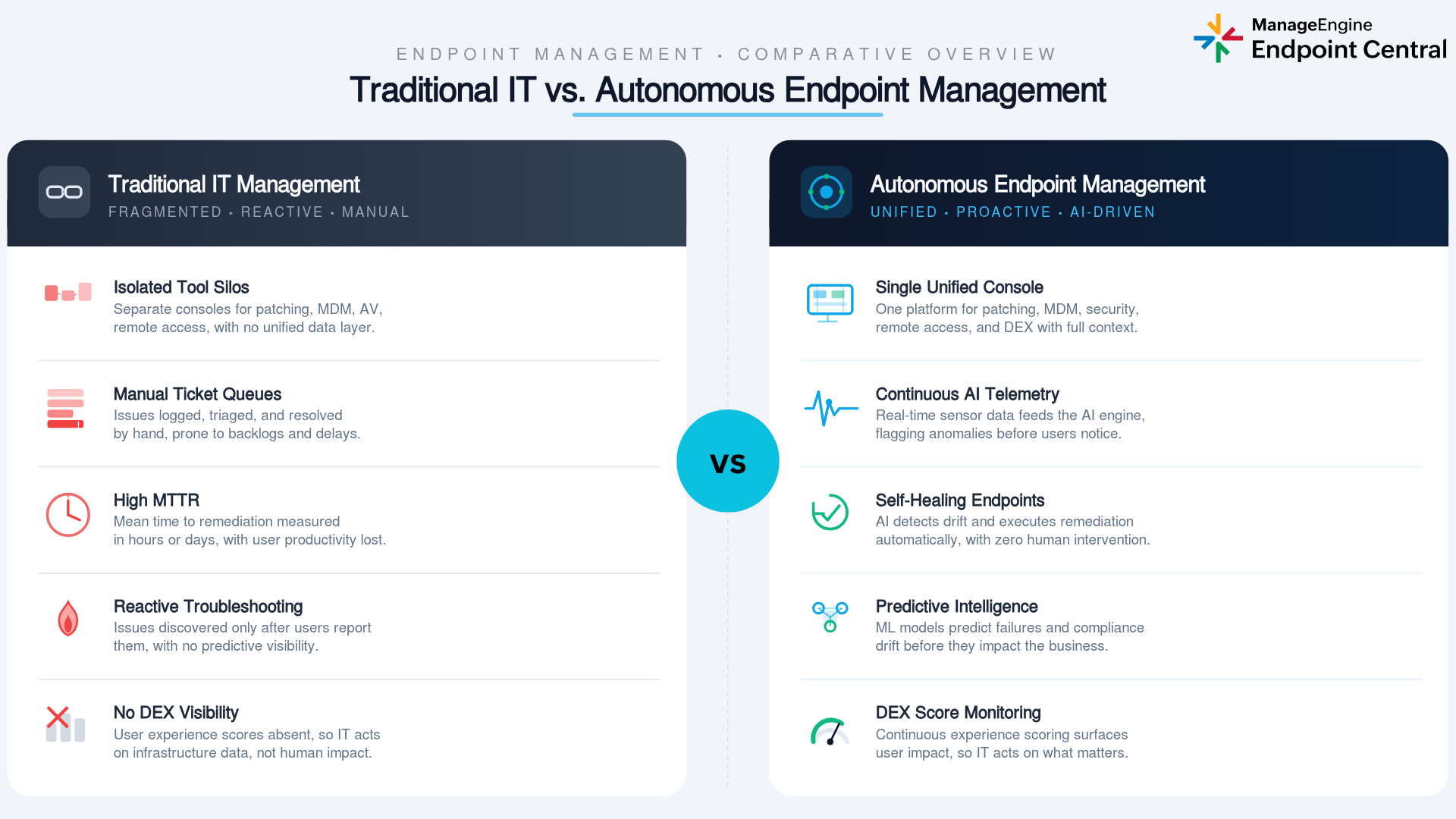
Traditional endpoint management tools were built for a different era: static, office-bound devices and predictable maintenance windows. The modern hybrid enterprise needs something fundamentally different.
| Dimension | Traditional endpoint management | Autonomous endpoint management |
|---|---|---|
| Management approach | Reactive. Responds to reported issues and scheduled tasks. | Proactive. Detects and resolves issues before employees report them. |
| Patch deployment | Manual or scheduled batch deployments. | Ongoing, automated deployment across Windows, Mac, Linux, and third-party apps. |
| Issue detection | Alert-driven. Relies on administrator-set thresholds. | Telemetry-driven. Correlates signals across devices to surface root causes. |
| Remediation | IT investigates and applies fixes manually, one ticket at a time. | Automated workflows resolve issues across the fleet without manual steps. |
| Configuration | Periodic pushes. Configuration drift often goes undetected. | Ongoing enforcement. Drift is detected and corrected before it compounds. |
| OS deployment | Manual imaging and installation per device. | Automated OS imaging and deployment, including required drivers and applications. |
| Scalability | IT headcount must grow in line with endpoint count. | Automation handles the scale. Smaller teams can manage larger fleets. |
| Visibility | Siloed. Device state, apps, and user experience tracked separately. | Unified. Telemetry, security, and experience data correlated in one platform. |
| Support ticket volume | High. End users report issues, which IT then investigates. | Lower. Automated workflows resolve common issues before tickets are raised. |
As device fleets grow, the gap between what manual endpoint management can handle and what the environment actually needs keeps widening. Autonomous endpoint management exists to close that gap.
Core features to look for in an autonomous endpoint management solution
Not every endpoint management platform delivers genuine autonomy. These are the capabilities that separate real automation from marketing language.
Automated patch deployment
A strong AEM solution scans for missing patches across all managed operating systems and third-party applications continuously and deploys them on defined schedules and rollout policies. Look for coverage across Windows, macOS, Linux, and a broad third-party library, along with staged rollouts and automated rollback if a patch causes problems.
Predictive analytics and anomaly detection
A capable AEM solution analyzes endpoint telemetry (CPU, memory, disk, battery, boot time, logon time, application crashes) continuously to flag issues before they become outages or security incidents. Strong anomaly detection correlates signals across device models, software versions, locations, and departments to surface the root cause of a problem, not just its symptoms.
Zero-touch provisioning and configuration
Zero-touch provisioning removes the need for a technician to handle each new device. OS images, drivers, and applications are deployed automatically the moment a device connects to the network. Configuration management then runs continuously to detect and correct drift from user changes, failed updates, or software conflicts, without waiting for an IT ticket.
Integration with UEM and SIEM platforms
AEM works best when connected to the broader IT and security ecosystem. Look for platforms that integrate natively with leading vulnerability management, SIEM, and ITSM tools so patch deployments, configuration changes, and threat responses remain visible and auditable within existing workflows.
Automated vulnerability detection and remediation
An AEM solution should scan continuously for missing patches, misconfigurations, and exposed services, then initiate remediation automatically rather than waiting for a scheduled window. Configuration compliance should also be validated against recognized security benchmarks on an ongoing basis.
Endpoint privilege management
Standing local administrator rights remain one of the most exploited footholds in enterprise environments. An autonomous privilege management approach removes default elevated access and grants permissions on a just-in-time, task-specific basis through defined policies, shrinking the attack surface for malware, ransomware, and insider threats without adding friction for employees. Endpoint Central’s privilege management handles this from the same console as the rest of your endpoint operations.
ManageEngine Endpoint Central for autonomous endpoint management
Endpoint Central is a unified endpoint management and security platform built for the full AEM lifecycle, one agent, one console, every capability covered.
- Automated patch management: Identifies, tests, and deploys patches for Windows, macOS, Linux, and third-party apps automatically, on administrator-defined schedules and approval policies. Learn more about Endpoint Central’s patch management.
- Digital employee experience (DEX): Monitors CPU, memory, GPU, disk, battery, boot time, logon time, and application crashes on every managed device to track and improve the end-user experience.
- Root cause analysis and automated remediation: Correlates telemetry across device models, application versions, and locations to pinpoint performance issues and push fixes fleet-wide before employees notice.
- Continuous vulnerability detection: Scans endpoints around the clock for missing patches, misconfigurations, and security exposures, and audits configurations against more than 75 CIS benchmarks. Learn more about vulnerability management.
- Automated OS imaging and zero-touch deployment: Automates OS imaging, driver installation, and application setup so new devices go from unboxed to fully managed without a technician touching each one.
- Configuration management and compliance enforcement: Enforces security baselines continuously and auto-corrects configuration drift from user changes, software conflicts, or failed updates.
- Application control with rule-based filtering: Lets administrators define approved software allowlists, block unauthorized executables, and automate application distribution across the fleet. Learn more about application control.
- Ransomware protection with automated incident response: Detects ransomware activity, identifies the root cause, and responds automatically to contain the threat and limit damage. Learn more about ransomware protection.
- Endpoint privilege management: Removes standing admin rights and grants task-scoped elevated access just-in-time through defined policies, with a full audit trail for every action. Learn more about privilege management.
- Advanced remote troubleshooting: Lets IT connect directly to any managed device in real time to resolve issues that fall outside the scope of automated remediation.
- Deep integration across the security ecosystem: Connects natively with Tenable, Splunk, CrowdStrike, Rapid7, ServiceDesk Plus, Jira Service Management, Zendesk, and ServiceNow.
- Broad device and OS coverage: Manages Windows, macOS, Linux, ChromeOS, iOS, iPadOS, Android, and tvOS across desktops, laptops, servers, mobile devices, tablets, rugged devices, IoT, and TVs from a single agent and console.
Manage every endpoint automatically, from patching and compliance to threat response, all from one console. Try ManageEngine Endpoint Central today.

Key benefits of autonomous endpoint management
AEM delivers measurable value across IT operations, security, and the experience employees have with their devices every day.
Reduced IT operational overhead
Scanning for patches, deploying updates, imaging devices, and chasing alerts takes up a large share of IT capacity in environments that rely on manual processes. By automating these workflows from detection through resolution, AEM shifts IT time toward higher-value work. Teams that previously needed to grow headcount as the device fleet scaled can instead extend their operational capacity through automation.
Faster mean time to resolution (MTTR)
In a traditional endpoint environment, resolving an issue means waiting for it to be reported, then triaged, assigned, investigated, and fixed. That sequence can stretch across hours or days. With autonomous endpoint management, automated workflows often resolve common issues fleet-wide before anyone submits a ticket. MTTR for patch-related, configuration-related, and performance-related problems drops substantially.
Proactive security posture
Most security incidents start with an unpatched vulnerability or a misconfigured system. Autonomous endpoint management attacks both of those root causes directly through ongoing patch deployment, real-time vulnerability detection, and automatic compliance enforcement. Rather than hardening endpoints during scheduled maintenance windows and hoping nothing slips through in between, security controls operate all the time.
Improved digital employee experience
Device performance directly affects how productive employees can be. When login times are slow, applications crash unpredictably, or disk issues cause instability, employees lose time and trust in their tools. By detecting and resolving those issues before they affect the workday, AEM reduces disruptions that would otherwise surface as IT tickets and productivity losses. Employees simply experience fewer problems, and when problems do occur, they tend to get fixed faster.
Compliance without manual audit cycles
Ongoing configuration enforcement and benchmark-based compliance validation mean endpoints stay aligned to regulatory requirements between audits, not just in the days before one. Organizations can present consistent, current compliance evidence rather than scrambling to patch gaps in the run-up to each review period.
How AEM works across industries
Healthcare
Healthcare IT teams manage endpoints across hospitals, clinics, remote care facilities, and administrative offices under strict regulatory requirements and very low tolerance for device downtime. AEM keeps clinical and administrative devices patched and compliant with required security baselines on an ongoing basis, and detects performance issues before they interrupt patient care workflows. When new devices need to be provisioned during staff onboarding or equipment refresh cycles, automated OS deployment handles the process without requiring on-site IT presence at each location.
Retail and distributed enterprises
Retail organizations run endpoints across hundreds or thousands of store locations, warehouses, and back-office environments. That level of geographic distribution is simply not serviceable through manual management. AEM enables remote, zero-touch provisioning of point-of-sale and back-office devices, automated patch deployment across the entire distributed fleet, and self-correcting remediation of performance issues or configuration drift at individual locations, all managed centrally without dispatching field technicians.
Financial services
Financial services organizations manage overlapping compliance obligations and operate with an elevated risk profile that demands well-documented, auditable endpoint controls. AEM provides ongoing patch deployment to close known vulnerabilities before they can be exploited, compliance enforcement validated against recognized security benchmarks, and automated privilege management that removes standing elevated access from endpoints. This reduces exposure to credential-based attacks and insider threats while keeping compliance documentation current.
Education
Educational institutions manage large, diverse device fleets serving students, faculty, and staff, often including a mix of institutionally owned devices and personally owned endpoints in bring-your-own-device programs. AEM automates patching and software distribution across diverse OS platforms, manages mobile devices alongside traditional endpoints from the same console, and enforces appropriate application control policies to maintain a secure learning environment at the scale these institutions require.
Remote and hybrid workforces
Remote and hybrid employees cannot bring their laptops to an IT desk. The organization cannot rely on physical IT presence to keep those devices healthy. AEM ensures devices used by distributed employees stay patched, correctly configured, and secure regardless of where they are located. When performance or configuration issues arise, automated remediation handles them without requiring the employee to contact IT or the device to be returned to an office.
Challenges and considerations of autonomous endpoint management
AEM delivers real operational and security value, but a successful rollout requires honest attention to a few practical realities.
Defining where automation ends and human review begins
Not every endpoint action is a good candidate for full automation. Changes that affect user-facing behavior, such as removing an application or modifying a configuration that alters a workflow, may need human review or formal change management approval before the platform acts. Organizations should define clear policies upfront about which actions can run without intervention and which ones require a human approval step in the workflow.
Managing device and OS diversity
Enterprise endpoint fleets are rarely uniform. Windows, macOS, Linux, ChromeOS, iOS, Android, and IoT devices each operate under different management protocols, patch delivery mechanisms, and configuration frameworks. An AEM solution needs to handle this diversity from a single management plane. If certain device types require separate tooling or manual handling, those gaps undermine the efficiency gains that autonomous management is supposed to deliver.
Agent deployment and onboarding at scale
AEM capabilities depend on a management agent running on each device. Deploying that agent across an existing mixed fleet of managed, unmanaged, BYOD, and legacy devices requires planning and coordination rather than a single deployment action. Zero-touch provisioning handles agent deployment on new devices efficiently, but retrofitting agents onto an existing diverse fleet is a project in itself, and change management matters as much as the technical rollout.
Staging and rollback for automated deployments
Autonomous patch deployment and remediation are faster than manual alternatives, but speed without safeguards creates a different kind of risk. A patch or configuration change that deploys autonomously to thousands of endpoints without adequate staging can cause widespread disruption if something goes wrong. AEM solutions need to support staged rollouts, testing rings, and automated rollback mechanisms so that autonomous deployment does not mean uncontrolled deployment.
Audit visibility into automated actions
Autonomy does not mean the IT or compliance team should be left without a record of what happened. Regulated organizations need a complete audit trail showing what was changed, when, on which device, and based on which policy or workflow trigger. AEM platforms need strong logging and reporting capabilities that keep autonomous operations fully accountable to compliance, security, and IT leadership teams.
Keeping autonomous actions visible in existing workflows
IT teams have established workflows in ticketing systems, change management platforms, and security operations tools. An AEM solution that takes autonomous action without surfacing what it did in existing ITSM and SIEM systems creates visibility gaps and erodes trust in the automation over time. Platforms that integrate natively with those existing tools ensure that autonomous endpoint management stays part of the operational picture rather than running in a separate silo.
Conclusion
Manual endpoint management cannot keep pace with the scale and complexity of modern enterprise IT environments. Distributed workforces, diverse device fleets, constant vulnerability disclosures, and expanding compliance requirements have collectively created a situation where reactive, ticket-driven management leaves too many gaps for too long.
Autonomous endpoint management addresses those gaps by keeping endpoint health under active observation, fixing issues before they become incidents, automating patch and compliance cycles that previously required scheduled windows, and making the IT team more effective without necessarily making it larger. The security, operational, and employee experience improvements are not incremental. They are structural, because they change how the team’s time is spent.
ManageEngine Endpoint Central delivers these capabilities through a single agent and a unified platform covering automated patching, vulnerability remediation, digital employee experience monitoring, configuration management, application control, ransomware protection, OS deployment, and integrations across the security ecosystem. Whether you are managing a few hundred endpoints or hundreds of thousands across multiple platforms and geographies, Endpoint Central provides the foundation for autonomous endpoint management that scales with your environment.
 About the author

Frequently asked questions on autonomous endpoint management
01. What is autonomous endpoint management?
-Autonomous endpoint management (AEM) replaces manual, reactive IT workflows with automation and real-time telemetry. It monitors device health continuously, detects issues as they emerge, and executes remediation automatically. This covers patch deployment, configuration enforcement, privilege management, and threat response, all without requiring administrator intervention at each step.
Read more02. How does autonomous endpoint management differ from traditional endpoint management?
+Traditional endpoint management is reactive. IT responds to reported issues, runs scheduled patches, and conducts periodic audits. AEM monitors telemetry in real time, identifies root causes before they become tickets, and resolves problems fleet-wide automatically. It also scales through automation rather than headcount, so the same team can manage a much larger, more distributed fleet without adding staff.
Read more03. What are the key benefits of autonomous endpoint management?
+AEM reduces IT operational overhead by automating repetitive tasks and cuts resolution times by acting immediately rather than waiting on triage. It strengthens security through continuous patching and vulnerability remediation, improves the employee experience by fixing performance issues before they disrupt work, and keeps compliance consistent through ongoing configuration enforcement.
Read more04. Is autonomous endpoint management suitable for small businesses?
+AEM delivers value at any organization size. Smaller businesses benefit most from automated patch management and vulnerability remediation. Larger organizations gain the ability to manage thousands of endpoints without proportional headcount growth. Platforms like Endpoint Central offer tiered editions so organizations can start at the right scale and expand as needed.
Read more05. What technologies power autonomous endpoint management?
+AEM combines endpoint agents that collect continuous telemetry, analytics engines that correlate data across the fleet to surface root causes, and automation frameworks that execute remediation and patch deployments without manual initiation. Integration layers connect to SIEM, vulnerability management, and ITSM platforms, keeping all autonomous actions visible and auditable.
Read more



