Distributed Monitoring
Enterprise networks are ever-growing in terms of size and complexity. It is becoming increasingly challenging for network administrators to get complete visibility of company's different location at once. The parameters that one needs to monitor is ever on the rise and this leads them to look out for friendlier tools to aid in monitoring the network. NetFlow Analyzer seeks to help such networkers with the Enterprise Edition.
Enterprise Edition is a scalable bandwidth monitoring, traffic analysis and network forensic tool for monitoring your network. It relies on flow data (NetFlow,sFlow etc.) received from switches and routers and caters to the needs of large enterprises with distributed networks. It can scale to monitor tens of thousands of interfaces or switch ports. NetFlow Analyzer Enterprise Edition enables rapid troubleshooting of network incidents, tracking of worms and security violations more effectively and helps in planning your network upgrades in a more informed manner. It can also serve the purpose of alerting you based on thresholds that you can set for limiting bandwidth usage in the network. Apart from this, you can also monitor QoS, SLAs, information specific to rich media traffic with the help of Cisco Medianet and more. The many users of NetFlow Analyzer are a testament to this! A high level of automation and intuitive reporting ensures easy understanding and insight into your network.
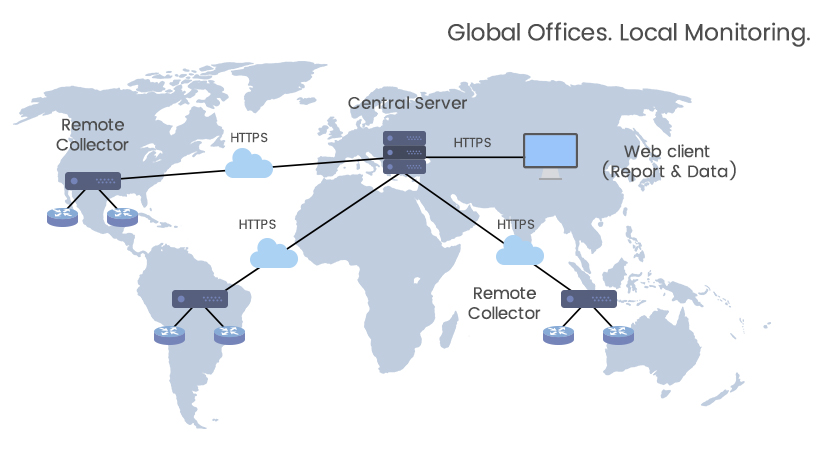
A typical setup involves a single Central Server and "n" number of Distributed Probes based on number of remote locations. The probes collect & process the flows from the routers and passes the compressed data to the Central Server through a secure https connection. The Central server stores the data from the probes and provides a centralized web console for generation of reports.