Kubernetes health monitoring
Optimizing Kubernetes performance with Applications Manager
Kubernetes has become the standard for container orchestration. While it offers powerful automation for deploying and scaling applications, its complexity introduces significant monitoring challenges. A healthy cluster requires visibility into multiple layers, including nodes, pods, and the applications themselves. ManageEngine Applications Manager provides a comprehensive solution for Kubernetes health monitoring, offering the deep visibility needed to maintain system uptime and performance.
The role of Kubernetes health monitoring
Kubernetes monitoring involves tracking the state of your cluster to ensure that every component functions as intended. Without effective monitoring, small issues like pod crashes or resource bottlenecks can quickly escalate into full system outages. A robust monitoring strategy should focus on:
- Availability: Ensuring that the control plane and worker nodes are operational.
- Performance: Tracking latency and throughput for containerized services.
- Utilization: Managing CPU and memory allocation to prevent resource exhaustion.
- Scalability: Verifying that the cluster can handle increased loads without degradation.
Core Kubernetes monitoring capabilities in Applications Manager
ManageEngine Applications Manager simplifies Kubernetes observability by consolidating metrics from every layer of the stack into a unified console.
Automated cluster discovery
The dynamic nature of Kubernetes makes manual configuration impossible. Applications Manager uses auto-discovery to detect clusters across various environments, including on-premises setups and managed services like Amazon EKS, Azure AKS, and Google GKE. This ensures that new nodes and pods are automatically brought under monitoring as they are provisioned.
Node and infrastructure health
The stability of a Kubernetes cluster depends on the health of its underlying nodes. Applications Manager tracks critical node metrics:
- CPU and memory usage: Monitors real-time consumption and compares it against capacity.
- Node status: Identifies nodes in NotReady or Unknown states to prevent scheduling failures.
- Network traffic: Tracks bytes sent and received to detect potential network congestion.
Pod and container visibility
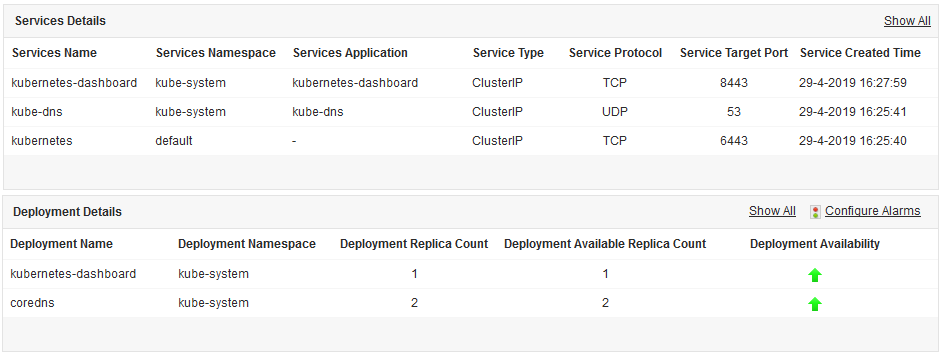
Pods are ephemeral, making them difficult to track. Applications Manager provides detailed insights into pod lifecycles:
- Restart counts: High restart rates often indicate underlying application bugs or configuration errors.
- Pod status tracking: Identifies pods stuck in Pending or Failed states.
- Container health probes: Monitors the results of Liveness, Readiness, and Startup probes to ensure traffic is only routed to healthy containers.
Persistent volume and storage monitoring
Applications that require data persistence rely on Persistent Volumes. Running out of storage can lead to data loss or application failure. Applications Manager monitors volume utilization and status, alerting administrators before a disk becomes full.
Namespace resource allocation
In shared environments, monitoring at the namespace level is essential for governance. Applications Manager allows teams to track resource consumption per namespace. This helps in identifying which teams or projects are using the most resources and ensures that quotas are not exceeded.
Advanced features for proactive management
Beyond basic metric collection, Applications Manager's Kubernetes health monitoring solution includes advanced features that help DevOps teams move from reactive troubleshooting to proactive optimization.
AI-powered anomaly detection
Static thresholds often lead to alert fatigue. Applications Manager uses machine learning to establish performance baselines. By analyzing historical data, it can identify anomalies that deviate from normal patterns, such as a sudden spike in memory usage that does not match typical seasonal trends.
Root cause analysis
When an issue occurs, finding the source is critical. Applications Manager correlates infrastructure metrics with application logs and performance data. This allows administrators to determine if a performance dip is caused by a hardware failure on a node, a configuration error in a pod, or a code-level bottleneck within the application.
Automated remediation
To minimize downtime, Applications Manager can trigger automated actions when specific health conditions are met. This includes executing scripts to restart a failing service or integrating with orchestration tools to scale resources dynamically.
Kubernetes monitoring metrics for peak performance
For effective monitoring, IT teams should prioritize specific metrics that indicate the overall state of the environment:
| Monitoring level | Key Performance Indicators (KPIs) |
|---|---|
| Cluster Level | Uptime, Control plane health, API server latency, ETCD performance |
| Node Level | CPU/Memory allocatable vs. capacity, Disk I/O, Network errors |
| Pod/Workload | Container CPU throttling, Memory working set, Restart count, OOM events |
| Storage | PV/PVC status, Volume usage percentage, IOPS |
The Applications Manager advantage
Many open source tools require complex manual setup and ongoing maintenance. ManageEngine Applications Manager offers an out-of-the-box experience that integrates infrastructure monitoring with Application Performance Monitoring (APM).
- Unified Dashboard: View the health of Kubernetes alongside databases, web servers, and cloud instances.
- Intuitive Alerting: Receive notifications via email, SMS, or third-party integrations like Slack and Jira.
- Capacity Planning: Use historical reports to predict future resource needs and optimize hardware investments
Maintaining a healthy Kubernetes environment requires more than just tracking uptime. It demands a detailed understanding of how infrastructure, orchestration, and applications interact. ManageEngine Applications Manager provides the necessary tools to monitor every component of a Kubernetes cluster, ensuring that organizations can deliver reliable and high-performing services.

