How AI agents help teams deliver better digital experiences
The moment your page slows down, two clocks start. One is yours: time to alert, time to investigate, time to fix. The other belongs to the user staring at the slow page. Yours is measured in minutes. Theirs runs out in seconds.
That gap is what AI agents close. Zia Agents in OpManager Nexus detects an issue, works out the cause, and runs the fix on its own, often before your users feel a thing. This blog looks at how that changes the experience you deliver.
For years, getting better at operations meant making your clock faster—better detection, tighter runbooks, sharper instincts. And it worked, right up to the point where there were no more manual steps left to speed up. In 2026, the distance between those two clocks is what separates a smooth digital experience from a lost user.
Our previous blog covered how Zia Agents works. This one focuses on what that means for the experience your users actually have: fewer slow pages, fewer abandoned sessions, and incidents that fix themselves.
Read our previous blog: The rise of autonomous digital operations
Your monitoring works, but the response is still manual
Issue detection got solved long ago. Your tools watch everything, you've tuned your thresholds, and an alert reaches the right person in seconds. What hasn't kept pace is everything that happens after the alert.
You manually correlate the signals, reason about the likely cause, pick the right runbook, and run it. That stretch between knowing and fixing is where mean time to repair (MTTR) stalls. That's because you can buy faster detection, but you can't buy your way past a manual step. It's also why someone on your team always has to be reachable—nights and weekends included.
The result is a story you know well: a capable setup, a tired on-call rotation, and an MTTR number that hasn't moved in a year. That's not a tooling problem. It's a handoff problem, and it's exactly what Zia Agents is built to remove.
Where Zia Agents changes the work
Zia Agents is the AI agent capability built into ManageEngine OpManager Nexus. Agents work on top of the monitoring and remediation workflows you already run there. An AI agent doesn't wait to be asked. When a signal goes bad, it investigates on its own, reasons through what's actually causing the slowdown, and triggers the right remediation for that cause, not a guess.
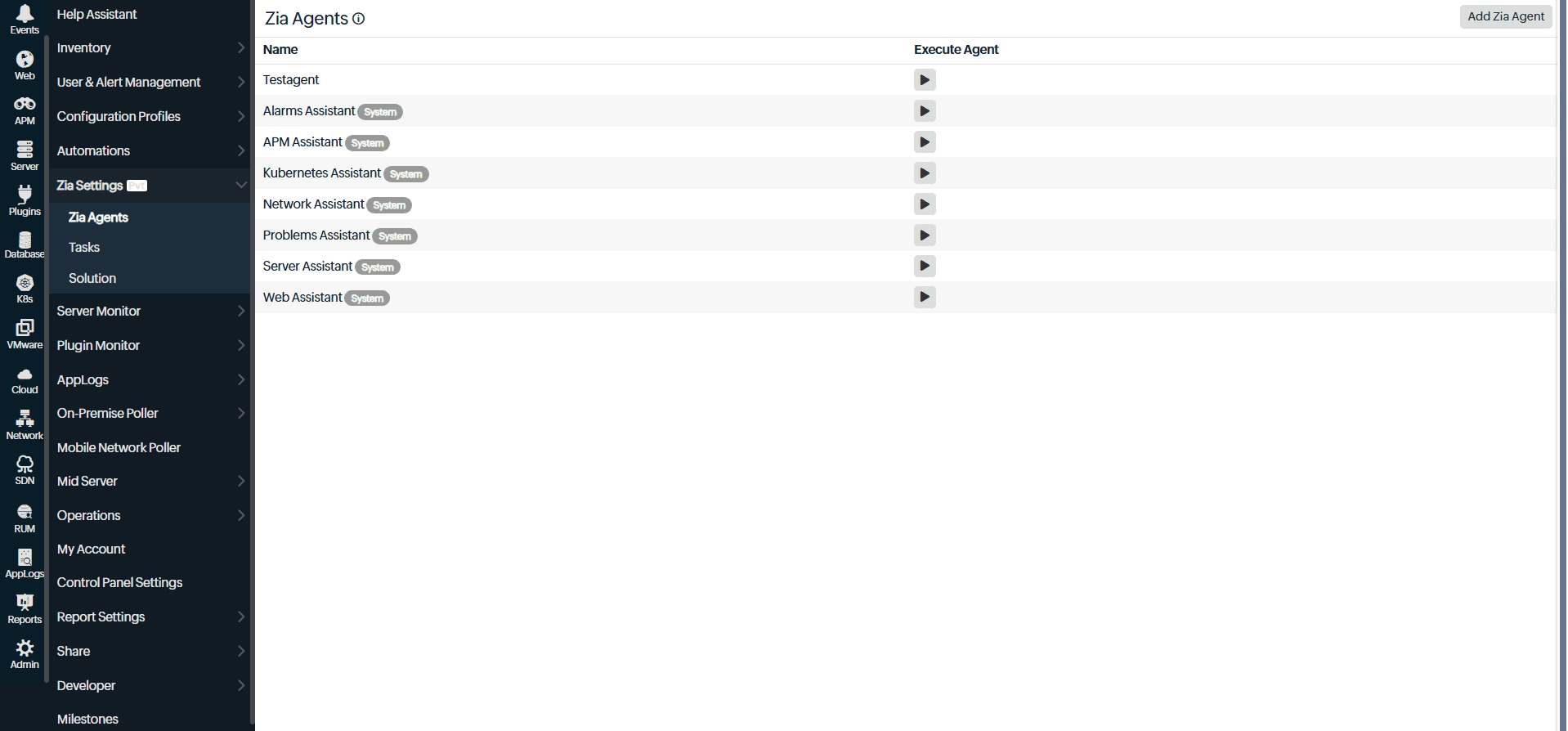
You can also build custom agents directly in OpManager Nexus for workflows specific to your environment. When those agents need to reach a third-party tool, Zia Agent Studio handles the integration.
Take the Autonomous IT Automation Agent. The moment an alert fires in OpManager Nexus, the agent steps in before an engineer has to figure out what to do next. It surfaces relevant solutions immediately, using either prebuilt fixes for common fault scenarios or custom solutions your team has already defined for your environment. If you've set guardrails on the agent, it pauses and asks for your approval before proceeding. If not, it applies the fix autonomously. No runbook hunting, no escalation chain, no time lost between the alert appearing and the fix starting.
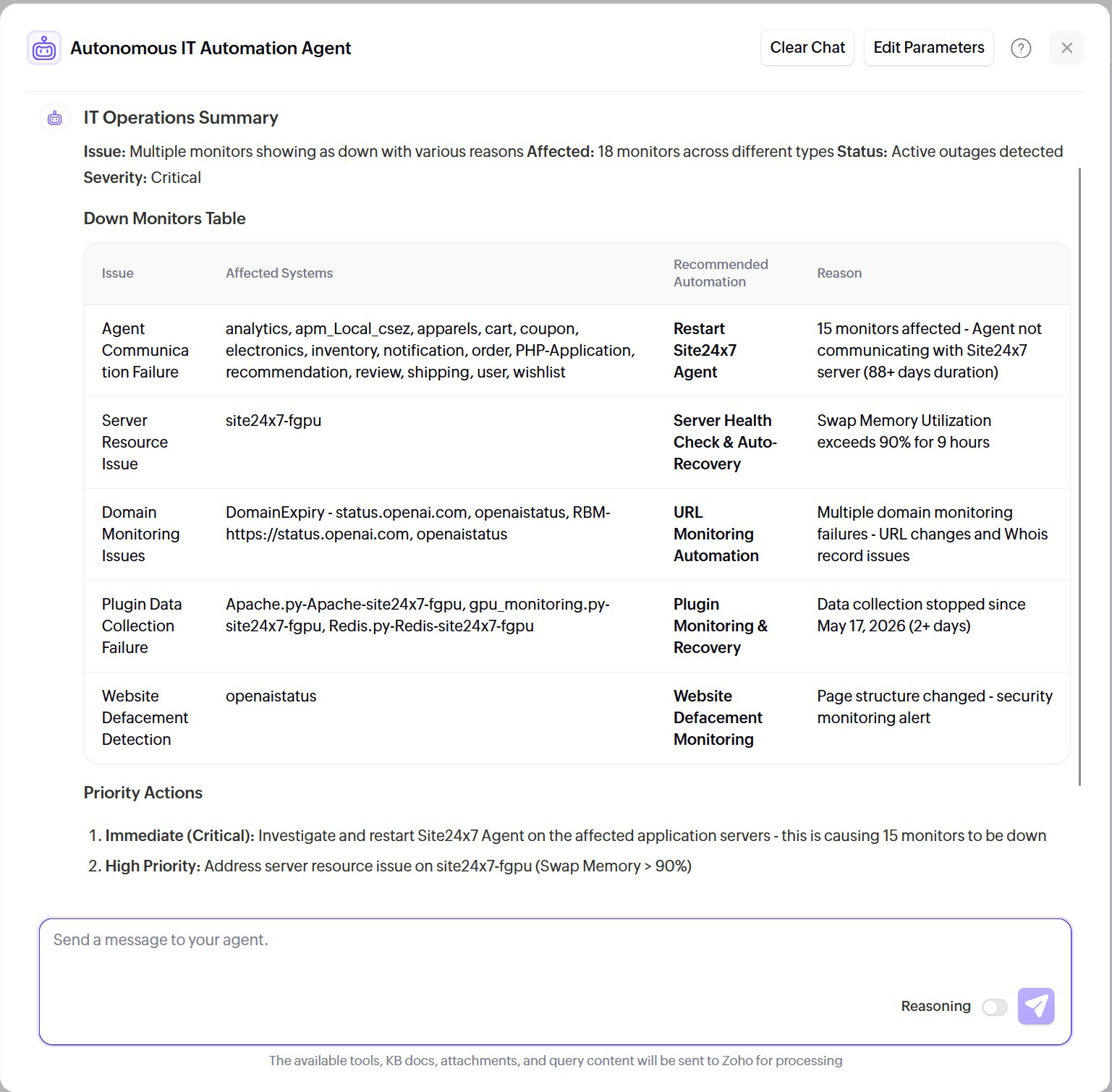
In the previous blog, you saw how the job shifts from doing the work to directing it. This is how you make that shift: delegate the incidents that follow a familiar shape, so your attention goes to the problems that genuinely need you.
When should you actually use Zia Agents?
This is the natural question. Alerts already tell you the moment something breaks, and Ask Zia gives you the details whenever you ask. So where does an agent fit in?
Think of it by situation. When you want to be informed, turn to alerts. When you want to investigate, Ask Zia. Both keep you in the driver's seat, which is right for the incidents that need your judgment.
Zia Agents is for the incidents that don't: the slowdown with a familiar shape, the fix you've run 20 times, the late-night page where the answer is the same runbook as last time. In those moments, being informed isn't the goal; being resolved is. Nothing gets replaced. The agent simply takes the incidents that don't need you, so the only ones reaching you are the ones that genuinely do.
But what if the agent runs the wrong fix?
This is the next fair question. Here's the reassuring part: an agent doesn't invent fixes. It picks from the remediation you already built and trust; the same runbooks your team wrote and tested.
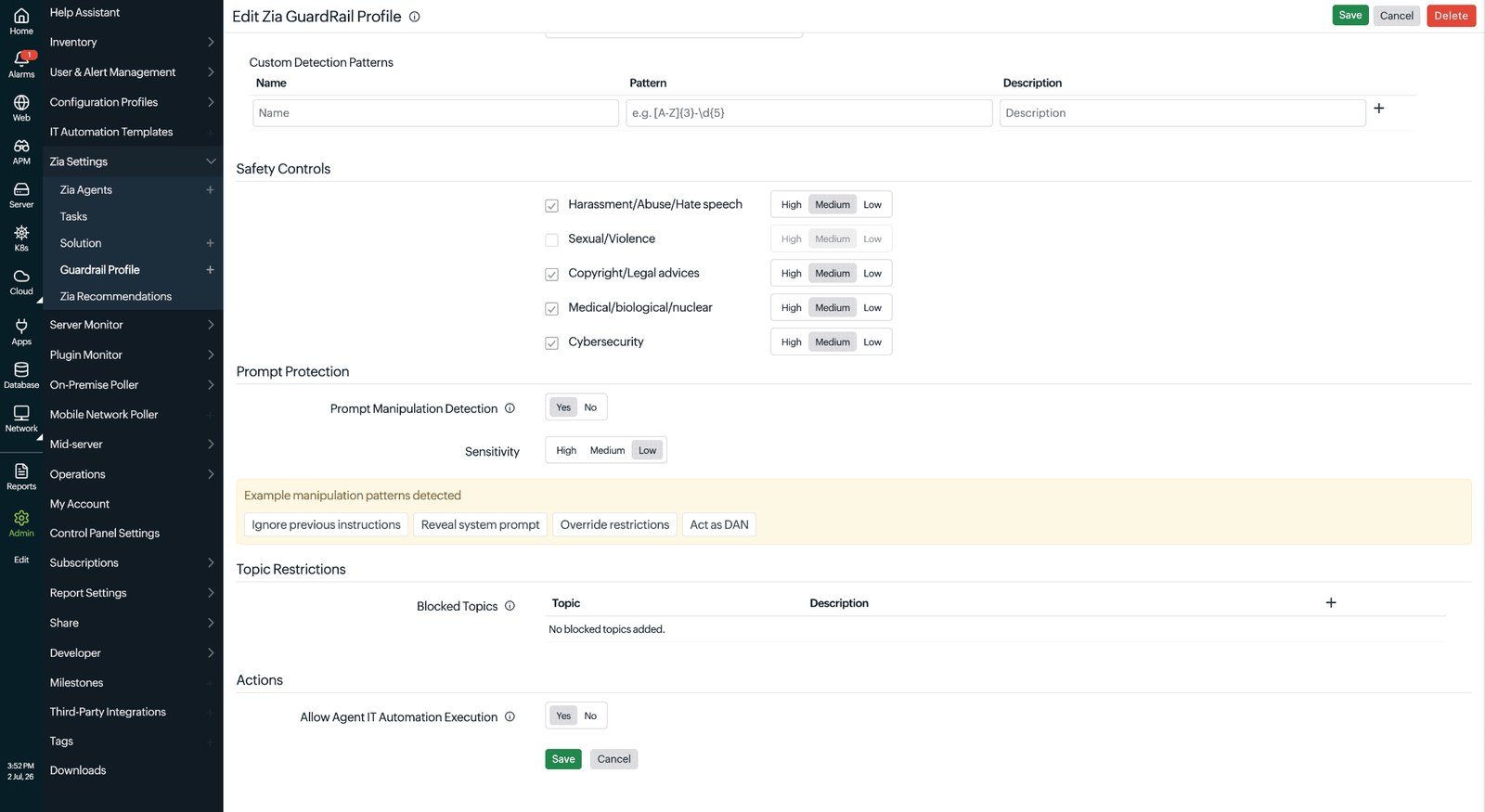
You also draw the boundaries. You decide what it resolves on its own and what pauses for sign-off, with its reasoning laid out so you can make the call fast. Plus, you can override or roll back its actions anytime. Familiar, low-risk incidents run end to end. High-stakes changes wait for a human. Autonomy isn't all or nothing. You set it where your team is comfortable and widen it as trust builds.
Where the payoff shows up
Once it's running, the same change reads differently depending on where you sit.
What it means for your team:
Lower MTTR: The agent takes over the slowest part of an incident—the investigating and deciding—so resolution time finally drops. The diagnosis and remediation that used to wait on a person now start in seconds, which is the most direct way to reduce MTTR without changing your stack.
Fewer after-hours pages: Routine incidents get handled without waking anyone, so on-call stops meaning always-on. The agent handles the off-hours incidents that follow a known pattern, and your rotation only hears about the ones that don't.
Less toil: No more line-by-line waterfall digging for the hundredth time. The agent does the repetitive diagnosis and shows you its reasoning, so even the incidents you review take minutes instead of an afternoon.
Reclaimed time: When routine incidents run themselves, the hours your engineers spent correlating alerts, running the same runbook, and writing up post-mortems go back to the roadmap. That's time spent on new integrations, performance improvements, and the kind of technical work that actually moves the product forward, rather than keeping the lights on.
What it means for leadership:
Protected revenue: Issues get resolved before users feel them, so fewer slow pages become abandoned visits. Every minute shaved off resolution means fewer abandoned carts and half-filled forms.
Stronger brand: A site that stays fast is one people trust and return to. Users rarely remember the one fast visit; they remember that it's always fast.
Smarter spend: Your best engineers spend their time on growth, not repetitive incident response. Auto-remediation covers the routine, so headcount goes toward building the website—not babysitting it.
Lower risk: Faster, steadier resolution means fewer experience problems turning into churn. This is the practical payoff of self-healing IT operations: problems stay small, and small problems don't cost customers.
From alert to resolution, automatically
Zia Agents sits at the end of a detection chain you've already built: telemetry collected, thresholds tuned, alerts routed. What was always missing was the step that turns an alert into a closed incident without a person having to search for the fix. That's what agents add. The Autonomous IT Automation Agent steps in when an alert fires, surfaces the right solution immediately, and puts the engineer one step from resolution instead of three escalations away.
The result isn't a different architecture. Your monitoring stack stays the same. What changes is the gap between detection and resolution goes from minutes to seconds. You go from runbook hunting and escalation chains to a single flow where the alert and the fix arrive together. For the incidents that follow a known pattern, the time your team used to lose figuring out what to do next is already gone before anyone opens a console.
That's the practical shape of agentic AIOps: faster path from signal to fix, running continuously, across everything you monitor.
Want to see what that looks like for your own environment? Try Zia Agents today!
Frequently asked questions
1. What does the Autonomous IT Automation Agent do?
When an alert fires in OpManager Nexus, the Autonomous IT Automation Agent surfaces relevant solutions before an engineer has to search for them. It offers prebuilt fixes for common fault scenarios and supports custom solutions for environment-specific procedures. The engineer picks what fits and applies it in one flow, cutting the time between alert detection and resolution without any runbook hunting or escalation.
2. How does Zia Agents help reduce MTTR?
Most of your mean time to repair (MTTR) is spent after detection, in the manual work of correlating signals, finding the cause, and triggering a fix. A Zia Agent does that middle stretch on its own, so resolution starts in seconds instead of waiting on a person to work through it.
3. How does faster incident response improve the digital experience?
Every minute an issue stays live is a minute users feel it through a slow page, a failed action, or a long wait. When an agent resolves the issue in seconds, most users never notice anything happened. That steady, fast experience is what keeps them coming back.
4. What is the difference between AIOps and AI agents?
AIOps analyzes your operations data to detect anomalies, correlate events, and cut alert noise. An AI agent acts on those insights by investigating the incident and running the fix. AIOps tells you what's wrong; an agent resolves it.
5. Do AI agents replace IT teams?
No. Agents only handle incidents that follow a known pattern, using runbooks your team already wrote. Your engineers still solve novel problems, set the guardrails, and approve high-stakes actions.
6. What is Zia Agent Studio and how does it work?
Zia Agent Studio is the no-code builder inside OpManager Nexus where you design, configure, and deploy Zia Agents. It gives IT teams 700+ actions across monitoring, diagnostics, remediation, and notifications, connected through a visual workflow. You define what the agent watches for, what it does when it fires, and when to escalate to a human. No developers or scripting knowledge required.
7. What's the difference between workflow automation and Zia Agents in OpManager Nexus?
Workflow automation lets you define a fixed sequence of actions that runs automatically when a specific monitor alert fires or a threshold is breached. Zia Agents handles the full incident from end to end: they investigate, identify the root cause, pick the right remediation, and close it out, without a predefined sequence, and without needing a human in the loop for routine incidents. High-stakes actions still pause for approval, and you set where that line is. Workflow automation handles a single trigger; Zia Agents handles the entire incident life cycle.