

- Free Edition
- Quick Links
- Active Directory Auditing
- Active Directory auditor
- Active Directory monitoring
- Account lockout analyzer
- Login monitoring software
- Active Directory change notifier
- User logon audit reports
- AD logon logoff tracker
- User logon failure auditing
- Login history tracking tool
- AD change auditor
- Insider threat detection software
- Permissions change auditing
- Entra ID reporting
- Privileged user monitoring
- User behavior analytics tool
- Active Directory security monitoring
- Group Policy auditing tool
- GPO change auditor
- Entra ID auditing
- Audit user account management
- OU change auditor
- Audit group membership changes
- Active Directory auditing and reporting tool
- GPO reporting tool
- Remote desktop monitoring software
- PowerShell logging and auditing
- Azure password protection auditing
- Azure sign-in risk detection
- File Server Auditing
- Windows Server Auditing
- Employee Tracking
- Workstations Auditing
- Compliance Auditing
- Other features
- SIEM Integration
- Windows DNS - Schema Auditing
- Windows security event log monitoring
- SIEM audit solution
- Schedule Active Directory change reports
- Reports from Archived Data
- Aggregated summary reports
- AD new/old attribute changes
- Audit trail
- Audit Active Directory LAPS
- Scheduled Reports & Alerts
- Account lockout examiner
- Industry
- Documents
- Success Stories
- Related Products
- Log360 (On-Premise | Cloud) Comprehensive SIEM and UEBA
- ADManager Plus Active Directory Management & Reporting
- ADAudit Plus Real-time Active Directory Auditing and UBA
- ADSelfService Plus Identity security with MFA, SSO, and SSPR
- DataSecurity Plus File server auditing & data discovery
- Exchange Reporter Plus Exchange Server Auditing & Reporting
- M365 Manager Plus Microsoft 365 Management & Reporting Tool
- RecoveryManager Plus Enterprise backup and recovery tool
- SharePoint Manager Plus SharePoint Reporting and Auditing
- AD360 Integrated Identity & Access Management
- AD Free Tools Active Directory FREE Tools
Extend Intune audit log retention for forensic and audit readiness
Trace user actions with complete context.
See who did what, when, and where. Instantly access Intune audit logs that show precise activity details for compliance, troubleshooting, and investigations.
Monitor sensitive device actions.
Keep tabs on device wipes, renames, restarts, and other impactful actions triggered by an Intune portal user.
Create custom alerts and automate responses.
Set up real-time email and SMS alerts for specific Intune actions using custom thresholds. Execute automated scripts to accelerate investigation and response.
Monitor device sync actions.
Record manual sync requests triggered from the Intune portal to keep track of when devices are refreshed with new policies.
Monitor Intune changes that matter most
Ensure long-term audit trail retention.
Avoid losing critical records. Extend Intune audit log retention to maintain a searchable, long-term archive of all portal changes
Log app protection policy creation.
Track the creation of app protection policies and view configured options like data transfer rules, access settings, and app assignments.
Audit device configuration policy changes.
Capture the creation, modification, and deletion of configuration policies, including settings like disabling Wi-Fi and Bluetooth.
Audit compliance policy changes.
Track creation, modification, and deletion of Intune compliance policies, including settings like the minimum OS version and firewall status.
Strengthen Intune visibility and security with ADAudit Plus
- Audit device enrollments
- Log sync requests
- Track app and policy activity
- Create custom alerts
-
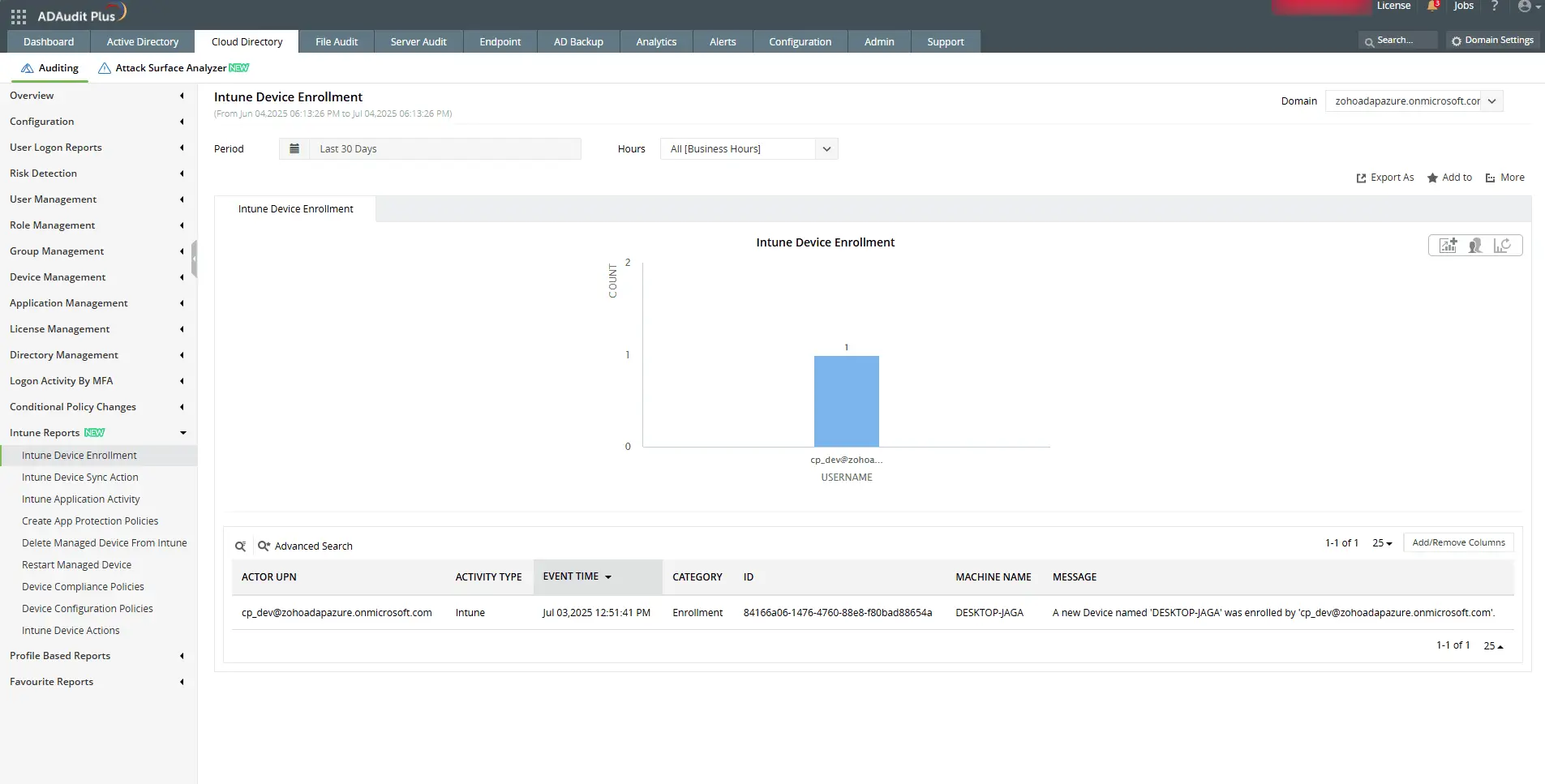
Identify the user and timestamp associated with the enrollment.
-
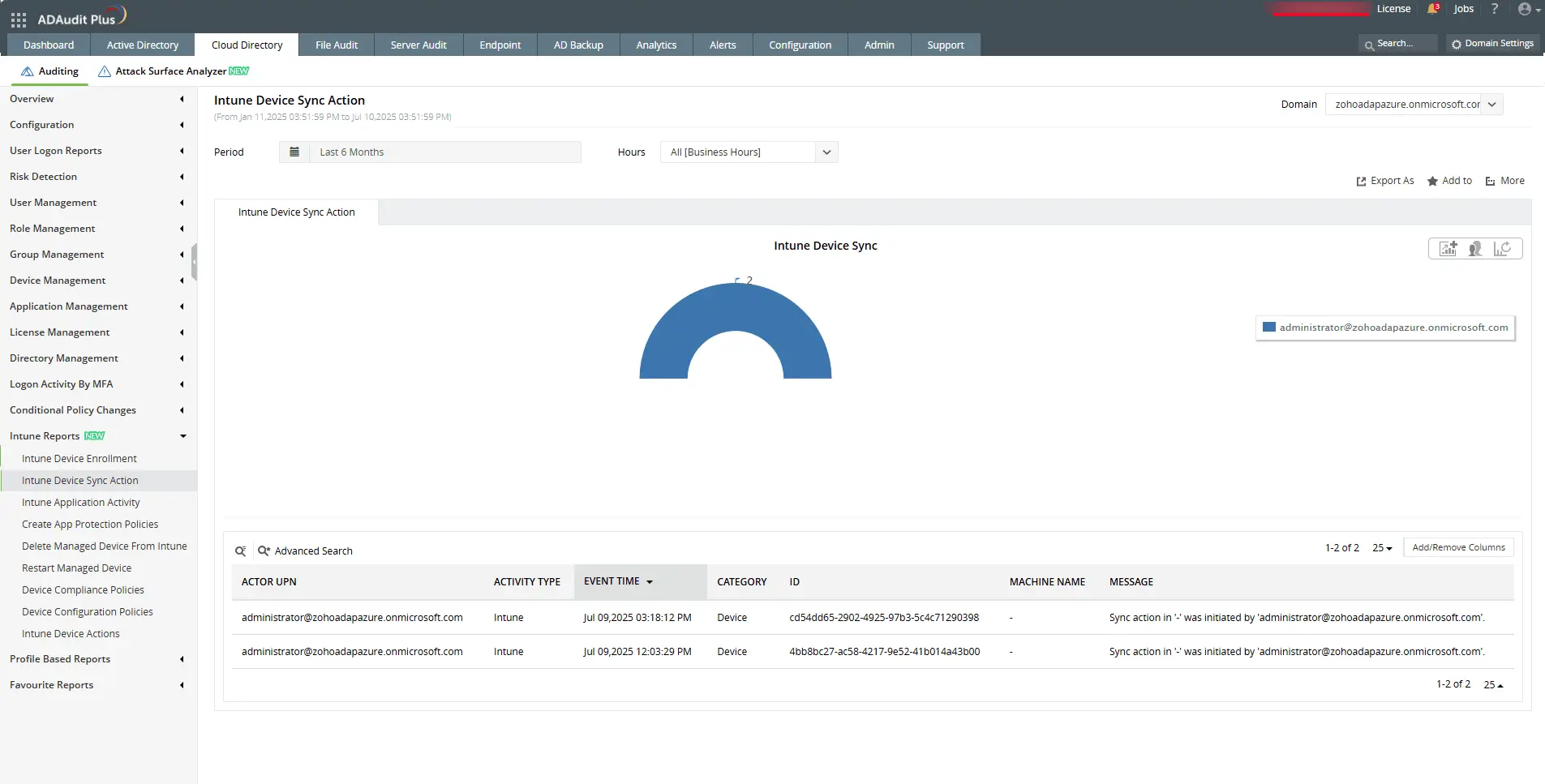
Check who initiated a sync and when it was triggered in the Intune portal.
-
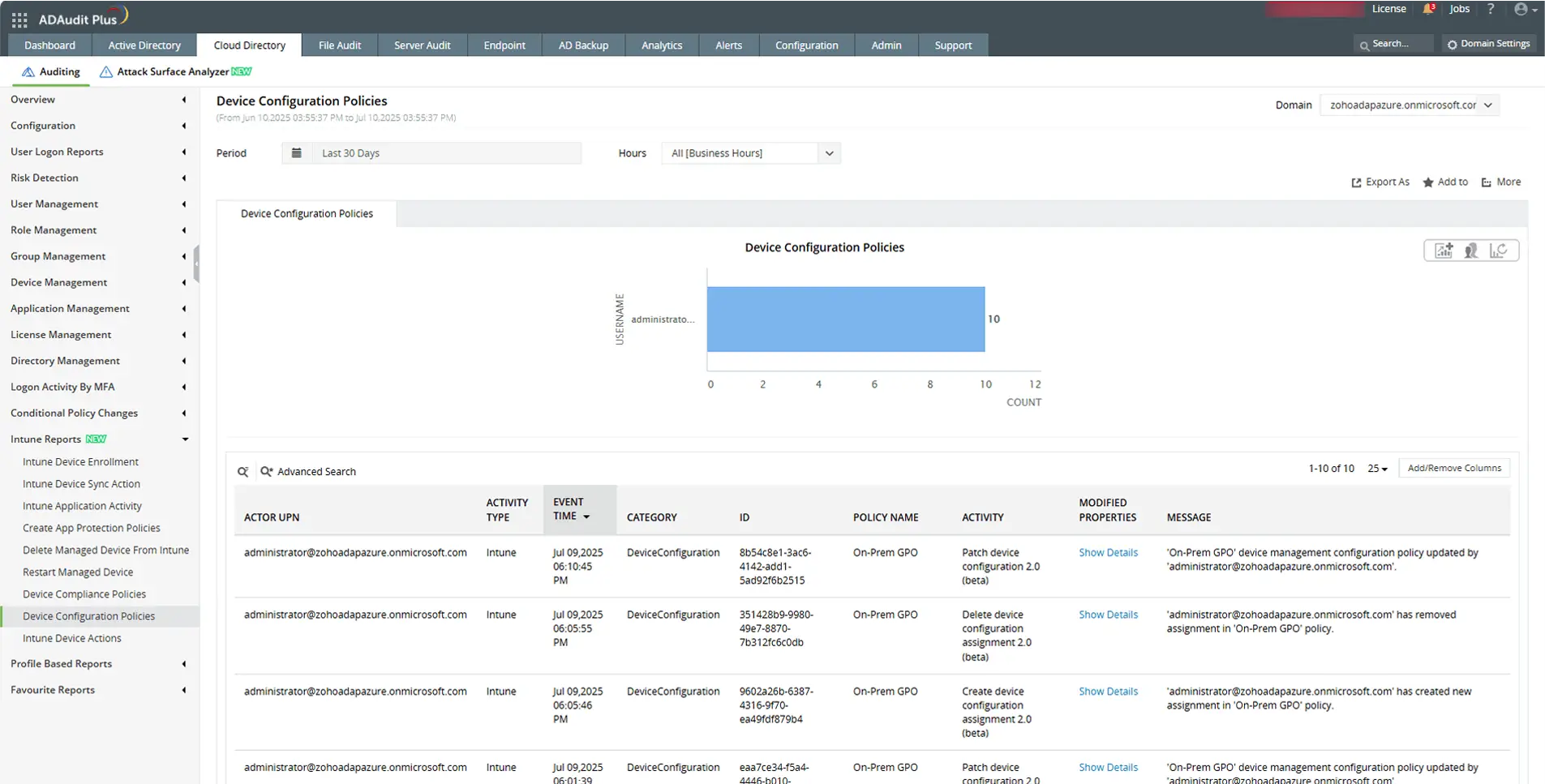
View detailed changes made to device configuration policy settings.
-
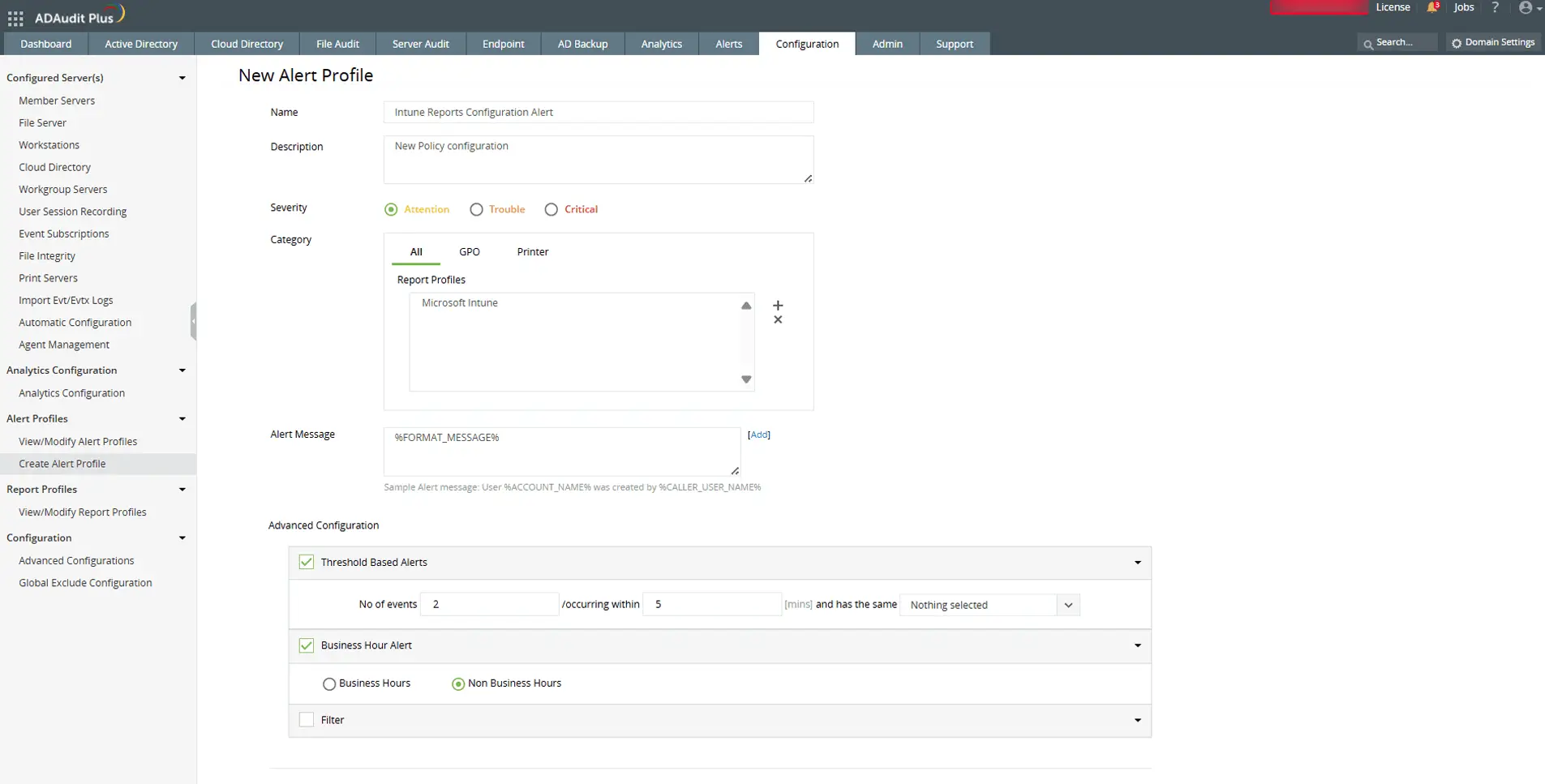
Send email and SMS alerts, and execute scripts automatically for faster response.
Frequently asked questions
Microsoft Intune is a cloud-based endpoint management solution that helps organizations manage and secure devices, apps, and users. It supports mobile device management (MDM) and mobile application management (MAM) across platforms like Windows, Android, and iOS.
Intune portal auditing refers to tracking and recording changes made within the Intune admin center. This includes who made the change, what was changed, when it happened, and the impact on apps, devices, and policies.
Auditing Intune admin center actions helps detect unauthorized configuration changes, monitor sensitive device operations like wipes or restarts, and trace policy updates that may impact compliance or security. It also enables faster troubleshooting by showing exactly who made changes to apps, policies, or devices, helping you investigate incidents and maintain accountability across your Intune environment.
By default, Microsoft Intune retains audit logs for up to one year. After that, the logs are automatically deleted. To preserve records beyond this period for compliance or forensic investigations, organizations can export the logs or integrate with external auditing tools, like ADAudit Plus, that support long-term retention.
Yes. Intune audit logs provide detailed records that can support compliance with standards such as HIPAA, the PCI DSS, SOX, and others, especially when combined with dedicated auditing solutions.
Other solutions offered by ADAudit Plus
File permissions auditing
Audit all file and folder permission changes. Know who made those changes, when, and from where.
File change monitoring
Gain instant visibility into all modifications and failed access attempts made to your critical files.
Forensic analysis
Investigate security incidents faster with actionable and accurate audit data.