

Error code: 80070005 - Unable to delete the user. Access is denied
Last updated on:In this article:
Issue description
When attempting to delete a user in ADManager Plus, the operation fails, and an error message "Error code: 80070005: Unable to delete the user. Access is denied. This prevents administrators from removing the user from AD using the tool.
Possible causes
- Insufficient permissions: The service account does not have the required privileges to delete user objects.
- Account protection enabled: The Protect object from accidental deletion option is enabled for the user.
- Locked or system-managed accounts: Certain accounts, like built-in system accounts, cannot be deleted.
- Domain controller connectivity issues: ADManager Plus cannot communicate with the assigned domain controller.
Prerequisites
- Admin access to ADManager Plus and ADUC.
- Ensure ADManager Plus is pointed to the correct domain controllers.
Resolution
Step 1: Disable Protect Object from Accidental Deletion (if enabled)
- Navigate to Management > User Management > Modify Single User. Search for the user and modify the user.
- Under the General tab, uncheck Protect object from accidental deletion.
- Click Update and try deleting the user.
Step 2: Verify domain controller connectivity
- Open ADManager Plus.
- Navigate to Directory/Application Settings > Active
Directory.
Note:
We recommend enabling Implement DC Sort Intelligence to identify the domain controller with latency.
- Test connectivity by pinging the domain controller:
- Ping <DomainControllerName>
- If connectivity issues exist, check the firewall rules and network configurations.
Step 3: Update service account credentials
- Navigate to Directory/Application Settings > Active Directory and select the configured domain.
- Verify the service account details and update the password if it has changed.
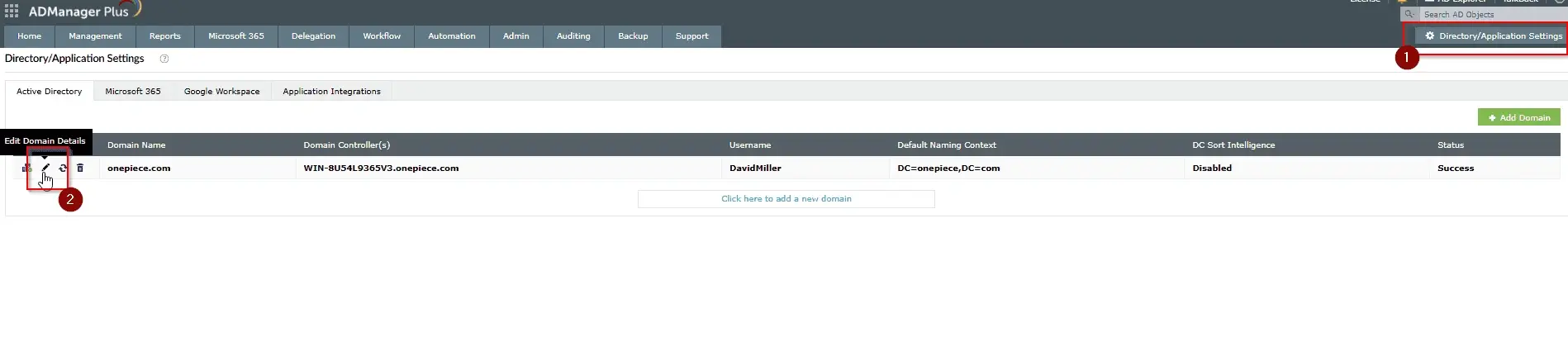
The Directory/Application Settings page in the product with the option to edit domain details.
Step 4: Verify ADManager Plus service account permissions
- Please ensure that ADManager Plus is running as a service.
- Check that you have configured a service account in the Directory/Application Settings of ADManager Plus.
- Check if the service account used by ADManager Plus has necessary permissions:
- Delete User Objects
- Modify Object Permissions
- You can add the user to the Domain Admin group to ensure there are no missing permissions.
Tips
- Disable the account first to prevent immediate disruptions.
- Verify group memberships and remove the account from critical groups.
- Transfer ownership of files, emails, and shared resources.
- Use a staged deletion approach (disable, move to a holding OU, and delete after a retention period).
How to reach support
If the issue persists, contact our support team here.












