- Four core components of an endpoint security policy
- Endpoint security policy roles & responsibilities
- How to implement and enforce the policy
- Regulatory requirements
- Free endpoint security policy template
- Summary
- Endpoint security policy FAQs
Share this article




Summary
An endpoint security policy is the official rulebook for protecting every device that handles corporate data - whether it's connected to the office network, a home Wi-Fi, or a public hotspot. It covers everything from laptops to smartphones and clearly explains the security steps that employees, contractors, and IT teams must follow. This guide breaks the policy down into four core components and clarifies exactly who is responsible for each section. We'll also walk through how to implement these rules, review the regulations that shape them, and provide a free template you can adapt for your own organization.
Introduction
According to Verizon's MSI report, up to 70% of successful data breaches and 90% of all cyberattacks originate at endpoint devices, making them the undeniable launchpad for modern threats. Today, critical company data lives in coffee shops and on personal smartphones.
A well-written endpoint security policy establishes a non-negotiable baseline for every device that touches your data. It is what turns a scattered, vulnerable fleet into something you can actually govern and protect, rather than an expensive incident waiting to happen.
What is an endpoint security policy?
An endpoint security policy is a formal, written document that explicitly dictates how an organization will protect every device connecting to its network. It serves as the definitive rulebook that employees, contractors, consultants, and IT staff must follow to keep those devices, and the data they hold, secure.
It typically covers the following questions:
- Which devices are in scope? Laptops, desktops, smartphones, tablets, servers, and increasingly IoT devices.
- How should those devices be configured before they're trusted?
- How will data on these devices be protected?
- Who owns enforcement, and what happens when something goes wrong?
It's also worth separating this from an endpoint protection policy, a term people often use interchangeably, but the two aren't quite the same thing.
- An endpoint security policy is the governance layer. It sets the rules: what's allowed, who's responsible, how violations are handled, and what standards the organization holds itself to.
- Endpoint protection refers to the technical controls that enforce those rules in practice: antivirus software, firewalls, disk encryption, and patch management tools.
Why this matters practically: endpoints are nearly always the initial foothold an attacker secures, not their final destination. Once a single device is compromised through a phishing email, a missing patch, or a weak password, that access becomes a launchpad. The attacker moves laterally across the network toward the data they actually want. A policy that keeps devices patched, encrypted, and monitored closes off that first step, and stopping an attack at the endpoint is far cheaper and less damaging than stopping one after it's already mapped the network.
Four core components of an endpoint security policy
Policies naturally vary in length, tone, and formatting depending on the culture of an organization. However, nearly all effective enterprise policies are built around the same four foundational pillars. Nailing these four elements ensures the rest of the document mostly writes itself.
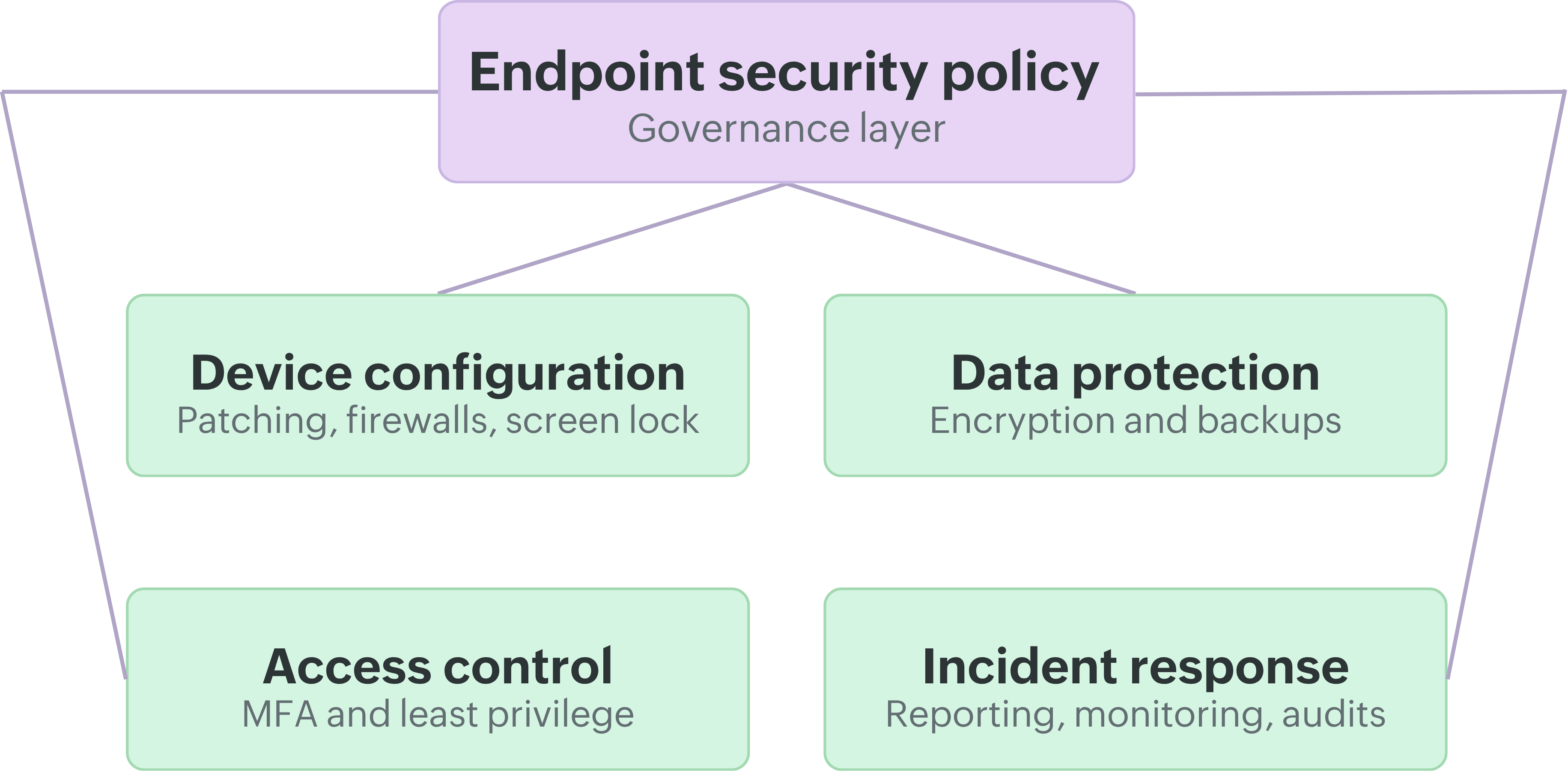
1. Device configuration and management
This pillar serves as the baseline. It defines precisely how a device must be configured before it's allowed anywhere near company data. This section covers initial device registration, ensuring every endpoint is logged in a central IT inventory before it ever connects to the network. It dictates rules for operating system updates and application patching, the activation of host-based firewalls, and mandatory automatic screen locking after a brief period of inactivity. A screen lock timeout of five to fifteen minutes is the standard expectation across most industries. (Refer Safeguard 4.3)
Patch management deserves particularly specific language in this section. A device that's perfectly configured today but running software that's six months out of date is still a liability, since most malware exploits vulnerabilities that vendors patched weeks or months earlier. The policy should mandate automatic updates wherever feasible, and set a strict maximum window for deploying critical patches once released, often within 72 hours for actively exploited zero-day threats.
The goal isn't to lock devices down so severely that employees can't do their jobs, since excessive friction just pushes people toward risky workarounds. It's to make sure every device starts from a known, secure state and stays there, rather than drifting out of compliance the moment IT stops watching.
2. Data protection
Data protection governs how sensitive information is secured while it rests on a device, and how it's backed up if that device is lost, stolen, or hit by ransomware. Strong encryption standards are non-negotiable, with AES-256 as the widely accepted baseline. This should apply to all data at rest on laptops, desktops, and mobile devices, and to any removable media, such as USB drives or external hard disks, that might carry sensitive files off-site. Equally important, data in transit must be protected by requiring secure VPN connections or modern protocols like TLS 1.3 to prevent interception over untrusted networks.
Backup requirements matter just as much as encryption. If a laptop is left on a train, the policy should already specify how often data is backed up, where those backups live, and how quickly they can be restored. Backups themselves should also be encrypted and access-controlled, since an unprotected, centralized backup server is often a more attractive target than the original, scattered data.
3. Access control and authentication
This component governs who can access a device or system and how they prove they're allowed to. Multi-factor authentication (MFA) is no longer a suggestion for regulated industries, it's the baseline expectation for any device accessing corporate resources, paired with password requirements covering minimum length, complexity, and rotation. Modern guidance increasingly favors long passphrases and change-on-compromise policies over arbitrary 90-day rotations, which tend to produce weaker passwords in practice.
The principle underneath all of this is least privilege: users get exactly the access they need, and nothing more. Giving everyone local admin rights by default is one of the most reliable ways malware spreads across a fleet, so most policies now explicitly restrict standing administrator access, requiring elevated privileges to be requested, logged, and approved case by case rather than granted permanently.
4. Incident response and monitoring
Even a well-configured device can fall victim to a sophisticated attack, so the policy needs to define what happens next. This covers how users report a lost device, a suspicious email, or a suspected infection, who investigates it, how the device gets isolated or remotely wiped, and how the incident is documented afterwards.
Continuous monitoring and auditing is the glue holding this together. Organizations need real-time visibility into whether devices are actually complying day to day, not just when they were first configured. Regular, automated audits are the only way to catch the gap between the policy on paper and what's actually happening on the network. Without them, leadership might assume the environment is secure while half the sales team has quietly disabled their firewalls to make a legacy app run faster.
Endpoint security policy: roles & responsibilities
A policy that doesn't clearly assign ownership tends to fail quietly. Nobody enforces it because everybody assumes somebody else is handling it. Most policies define at least three groups, with two more that larger organizations tend to fold in.
IT and security teams own implementation and day-to-day enforcement. That means deploying and maintaining the tools that keep endpoints compliant, patched, and monitored, investigating incidents as they come in, and keeping the device inventory current so nothing connects to the network unaccounted for.
Employees and end users are responsible for following the practices the policy lays out: using only approved devices for work, not disabling security tools even when they're inconvenient, locking their screens when stepping away, and reporting anything suspicious promptly rather than trying to quietly handle it themselves.
Management and department heads make sure their teams actually comply day to day, and they back enforcement when it's needed, including supporting disciplinary action for repeated or serious violations. Without visible management buy-in, a security policy tends to be treated as optional guidance rather than a real requirement.
HR typically folds policy awareness into onboarding, so new hires understand the rules from day one rather than picking them up informally months later, and coordinates recurring training refreshers.
Legal or compliance teams review the policy against applicable data protection laws and any contractual obligations to customers or partners whose data might pass through company devices, and they're usually the first call when an incident has potential regulatory or legal exposure.
How to implement and enforce the policy
Drafting a comprehensive, legally sound policy document is genuinely the easiest part of this entire process. Getting an organization of independent human beings to actually follow it is where most security initiatives fall apart. A successful, structured rollout typically follows this phased playbook.
1. Assess your current environment. Before writing a single rule, find out what you're actually working with: how many devices are connecting to the network, what operating systems and patch levels they're running, which ones are personally owned versus company issued, and where the obvious security gaps already sit.
2. Define scope and objectives. Decide which devices and users the policy covers, and what you're actually trying to achieve, whether that's reducing malware incidents, meeting a specific compliance requirement, or simply getting visibility into a device fleet that's grown faster than IT's ability to track it manually.
3. Draft the policy around the four core components. Use device configuration, data protection, access control, and incident response as your backbone, then layer in the specifics that fit your organization: encryption standards, password rules, remote access requirements, and BYOD terms.
4. Get sign-off from stakeholders. Route the draft past legal, HR, and department heads before it's finalized. This catches practical objections early, and it builds the management buy-in that makes enforcement possible once the policy goes live.
5. Communicate and train. Distribute the policy in plain language, not just as a PDF nobody opens, and walk employees through what's expected of them and why it matters, rather than just handing down a list of rules. Short, recurring refreshers tend to stick better than a single onboarding session that's forgotten within a month.
6. Deploy the technical controls that enforce it automatically. A policy that depends on employees remembering to patch their own laptops or manually re-enabling a firewall will erode within weeks of being announced. This is where a unified endpoint management platform earns its keep.
ManageEngine Endpoint Central lets IT teams turn policy requirements such as automated patching, configuration baselines, disk encryption, and MFA into rules that apply themselves consistently across the fleet, rather than relying on manual follow-up for every single device.
See it in action.
Endpoint Central turns each of these policy requirements, patching, configuration, encryption, and access control, into rules that enforce themselves across your fleet, without manual follow-up per device.

7. Monitor, audit, and review. Set a fixed review cycle, at least annually, sooner if a major incident or new regulation demands it, and use ongoing audits to catch devices that have quietly drifted out of compliance since they were last checked.
Regulatory requirements
Depending on your industry and where your customers are located, several regulatory frameworks effectively require you to have one, even if none of them use that exact phrase. Some name endpoint controls explicitly; others fold them into broader language like "appropriate technical and organizational measures." Either way, auditors working against any of these expect to see each control in practice, not just referenced in the policy text.
The frameworks below cover the most common obligations organizations encounter.
| Framework | Who it applies to | Key endpoint obligations |
|---|---|---|
| GDPR | Any organization handling personal data of EU individuals | Encryption, access controls, and breach notification procedures on every endpoint touching personal data |
| HIPAA | US healthcare organizations and their business associates | Device encryption, access logging, and automatic screen locks on any endpoint that can reach patient records (ePHI) |
| PCI DSS | Any organization that stores, processes, or transmits cardholder data | Antivirus software, regular patching, and strong access controls on all systems in the cardholder data environment |
| ISO 27001 | Any organization seeking a certified information security management system | An endpoint security policy is one of the core documented policies auditors expect as part of the ISMS |
| NIST CSF 2.0 | All industries; widely used for vendor and customer due diligence | Documented, enforced endpoint controls covering configuration management, access control, and incident response |
| SOC 2 | Service organizations handling customer data | Enforced endpoint controls across configuration management, access control, and incident response |
| CCPA / CPRA | Businesses handling personal data of California residents | Encryption and access control on endpoints handling consumer data; cybersecurity audit requirements from 2026 |
| NIS2 | Essential and important entities across 18 critical sectors in the EU | Patch management, incident reporting timelines, and endpoint risk-management measures |
| FERPA | US schools and universities managing student education records | Endpoint controls on any device accessing or storing student records, including student-issued laptops |
| DORA | EU financial services organizations | Continuous, evidence-backed endpoint compliance; ICT risk management and incident reporting |
| RBI IT Framework | Banks and financial institutions regulated by the Reserve Bank of India | Continuous endpoint compliance with IT governance requirements; evidence-backed audit trails |
| NCSC Cyber Essentials | UK organizations, especially those seeking government contracts | Secure configuration, patch management, access control, and malware protection on all endpoints |
None of these frameworks are satisfied by writing a document and filing it away. Auditors generally want evidence that the policy is being enforced: patch compliance reports, access logs, and configuration audit trails among them. Endpoint Central ships with pre-built compliance templates mapped to all of the frameworks above, making that evidence easier to produce when an audit comes around.
Turn compliance into a byproduct of good enforcement. Endpoint Central maps these frameworks to concrete endpoint controls and keeps the evidence ready year-round.

Free endpoint security policy template
Below is an expansive structure you can adapt for your own business. It mirrors the architecture of enterprise-grade endpoint security policies and covers the specific elements that auditors and regulators typically demand to see.
1. Purpose State why the policy exists: to protect endpoint devices connecting to the network, safeguard company data, and reduce the risk of malware, breaches, and unauthorized access.
2. Scope Define who and what the policy applies to: employees, contractors, consultants, temporary staff, and third parties, using either company-owned or personal devices to connect to organizational resources.
3. Definitions Include plain-language definitions for key terms such as endpoint device, malware, and BYOD, so the rest of the document reads clearly for non-technical staff as well as IT.
4. Policy Statement A short paragraph confirming that all endpoints must meet the organization's security standards before connecting, and that non-compliant devices may be restricted or blocked from network access.
5. Roles and Responsibilities Outline what's expected of IT, end users, and management, along the lines described in the roles section above.
6. Endpoint Security Controls This is the largest section of most policies. It helps to break it into sub-sections:
- Device registration and inventory: require all devices to be registered with IT before connecting, with an up-to-date inventory maintained centrally.
- Encryption: specify that all stored data, including on removable media, uses a strong standard such as AES-256.
- Authentication: require MFA on all devices accessing corporate resources, along with password complexity and rotation requirements.
- Antivirus and anti-malware: require up-to-date protection with regular scans and a defined process for reporting detected threats.
- Patching and updates: require automatic updates wherever possible and a defined timeline for applying critical security patches.
- Firewalls: require host-based firewalls enabled by default, with exceptions only through documented IT approval.
- Device locking: require automatic locking after a short period of inactivity, typically capped at 15 minutes.
7. Remote Access Specify approved methods for remote connectivity, such as VPN, SSH, or secure cloud access, require encryption on all remote sessions, and limit remote access to authorized personnel only.
8. Bring Your Own Device (BYOD) State that personal devices require IT approval before accessing company resources, must meet the same security standards as company-owned devices, and that IT retains the right to remotely wipe corporate data if a device is lost, stolen, or the employee leaves the organization.
9. Incident Reporting Define how quickly users must report a lost device, suspected malware, or any other security incident, and what cooperation is expected of them during the investigation that follows.
10. Data Backup Require regular backups of critical business data in line with the organization's broader backup policy, with those backups encrypted and stored in a secure, access-controlled location.
11. Monitoring and Auditing State that the organization reserves the right to monitor endpoints for compliance and will conduct periodic audits of endpoint security practices across the fleet.
12. Enforcement Outline the consequences of non-compliance, ranging from restricted network access to formal disciplinary action, up to termination of employment or access privileges for serious or repeated violations.
13. Exceptions Define how exceptions to the policy are requested and approved, typically requiring sign-off from both IT and senior management, with every exception documented for future review.
14. Policy Review Commit to reviewing the policy at least annually, or sooner if a significant threat, technology change, or new regulatory requirement makes an earlier review necessary.
15. Approval Close with the formal details: company name, policy contact, effective date, review date, and version number, along with sign-off from the executive team.
This structure works whether you're a 50-person company writing your first policy or a larger organization refreshing an outdated one. The specifics, how many characters a password needs, how many minutes before a screen locks, will vary based on your risk tolerance and any regulations you're subject to, but the shape of the document tends to stay fairly consistent across industries.
What does it all boil down to?
An endpoint security policy is one of those documents that's easy to postpone and expensive to skip. The devices connecting to your network today, laptops, phones, and everything in between, remain the most common way attackers get a foothold, and a clear policy is what keeps that risk from turning into an actual incident on someone's desk.
Start with the four core components covered here (device configuration, data protection, access control, and incident response), assign clear ownership across IT, employees, and management, and back the document with tools that actually enforce it. Use the template above as a starting point, adjust it to fit your regulatory obligations, and revisit it at least once a year as your device fleet and the threat landscape keep changing.
 About the author

Endpoint security policy FAQs
01. What's the difference between an endpoint security policy and an acceptable use policy?
-An acceptable use policy governs how employees use company systems and internet access day to day, personal browsing, prohibited content, and similar concerns. An endpoint security policy is narrower and more technical: it governs how the devices themselves are configured, secured, and monitored. Many organizations maintain both, with some overlap.
Read more02. How often should an endpoint security policy be reviewed?
+At minimum, once a year. In practice, it should also be revisited any time there's a significant security incident, a new regulatory requirement, or a major shift in how the organization works, such as a move to full remote work or the rollout of a new BYOD program.
Read more03. Do small businesses actually need a formal endpoint security policy?
+Yes. Attackers don't check company size before targeting a device, and smaller organizations are frequently targeted precisely because they're assumed to have weaker defenses and less oversight. A short, clear policy is far better than none at all, and it doesn't need to be complicated to be effective.
Read more04. What happens if an employee violates the policy?
+This depends on severity and how the organization's enforcement section is written, but consequences typically range from a warning and mandatory retraining for minor or accidental violations, to restricted access for repeated issues, up to termination for serious breaches, particularly ones that expose sensitive data.
Read more05. Can BYOD devices really be covered under an endpoint security policy?
+Yes, and given how common BYOD has become, they generally have to be. The policy should require personal devices to meet the same core standards as company-owned ones, encryption, antivirus, and MFA among them, and give IT the right to remotely wipe corporate data if the device is lost, stolen, or the employee leaves.
Read more06. What tools help enforce an endpoint security policy without constant manual effort?
+Unified endpoint management platforms handle most of the heavy lifting: automated patch deployment, configuration baseline enforcement, encryption checks, and compliance reporting mapped to frameworks like HIPAA, GDPR, and PCI DSS. This turns a written policy into something enforced continuously, rather than checked once a quarter and forgotten in between.
Read more07. Is an endpoint security policy required for certifications like SOC 2 or ISO 27001?
+Not always by that exact name, but auditors for both frameworks expect to see documented, enforced controls over device configuration, access, and incident response, which is exactly what an endpoint security policy is meant to provide. Without one in place, passing either audit becomes considerably harder to demonstrate.
Read more