Automate user creation in cloud applications with SCIM-based, JIT user provisioning in ADSelfService Plus
ADSelfService Plus offers JIT user provisioning using the SCIM protocol, enabling the dynamic creation of user accounts and their attributes in target applications based on the information provided by the identity provider (IdP) during the authentication process.
Why JIT provisioning is beneficial
- Efficiency: The industry-wide shift to the cloud comes with multiple applications for users, each with designated access levels and privileges. ADSelfService Plus offers automatic provisioning of user accounts with JIT user provisioning, reducing the risk of errors associated with manual processes.
- Reduced costs: Automated, JIT provisioning reduces the IT workload and associated overhead costs significantly. With ADSelfService Plus, users can effortlessly access enterprise apps upon their initial login through secure SSO without waiting for an IT administrator to perform manual provisioning.
- Consistency: JIT provisioning ensures that user accounts and attributes are synchronized across all connected applications, maintaining consistency and reducing the likelihood of discrepancies.
- Scalability: ADSelfService Plus' automated user provisioning capabilities make it easier to scale identity management processes as the organization grows, since the dependency on manual processes is reduced significantly.
- Built on existing standards: JIT provisioning is built on existing standards, such as LDAP directory services, and uses familiar JSON and HTTP protocols.
Overall, JIT provisioning helps organizations streamline their identity management processes efficiently, reduce costs and the IT workload, and ensure scalability regardless of their growth rate.
Learn more about JIT provisioning here.
Configuring JIT provisioning in ADSelfService Plus
You can configure JIT provisioning for enterprise applications that have SAML-based SSO enabled in two simple steps:
- Enable SCIM-based user provisioning in the service provider (the target application).
- Configure JIT provisioning in the IdP (ADSelfService Plus) for the target application using the SCIM protocol.
For example, let us configure JIT provisioning for AssetSonar using ADSelfService Plus.
AssetSonar (service provider) configuration steps
- Log in to AssetSonar as an admin.
- Navigate to Settings > ADD ONSs and select User Provisioning via SCIM.
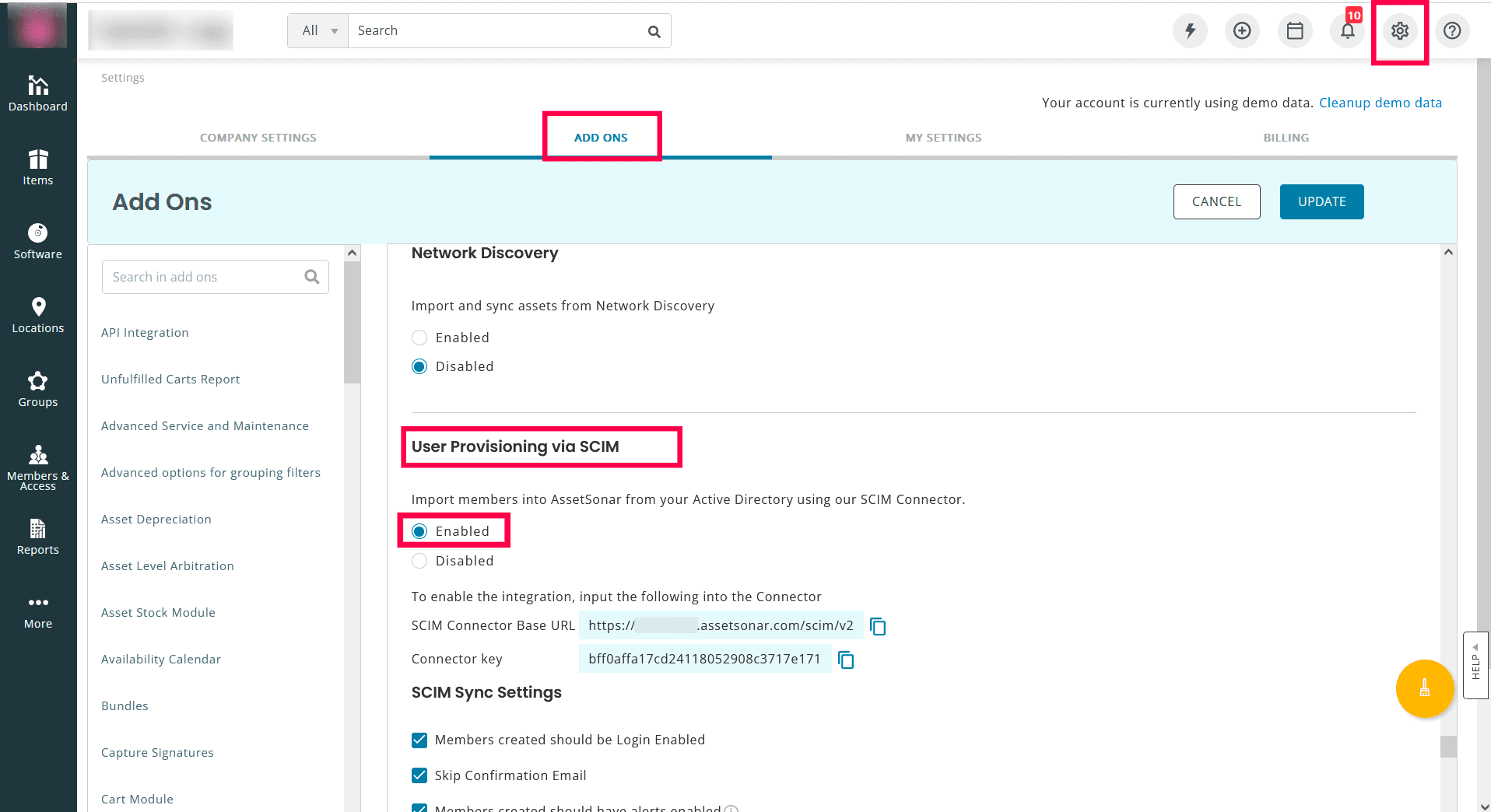
- Click Enabled to configure SCIM-based user provisioning.
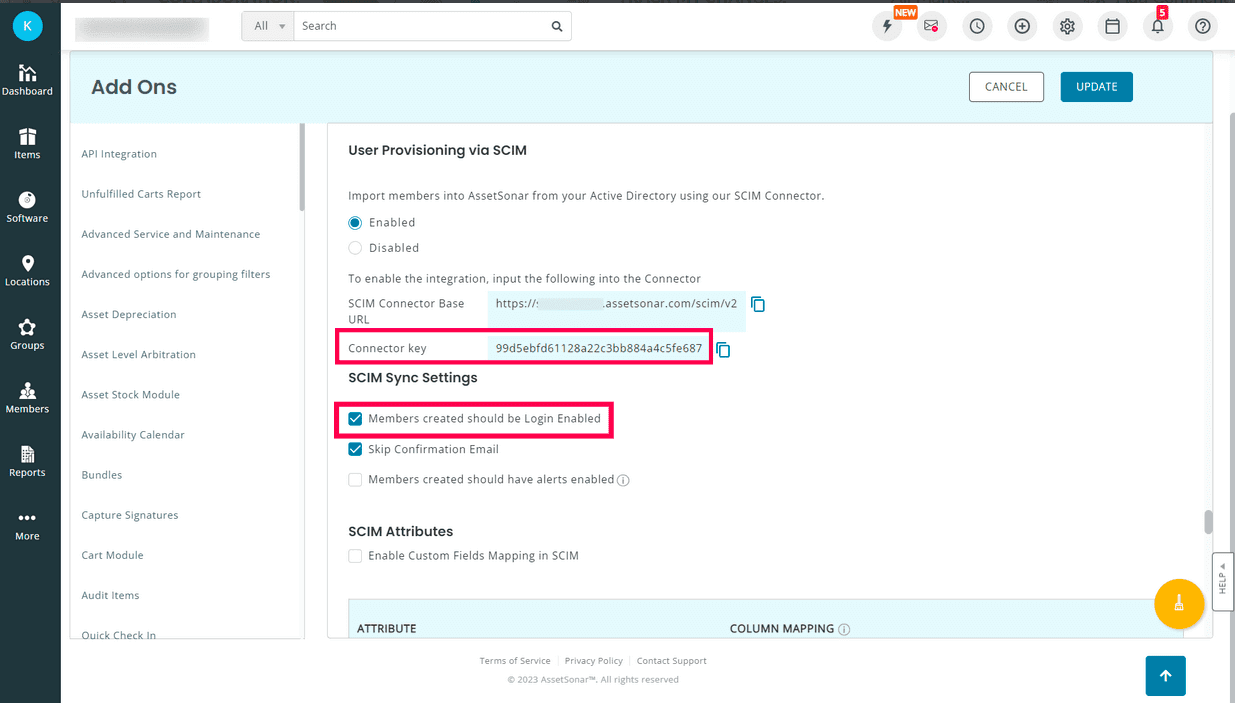
- Copy the value in the Connector key field.
- Select Members created should be Login Enabled.
- Click UPDATE.
ADSelfService Plus (IdP) configuration steps
- Log in to ADSelfService Plus with administrator credentials.
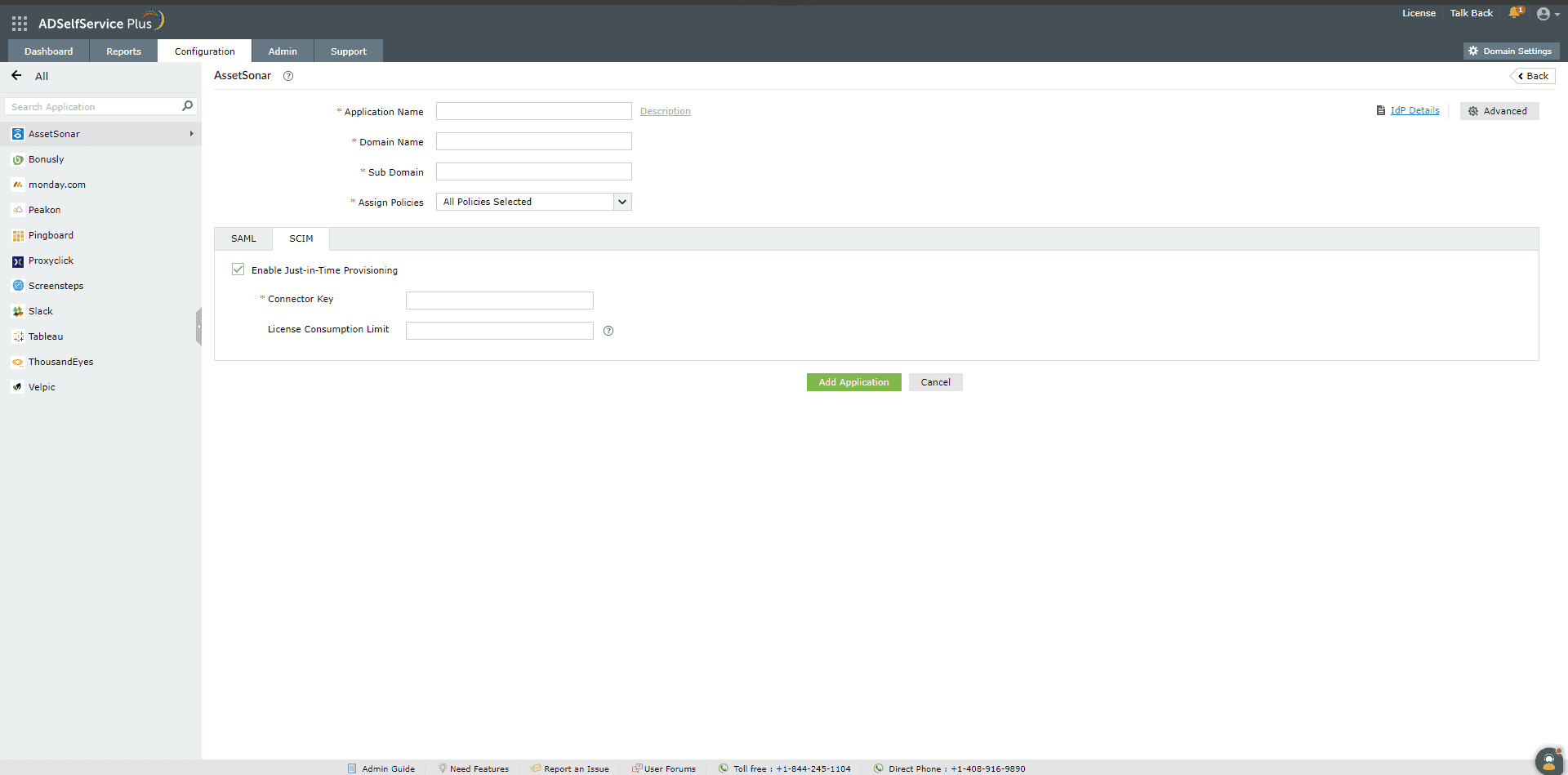
- Navigate to Configuration > Self-Service > Password Sync/Single Sign On > Add Application and select AssetSonar from the applications displayed.
- Enter the Application Name and Description.
- Enter the Domain Name of your AssetSonar account. For example, if you use johndoe@example.com to log in to AssetSonar, then example.com is the domain name.
- In the Sub Domain field, enter the subdomain name of your AssetSonar account. For example, if your AssetSonar URL is https://xyzcorp.assetsonar.com, then xyzcorp is the subdomain name.
- In the Assign Policies field, choose the policies for which you want the application to be assigned.
- Click SCIM and select Enable Just-in-Time Provisioning.
- In the Connector Key field, paste the Connector key copied in Step 4 of the service provider configuration steps.
- In the License Consumption Limit field, enter the maximum number of licenses you want to be consumed for this application. This will ensure that only the specified license count is used when creating user accounts in the application. If license consumption exceeds the specified limit, then the user account creation process is stopped.
- Click Add Application.
You have now successfully configured JIT provisioning for AssetSonar. User accounts that do not already exist in AssetSonar will be created automatically during SSO login.
Find the full list of applications that ADSelfService Plus offers JIT provisioning for here.
Highlights of ADSelfService Plus
Allow Active Directory users to self-service their password resets and account unlock tasks, freeing them from lengthy help desk calls.
Get seamless one-click access to 100+ cloud applications. With enterprise single sign-on, users can access all their cloud applications using their Active Directory credentials.
Intimate Active Directory users of their impending password and account expiry via email and SMS notifications.
Synchronize Windows Active Directory user passwords and account changes across multiple systems automatically, including Microsoft 365, Google Workspace, IBM iSeries, and more.
Strong passwords resist various hacking threats. Enforce Active Directory users to adhere to compliant passwords by displaying password complexity requirements.
Enable Active Directory users to update their latest information themselves. Quick search features help admins scout for information using search keys like contact numbers.
 Free Edition









