 Free Edition
In a world reeling under a large number applications to make our life easier, it is a daunting task to remember the usernames and passwords for each and every application being used. Though the administrators force users to change the passwords periodically, users always tend to find a loophole to ease their task. One such trick is using the old password again while resetting password. This is not a good idea as it sounds. Intruders must just have to try a few old passwords if they happen to be a well known person.
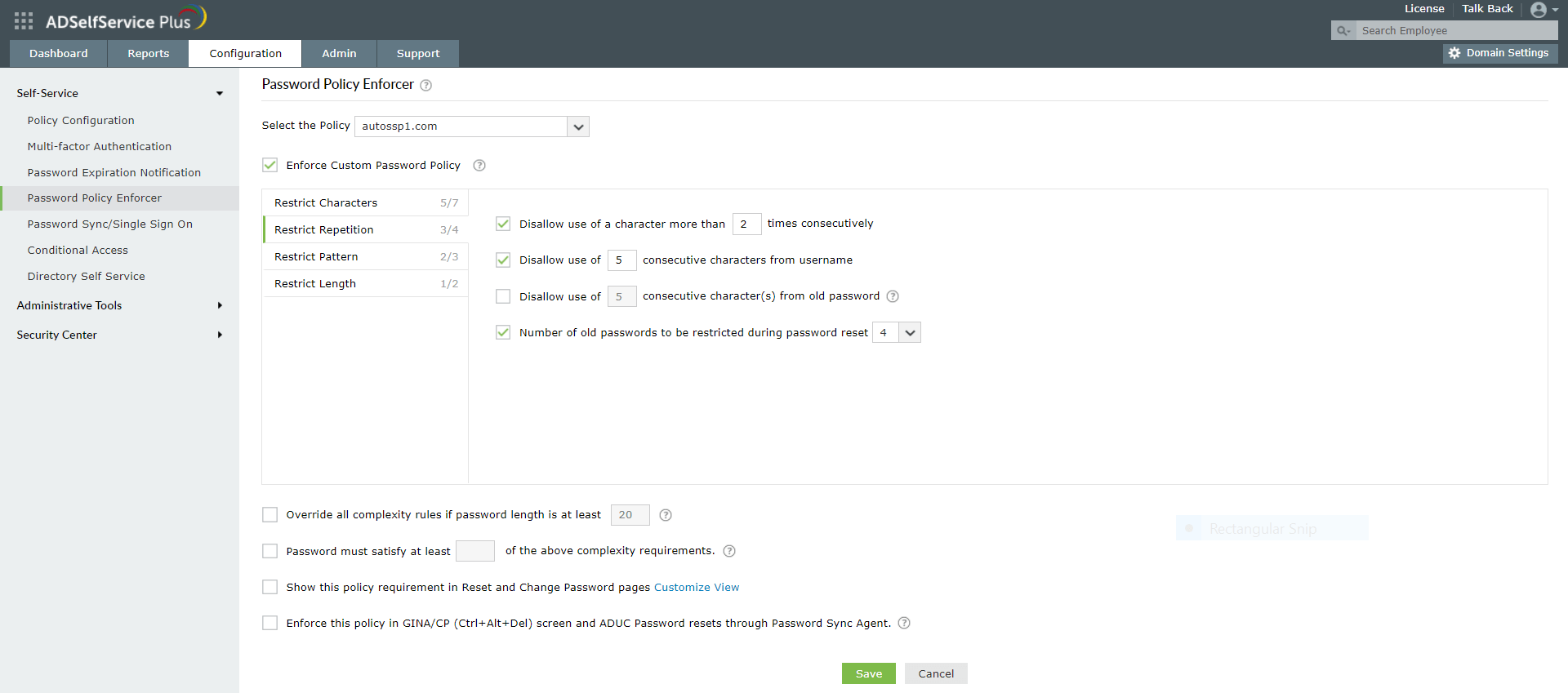
ADSelfService Plus, with its highly flexible password policy enforcer, helps to implement stringent password policies. It provides an option to prevent users from using the previous 'n' number of passwords. The 'n' has to be configured by the administrators.
For example, if you select 5, users won't be able to use the previous 5 old passwords while resetting the it.
Click here to know more about password policy enforcer of ADSelfService Plus.
Need further assistance? Fill this form, and we'll contact you rightaway.
Allow Active Directory users to self-service their password resets and account unlock tasks, freeing them from lengthy help desk calls.
Get seamless one-click access to 100+ cloud applications. With enterprise single sign-on, users can access all their cloud applications using their Active Directory credentials.
Intimate Active Directory users of their impending password and account expiry via email and SMS notifications.
Synchronize Windows Active Directory user passwords and account changes across multiple systems automatically, including Microsoft 365, Google Workspace, IBM iSeries, and more.
Strong passwords resist various hacking threats. Enforce Active Directory users to adhere to compliant passwords by displaying password complexity requirements.
Enable Active Directory users to update their latest information themselves. Quick search features help admins scout for information using search keys like contact numbers.










