- Free Edition
- Quick Links
- Exchange Mailbox Reports
- Mailbox Size Reports
- Mailbox Properties Reports
- Mailbox Status Reports
- Mailbox Permission Reports
- Mailbox Content Reports
- Mailbox Logon by Users
- Inactive Mailboxes Reports
- Mailbox Enabled Users
- Office 365 Mailbox Reports
- Room Mailbox Reports
- Shared Mailbox Reports
- Exchange Mailbox Permissions
- Shared Mailbox Permissions
- Calendar Permission Reports
- Export Mailbox Permissions Reports
- Export Mailbox Size Reports
- Export Exchange Mailbox Reports
- Export Public Folder Lists
- Exchange Server Monitoring
- Client Access Server Health
- Exchange Server Monitoring Tool
- Exchange Server Monitoring Reports
- Exchange Service Health Monitoring
- DAG Monitoring Reports
- Connectivity Monitoring Reports
- Mail Flow Health Monitoring
- Exchange Database Monitoring
- Storage Monitoring Reports
- Email Queue Monitoring
- Replication Health Monitoring
- Exchange Audit Reports
- Exchange Server Auditing
- Exchange Server Auditing and Alerting
- Exchange Server Compliance Reporting
- Exchange Audit and Compliance Tool
- Exchange Admin Audit Logging
- Non-Owner Mailbox
Logon Reports - Mailbox Permission Changes Reports
- Mailbox Property Changes Reports
- Exchange Database Changes Reports
- Server Configuration Changes Reports
- Exchange Mailbox Audit Logging
- Exchange Traffic Reports
- Exchange Office 365 Reports
- Other Reports
- Mailbox Content Search
- Skype for Business server reporting
- Outlook Web Access Reports
- ActiveSync Reports
- Mailbox and Public Store Reports
- Distribution Lists Report
- Server Storage Tracking Reports
- Public Folder Reports
- Public Folder Content Report
- Email Non-Delivery Reports
- Retention Policy Reports
- Email Non Delivery Reports
- Exchange Migration
- Resources
- Related Products
- ADManager Plus Active Directory Management & Reporting
- ADAudit Plus Hybrid AD, cloud, and file auditing and security
- ADSelfService Plus Identity security with MFA, SSO, and SSPR
- EventLog Analyzer Real-time Log Analysis & Reporting
- M365 Manager Plus Microsoft 365 Management & Reporting Tool
- SharePoint Manager Plus SharePoint Reporting and Auditing
- DataSecurity Plus File server auditing & data discovery
- RecoveryManager Plus Enterprise backup and recovery tool
- AD360 Integrated Identity & Access Management
- Log360 Comprehensive SIEM and UEBA
- AD Free Tool Active Directory Free Tool
In a multiple administrator environment, it is always difficult to keep track of individual changes. Each administrator modifies a whole bunch of configurations and settings every single day. Without proper documentation and the ability to determine which administrator made what change, troubleshooting becomes extremely difficult.
Exchange Reporter Plus simplifies Exchange admin audit logging for you, and offers answers to all four W's:
- Who made the change?
- When did they make it?
- What setting was modified?
- Which cmdlet did they use?
Audit all changes made by your administrators with Exchange Reporter Plus' admin audit log reports.
Report on and audit Exchange Online using Exchange Reporter Plus.
Mailbox Permission Changes report
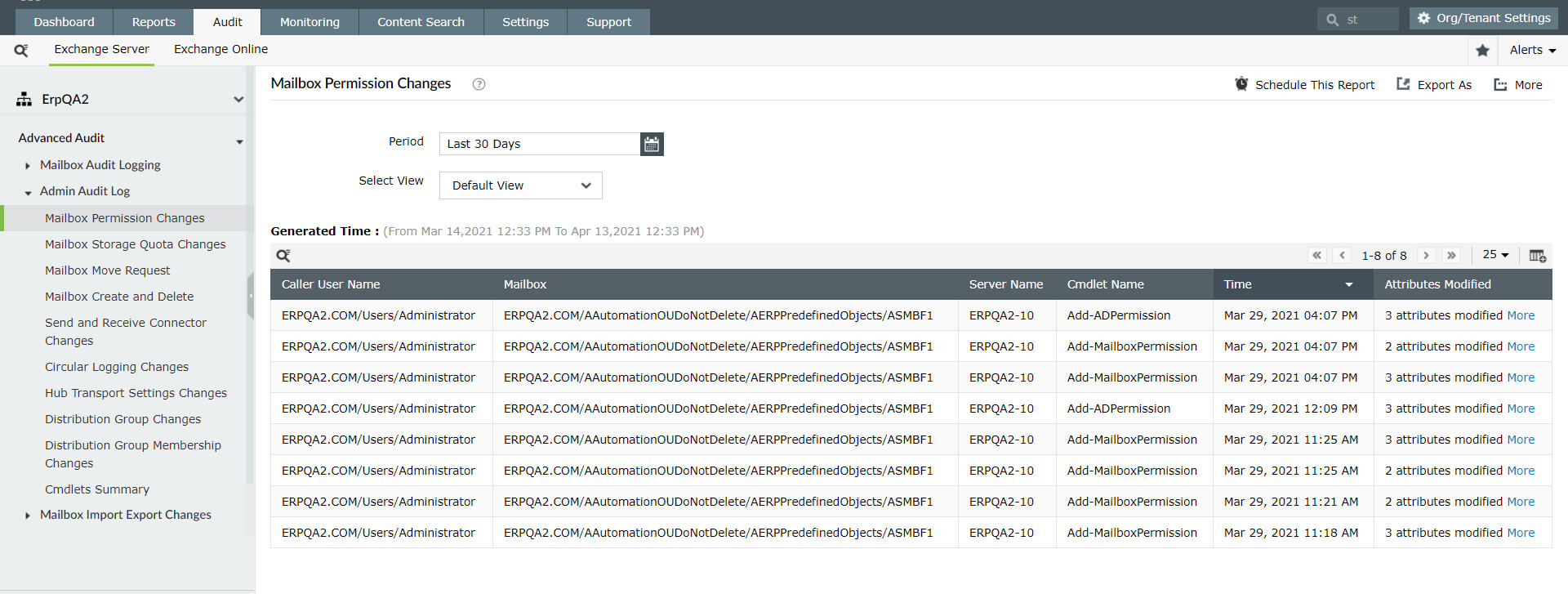
Get complete details about changes made to mailbox permissions, including:
- Mailbox and server name.
- Executed cmdlet.
- Attributes modified.
- Name of the admin who made the change.
- Time it happened.
Mailbox Storage Quota Changes report
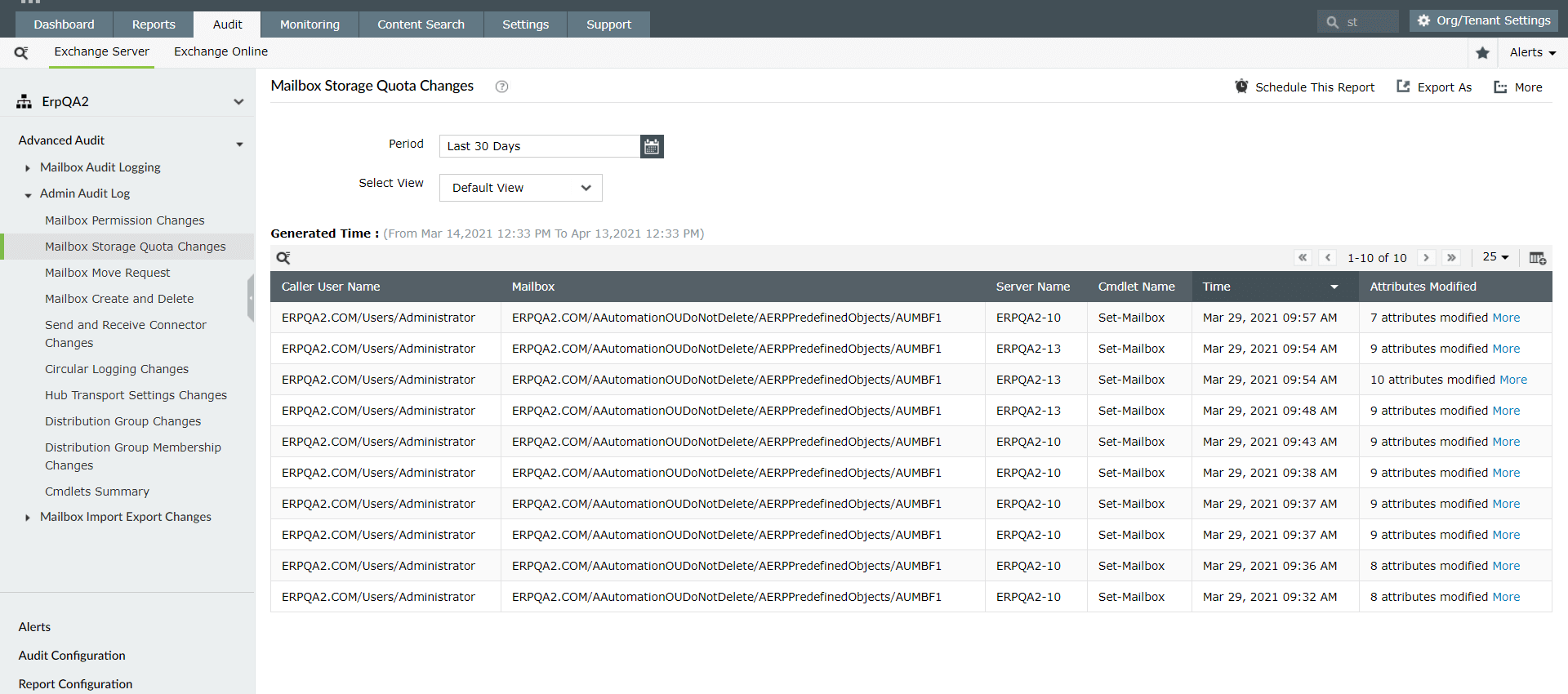
View the changes made to mailbox storage quotas (e.g. issue warning at, prohibit send at, prohibit send, and receive at) in your organization, including:
- Attribute modified.
- Mailbox, server, and cmdlet name.
- Name of the user who made the change.
- Time the storage quota modification happened.
Mailbox Move Requests report
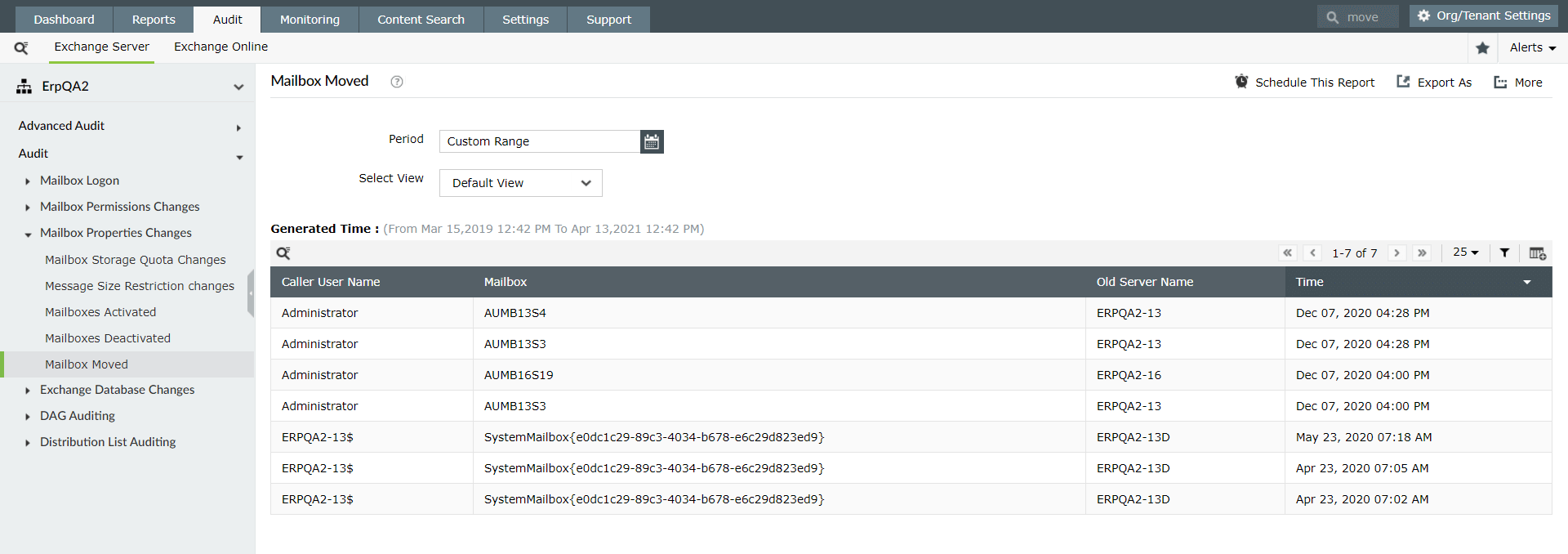
Audit Exchange mailbox move requests with information such as:
- Caller username.
- Mailbox, server, and cmdlet name.
- Attributes modified.
- Time the move happened.
Mailboxes Created and Deleted report
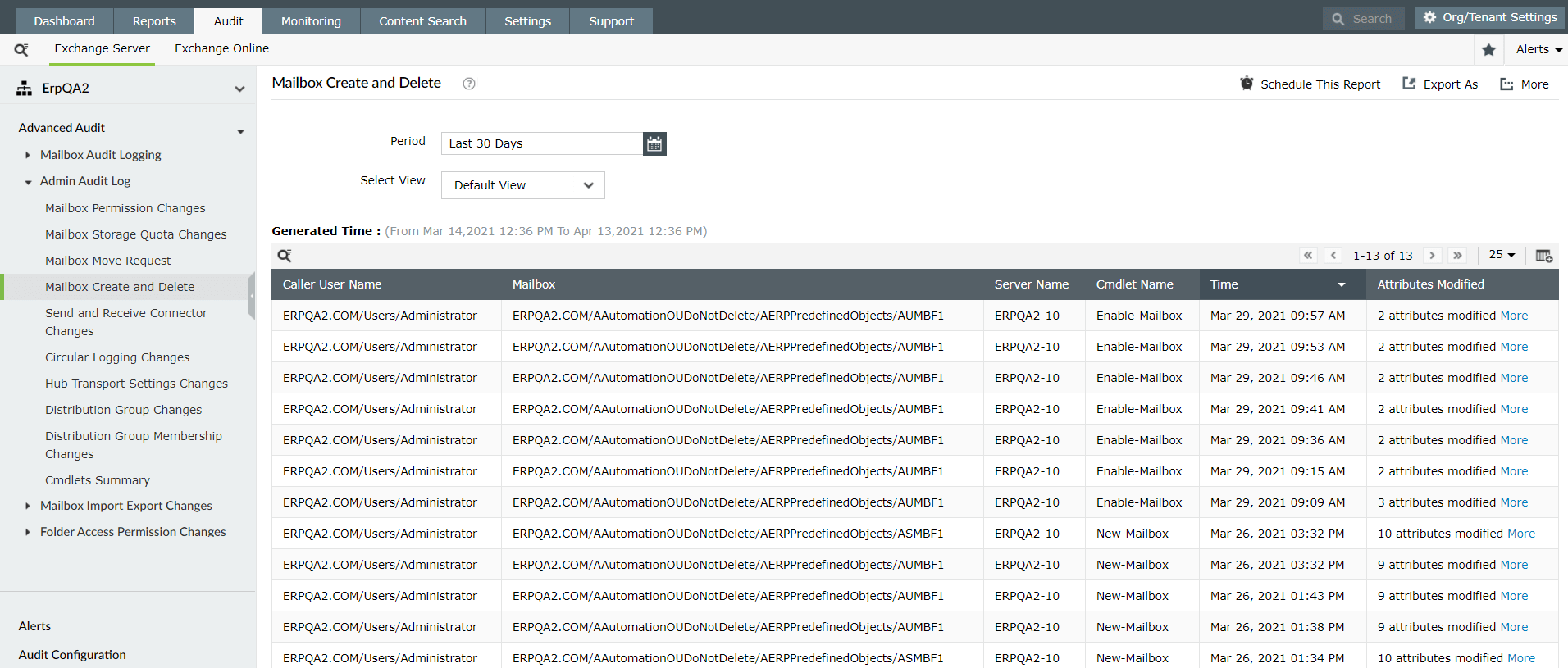
Get details on mailbox creation and deletion in your organization, including:
- Caller username.
- Mailbox, server, and cmdlet name.
- Attributes modified.
- Time the mailboxes were created or deleted.
Send and Receive Connector Changes report
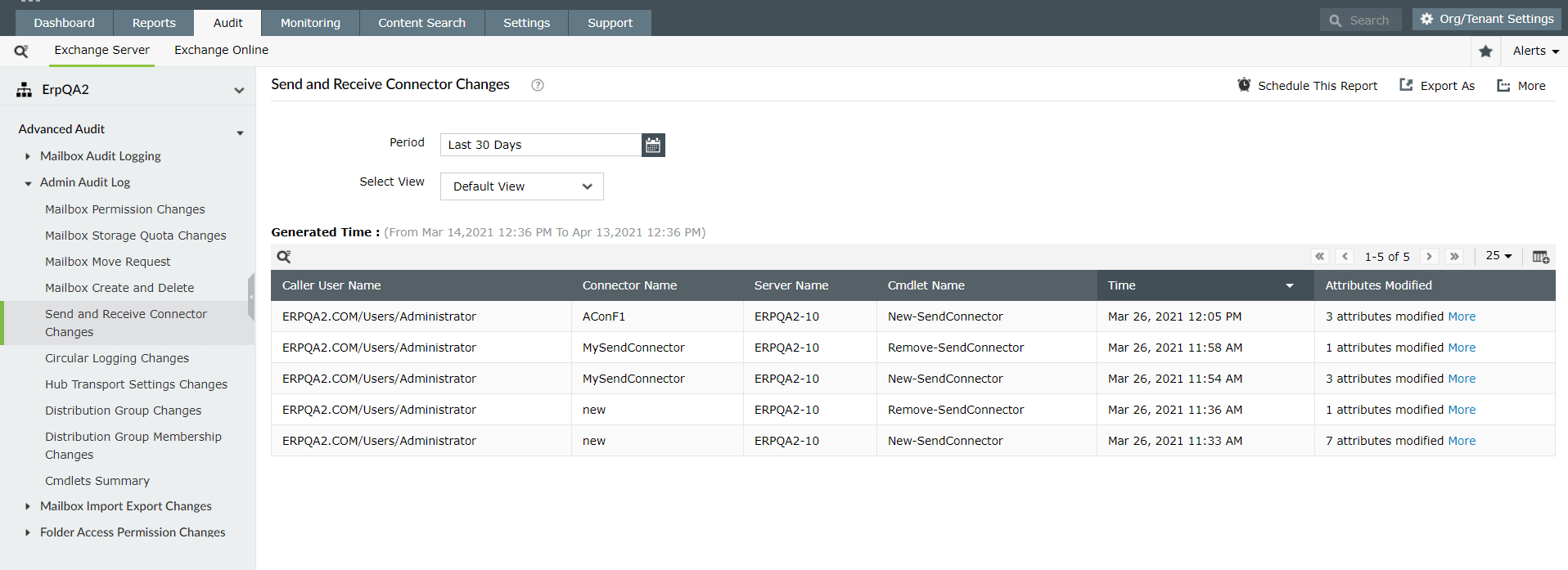
Track your Exchange environment audit results for send and receive connector changes and find out:
- Who is making changes to connectors.
- Connector and server names.
- Executed cmdlet.
- Attributes modified.
Circular Logging Changes report
Check whether the circular logging setting of your databases is enabled or disabled and list the:
- Name of the user who modified the setting.
- Database and server name.
- Executed cmdlet.
- Attribute modified.
Hub Transport Settings changes report
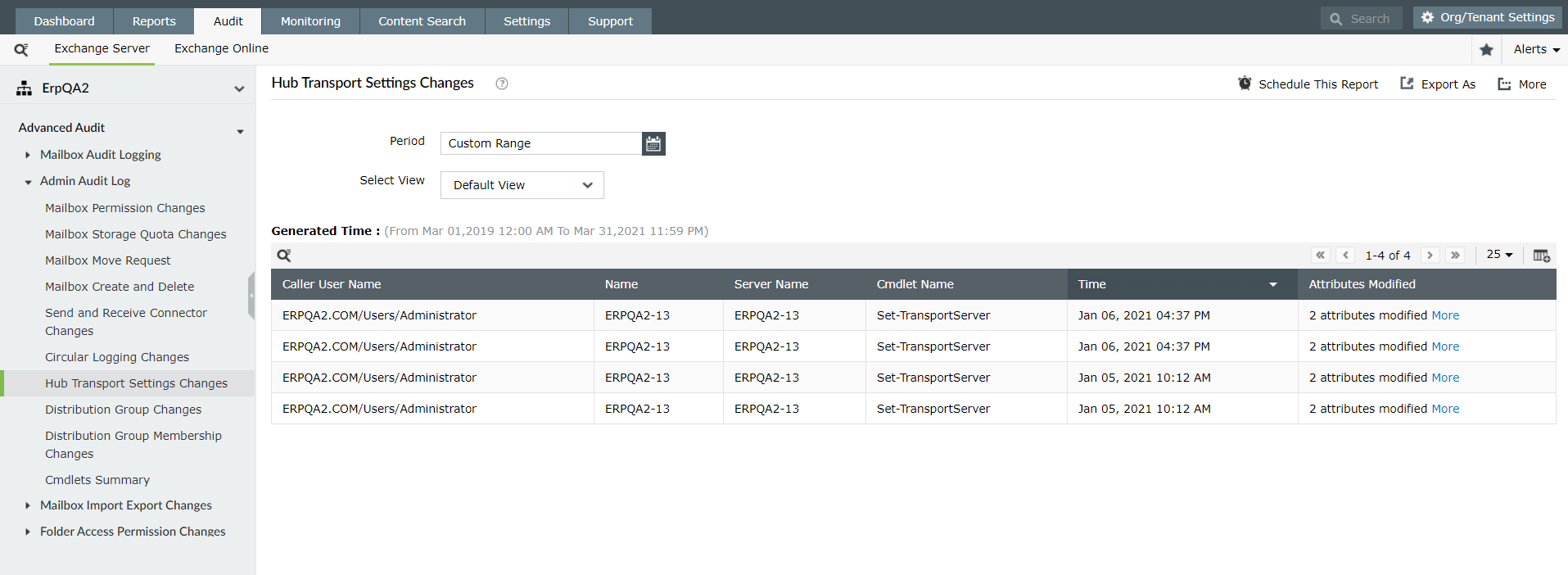
Track changes made to the hub transport settings in your Exchange Servers and view details such as:
- Who made the change.
- The user's domain.
- Attribute modified.
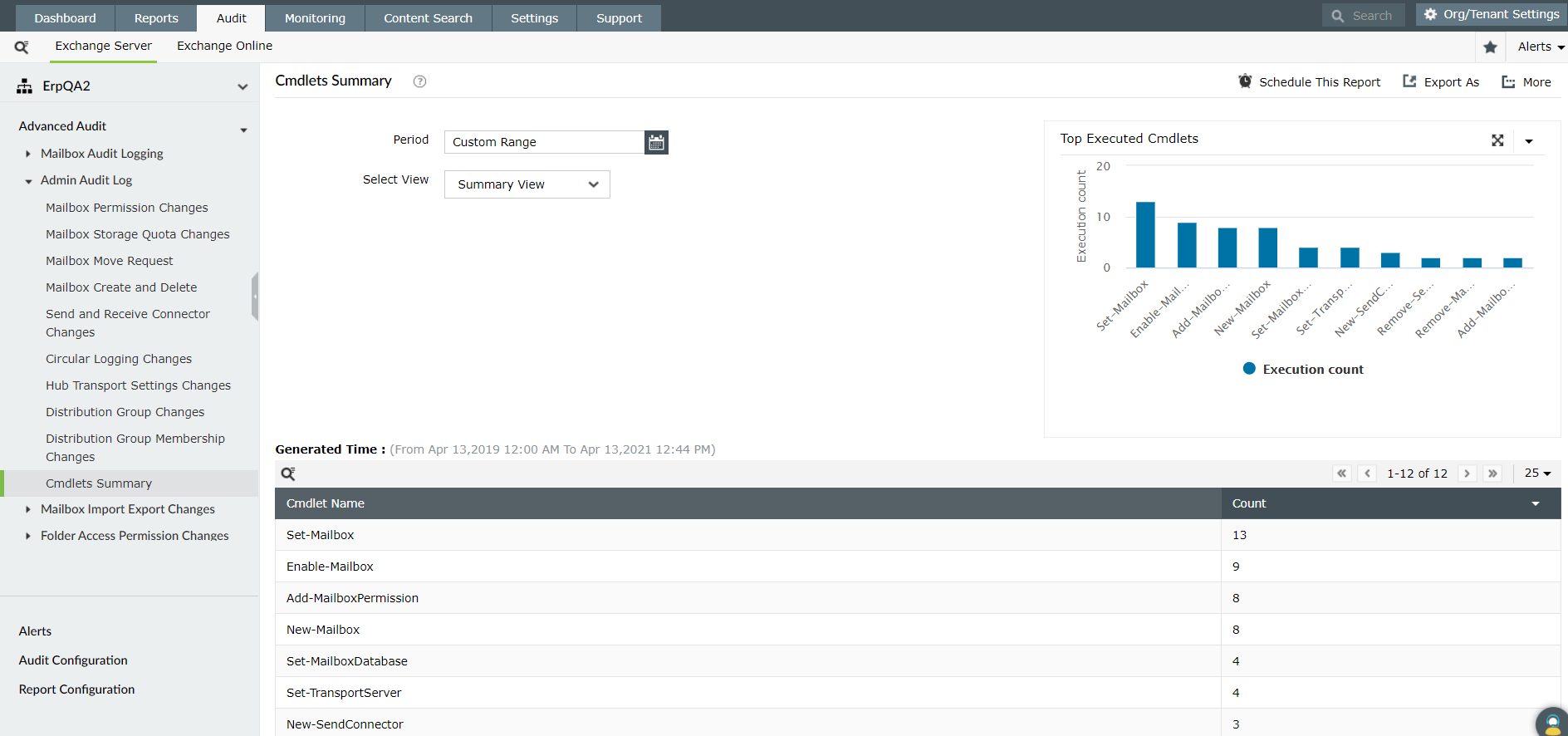
Cmdlets Summary report
Get a summary of all the cmdlets that have been executed in your Exchange environment. View a graph of the cmdlets that have been executed the most.
In addition to just viewing these reports, you can also configure real-time alerts to receive notifications the instant a change is made in your Exchange organization. Documentation and troubleshooting become so much easier with Exchange Reporter Plus' auditing functionality. Complying with regulatory mandates such as SOX, HIPAA, PCI DSS, GLBA, GDPR, and FISMA has never been easier!
Exchange Reporter Plus is a web-based analysis, monitoring, and change auditing tool for your Exchange servers, including versions 2003, 2007, 2010, 2013, and 2016. It features over 200 unique reports on various Exchange entities such as mailboxes, public folders, Outlook Web Access, and ActiveSync. This all-around reporting solution also has customizable reports that display message details based on keywords in their content, track room mailbox usage, as well as break down email response times. Generate reports and export them to a destination folder and also have them emailed to you at specified times in several file formats, including CSV, PDF, XLS, and HTML. Configure alerts in Exchange Reporter Plus for instant notifications on critical changes that require your attention. Download a free trial today to explore all these features.
Configure real-time email alerts for critical Exchange user activities.
Download a free trial now! Request demo