
Help Document

Topsec overview

Topsec Firewall is a next-gen security gateway that offers advanced threat protection, intrusion prevention, and access control. Monitoring its logs helps detect unauthorized access, policy violations, and network anomalies. It enables real-time threat analysis, compliance reporting, and proactive incident response.

Topsec extension scope

The Topsec extension for Log360Cloud enables integration of Topsec logs into the Log360 Cloud ecosystem. This extension provides features such as log collection, parsing, reporting, and advanced log search capabilities.

Topsec

Configuring the Syslog service in Topsec devices

To configure the Syslog service in your Topsec devices, follow the steps below:

  1. Login to the Topsec device as an administrator.
  2. Navigate to Logs and alarms > Log Settings.
  3. Configure the following settings:
    • Server address: Provide Log360 Cloud agent IP
    • Server port: Enter 513 or 514.
    • Transmission type: Syslog
    • Select the Whether to transmit checkbox
    • Do not select Whether to combine transmission data and Whether the data is encrypted or not checkboxes
    • Log level: Information
    • Check all necessary Log Type boxes
    • Input Log language: English
  4. Click Apply to save the settings.

Configuring in Log360 Cloud

In Log360 Cloud, the format of the logs collected from Topsec devices will not be automatically identified.

User must manually assign "Topsec" as the log type. To implement this:

  1. Log into your Log360 Cloud console.
  2. Navigate to Settings → Configuration → Log Source Configuration → Devices → Syslog Devices.
  3. Topsec

  4. In the Syslog Devices page, select the devices and click the update icon This will open the Update Device window.
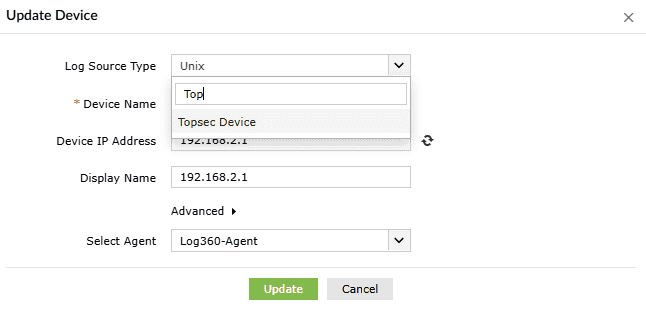
  5. Click the Log Source Type dropdown and select Topsec Device.
  6. Topsec

Viewing Topsec reports

To view Topsec reports, navigate to the Reports → Custom Reports → Topsec.

Topsec