Setting up Zia Insights
In this page:
Overview
Zia Insights in Log360 Cloud provides AI-powered actionable insights on incidents, alerts and logs using the Bring Your Own Key (BYOK) model, supporting integration with Azure OpenAI services.
This page elaborates on configurations that are essential to enable Zia Insights in Log360 Cloud. It covers the creation of an Azure OpenAI resource, deployment of a compatible model, retrieval of necessary credentials such as the endpoint URL and API key, and integrating the AI service with Log360 Cloud.
Pre-requisites
Before beginning the setup, ensure the following:
- Zia Insights capability of Log360 Cloud is only available for the Professional and MSSP plan subscription users.
- You must have an active Azure subscription with access to the Azure OpenAI service.
- The following credentials are required from your Azure portal:
- Endpoint URL
- API key
- Deployed model name
Accessing Zia Insights in the Log360 Cloud
- Log in to Log360 Cloud.
- Go to the Settings tab, and select Admin.
- Navigate to Zia and select Insights.
- To enable Zia Insights in Log360 Cloud, click Configure Now.

Figure 1: Configuring Azure OpenAI in ManageEngine Log360 Cloud
- Enter the following details obtained from your Azure Portal:
- Endpoint URL
- Deployment Name
- API Key
- Click Save to complete the initial setup.

Figure 2: Configuring Azure OpenAI in ManageEngine Log360 Cloud
- In the pop-up window that appears, read the data privacy notice, select the I understand checkbox to acknowledge the terms, and then click Proceed to complete the OpenAI integration.

Figure 3: Azure OpenAI integration in ManageEngine Log360 Cloud
- Once the integration is complete, Zia Insights will be enabled.

Figure 4: Azure OpenAI integration in ManageEngine Log360 Cloud
NOTE:
- To disable or re-enable Zia Insights, use the toggle switch beside the Azure OpenAI option.
- A confirmation pop-up will appear when disabling.
- Click Yes to disable Zia Insights.
- To delete the Azure OpenAI configuration, select the checkbox “Delete existing Azure OpenAI configuration” before clicking Yes.

Figure 5: Disabling and deleting Azure OpenAI configuration in Log360 Cloud
Creating an Azure OpenAI resource
If you do not already have an Azure OpenAI resource, follow these steps:
NOTE: If you already have an Azure OpenAI resource, refer to
this to obtain the API key and Endpoint URL.
- Log in to Azure portal and click Create a resource.

Figure 6: Creating a resource in Microsoft Azure
- Select Azure OpenAI as the resource type.

Figure 7: Creating an Azure OpenAI resource
- Choose a Subscription of your choice.
- Select an existing Resource group or create a new one.

Figure 8: Creating a resource group in Microsoft Azure
- Pick your desired Region and Pricing Tier.
- Enter a suitable Name for the resource.
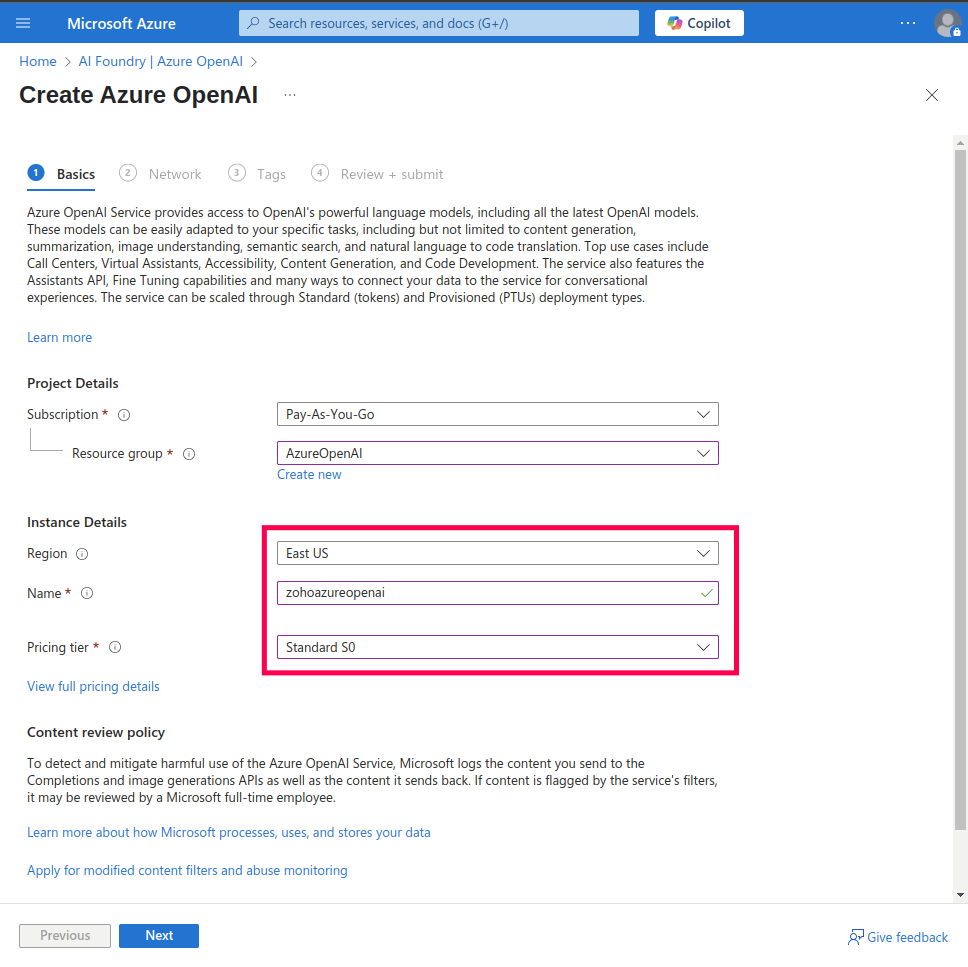
Figure 9: Instance details for Azure OpenAI service
- Under Networking, select All networks, including the internet, can access this resource.
NOTE: The Azure OpenAI resource must be publicly available on the internet so that Log360 Cloud can access the endpoint.

Figure 10: Configuring network security for Azure AI services resource
- Click Next to configure Tags (optional).
- Click Next again to move to the Review + Submit page.

Figure 11: Final review to create resource
- Review your settings and click Create to provision the resource.
Steps to obtain Endpoint URL and API key
If you already have an Endpoint URL and API key, skip to the next section. If not:
- Log in to Azure portal and navigate to your Azure OpenAI resource.
- In the left pane, under the Resource Management section, click on Keys and Endpoint. It will open Keys and Endpoint console.
- In this window, you will find the Endpoint URL and API keys for your Azure OpenAI resource. Copy these details for use in Log360 Cloud.

Figure 12: Obtaining API keys and Endpoint URL for Azure OpenAI resource
Deploying a model in Azure OpenAI
A deployed model is a version of an AI model (such as GPT-4o or GPT-4.1) that has been activated and made available for use within your Azure OpenAI resource. Log360 Cloud will interact with the deployed model to generate AI-powered insights from your logs and alerts.
NOTE: If you already have a deployed model, you can directly use its deployment name when integrating with Log360 Cloud. Ensure that the model is one of the following types:
- The Chat Completion API model (models GPT-4o or newer). For better results, use latest available model such as GPT-4.1 or newer.
- A non-reasoning model, excluding versions like o1-preview and o1-mini
If you do not have a deployed model, follow the steps below.
Steps to deploy a model
- Navigate to your Azure OpenAI resource and click Go to Azure AI Foundry portal.

Figure 13: Deploying a model in the Azure AI Foundry portal
- On the Azure AI Foundry portal, navigate to the Deployments section, click Deploy model, and select Deploy base model.

Figure 14: Deploying a model in Azure AI Foundry portal
- Choose a model that meets the following constraints:
- Must support the Chat Completion API (models GPT-4o or newer). For better results, use latest available model such as GPT-4.1 or newer.
- Avoid reasoning models like o1-preview and o1-mini because they do not support system prompts.

Figure 15: Available models for deployment in Azure AI Foundry portal
- Enter a deployment name of your choice (defaults to the model name).

Figure 16: Deployment settings in Azure AI Foundry portal
- Select the deployment type based on your data processing needs. Learn more about deployment types.

Figure 17: Deployment settings in Azure AI Foundry portal
- Click Create resource and deploy to complete the model deployment.

Figure 18: Model deployment in Azure AI Foundry portal
NOTE: Once you've completed these steps and obtained your credentials, refer to this
section to access Zia Insights in Log360 Cloud.
Read also
This document detailed the configuration steps required to enable Zia Insights in ManageEngine Log360 Cloud, including Azure OpenAI resource creation, model deployment, and integration setup. To leverage the capabilities of Zia Insights, refer to the following articles: