Device Management for K-12 Education
Mobility is revolutionizing education with digital textbooks and interactive learning modules. Mobile Device Manager Plus empowers K-12 and higher education institutions to manage mobility by providing a holistic and secure learning platform.
This is possible by organizing mobile devices and their resource access by methodical device deployment, app management, and security policies for iOS, Android and Windows devices. K-12 and higher education organizations can now embrace all the mobility benefits - from recording lectures, collaborating classwork to conducting online tests.
Why K-12 Schools Need an MDM Solution
As classrooms move from textbooks to tablets, schools are managing more devices than ever - often across multiple grades, buildings, and operating systems. Without a centralized way to manage this fleet, IT teams are left juggling manual configurations, inconsistent security policies, and devices that are vulnerable to misuse or loss.
An MDM solution gives schools a single console to enroll, configure, secure, and monitor every device on campus. It helps IT administrators enforce consistent policies at scale, protect sensitive student data in line with regulations like FERPA and COPPA, keep students focused with app and content restrictions, and quickly respond when a device is lost, stolen, or misused - all without needing to physically handle each device.
Mobile Device Manager Plus: Supported Devices and Platforms
Mobile Device Manager Plus supports the mixed-device environments common in K-12 and higher education, so schools aren't locked into a single vendor or device type.
iOS and iPadOS devices
Manage school-owned and BYOD iPhones and iPads, with support for Apple School Manager, Apple Configurator, and Apple's shared iPad for education.
Android devices
Manage Android tablets and phones with support for Android Enterprise, Samsung KNOX, and zero-touch or NFC-based enrollment.
Windows devices
Manage Windows laptops and tablets used in computer labs, libraries, and classrooms, including Windows Autopilot enrollment.
Chromebooks
Extend visibility and policy control to Chrome OS devices alongside your other platforms.
Key Features of K-12 MDM Sofware
Simplified device management.
Quick device enrollment.
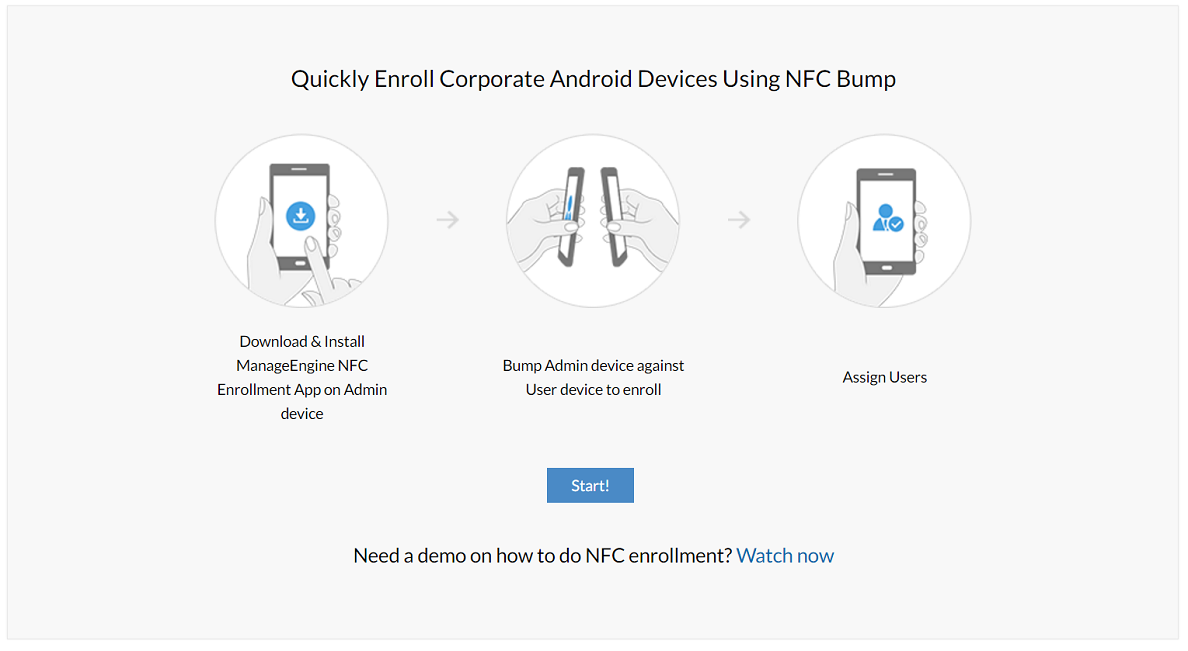
Deploy hundreds of devices campus-wide, after enrolling them with MDM. Mobile Device Manager Plus simplifies this process with Apple School Manager (ASM) and Apple Configurator for iOS devices and Android NFC and Samsung KNOX mobile enrollment for Android devices.
Manage shared devices.
Oversee multi-user devices easily by enforcing specific policies and restrictions while providing personalized setting and flexibility for students and faculty. Students can access their files from where they left off, just by entering their credentials on the device.
BYOD management.
Permit access to only those devices that are enrolled with MDM. For BYO devices, enrollment requests can be sent over emails. They can be grouped separately, with specific policies set for them.
Provisioning and restrictions.
Provision and protect devices effectively.
Secure devices in K-12 and higher education by allowing only MDM enrolled devices to access educational resources and networks like Wi-Fi and VPN. Geo-locate, remote lock/alarm lost devices. Restrict students from modifying device settings like factory reset, passcodes or installing new apps.
Provide admin controls to teachers.
Empower the teaching faculty with basic MDM admin controls like pushing apps to their class devices, remotely access specific devices and monitor the students' work.
Set global proxy.
Direct internet access for managed devices through a secure proxy server. You can filter out all other web connections so students don't go overboard with the browsing.
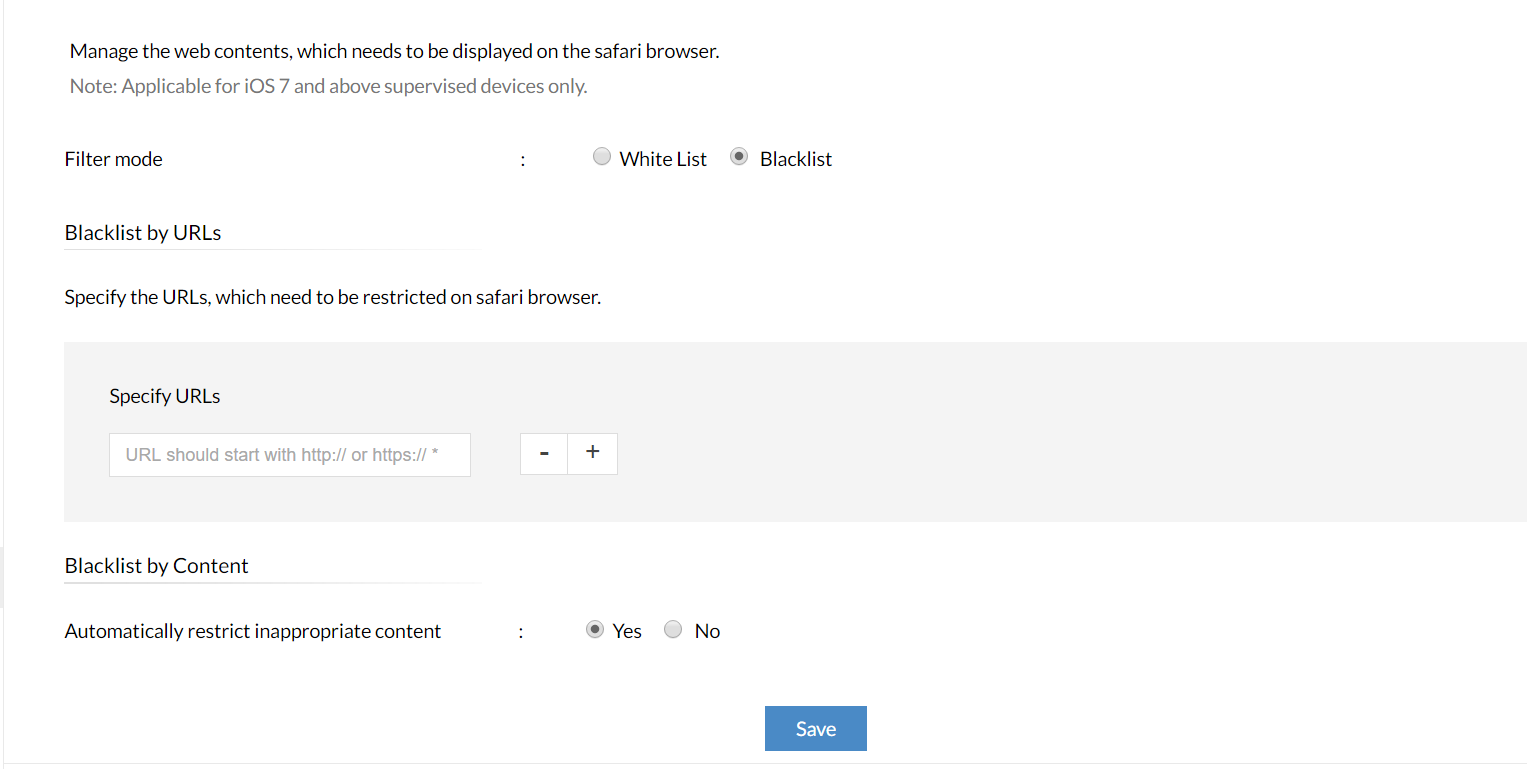
Filter web content.
Prohibit inappropriate websites with adult content, torrent sites, and so on by blocklisting them. Or even better, provide access to only specific websites so your students don't get carried away.
Automated app distribution.
Regulate apps for distraction-free classrooms.
Students need to have the right apps on their devices at all times. Distracting apps can be barred or devices can be locked to a single app. Limit distracting apps like camera, games, social networking and so on. Remotely push apps like test monitors, learning modules and so on to your students' devices.
Easy app purchases.
Purchase learning apps and ebooks in bulk for your K-12 school or educational institution with volume purchase programs for iOS and Android. Acquire or revoke app licenses based on the subject requirements.
How MDM Solution Benefit K-12 Schools
For IT Teams
IT administrators get a single console to enroll, configure, and secure every device on campus, cutting down on manual setup and one-off troubleshooting. Bulk policy enforcement, remote wipe and lock for lost or stolen devices, real-time inventory visibility, and automated compliance checks let small IT teams manage large device fleets without added headcount.
For Teachers
Teachers can push learning apps and resources to an entire class in seconds, lock devices to a single app during tests or lessons, and remotely view or assist with a student's device when they're stuck. This keeps classroom technology working for instruction instead of becoming a distraction to manage.
For Students
Students get devices that are pre-configured with the right apps and content the moment they log in, whether it's a personal device or a shared classroom device. Content filtering and app restrictions also create a safer, more focused digital learning environment both in class and at home.
For School Administrators
Administrators gain visibility into device usage and compliance across every campus, helping meet data privacy obligations and budget device investments more effectively. Centralized reporting and audit trails also make it easier to demonstrate accountability to school boards and parents.
Why Choose Mobile Device Manager Plus to manage K-12 Schools devices?
Mobile Device Manager Plus is built to handle the scale and diversity of school device fleets, from a single campus to multi-district deployments. It supports iOS, Android, Windows, and Chrome OS from one console, so schools aren't forced to standardize on a single platform.
Purpose-built education features - shared iPad support, Apple School Manager and Google Workspace for Education integration, classroom app locking, content filtering, and teacher-level admin controls - address the specific needs of K-12 environments rather than generic enterprise device management. Combined with flexible deployment options (cloud or on-premises) and responsive support, it gives schools a scalable, secure way to manage mobility as their 1:1 or shared-device programs grow.
FAQs
Which devices can Mobile Device Manager Plus manage in schools?
Mobile Device Manager Plus manages iOS and iPadOS devices, Android devices, Windows laptops and tablets, and Chromebooks, giving schools a single console for mixed-device environments.
Can Mobile Device Manager Plus support both school-owned and BYOD devices?
Yes. School-owned devices can be enrolled in bulk using programs like Apple School Manager or Android zero-touch enrollment, while BYOD devices can be enrolled through email invitations and grouped separately with their own policies.
How does MDM help protect student and school data?
MDM restricts network and resource access to enrolled, compliant devices, enforces passcode and encryption policies, and allows IT teams to remotely lock or wipe a lost or stolen device, helping keep student data secure in line with privacy regulations like FERPA.
Does Mobile Device Manager Plus support shared classroom devices?
Yes. Shared or multi-user devices can be configured so students sign in with their own credentials and pick up their files and settings where they left off, while IT retains centralized control over the device.
Can IT administrators remotely troubleshoot student and staff devices?
Yes. Administrators can remotely access, view, and troubleshoot enrolled devices without needing to physically collect them, reducing downtime for students and staff.
How does MDM simplify device deployment for new students and faculty?
New devices can be enrolled in bulk ahead of time using programs like Apple School Manager, Android NFC/zero-touch enrollment, or Windows Autopilot, so devices arrive pre-configured with the right apps, restrictions, and network access from the first login.
Is Mobile Device Manager Plus suitable for school districts managing multiple campuses?
Yes. Devices across multiple campuses or buildings can be organized into groups with campus-specific policies, all managed centrally from one console, making it suitable for single schools and larger multi-campus districts alike.
Can schools enforce internet usage and device restrictions using MDM?
Yes. Schools can set a global proxy to route and filter internet traffic, blocklist or allowlist specific websites, and restrict distracting apps like games, cameras, and social media, keeping students focused during class.