
 Free Edition
The Windows login agent that comes bundled with ADSelfService Plus must be installed on users' machines to enable:
When installing the Windows login agent through the GINA/Mac/Linux Installation option (Configuration > Administrative Tools > GINA/Mac/Linux (Ctrl+Alt+Del)) in ADSelfService Plus, the product tries three methods in the following order:
At times, RemCom or PAExec services may be flagged by some antivirus solutions as threats, which may cause issues with the installation of the login agent. By default, if the RemCom method fails, ADSelfService Plus will automatically try the PAExec method. If PAExec also fails, the WMI method will be tried to ensure successful installation.
You can change the order of these installation methods so that the login agent is directly installed through a method that assures a higher success rate based on the constraints in your environment. This documentation will show you how.

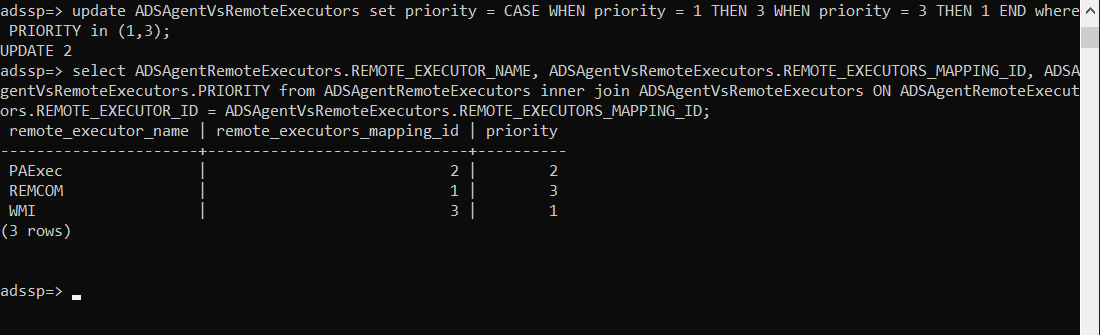
For example, if you want ADSelfService Plus to use the WMI method first to install the login agent, execute the command given below:
Here, we are setting the priority of RemCom (default priority of 1) to 3 and the priority of WMI (default priority of 3) to 1. After executing this command, WMI will be set as the default installation method, while PAExec and RemCom will be tried only if the WMI method fails.
If you need help performing these steps for your ADSelfService Plus instance, feel free to contact support@adselfserviceplus.com.
Enable users to reset passwords from their Windows, macOS, Linux login screen, etc.
Download a free trial now! Request demoNeed further assistance? Fill this form, and we'll contact you rightaway.
Allow Active Directory users to self-service their password resets and account unlock tasks, freeing them from lengthy help desk calls.
Get seamless one-click access to 100+ cloud applications. With enterprise single sign-on, users can access all their cloud applications using their Active Directory credentials.
Intimate Active Directory users of their impending password and account expiry via email and SMS notifications.
Synchronize Windows Active Directory user passwords and account changes across multiple systems automatically, including Microsoft 365, Google Workspace, IBM iSeries, and more.
Strong passwords resist various hacking threats. Enforce Active Directory users to adhere to compliant passwords by displaying password complexity requirements.
Enable Active Directory users to update their latest information themselves. Quick search features help admins scout for information using search keys like contact numbers.








