Configure Cyberoam Firewalls
Firewall Analyzer supports Cyberoam Firewall Version: 9.5.4 build 66 onwards
Configuring Cyberoam FIrewall
On the Cyberoam Firewall Web Admin Console do the following.
- Select System > Logging > Manage Syslog
- Specify unique name for Syslog server
- Specify IP address and port of the syslog server. Cyberoam will send logs to the configured IP address. The default port is 514
- Select Facility. Facility indicates the source of a log message to the syslog server. You can configure Facility to distinguish log messages from different Cyberoam Firewalls
- Select the Severity level of the messages logged. Severity level is the severity of the message that has been generated
| Note: | Cyberoam logs all messages at and above the logging severity level you select. For example, select ‘ERROR’ to log all messages tagged as ‘ERROR,’ as well as any messages tagged with ‘CRITICAL,’ ‘ALERT’ and ‘EMERGENCY’ and select ‘DEBUG’ to log all messages. Note: Firewall Analyzer requires the severity level as 'INFORMATIONAL'. |
- Click Create to save the configuration.
Also you need to enable logging on each rule to monitor allowed and denied traffic. Please follow the below steps.
- Click Log Traffic to enable/disable traffic logging for the rule. Ensure firewall rule logging is in On/Enable state in the Logging Management. Refer to Cyberoam Console Guide, Cyberoam Management for more details.
- To log the traffic permitted and denied by the firewall rule, you need to keep On/Enable state in the firewall rule logging from the Web Admin Console >Firewall rule and from the Telnet Console > Cyberoam Management.
- Specify full description of the rule, displays full description of the rule, modify if required.
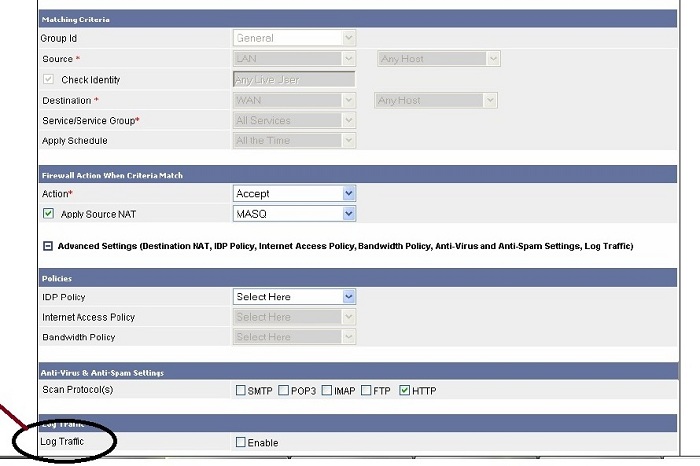
- Click Save to save the rule.
Thank you for your feedback!