Firewall Analyzer - Squid proxy log analysis and reporting software
Firewall Analyzer is a Squid proxy logs analyzer tool.It analyzes logs from a variety of network periphery security devices like, firewalls, proxy servers, IDS, IPS, VPN.
Proxy server is typically used along with a firewall or it forms part of the firewall. Firewall is used to protect internal network resources from the external (internet) attacks and the proxy server is used to control and streamline the internet traffic to and fro the intranet. Squid proxy log analysis and reporting gives deeper insight into internal network user's web sites access patterns. Firewall Analyzer is a Squid logs parser tool. It generate exclusive Squid proxy reports.
Firewall Analyzer is also a Squid proxy logs analyzer. Since Squid proxy server is widely used, Firewall Analyzer (Squid Proxy Log Analyzer) supports Squid proxy logs and hence can provide detailed Squid proxy server reports.
Firewall Analyzer fully support (Squid) proxy, firewall combination and as two separate entities. The application acts as a Squid log analyzer and helpful in Squid proxy reporting. The following Squid proxy reports are generated using Squid proxy log analysis.
Live Reports
The Live reports for each proxy device shows the minimum, maximum, and average amount of outgoing traffic through that device, over specific time periods. Traffic information is available for the following time periods: last day, last week, last month, and last year, with an average granularity of 5 minutes, 30 minutes, 2 hours, and 1 day respectively.
The outgoing bandwidth is displayed in Kbps.
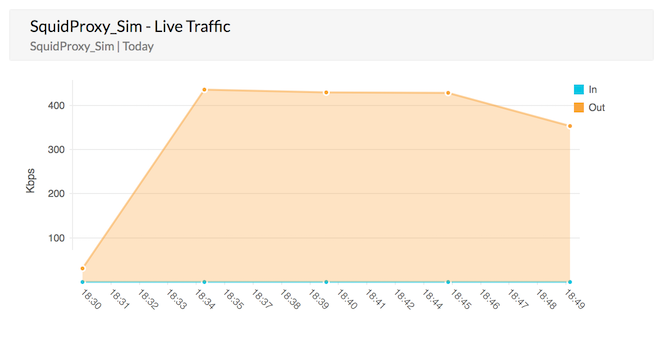
Squid proxy log report - Live reports
Request Demo
Top Talkers Report
The Top Talkers report shows the top hosts and users generating traffic on both the LAN and the WAN. You can then drill down from each of these reports to see the top web sites, URLs, and more.
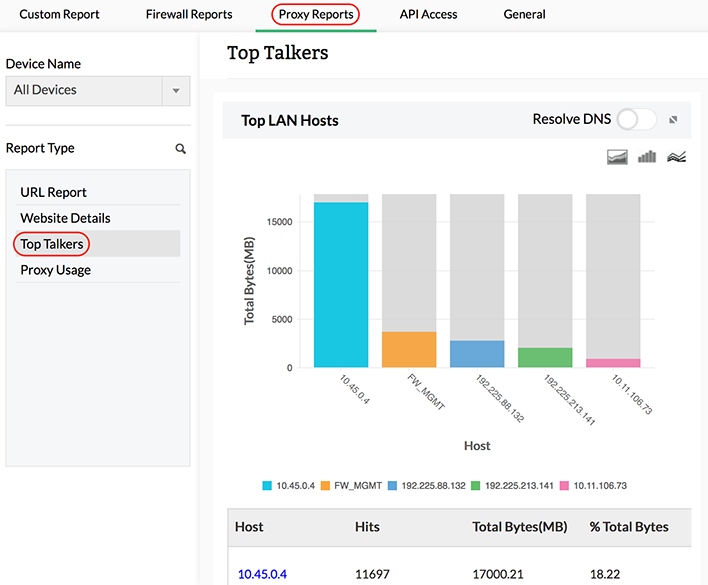
Squid proxy log report - Top Talkers
Website Details Report
The Website Details report shows the top domains, web sites, and web pages accessed. you can see more information about each report, such as top users, top URLs, and Squid cache code, by drilling down from each of the graphs.
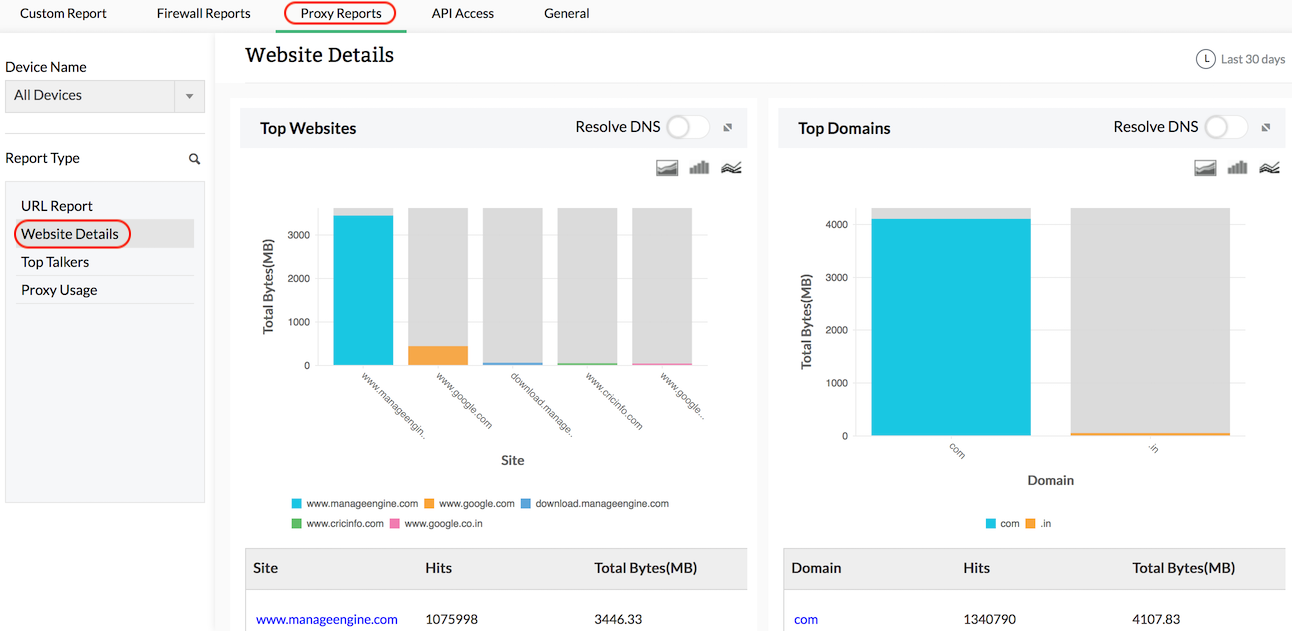
Squid proxy log report - Website Details
Squid Usage Summary Report
The Squid Usage Summary report shows details on the Squid proxy cache. You can see the top cache codes generated, peer status codes, and HTTP status codes, and also drill down to see more information on hosts and URLs generating the code.
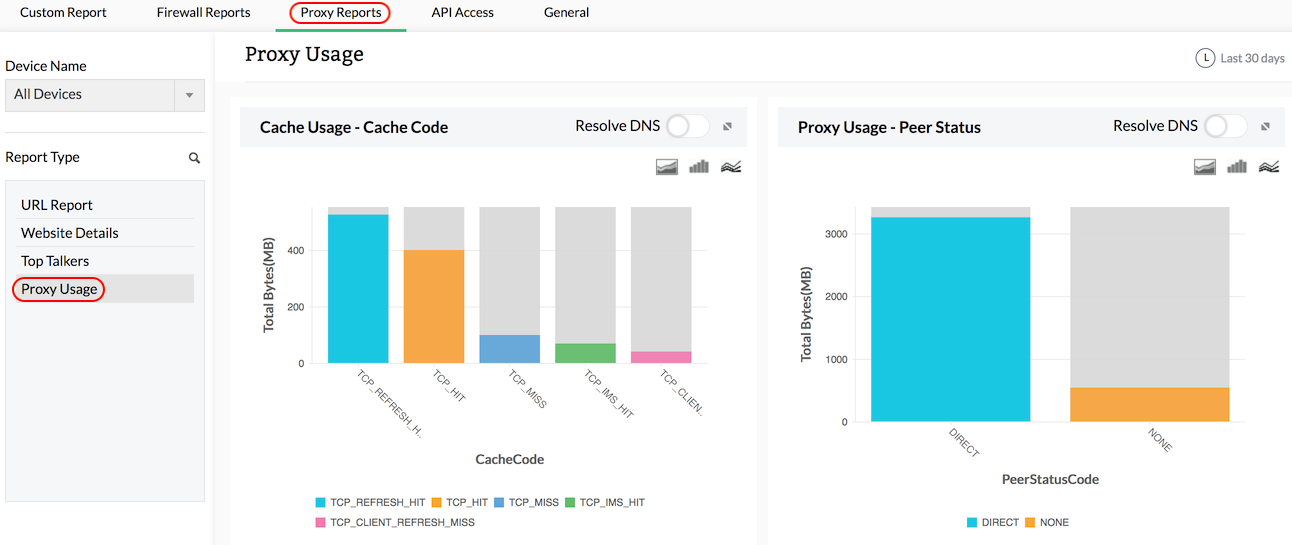
Squid proxy log report - Squid Usage Summary
Proxy Server - URL Categories Reports
Firewall Analyzer provides reports based on URL categories for each Proxy Server. You can get the reports under the major categories allowed and denied URLs. Further, under the major categories, you can get the categories of URLs like social networking, live streaming etc. You can drill down the reports to Top accessed URLs, Top Sources and Top Destinations with number of hits to that URL.
Firewall Analyzer Squid proxy reports provide an unified solution to manage your organization's internet usage. The reports help you safeguard your users better from external vulnerabilities. Download a 30-day free trial version of Firewall Analyzer today!
Featured links
Firewall Rule Management
Manage your firewall rules for optimum performance. Anomaly free, properly ordered rules make your firewall secured. Audit the firewall security and manage the rule/config changes to strengthen the security.
Firewall Compliance Management
Integrated compliance management system automates your firewall compliance audits. Ready made reports available for the major regulatory mandates such as PCI-DSS, ISO 27001, NIST, NERC-CIP, and SANS.
Firewall Log Management
Unlock the wealth of network security information hidden in the firewall logs. Analyze the logs to find the security threats faced by the network. Also, get the Internet traffic pattern for capacity planning.
Real-time Bandwidth Monitoring
With live bandwidth monitoring, you can identify the abnormal sudden shhot up of bandwidth use. Take remedial measures to contain the sudden surge in bandwidth consumption.
Firewall Alerts
Take instant remedial actions, when you get notified in real-time for network security incidents. Check and restrict Internet usage if banwidth exceeds specified threshold.
Manage Firewall Service
MSSPs can host multiple tenants, with exclusive segmented and secured access to their respective data. Scalable to address their needs. Manages firewalls deployed around the globe.
Thank you for your feedback!