
- Cloud Protection
- Compliance
- Data Leak Prevention
- Data Risk Assessment
- File Analysis
- File Audit
- Threat Glossary
Email DLP
Key takeaways
- Email DLP regulates data movement through email. It prevents sensitive data from leaving your organization and stops inbound threats before they cause a breach.
- Email data leaks can stem from a simple reply-all error, a compromised insider, or a sophisticated phishing attack.
- Email DLP inspects email traffic, scans for sensitive data, evaluates context, screens for inbound threats, enforces control policies, and logs every event.
- Without email DLP, organizations risk regulatory penalties, intellectual property loss, and financial and reputational damage.
- Effective email DLP starts with data discovery and classification, covers both outbound and inbound email, and aligns with broader endpoint controls.
What is email DLP?
Email data leak prevention (DLP) is a security practice that regulates data movement to and from your organization through email. It scans outbound emails body content, subject line, and attachments against data leak policies; monitors inbound email for threats that could lead to a breach; and takes a configured action such as blocking, quarantining, or encrypting when a violation is detected.
Why is email DLP important?
Email is one of the most common paths for sensitive data to leave an organization, accidentally or otherwise. A misaddressed message, a departing employee's malicious actions, or a phishing attack can all result in a damaging data leak. Email DLP gives you the visibility and control to prevent these losses. With email DLP, you can:
- Meet regulatory requirements: Adhere to GDPR, HIPAA, and PCI DSS obligations by ensuring regulated data is never transmitted through email without authorization.
- Protect intellectual property: Control what leaves your organization through email, so that pricing models, product roadmaps, and source code stay secure.
- Avoid financial loss and reputational damage: The absence of email DLP leaves organization vulnerable to data breaches. With the average breach costing upwards of $4.88 million, the financial impact alone is significant, and the reputational damage that follows can take years to recover from.
Types of email data leaks
Email data leaks are often innocuous in origin. They can stem from a simple mistake, a malicious insider, or a sophisticated attack. Here are the three main types:
| Type | What it looks like |
|---|---|
| Accidental outbound disclosure |
An employee selects the wrong contact from autocomplete, hits Reply All to a large group, or forwards a thread with a sensitive attachment without realizing it. These incidents commonly include autocomplete slips, accidental reply-all responses, and unintentionally forwarding sensitive attachments. |
| Deliberate insider exfiltration | An employee emails confidential files to a personal account or a competitor before resigning, exploiting their authorized access to move data out undetected. |
| Inbound-triggered exfiltration | A phishing email may deceive an employee into downloading a malicious attachment or handing over credentials, enabling attackers to gain unauthorized access and exfiltrate sensitive data from within the organization. |
Email DLP breaches and security incidents
Email data leaks are not confined to any one industry or organization type. The following incidents illustrate how they unfold in practice:
- CFPB data breach, 2023: A former CFPB employee forwarded confidential data relating to 256,000 consumers and 45 financial institutions to a personal email account across 14 separate emails before leaving the organization. The breach was reported to Congress and triggered a federal investigation into the agency's data handling controls.
- Microsoft government email hack, 2023: Chinese state-backed hackers accessed senior United States government email accounts across 25 organizations by forging authentication tokens following a phishing-originated compromise of a Microsoft engineer's corporate account. The DHS Cyber Safety Review Board later described the breach as "entirely preventable."
- Slater Gordon insider breach, 2025: A former employee circulated emails to all staff containing sensitive internal data including employee salaries, performance ratings, and strategic discussions. The emails deliberately excluded IT and senior leadership, prompting an investigation by Victoria Police.
How does email DLP work?
Email DLP monitors both inbound and outbound email traffic and applies security policies to prevent sensitive data from being exposed through either channel. The process unfolds across five distinct stages:
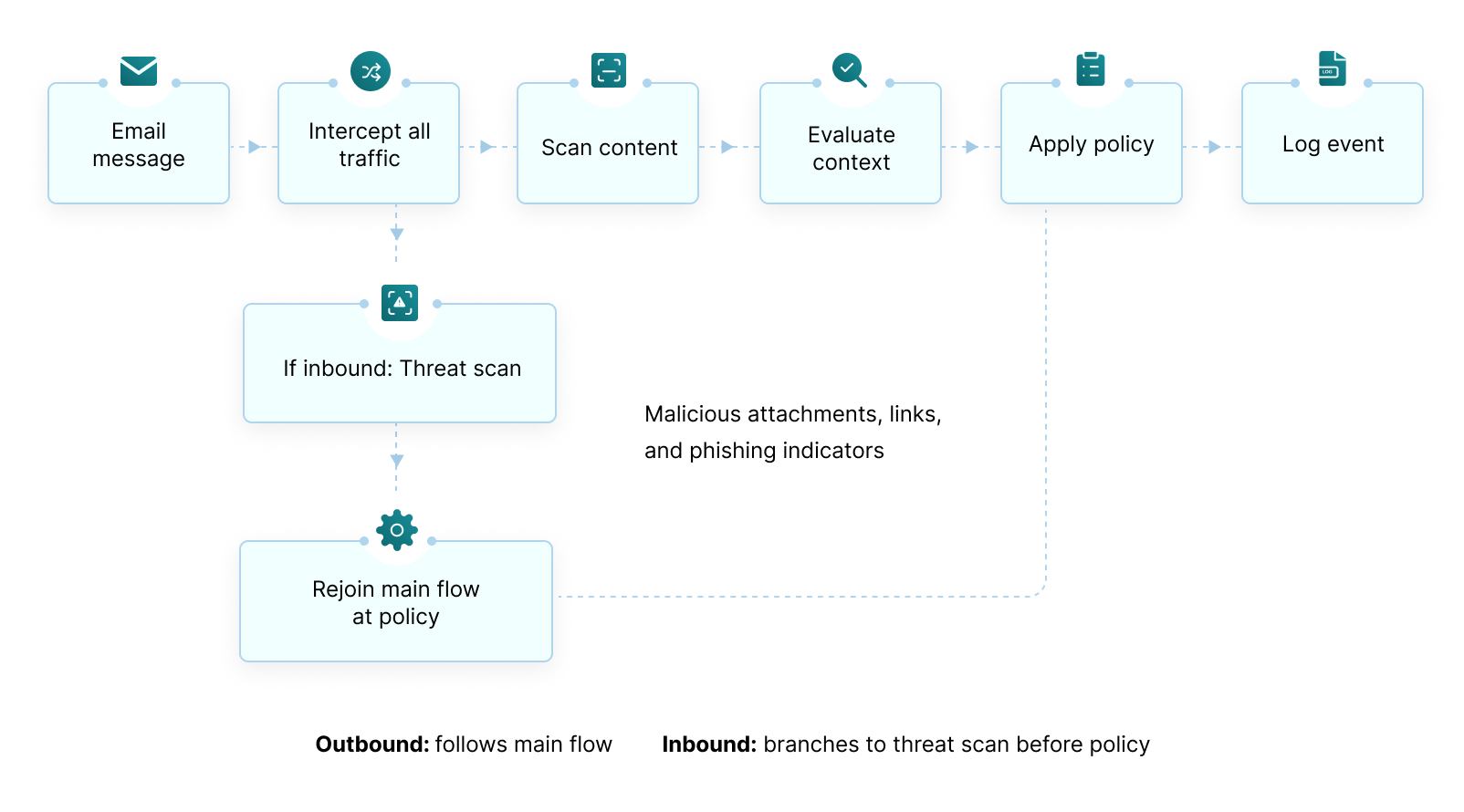
- Intercept and scan email traffic: The email DLP solution intercepts outbound email before delivery and inbound messages before they reach the user's inbox. It scans the email body, subject line, and attachments for sensitive information using techniques such as regular expression (regex) for structured data like credit card numbers and national IDs, keyword matching for confidential terms, document fingerprinting, and optical character recognition (OCR) for image-based files.
- Evaluate sender and recipient context: The solution evaluates who is sending or receiving the email, the domains involved, and whether the activity aligns with normal pattern user behavior. For example, an email sent to an approved auditing partner is treated very differently from one sent to a personal Gmail account.
- Screen for inbound threats: Incoming emails are scanned for malicious attachments, suspicious links, and phishing indicators. This helps stop account compromise and restricts attacker from gaining access to internal systems and critical data.
- Apply the policy response: Based on the content and context the system enforces a predefined action. This may include blocking the email and notifying the sender, quarantining it for review, encrypting it before delivery, or prompting the sender to confirm recipient before sending.
- Log the event: Every policy match is recorded in an audit log, capturing what was detected, what action was taken, who was involved, and when it occurred. These logs supports incident investigation, compliance reporting, and ongoing policy optimization.
While this outlines how email DLP works, real-world deployments often encounter operational and implementation challenges that hinder the effectiveness of each stage.
Common email DLP deployment challenges
Email DLP is only as effective as its implementation. Below are the most common deployment challenges that organizations face:
- Generating excessive false positives: Overly broad policies flag legitimate emails alongside genuine violations. When employees receive repeated unnecessary warnings routinely, they may begin ignoring them or start bypassing controls entirely.
- Maintaining consistent coverage across email clients: Many solutions are built primarily for Outlook. Organizations using a mix of platforms such as Gmail, Zoho Mail, or other webmail services on managed devices end up with coverage gaps that go undetected until a leak occurs.
- Balancing security with productivity: Strict enforcement policies can disrupt normal workflows and frustrate users. In response, employees may resort to forwarding files to personal accounts or using unmonitored messaging platforms, creating new blind spots outside security oversight.
- Detecting sensitive data in image-based attachments: Most email DLP solutions focus on text-based files by default. Sensitive information embedded in screenshots and scanned documents may go undetected unless OCR is explicitly enabled and properly configured.
Email DLP best practices
Here are the practices that separate an effective email DLP strategy from one that falls short:
- Start with sensitive data discovery and classification: Effective email DLP policies depend on a clear understanding of what sensitive data your organization holds and where it lives. Data discovery and classification locates and categorizes that data, ensuring policies are built around actual risk rather than assumptions.
- Examine attachments: Most email data leaks happen through attachments, not inline text. Policies that only scan the message body miss the most common exfiltration method. Scanning of documents, spreadsheets, and compressed files needs to be covered.
- Encrypt rather than block where possible: Blocking disrupts legitimate work and pushes users toward work-arounds. For data that regularly leaves the organization, automatic encryption keeps the workflow intact while keeping the data protected.
- Treat inbound email as part of your data leak prevention strategy: A phishing email that compromises an account is the starting point for a far more damaging leak than a misaddressed message. Inbound scanning is as important as outbound controls.
- Flag high-risk email sending behaviors specifically: Forwarding emails to personal accounts, bulk file sends, and replies to unknown external domains carry disproportionate risk. Rules targeting these user actions catch what content matching alone misses.
- Align email DLP with your broader endpoint controls: Email is one channel among many. Connecting email DLP with your wider DLP framework ensures sensitive data is protected consistently across USB, print, cloud apps, and more.
Email DLP vs. endpoint DLP
Email DLP and endpoint DLP solve different parts of the same problem. Understanding the distinction helps organizations decide where to start and how both complement each other as part of a broader data protection strategy.
| Category | Email DLP | Endpoint DLP |
|---|---|---|
| Focus | The email channel specifically | The device, including laptops, desktops, and mobile endpoints |
| Coverage | Outbound email messages, attachments, and inbound threats | USB transfers, printing, screenshots, clipboard activity, local file transfers, and email |
| Where it operates | At the mail gateway or email server | On the endpoint device via an installed agent |
| Content depth | Deep inspection of email body, subject line, attachments, and recipient context | Broad control across all device channels |
| Inbound scanning | Scans inbound email for malicious attachments and phishing | Not designed for inbound email threat detection |
| Best used for | Preventing data leaks through email specifically | Comprehensive DLP across all channels originating from a device |
The two are complementary. Endpoint DLP gives you control across every channel through which data can leave a device. Email DLP adds the depth that the most frequently exploited channel requires. DataSecurity Plus brings both together, covering email alongside USB, print, and cloud apps under a single endpoint DLP framework.
Prevent email data leaks with DataSecurity Plus
From misaddressed messages to webmail downloads on unmanaged devices, email is a major source of data leaks. ManageEngine DataSecurity Plus helps close these gaps. With it, you can:
- Discover and classify sensitive data using keyword and pattern matching to assess which files require the highest levels of protection.
- Prevent outbound sensitive data leaks by performing a comprehensive analysis of the subject line, body, and attachments of Outlook emails.
- Block unauthorized web-based email applications and manage file uploads and downloads to approved domains with advanced URL filtering.
- Go beyond email protection with unified controls across USB devices, clipboards, printers, and cloud uploads with DLP.
Start your free trial today to learn how DataSecurity Plus secures your data across email, external devices, and cloud apps.
Get your free trialFrequently asked questions
How does email DLP help with regulatory compliance?
The GDPR, HIPAA, and the PCI DSS require organizations to demonstrate that sensitive data is not transmitted without authorization. Email DLP enforces this by inspecting outbound messages and attachments before delivery, and then blocking or quarantining any content that matches a sensitive data pattern without a valid business justification.
Every policy event is logged with full context, including who sent the email, to which domain, what attachment was involved, and what response was initiated. This audit trail provides evidence during compliance reviews and incident investigation, that policy violations were detected, monitored, and addressed appropriately.
How is shadow AI different from shadow IT?
Shadow IT is the broader term referring to any technology used without IT team approval. Shadow AI is a more specific, riskier subset of shadow IT. With shadow IT, the concern is mostly about what tools exist and who controls them. With shadow AI, the concern extends to what happens to the data inside those tools, what the tools do with it, and what decisions get made based on their output. Shadow AI is a harder problem to govern because the exposure is less visible and harder to reverse.
How do I measure the effectiveness of email DLP policies?
Track the following metrics to assess the effectiveness of your email DLP policies:
- False positive rate: A high rate indicates policies may be too broad. When legitimate emails are regularly blocked, user trust erodes and override requests increase.
- Quarantine queue volume: A growing quarantine queue indicates either overly aggressive policies or a review process that is not keeping pace with incoming alerts.
- Policy override frequency: A high override rate within a specific team or against a specific policy may indicate the need for a closer investigation into user actions.
- Violation trend over time: A sustained decline in violation, combined with stable override rates, generally indicates that policies are well-calibrated. Flat or rising violation counts may indicate a coverage gap.
What is contextual analysis in email DLP?
Content inspection identifies what is in an email. Contextual analysis determines whether that content should be leaving the organization based on the circumstances surrounding the transmission. It evaluates factors such as the sender's identity, destination domain, time of transmission, and attachment size.
For example, a finance analyst forwarding a spreadsheet to an approved client domain during business hours appears very disparate from the same file being sent to a personal Gmail account late at night, even if the content itself is identical.
By layering behavioral signals on top of content detection, contextual analysis helps reduce false positives and ensures policies trigger only under the right circumstances
What is the difference between email DLP and spam filtering?
Spam filtering focuses on identifying and blocking unsolicited, malicious, or suspicious inbound email, including phishing attempts and malware. Email DLP regulates both inbound and outbound email: It prevents sensitive data from leaving and screens inbound messages for threats that could lead to a breach. The key difference is purpose: Spam filtering protects your users from external threats; email DLP protects business-critical data from leakage or misuse.
What should I look for in an email DLP solution?
Most email DLP solutions handle basic outbound filtering. What separates a mature email DLP solution from a basic one is the depth of coverage across every data transfer scenario. Look for these capabilities:
- Bidirectional inspection: Outbound coverage prevents authorized data sharing; inbound inspection identifies phishing payloads that can trigger secondary exfiltration.
- Deep attachment inspection: Simple file type validations can be bypassed by file renaming. Solutions that use content inspection, which scans the actual text within documents and images via OCR, is significantly more reliable.
- Granular policy controls: Look for flexible response actions, such as the ability to audit without blocking, restrict sends to trusted domains, require sender justification, or block outright, applied per content type, user role, or destination.
- Integration with data classification: An email DLP solution should integrate with enterprise data classification frameworks. Without classification awareness, policies operate without understanding the sensitivity level of the underlying data. The most effective deployments combine classification-driven policies with centralized DLP reporting and compliance monitoring.