

- Home
- Logging guide
- AWS S3 traffic monitoring
AWS S3 traffic monitoring
In this page
- How is traffic monitoring different from bucket activity monitoring?
- Why is it important to monitor AWS S3 traffic?
- How to monitor AWS S3 traffic
- Steps to monitor AWS S3 traffic using Log360 Cloud
AWS S3 traffic monitoring involves tracking and analyzing the data flow and requests to and from Amazon Simple Storage Service (S3) buckets. This process ensures that the interactions with S3 are secure, efficient, and cost-effective. By monitoring S3 traffic, organizations can gain insights into access patterns, data transfer volumes, and performance metrics, enabling them to optimize their storage solutions, detect unauthorized access, and manage costs effectively.
How is traffic monitoring different from bucket activity monitoring?
AWS S3 traffic monitoring and AWS S3 bucket activity monitoring differ in their scope and focus. Traffic monitoring centers on the data flow and access patterns to and from S3 buckets, emphasizing metrics like data transfer volumes, request rates, network paths, and IP traffic to optimize performance, ensure security, and manage costs. It involves detailed analysis of the interactions between clients and S3, including monitoring inbound and outbound data and detecting anomalies in network traffic.
In contrast, bucket activity monitoring focuses on the actions performed within the S3 buckets themselves, such as uploads, downloads, deletions, and configuration changes. It tracks the detailed logs of these activities, evaluates bucket configurations for compliance and security, and monitors storage usage and performance metrics. While traffic monitoring looks at the broader data flow and access patterns, bucket activity monitoring hones in on the specific operations and configurations within the S3 buckets.
Why is it important to monitor AWS S3 traffic?
Monitoring AWS S3 traffic is essential for maintaining the security of your data storage and transfer activities. It provides critical insights and enables proactive management of resources, ensuring that your applications and services run smoothly and securely.
1. Security
- Unauthorized access detection: Monitoring helps detect unauthorized or suspicious access attempts to S3 buckets, enabling quick action to prevent data breaches.
- Anomaly detection: Identifying unusual traffic patterns can reveal potential security threats, such as data exfiltration or malware activity.
- Data integrity: Monitoring access logs and data transfer activities helps ensure that data hasn't been tampered with.
2. Service health and reliability
- Service monitoring: Continuous monitoring of S3 traffic helps maintain the health and reliability of services that depend on S3 for storage.
- Error tracking: Monitoring helps identify and resolve errors in data transfer, ensuring data availability and integrity.
3. Incident response
- Quick response: Real-time monitoring enables quick detection and response to incidents, such as data breaches or service disruptions.
- Root cause analysis: Detailed logs and metrics help in understanding the root cause of incidents, facilitating quicker resolution and prevention of future occurrences.
4. Data governance
- Policy enforcement: Monitoring who accesses the data and how ensures that access policies are being correctly enforced.
- Data residency: Monitoring data transfers helps ensure they comply with data residency requirements, preventing unauthorized cross-border data flows.
How to monitor AWS S3 traffic
AWS S3 traffic can only be effectively monitored using third-party SIEM solutions. ManageEngine Log360 Cloud, a unified cloud SIEM solution, offers advanced cloud security monitoring and log management capabilities. Log360 Cloud helps you track access requests to your S3 buckets, analyze traffic patterns, and detect potential security incidents by utilizing S3 server access logs.
Steps to monitor AWS S3 traffic using Log360 Cloud
-
Set up S3 server access logging
Ensure that S3 server access logging is enabled for the specific S3 bucket you want to monitor. This logging will track requests made to the S3 bucket, recording details like the requester, bucket name, request time, action taken, response status, and any error codes.
-
Configure an AWS Cloud Account in Log360
Ensure that you have at least one AWS Cloud Account configured in Log360. If not, follow the steps provided by Log360 to configure it.
-
Log in to Log360 Cloud
Access the Log360 Cloud console using your login credentials.
-
Navigate to Data Source Configuration
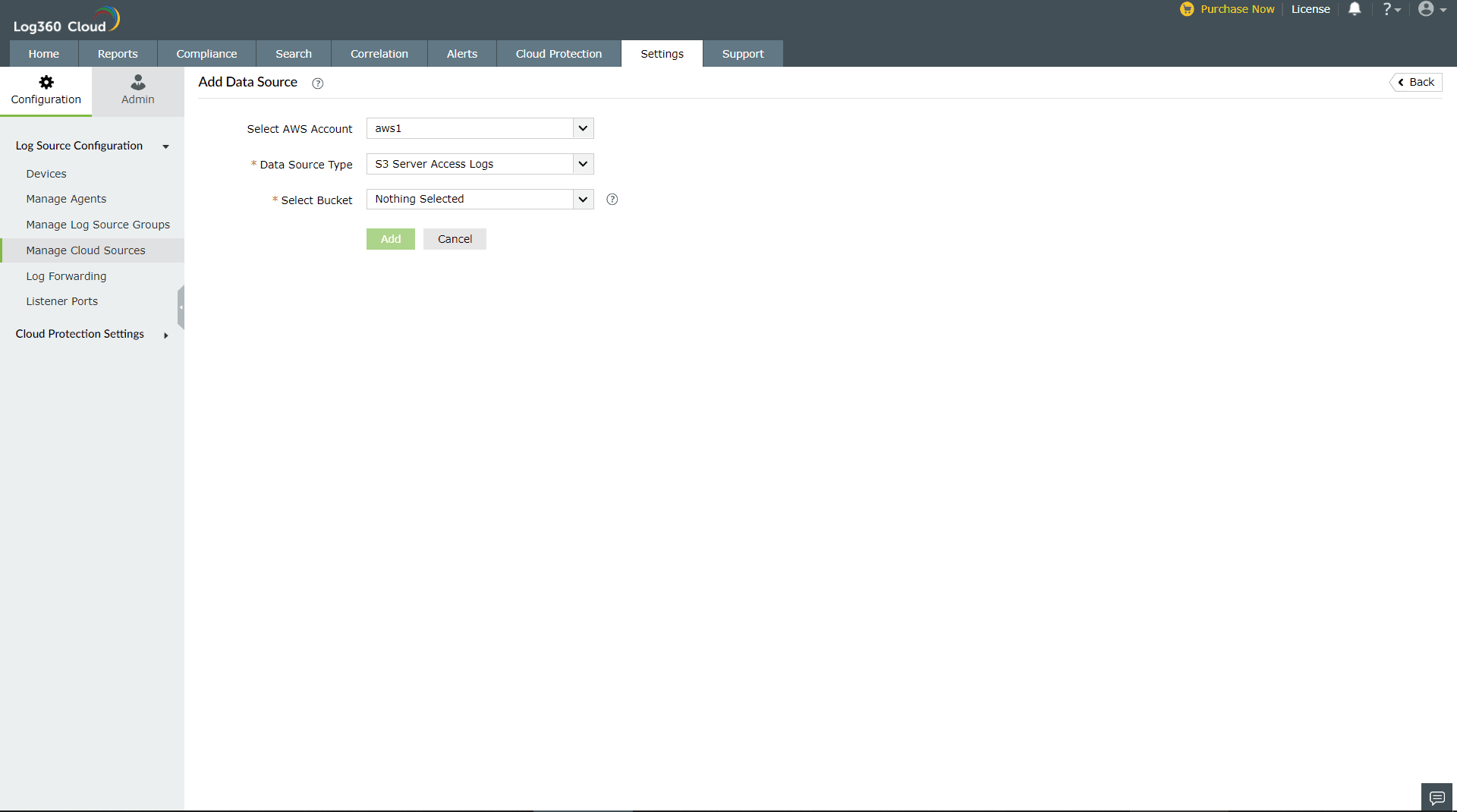
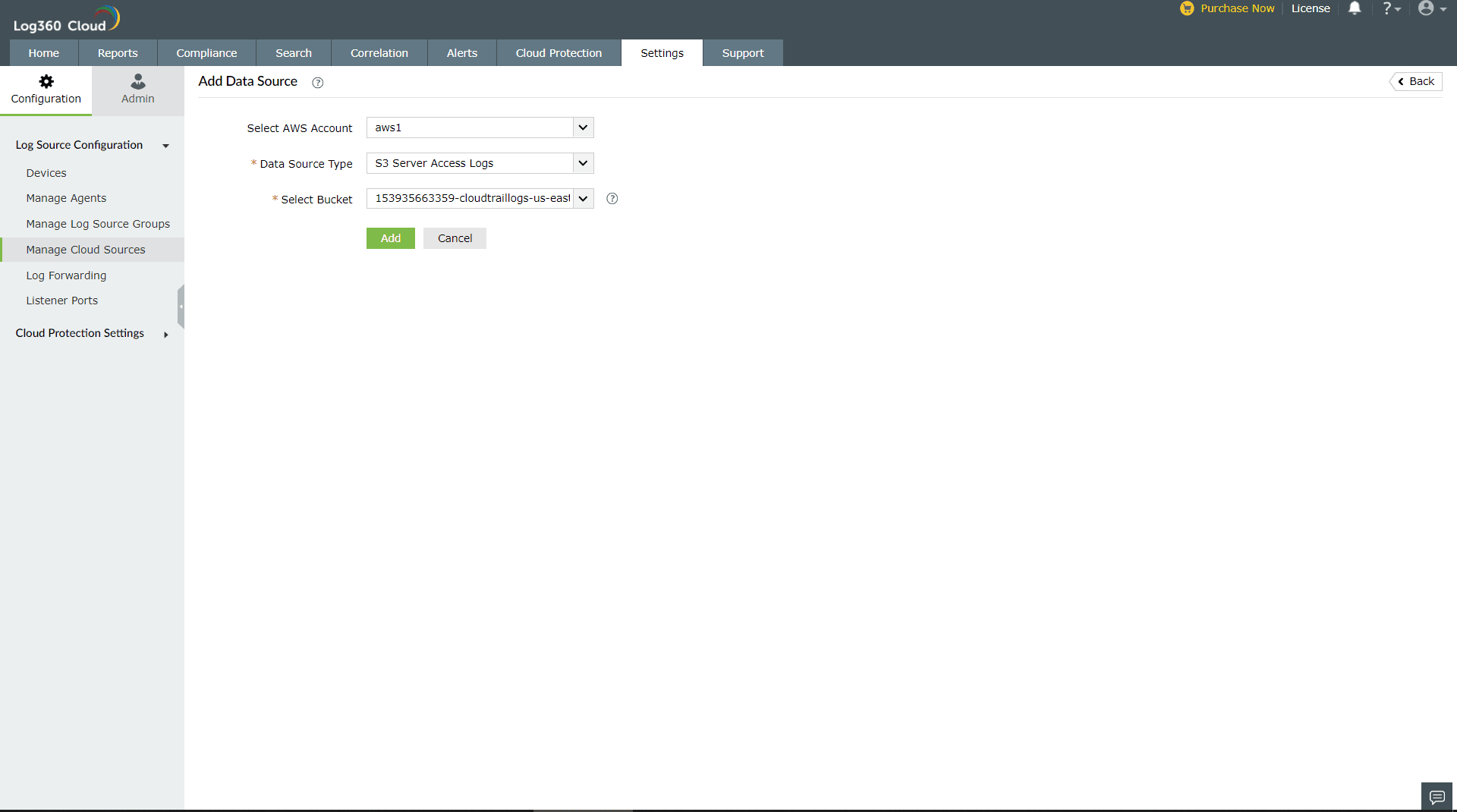
- In the Log360 Cloud console, go to Settings > Configuration > Manage Cloud Sources.
- Click Add Data Source.
- From the Data Source Type drop-down, choose S3 Server Access Logs.
- From the Select Bucket drop-down, select the specific S3 bucket for which you want to enable and monitor access logging.
-
Configure the data source
Click Configure to complete the setup. This will add the S3 Server Access Logs as a data source in Log360.
Log360 Cloud also offers built-in reports like S3 File Changes Audit and S3 Traffic Analysis to help you effortlessly track modifications to your S3 files and examine traffic trends, ensuring comprehensive visibility and security of your AWS S3 environment.
Try Log360 Cloud for efficient AWS S3 traffic monitoring
Log360 Cloud is ManageEngine's cloud-based SIEM solution that offers comprehensive visibility and security management across on-premises and cloud environments in a single platform. Enhance your security posture with real-time log analysis and threat detection.









