

- Home
- Logging Guide
- How does a firewall work?
How does a firewall work?
In this page
- What is a firewall?
- -What does a firewall do?
- -Why do you need a firewall?
- -Different types of firewalls
- How does a firewall work?
- -Key features of a firewall
- -How a firewall operates
- Limitations of firewalls
- Best practices for network firewall security
- Why monitor your firewalls?
- How EventLog Analyzer helps you monitor your network firewalls
Before delving into the topic, let us first explore the fundamental concept of a firewall, its significance, and its essential role in network security.
What is a firewall?
A firewall is a network security tool that monitors and filters traffic based on set rules to protect internal networks from untrusted external access. Firewalls, available as hardware or software, inspect data packets and allow or block them based on criteria like IP addresses, ports, and protocols.
What does a firewall do?
A firewall acts as a digital gatekeeper, monitoring and controlling network traffic to ensure security. It acts as a barrier between trusted internal systems and external networks, filtering data to block unauthorized access and prevent cyberattacks.
Why do you need a firewall?
- Blocking unauthorized access: Acts as a barrier to keep out unauthorized users, protecting sensitive information
- Filtering malicious traffic: Detects and blocks threats like viruses and hacking attempts, stopping the spread of malware
- Enhancing network security: Adds an extra layer to defend against network vulnerabilities
- Preventing data breaches: Reduces the risk of breaches, helping you avoid financial and reputational harm
- Protecting sensitive data: Secures important information, like customer data and financial records, from theft
Different types of firewalls
There are several types of network firewalls, each providing different levels of security based on network needs:
- Packet filtering firewalls
- Examine individual packets based on the IP, port, and protocol
- Operate at the network layer, inspecting individual packets based on rules like the IP address and port number
- Are simple and fast but lack context about the overall traffic flow, making them less effective against sophisticated attacks
- Stateful inspection firewalls
- Monitor active connections and connection states
- Maintain a record of active connections and make filtering decisions based on the context of the traffic
- Provide better security compared to packet filtering firewalls but may introduce latency under heavy traffic
- Proxy firewalls
- Act as intermediaries, hiding internal networks
- Ensure high security by inspecting requests and responses
- Filter traffic at the application layer and examine payloads for malicious content
- Are more secure but can slow down performance due to deeper inspection
- Next-generation firewalls
- Combine traditional firewall functions with advanced features like intrusion prevention, deep packet inspection (DPI), and application-level filtering
- Are versatile and address modern threats but require higher resource allocation
- Cloud firewalls
- Are virtual firewalls designed for cloud environments
- Offer scalability and are ideal for securing remote and cloud-based resources
- Are ideal for organizations leveraging cloud infrastructure but rely heavily on proper configuration
- Application-level gateways
- Inspect data packet content to identify and block risky applications or protocols
- Filter traffic based on protocols like HTTP, FTP, and SMTP
- Offer advanced protection but may impact network performance
- Inspect the content of network traffic at the application layer, providing granular control over specific applications and protocols
- Allow for more advanced security measures, such as blocking malicious websites or preventing unauthorized access to specific services
How does a firewall work?
Key features of a firewall
- Hardware or software
- Hardware firewalls: These physical devices sit between networks, inspecting all traffic that passes through them.
- Software firewalls: These software programs are installed on individual devices or network devices to filter traffic.
- Packet filtering: This core function involves inspecting the header information of each packet, including the source and destination IP addresses, port numbers, and protocol type. Based on predefined rules, the firewall decides whether to allow or block the packet.
- Application gateways: These components provide a secure gateway for specific applications, such as web servers or email servers. They can inspect application-specific traffic, block malicious attacks, and enforce security policies.
- Network address translation (NAT): NAT is a technique used to translate private IP addresses into public IP addresses, hiding the internal network structure from external threats.
- DPI: DPI involves analyzing the content of network packets to identify malicious traffic, such as viruses, worms, and spyware.
- Intrusion detection systems (IDSs) and intrusion prevention systems (IPSs): These systems monitor network traffic for signs of malicious activity, such as unauthorized access attempts or malicious code. IDSs and IPSs can actively block attacks or generate alerts for further investigation.
- Network policies: These policies define the rules and guidelines for network traffic, including access control lists and firewall rules.
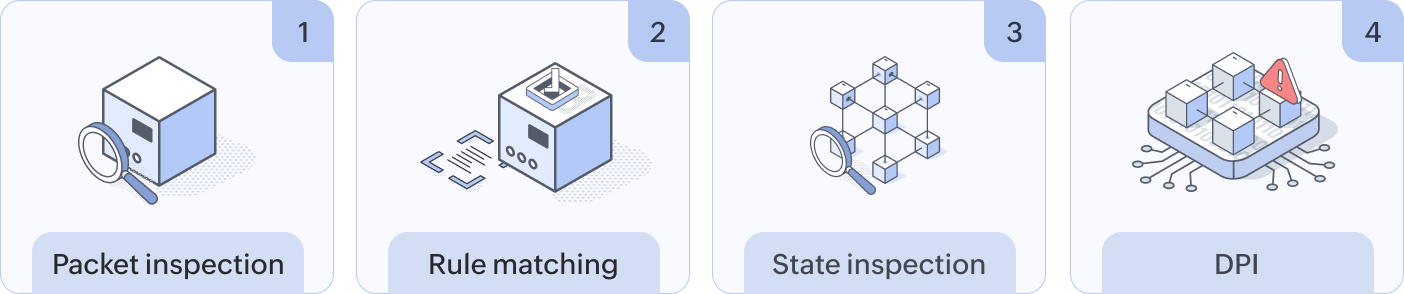
- Packet inspection
- Header inspection: The firewall examines the header of each network packet, which contains metadata such as the:
- Source and destination IP addresses.
- Source and destination port numbers.
- Protocol type (TCP, UDP, or ICMP).
- Time to live field.
- Payload inspection: In some cases, the firewall may inspect the payload of the packet to identify malicious content, such as viruses, worms, or spyware. This is often done using DPI techniques.
- Header inspection: The firewall examines the header of each network packet, which contains metadata such as the:
- Rule matching
- Rule matching: The firewall compares the packet's characteristics against a set of predefined security rules. These rules can be based on the:
- IP addresses (the source, the destination, or specific ranges).
- Port numbers (e.g., port 80 for HTTP or port 443 for HTTPS).
- Protocol types (TCP, UDP, or ICMP).
- Packet content (for advanced firewalls).
- Decision-making: Based on the rule matching, the firewall makes a decision:
- Allow: If the packet complies with the security rules, it is allowed to pass through the firewall.
- Block: If the packet violates the rules, it is discarded or dropped, preventing it from reaching its destination.
- Log: Information about the packet may be logged for future analysis and security auditing.
- Rule matching: The firewall compares the packet's characteristics against a set of predefined security rules. These rules can be based on the:
- State inspection
- Connection tracking: The firewall keeps track of the state of network connections, including the sequence numbers of packets.
- Anomaly detection: By analyzing the state of connections, the firewall can detect anomalies and potential attacks, such as IP spoofing or port scanning.
- DPI
- Content analysis: DPI involves examining the payload of network packets to identify malicious content or specific applications.
- Protocol analysis: DPI can also be used to analyze protocol behavior and detect deviations from standard protocols.
- Limited protection against advanced threats
- Advanced persistent threats: Firewalls may struggle to detect and prevent sophisticated, targeted attacks that can bypass traditional security measures.
- Zero-day exploits: These attacks exploit vulnerabilities that are unknown to security vendors, making it difficult for firewalls to have preconfigured defenses.
- Vulnerability to social engineering attacks
- Phishing and social engineering: Firewalls cannot prevent attacks that exploit human psychology, such as phishing emails or social engineering tactics. These attacks often bypass technical defenses by tricking users into revealing sensitive information or downloading malicious software.
- Negative performance impacts
- Network overhead: Firewalls can introduce latency and overhead, particularly when inspecting encrypted traffic or large volumes of data. This can impact network performance, especially in high-traffic environments.
- Configuration errors
- Misconfigured rules: Incorrectly configured firewall rules can inadvertently block legitimate traffic or create security loopholes, leaving the network vulnerable to attacks.
- Susceptibility to evasion techniques
- Port scanning, IP spoofing, and tunneling: Cybercriminals can employ various techniques to bypass firewall restrictions, making it essential to stay informed about the latest threats and regularly update firewall rules.
- Limited visibility into encrypted traffic
- Encrypted traffic: Firewalls typically cannot inspect the content of encrypted traffic, making it difficult to detect malicious activity hidden within encrypted payloads.
- Reliance on user behavior
- Insider threats: Firewalls cannot prevent malicious actions taken by authorized users, such as downloading malware or sharing sensitive information. User education and awareness are crucial to mitigating these risks.
- Robust configurations: Enforce strong, secure default configurations; strict access controls; and regular rule reviews.
- Effective monitoring: Centralize log management with a SIEM solution, enabling real-time monitoring for prompt threat response.
- Regular updates: Keep firmware and software up to date with vendor-provided patches.
- Layered security: Implement network segmentation, IDSs and IPSs, and secure remote access.
- User awareness: Educate users about security best practices and conduct regular training.
- Incident response planning: Establish a dedicated team and a well-tested incident response plan.
- Proactive threat detection: By analyzing firewall logs, you can identify potential threats and security breaches early on.
- Performance optimization: Monitoring helps you identify performance bottlenecks and optimize firewall resource utilization.
- Configuration verification: Regular monitoring helps you ensure that firewall rules are correctly configured and up to date.
- Compliance: Monitoring assists with maintaining compliance with industry regulations and security standards.
- Incident response: Timely detection of security incidents enables swift responses and mitigation.
- Risk mitigation: By proactively identifying and addressing vulnerabilities, you can reduce the risk of successful attacks.
How a firewall operates
Limitations of firewalls
While network firewalls are a crucial security tool, they have limitations:
To truly optimize your firewalls' effectiveness, it is crucial to analyze their logs meticulously. By leveraging advanced log analysis tools, you can detect anomalies, identify potential threats, and proactively respond to security incidents.
Best practices for network firewall security
A well-configured, well-maintained network firewall is a critical component of a robust security strategy. Here are some best practices to ensure optimal firewall security:
By adhering to these guidelines, you can significantly enhance your network's security posture and protect your valuable assets from cyber-threats.
Why monitor your firewalls?
Monitoring your firewalls is crucial for several reasons:
Firewall monitoring tools strengthen security by detecting threats, supporting compliance, improving performance, and enabling rapid responses to incidents.
How EventLog Analyzer helps you monitor your network firewalls
EventLog Analyzer is a powerful tool that can significantly enhance your firewall monitoring capabilities. By centralizing firewall logs from multiple devices onto a single, unified interface, it simplifies analysis and troubleshooting. Its real-time monitoring capabilities enable the detection of anomalies and potential threats with instant alerts for critical events. Additionally, its advanced log correlation helps you uncover hidden threats by correlating firewall logs with other system logs.
With EventLog Analyzer, you can ensure compliance with industry regulations and provide detailed audit reports to demonstrate your security posture. Its in-depth forensic analysis capabilities help you identify the root cause of security breaches, enabling effective preventive measures. By utilizing EventLog Analyzer, you can effectively monitor your firewalls, detect and respond to threats promptly, and maintain a strong security posture.
Next steps:
Safeguard your network firewalls with EventLog Analyzer. Start your free, 30-day trial today with free technical assistance and enhance your firewall monitoring and security management.
- Packet inspection









