Syslog Protocols: A Complete Guide
Last updated on:In this page
- Syslog protocol comparison
- User Datagram Protocol (UDP)
- Transmission Control Protocol (TCP)
- Syslog over TLS (encrypted syslog)
- Reliable Event Logging Protocol (RELP)
- How to choose a syslog protocol
- Which syslog protocol should you use with EventLog Analyzer?
- How EventLog Analyzer collects syslogs
- Syslog reports for threat detection and compliance
Syslog messages travel from devices to a centralized collector or syslog server over one of four transport protocols. UDP moves high volumes of telemetry but drops packets under load. TCP adds reliable, ordered delivery. TLS adds encryption on top of TCP. RELP goes further, acknowledging each message so nothing is lost across a dropped connection.
Key takeaways:
Syslog can be transported over UDP, TCP, TLS, or RELP, each with different trade-offs in reliability, security, and overhead.
UDP (port 514) is the historical default and stays useful for high-volume, non-critical logs.
TCP (port 514 or 6587-framed) adds byte-level reliability; TLS (port 6514) adds encryption; RELP (port 2514) adds session-level message acknowledgment.
For most modern deployments, use TCP for internal servers, TLS for compliance-bound or cross-network traffic, and RELP where message-level guarantees matter more than raw throughput.
Simplify syslog collection across your network
Collect syslog messages using UDP, TCP, or TLS protocols from one console.
Syslog protocol comparison
| UDP | TCP | TLS (over TCP) | RELP | |
|---|---|---|---|---|
| Default port | 514 | 514 | 6514 | 2514 |
| Reliability | None | Byte-level | Byte-level | Message-level, survives disconnects |
| Ordering | Not guaranteed | Guaranteed | Guaranteed | Guaranteed |
| Encryption | No | No | Yes | No (unless tunneled) |
| Overhead | Lowest | Moderate | Highest | Moderate |
| Spec / origin | RFC 3164 | RFC 6587 | RFC 5425 | rsyslog project |
| Best for | High-volume, non-critical logs | Server and application logs | Compliance-bound or untrusted networks | Regulated environments and WAN links |
User Datagram Protocol (UDP)
UDP is the original transport protocol for syslog, defined alongside the BSD syslog protocol in RFC 3164. The modern message-format spec, RFC 5424, obsoletes RFC 3164 but preserves UDP compatibility through a separate transport mapping in RFC 5426. It remains the default on most network devices due to its low overhead and minimal implementation footprint. UDP is connectionless and unacknowledged, which makes it lightweight but also unreliable.
The absence of acknowledgment is the central trade-off. A UDP sender transmits messages to a collector without establishing a session or confirming receipt. When a packet is dropped by a congested router or discarded at a full queue, neither the sender nor the collector is notified, and the message is lost.
For this reason, UDP is not suitable for log data that must be preserved. Authentication events, database audit trails, and any log source with compliance implications should use a reliable transport.
Default port: UDP 514. For a complete port reference across syslog transports, refer to syslog port 514.
When UDP is acceptable
UDP remains an appropriate choice in specific scenarios:
- High-volume network device telemetry: Firewalls, routers, and switches under heavy load can generate thousands of syslog messages per second. UDP prevents the sender from stalling on network back-pressure.
- Local network collection: On low-loss LAN segments where the collector is topologically close to the source, UDP packet loss is negligible in practice.
- Non-critical operational logging: Debug traces and informational events where occasional message loss does not affect operational or forensic outcomes.
Limitations of using UDP
- Silent packet loss under load: UDP has no congestion control. When a switch queue reaches capacity, packets are discarded without any indication to the sender or the collector.
- MTU fragmentation: Syslog messages that exceed the network MTU are fragmented at the IP layer. Loss of any single fragment discards the entire message.
- No delivery guarantee: UDP provides no mechanism to confirm receipt. If message loss would compromise a post-incident investigation or compliance report, use TCP or RELP.
Configuring UDP syslog collection
On rsyslog, enable the UDP input module:
$ModLoad imudp
$UDPServerRun 514
On syslog-ng, this is the equivalent source block:
source s_udp {
    udp(ip("0.0.0.0") port(514));
};
Both configurations listen on the default UDP port. Modify the port only if the environment already reserves 514 for another service or if syslog traffic is being segmented across multiple ports.
Transmission Control Protocol (TCP)
TCP was introduced as a syslog protocol to address the reliability gap in UDP. Defined in RFC 6587 (Transmission of Syslog Messages over TCP), it establishes a connection between the sender and the collector, delivers messages in order, and retransmits any packets that go unacknowledged at the transport layer. In most modern syslog deployments, TCP is the default. Both rsyslog and syslog-ng ship with TCP-based collection preferred over UDP.
The session-oriented nature of TCP means the sender is aware when the collector becomes unreachable. Messages held in the local buffer can be retried once the connection is re-established, and log ordering is preserved end to end within a session.
Default port: TCP 514 is the historical default; some implementations use port 601 when strict RFC 6587 compliance is required.
Framing methods in RFC 6587
Unlike UDP, where each message is a self-contained datagram, TCP delivers a continuous byte stream. To let the receiver separate one syslog message from the next, RFC 6587 defines two framing methods:
- Octet-counting framing: Each message is prefixed with its length in bytes, followed by a space, followed by the message itself. This is the preferred method for variable-length messages, particularly those following the RFC 5424 format, whose structured-data elements make message length unpredictable because the receiver knows exactly where each message ends.
- Non-transparent framing: Messages are separated by a delimiter character, most commonly the newline (\n). This method is simpler to implement but breaks when a message legitimately contains the delimiter character.
Most modern collectors support both. When configuring senders and receivers from different vendors, verify that the framing method matches at both ends. A mismatch causes messages to be concatenated or split silently.
When TCP is the right choice
TCP is appropriate wherever log loss carries operational or compliance consequences:
- Server and application logs: Authentication events, database transactions, and application errors that must survive for incident response.
- Compliance-driven log collection: Any workload subject to regulatory audit where evidence of complete log delivery is expected.
- Cross-segment collection: When logs traverse multiple network hops and UDP's silent packet loss would compound with each hop.
Limitations of using TCP
- Byte-level guarantee, not message-level: TCP guarantees ordered byte delivery over a live connection. Messages already sent from the application to the local kernel buffer but not yet transmitted when the connection drops can still be lost.
- Sender-side buffering matters: rsyslog and syslog-ng offer configurable disk-assisted queues to hold messages during collector outages. Without these, extended downtime results in dropped events regardless of TCP's reliability at the wire level.
- When message-level guarantees are required, use RELP instead.
Configuring TCP syslog collection
On rsyslog, enable the TCP input module:
$ModLoad imtcp
$InputTCPServerRun 514
On syslog-ng, this is the equivalent source block:
source s_tcp {
    tcp(ip("0.0.0.0") port(514));
};
Syslog over TLS (encrypted syslog)
Syslog over TLS wraps a standard TCP syslog session in a TLS-encrypted tunnel, defined in RFC 5425 (TLS Transport Mapping for Syslog). RFC 5424, the modern syslog message format specification, mandates TLS as the required minimum transport for compliant implementations where RFC 5425 defines exactly how that mapping works. It provides three properties that plain TCP does not: confidentiality of message contents in transit, integrity protection against tampering, and mutual authentication between sender and collector using X.509 certificates.
TLS is the required transport in most compliance regimes that involve log data crossing untrusted networks. The PCI DSS explicitly requires strong cryptography for cardholder-data-adjacent logs traversing public networks. HIPAA's Security Rule imposes similar requirements on protected health information referenced in logs. In practice, any log traffic leaving a controlled network segment should use TLS.
Default port: TCP 6514
Trade-offs
- Certificate management: TLS requires a certificate on the collector and, for mutual authentication, on each sender. Rotation, revocation, and trust chain management add operational overhead.
- CPU cost: The TLS handshake and per-session encryption impose a modest CPU cost on both sides. For collectors ingesting tens of thousands of messages per second, this is measurable but rarely a bottleneck on modern hardware.
- Debugging complexity: Encrypted traffic is not visible to packet captures without the session key, which complicates network-level troubleshooting.
Configuring TLS syslog collection
On rsyslog, TLS is enabled by loading the GnuTLS network stream driver and pointing to the certificate files:
$DefaultNetstreamDriver gtls
$DefaultNetstreamDriverCAFile   /etc/ssl/ca.pem
$DefaultNetstreamDriverCertFile /etc/ssl/collector-cert.pem
$DefaultNetstreamDriverKeyFile  /etc/ssl/collector-key.pem

$ModLoad imtcp
$InputTCPServerStreamDriverMode 1
$InputTCPServerStreamDriverAuthMode x509/name
$InputTCPServerRun 6514
Reliable Event Logging Protocol (RELP)
RELP was developed by the rsyslog project to solve a specific gap in TCP-based syslog: TCP guarantees byte delivery over a live connection, but any messages in flight when the connection drops are lost without either side knowing. RELP closes this gap.
RELP operates on top of TCP and adds application-layer acknowledgment. For each syslog message sent, the receiver returns an acknowledgment identifying that specific message. The sender maintains session state and holds unacknowledged messages in a local buffer. When a connection is interrupted and later re-established, RELP reissues any messages that were not acknowledged in the previous session—no duplicates, no losses.
The distinction in practice:
- TCP guarantees byte delivery over a live connection.
- RELP guarantees message delivery across connection drops.
Default port: TCP 2514
When RELP is the right choice
RELP is worth the added complexity in environments where message loss is not tolerated:
- Regulated industries: Financial services, healthcare, and government workloads where every event must be preserved for audit.
- Multi-hop syslog relays: Each additional relay in the delivery chain is another point where a TCP disconnect can drop in-flight messages. RELP guarantees delivery hop by hop.
- WAN links: Log traffic crossing wide area networks with variable latency and periodic disconnects benefits from RELP's reconnect-and-resume behavior.
Ecosystem support
RELP is supported natively in rsyslog through the imrelp and omrelp modules. syslog-ng added RELP support later and it is available in current releases. Coverage on network appliances and third-party syslog senders is uneven—many firewalls, switches, and legacy logging agents still offer only UDP and TCP. Verify RELP support on the sender before designing a RELP-based collection architecture.
Configuring RELP syslog collection
On the sender (rsyslog):
$ModLoad omrelp
*.* :omrelp:collector.example.com:2514
On the receiver (rsyslog):
$ModLoad imrelp
$InputRELPServerRun 2514
How to choose a syslog protocol
The decision usually comes down to the log source, the sensitivity of the data, and the network path between sender and collector.
Network devices: Firewalls, routers, switches
Most network hardware defaults to UDP and many models still lack support for anything else. Use UDP when the collector is on the same low-loss network segment. Move to TCP where the vendor supports it and the log data is used for security investigations rather than only operational monitoring.
Server and application logs
Use TCP. Modern Linux servers running rsyslog or syslog-ng handle TCP with negligible overhead, and log loss for authentication events, application errors, and database activity carries real cost during incident response.
Logs crossing an untrusted network
Use TLS. Any log traffic leaving a controlled network segment—between data centers, from cloud workloads to on-premises collectors, or across the public internet—should be encrypted. Plain TCP exposes credential data, session tokens, and internal hostnames to anyone in the network path.
Compliance-bound workloads (PCI DSS, HIPAA, SOX, ISO 27001)
Use TLS as the baseline. Add RELP where the compliance regime or internal control framework requires demonstrable message-level delivery guarantees. TLS handles confidentiality and integrity; RELP handles delivery assurance.
Multi-hop or WAN log relay
Use RELP. Each additional relay hop introduces another connection that can drop, and each dropped connection over plain TCP means some number of in-flight messages are lost silently. RELP is the only common transport that preserves messages across reconnects.
Air-gapped or non-critical local logging
UDP is acceptable. On isolated networks with low traffic and non-critical log content, UDP's overhead advantage outweighs the theoretical reliability benefit of TCP.
Which syslog protocol should you use with EventLog Analyzer?
The product supports all four protocols, so the choice depends on the sender side and the sensitivity of the log data:
- UDP 514 should be used for network devices that don't support anything else, and for non-critical operational logs on trusted network segments.
- TCP 514 is the default recommendation for server and application logs where message loss matters.
- TLS 6514 is mandatory for PCI DSS Requirement 4 (strong cryptography for cardholder-data-adjacent logs on public networks) and HIPAA Security Rule transmission safeguards. It's also the correct choice for any log traffic leaving a controlled network segment.
- RELP should be used where compliance controls or internal frameworks require demonstrable message-level delivery across connection drops.
How EventLog Analyzer collects syslogs
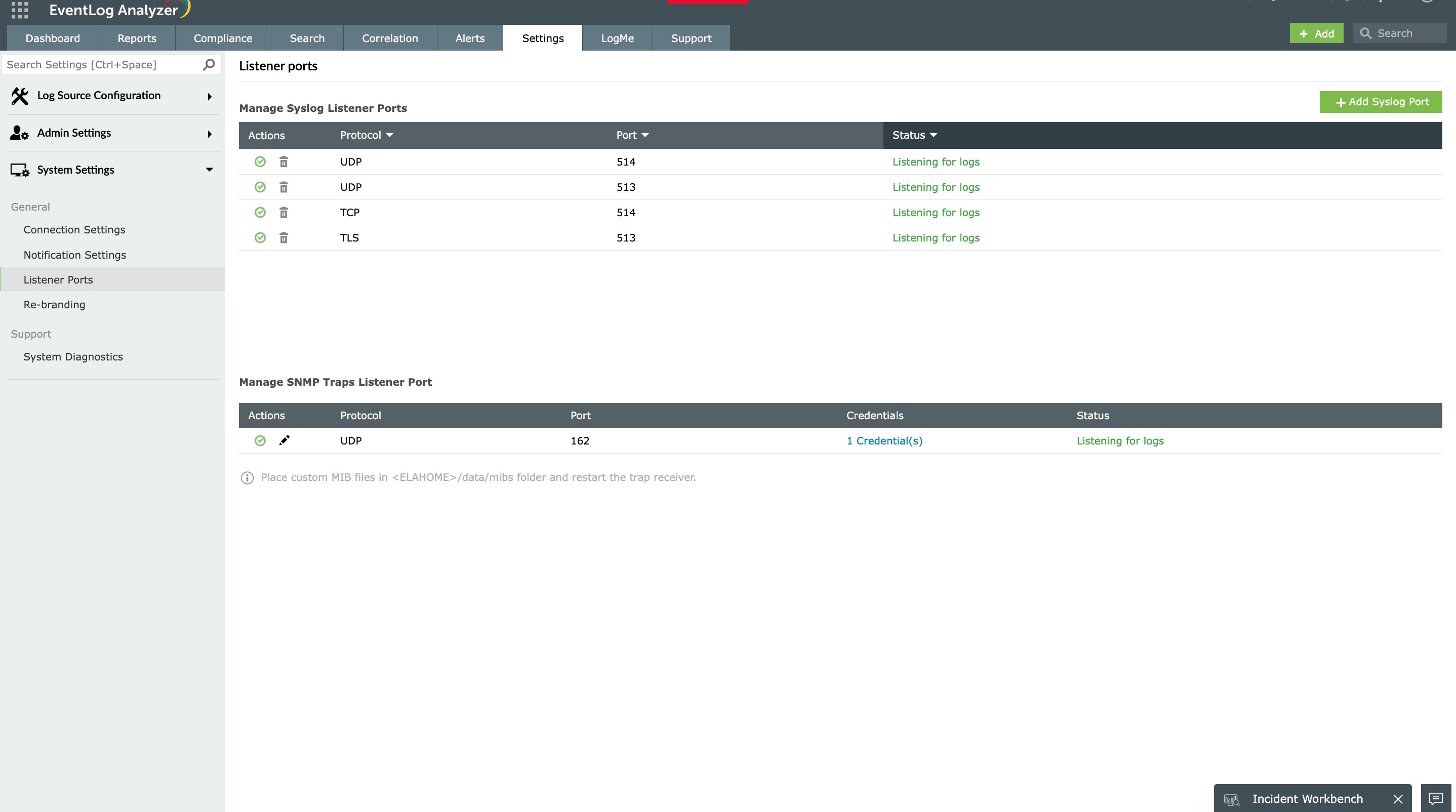
The built-in syslog server listens on UDP 514, TCP 514, and TLS 6514 concurrently with no separate collectors or protocol-specific instances. Devices continue sending on whichever transport they support, and EventLog Analyzer normalizes the incoming data into a single parsing and analysis pipeline. The custom log parser handles vendor-specific formats and any human-readable log structure that isn't recognized out of the box.
Syslog reports for threat detection and compliance
Once collected, syslog messages from UDP-only network devices, TCP-connected servers, and TLS-encrypted cloud workloads appear in a unified log management dashboard. Over 1,000 predefined reports cover the most common syslog sources, and the correlation engine detects patterns across log sources.
EventLog Analyzer also offers predefined compliance reports for the PCI DSS, HIPAA, SOX, ISO 27001, the GDPR, FISMA, the GLBA, GPG 13, ISLP, and Cyber Essentials. TLS 6514 collection ensures log data in transit meets encryption requirements. Archived logs are encrypted and retained to match regulatory mandates.
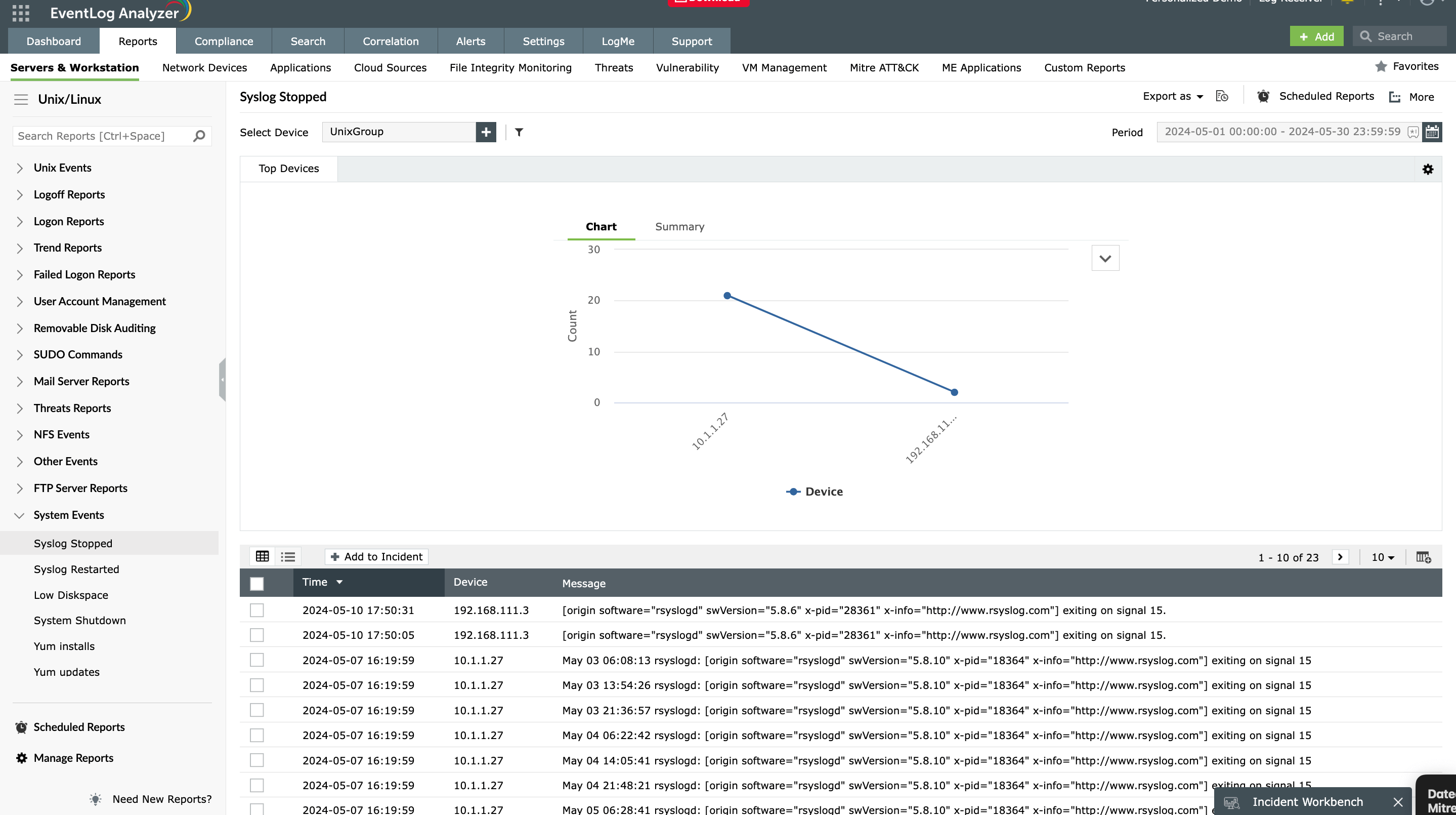
Ensure secure and compliant log collection with EventLog Analyzer’s robust support for all major syslog protocols.
Frequently asked questions
Syslog can be transmitted over UDP, TCP, TLS, or RELP. UDP is the historical default and remains the most common transport on network devices, but modern deployments increasingly rely on TCP for reliability or TLS for encrypted delivery. For a lookup of default port numbers across all four transports, see syslog port 514.
Both. The original BSD syslog protocol defined in RFC 3164 uses UDP, and most network devices still default to UDP for backward compatibility. Modern server and application deployments favor TCP for its ordered, acknowledged delivery, and TLS-encrypted TCP where log traffic crosses untrusted networks.
TCP is connection-oriented and delivers messages in order with acknowledgment at the transport layer; UDP is connectionless and provides no delivery guarantee. TCP is the appropriate choice for logs that must survive network congestion or brief collector unavailability, while UDP suits high-volume telemetry where occasional message loss is acceptable.
The Reliable Event Logging Protocol (RELP) is a TCP-based syslog transport developed by the rsyslog project that adds application-layer acknowledgment on top of TCP. It maintains session state, holds unacknowledged messages in a local buffer, and reissues them after a reconnection, guaranteeing message-level delivery even when the underlying TCP connection drops. RELP is the correct choice for regulated industries, multi-hop syslog relays, and WAN log collection.
Encrypt syslog traffic using TLS on TCP port 6514, as defined in RFC 5425 (TLS Transport Mapping for Syslog). TLS provides confidentiality, integrity, and mutual authentication between sender and collector, and is required by the PCI DSS and HIPAA for log data crossing untrusted networks. For a full configuration walkthrough covering certificate generation and rsyslog setup, see how to encrypt remote syslog with TLS.
RELP uses TCP port 2514 by default. The port is configurable in rsyslog through the imrelp (receiver) and omrelp (sender) modules. For a complete port reference across all syslog transports, see syslog port 514.