ManageEngine ADSelfService Plus Authentication bypass vulnerability management and remediation FAQ [CVE-2021-40539]
FAQs
- What is the CVE-2021-40539 vulnerability?
- Which versions of ADSelfService Plus has this vulnerability?
- How do I know if I've been affected by this vulnerability?
- What should I do to keep my environment safe from attackers exploiting this vulnerability?
- How do I update ADSelfService Plus to build 6114?
- How do I find my current build number?
- What does the CISA recommend users of ADSelfService Plus to do?
- Are there any workarounds that address this vulnerability if I can't update immediately?
- What is ManageEngine doing to address this vulnerability?
- Where can I get complete details about this vulnerability and recommended actions?
1. What is the CVE-2021-40539 vulnerability?
CVE-2021-40539 is an authentication bypass vulnerability concerning the REST API URLs in ADSelfService Plus. This is a critical issue and can allow attackers to gain unauthorized access to the product through REST API endpoints by sending a specially crafted request. This would allow the attacker to carry out subsequent attacks and perform RCE.
2. Which versions of ADSelfService Plus has this vulnerability?
ADSelfService Plus builds up to 6113 are vulnerable.
3. How do I know if I've been affected by this vulnerability?
- Run our exploit detection tool
We have developed a remediation tool to help you identify whether your installation has been affected by this vulnerability. You can download the tool here. Once you have downloaded, follow these steps:
- Extract the tool to the \ManageEngine\ADSelfService Plus\bin folder.
- Right-click on the RCEScan.bat file, and select Run as administrator.
- A Command Prompt window will open and the tool will run a scan. If your installation is affected, you will get the following message:
Result: Your ADSelfService Plus installation is affected by the authentication bypass vulnerability.
(or) To manually identify if your installation is affected, follow these steps:
- (a). Check for specific log entries
a. Access log
In \ManageEngine\ADSelfService Plus\logs folder, search the access log files of pattern '"access_log_<date>.txt" and check for entries with the strings listed below:
/../RestAPI
/./RestAPI
The image below shows such an access log entry:
 CVE-2021-40539 exploit analysis flowchart
b. ServerOut log
In \ManageEngine\ADSelfService Plus\logs folder, search the access log files of pattern '"serverOut_<date>.txt" and check for an exception as shown in the image below:
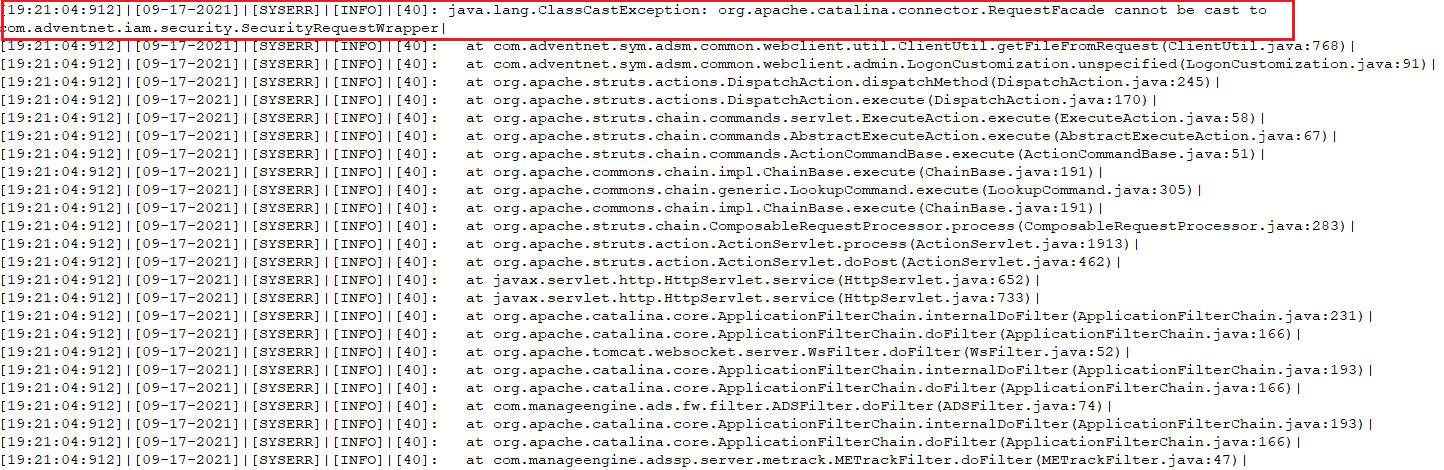 CVE-2021-40539 exploit analysis flowchart
C. ADS log
In \ManageEngine\ADSelfService Plus\logs folder, search the access log files of pattern '"adslog_<date>.txt" and check for an exception as shown in the image below:
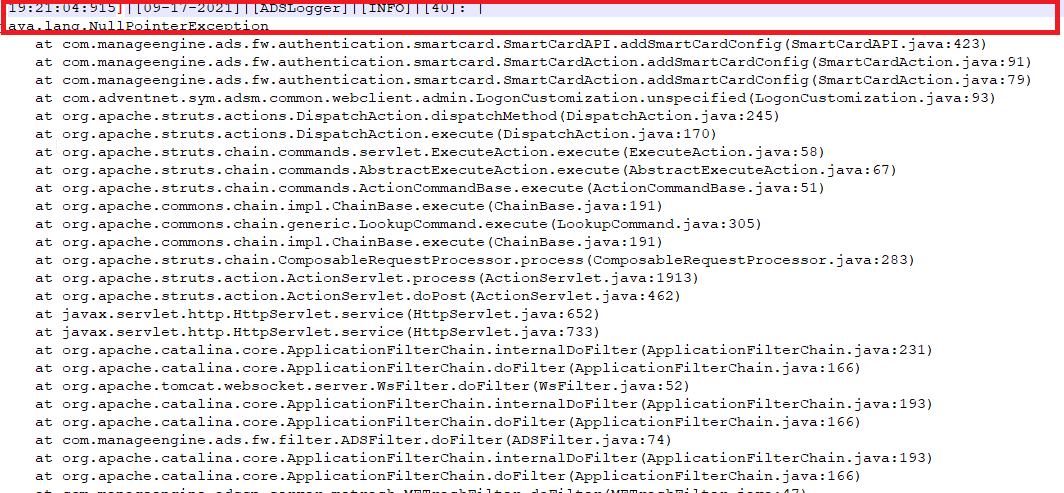 CVE-2021-40539 exploit analysis flowchart
- (b). Check for specific files in the system
Affected systems will have the following files in the ADSelfService Plus installation folder if you are running versions 6113 or lower:
- service.cer in the \ManageEngine\ADSelfService Plus\bin folder.
- ReportGenerate.jsp in \ManageEngine\ADSelfService Plus\help\admin-guide\Reports and \ManageEngine\ADSelfService Plus\webapps\adssp\help\admin-guide\reports folders.
- adap.jsp in the \ManageEngine\ADSelfService Plus\webapps\adssp\help\html\promotion folder.
- custom.bat and custom.txt files in the C:\Users\Public\ folder.
4. What should I do to keep my environment safe from attackers exploiting this vulnerability?
Implement the remediation steps provided below at the earliest.
- If your installation is affected by the vulnerability
- Download and install ManageEngine ADSelfService Plus. The build of the new installation should be the same as that of the backup.
- Restore the backup, and start the server. It is highly recommended to utilize a different hardware setup for the new installation.
- Once the server is up and running, update the installation to the latest build, 6114 or above, using the service pack.
- Check for unauthorized access to or use of accounts. Also, check for any evidences of lateral movement from the compromised machine to other machines. If there are any indications of compromised Active Directory accounts, initiate password reset for those accounts.
- If you need further information, have any questions, or face any difficulties updating ADSelfService Plus, contact our emergency support hotline: adselfserviceplus-security@manageengine.com or +1-408-916-9890 (toll free)
- If your installation is not affected by the vulnerability
Even if your installation is not affected by the vulnerability, we suggest you update to ADSelfService Plus build 6114 or above using the service pack.
5. How do I update ADSelfService Plus to build 6114?
Follow the below steps to update ADSelfService Plus to build 6114:
- Shut down ADSelfService Plus
- If the product runs as an application, click on Start → All Programs → ADSelfService Plus → Stop ADSelfService Plus.
- If the product runs as a Windows service, click on Start → Run → type "services.msc" → Stop "ManageEngine ADSelfService Plus".
- Execute the stopDB.bat file under <ADSelfService Plus>\bin directory.
- Backup ADSelfService Plus by zipping the contents of <ADSelfService Plus> directory.
- If you are using an external database server (MS SQL or MySQL), then take a backup of the database also. If you are using a MySQL server and have McAfee antivirus scanning the machine, then please pause the antivirus software till the update process is complete.
- Open Command Prompt and execute the UpdateManager.bat file under <ADSelfService Plus>\bin directory.
- For Windows Vista, Server 2008 and higher machines with User Account Control enabled, start the Command Prompt as an administrator (right-click Command Prompt and select 'Run as Administrator')
- Click Browse and select the PPM file that you have downloaded.
- Click on Install for the service pack. Depending on the amount of data to be migrated, the installation procedure may take a few minutes. Please do not terminate prematurely.
- Click Close and then Exit to quit Update Manager tool.
- Start ADSelfService Plus.
- If the product runs as an application, click on Start → All Programs → ADSelfService Plus → Start ADSelfService Plus.
- If the product runs as a Windows service, click on Start → Run → type "services.msc" → Start "ManageEngine ADSelfService Plus".
6. How do I find my current build number?
To find your current build number, log in to the ADSelfService Plus web client, and click the "License" link in the top pane. You'll find the build number in the License Details popup.
7. What does the CISA recommend users of ADSelfService Plus to do?
The CISA recommends users and administrators to review our security advisory and update ADSelfService Plus to the latest build 6114 or above.
8. Are there any workarounds that address this vulnerability if I can't update immediately?
Currently, there are no workarounds to address this vulnerability. The threat posed by the vulnerability is critical. Therefore, we strongly recommend you update ADSelfService Plus to the latest build as soon as possible.
9. What is ManageEngine doing to address this vulnerability?
The new ADSelfService Plus build 6114 released on 7th September 2021 fixes the authentication bypass vulnerability.
You can use our exploit detection tool to check if your installation has been affected by this vulnerability. We've also put together an incident response plan to help you immediately address this vulnerability.
For any immediate support regarding this issue, customers can get in touch with us at adselfserviceplus-security@manageengine.com or +1-408-916-9890 (toll free).
To bolster the security of ADSelfService Plus further, our engineering and security teams are taking measures to improve the security of the product.
10. Where can I get complete details about this vulnerability and recommended actions?
We've put together a dedicated webpage to keep you up to date on the latest updates from our side, the timeline of the vulnerability detection, technicalities of the vulnerability, our incident response plan, and recommended actions. Visit this page for more info.
Highlights of ADSelfService Plus
Allow Active Directory users to self-service their password resets and account unlock tasks, freeing them from lengthy help desk calls.
Get seamless one-click access to 100+ cloud applications. With enterprise single sign-on, users can access all their cloud applications using their Active Directory credentials.
Intimate Active Directory users of their impending password and account expiry via email and SMS notifications.
Synchronize Windows Active Directory user passwords and account changes across multiple systems automatically, including Microsoft 365, Google Workspace, IBM iSeries, and more.
Strong passwords resist various hacking threats. Enforce Active Directory users to adhere to compliant passwords by displaying password complexity requirements.
Enable Active Directory users to update their latest information themselves. Quick search features help admins scout for information using search keys like contact numbers.

 Free Edition







