Executing Custom Scripts
What is a Custom Script Configuration?
Custom script configuration in Endpoint Central enables administrators to establish and manage essential settings and tasks for their organization. This includes actions like disabling Windows auto update, setting the date format, checking for the existence of a file, etc. These configurations can be applied to the Windows operating systems as Computer Configuration. These scripts offer more flexibility compared to standard options, allowing you to run scripts tailored to your specific requirements. They can be scheduled to run during Every Startup, Subsequent Startup, Refresh Cycle, or just Once.It is important to select the configuration type as Computer based on the script's behavior.
Supported Language for Windows Custom Script
Windows supported script types - vb, js, ps1, cmd, msi, jse, exe, bat, vbe, vbs, wsf, wsc, wsh, reg.
In Endpoint Central, scripts must be added to the Script Repository before being deployed to end-machines. You can choose from the predefined script templates or add your own scripts to the repository.
How to Deploy a Custom Script Configuration?
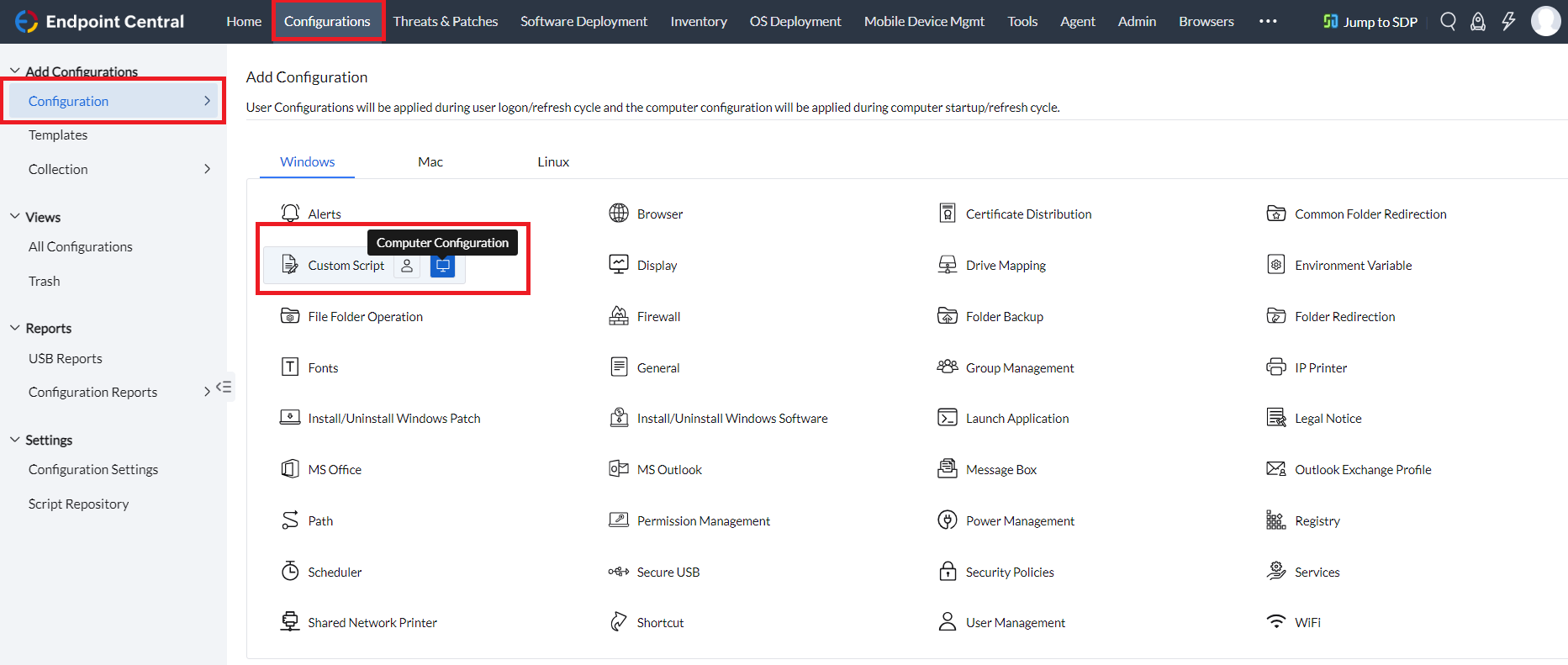
- In the Endpoint Central console, navigate to Configurations > Add Configurations > Windows Configuration > Custom Script > Computer Configuration.
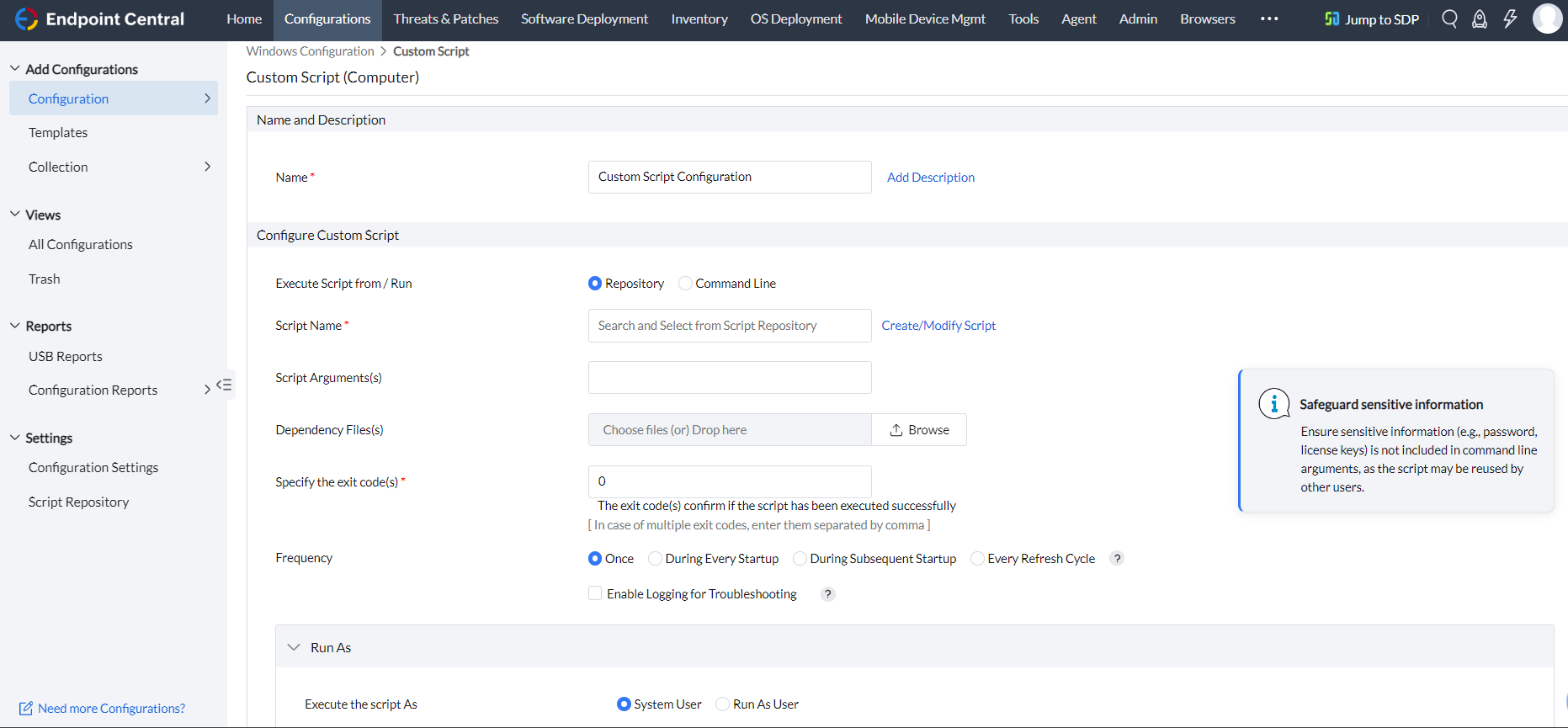
- Specify the Name and Description for the configuration
- You can execute the custom script using the Repository or Command line option.
- If you want to execute scripts that are available in the Script Repository, then you can proceed with the Repository option.
- Select the script from the Script Name field.
- Provide Script Arguments, if any.
Note: For example, in case of blockexe.bat the application to be blocked must be provided in script arguments. In case of hard coded scripts, it may not be necessary. If multiple arguments are required, each argument needs to be enclosed within "...." and each argument is separated from one another by blank white space.
- Upload Dependency Files, if any.
- Exit codes confirm if the script has been executed successfully. By default, it is 0. If you have any exit codes, you can specify them here. If there are multiple exit codes, separate them with commas [,].
- If you want to run commands, then you can proceed with the Command Lineoption.
- Enter the command to be executed in the Command Line. To execute multiple commands, enter them separated by a semicolon [;].Dynamic variables can be assigned if needed.
- Upload Dependency Files, if any
- Exit codes confirm if the script has been executed successfully. By default, it is 0. If you have any exit codes, you can specify them here. If there are multiple exit codes, separate them with commas [,].
- Configure the Frequency as per your requirement from the options given below:
- Once: The script will be deployed once.
- During Every Startup: The script will be deployed during every system startup. If execute until is selected, then the script will be executed during every system startup until the configured date and time.
- During Subsequent Startup: The script will be executed for the next number of startups you select from the dropdown.
- Every Refresh Cycle: The script will be executed every 90 minutes on the target machine.
- If you select Enable logging for troubleshooting,the executed script output will be logged and it will be displayed in the Remarks section under
All Configurations > Click on any your Computer Configuration > Execution Status
- Configure Run As as per your requirement from the options given below:
- System user: The script will be applied at the System level, utilizing the System user account.
- Run as User: The script will be deployed to the target machine with the credentials you select. We recommend choosing the Domain Admin credentials to avoid access level issues.
- Define the targets for the deployment.
- Specify retry options, if required
- You can also enable notificationsto receive emails based on the specified frequency.
- Click on the Deploy/Deploy Immediately button to deploy the configuration in the target machines.
- To save the configuration as a draft or template for later use, click Save as
You have successfully added a Windows Computer-based Custom Script for your endpoints.



