 Wake On LAN Tool
The free Wake on LAN tool can be used to boot machines in the LAN from remote.
It allows you to boot multiple machines simultaneously.
Wake On LAN ToolThe free Wake on LAN tool can be used to boot machines in the LAN from remote.
It allows you to boot multiple machines simultaneously.
Endpoint Central offers free Windows Admin tools which is essential for every windows administrators. This tool will be helpful to optimize the day-to-day operations at ease. Various operations like, Remote Desktop Connection, Remote Task Manager, Wake on LAN, Software Inventory, Remote Command Prompt, GPO Update, Remote Shutdown/Restart, Join/Unjoin Computer, Currently Logged On User, Hard Disk Space Detector, Local Users/Groups List, Network Share Browser, and Laptop Battery Power Monitor, System Inventory and Remote Device Manager. These tools are made available from the Endpoint Central family and is provided as a separate download, which is absolutely free to use.
Download now: Free Android app for remote system administration
You can download and install the tool from here. Once the installation has completed, you will have to invoke the tool by clicking the desktop shortcut. You will have to click settings tab and add your domain credentials, to fetch the list of managed computers. While adding the domain, ensure that you specify a valid domain net bios name or a fully qualified domain name, provide admin username and password of the selected domain. Similarly while specifying the user name you need not include the domain alias name. Refer the below screenshot for adding the domain.
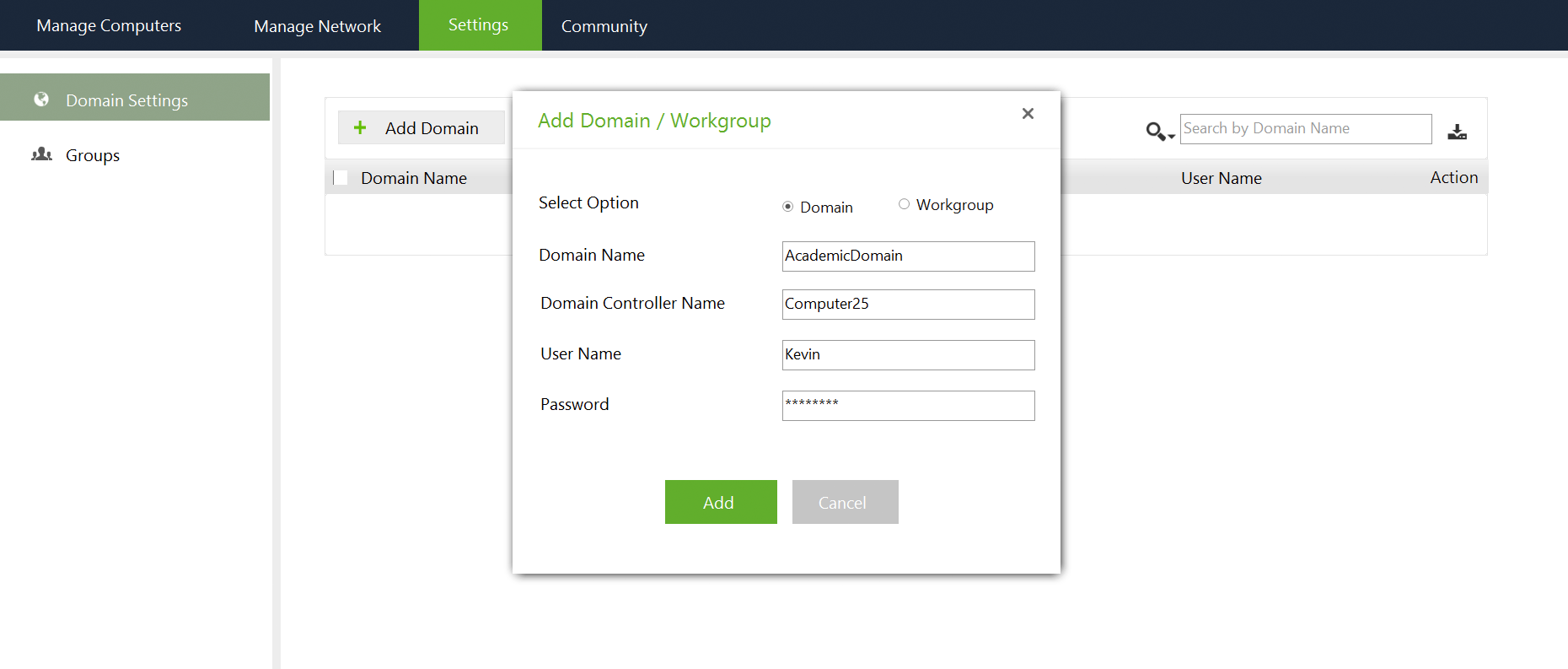
You should now choose the comptuers which needs to be managed. Click Managed Computers tab and choose "Add", to add the computers. You are now ready to perform the any of the below listed operations.
Tool that helps in taking control of a remote windows computers and troubleshoot them remotely. It doesn't require any agents to be installed on those remote computers for establishing a remote desktop connection and also helps in sharing files between them.
Utility to view the processes running in a remote computer along with its details like, Process ID, Memory Usage, Session ID, Priority, etc. It also provides an option to select the parameters to view. Apart from just viewing the processes, the administrators can also terminate a process.
Utility to boot computers in the network (LAN) from remote. It allows the administrators to boot multiple computers simultaneously. The Administrator has to just specify the IP Address, MAC Address and the Subnet Mask of the computers to wake them up.
Utility to retrieve the details of the software installed in the computers of a Windows Domain. The Software details include Software Name, Version, Manufacturer and Usage statistics. The software details can be exported as txt and csv formats.
Free tool to open a command prompt of a remote computer and execute a command. The remote computer can be in the domain or a workgroup. The administrator has to specify a credential that has necessary privileges to execute the commands. The computer can be either specified manually or selected by specifying the Domain Controller.
Utility to perform a GPO Update in the computers of a Windows Domain. GPOs are used to send configuration instructions to user and computer objects in the Windows Active Directory. By default, the GPO updates happen periodically, every 90 minutes. This utility helps the Administrators to perform a GPO Update on-demand on multiple domain computers simultaneously.
Utility to shutdown or restart the computers of a Windows Domain. The Administrator can specify a common credential to perform this operation on multiple computers and can select the computers by specifying the Domain Controller.
Utility to move a computer from one domain to another or from a domain to a workgroup or from a workgroup to a domain. It also provides the ability to restart the computer after this operation. The status of the operation is also displayed at the bottom of the window.
Utility to retrieve the details of the users logged on to a remote computer. The Administrator can specify a common credential to perform this operation on multiple computers and can select the computers by specifying the Domain Controller.
Utility to retrieve the information about the Hard Disk like Partition/Drives, Volume Name, Total Size, Free Space, and File System. The Administrator can specify a common credential to perform this operation on multiple computers and can select the computers by specifying the Domain Controller.The results can be exported to a CSV or Text format for a later reference.
Tool to get the information about local users and groups in the remote computers. The user details include, Computer Name, User Name, Full Name, Caption, Status, etc. The group details include, Computer Name, Group Name, Caption, Description, and Status. The Administrator can specify a common credential to perform this operation on multiple computers and can select the computers by specifying the Domain Controller.The results can be exported to a CSV or Text format for a later reference.
Tool to get the information about the files, folders and Active Sessions of the shares in a remote computer. The results can be exported to a CSV or Text format for a later reference.
Tool to monitor the battery power of the portable computers in the network periodically and alert by playing a sound when the power falls below a specified percentage. The Administrator can specify a common credential to perform this operation on multiple computers and can select the computers by specifying the Domain Controller.The results can be exported to a CSV or Text format for a later reference.
Tool to fetch inventory information of a remote computer. The inventory details include system information like Services, Users,Groups, Shares, Environment, Updates, and Startup items, and Hardware details like Hardware elements and Hardware resources.The details can be exported as CSV for every module.
Tool to manage devices connected to a remote computer. It allows you to enable, disable, update or uninstall the devices attached to the remote computer in your domain. This tool can be used to manage keyboards, monitors, mice, battery, processor, USB controller, disk drivers, imaging devices, storage volume, display adapter, network adapter etc.,