

- Free Edition
- Quick Links
- Active Directory Auditing
- Active Directory auditor
- Active Directory monitoring
- Account lockout analyzer
- Login monitoring software
- Active Directory change notifier
- User logon audit reports
- AD logon logoff tracker
- User logon failure auditing
- Login history tracking tool
- AD change auditor
- Insider threat detection software
- Permissions change auditing
- Entra ID reporting
- Privileged user monitoring
- User behavior analytics tool
- Active Directory security monitoring
- Group Policy auditing tool
- GPO change auditor
- Entra ID auditing
- Audit user account management
- OU change auditor
- Audit group membership changes
- Active Directory auditing and reporting tool
- GPO reporting tool
- Remote desktop monitoring software
- PowerShell logging and auditing
- Azure password protection auditing
- Azure sign-in risk detection
- File Server Auditing
- Windows Server Auditing
- Employee Tracking
- Workstations Auditing
- Compliance Auditing
- Other features
- SIEM Integration
- Windows DNS - Schema Auditing
- Windows security event log monitoring
- SIEM audit solution
- Schedule Active Directory change reports
- Reports from Archived Data
- Aggregated summary reports
- AD new/old attribute changes
- Audit trail
- Audit Active Directory LAPS
- Scheduled Reports & Alerts
- Account lockout examiner
- Industry
- Documents
- Success Stories
- Related Products
- Log360 (On-Premise | Cloud) Comprehensive SIEM and UEBA
- ADManager Plus Active Directory Management & Reporting
- EventLog Analyzer Real-time Log Analysis & Reporting
- ADSelfService Plus Identity security with MFA, SSO, and SSPR
- DataSecurity Plus File server auditing & data discovery
- Exchange Reporter Plus Exchange Server Auditing & Reporting
- M365 Manager Plus Microsoft 365 Management & Reporting Tool
- RecoveryManager Plus Enterprise backup and recovery tool
- SharePoint Manager Plus SharePoint Reporting and Auditing
- AD360 Integrated Identity & Access Management
- AD Free Tools Active Directory FREE Tools
Windows Event ID 4724 - An attempt was made to reset an account's password
- Introduction
- Description of Event Fields
- Monitoring event ID 4724.
- The need for an auditing solution
Introduction
Event ID 4724 is generated every time an account attempts to reset the password for another account (both user and computer accounts).
Note: Event ID 4723 is recorded every time a user attempts to change their own password. (See details)
If the new password fails to meet the domain password policy (or local password policy in local user accounts) then a failure event is recorded.
No event is generated when an attempt is made with a user account that doesn't have the permission to do so.
Description of the event fields.
Figure 1. Event ID 4724 — General tab under Event Properties.
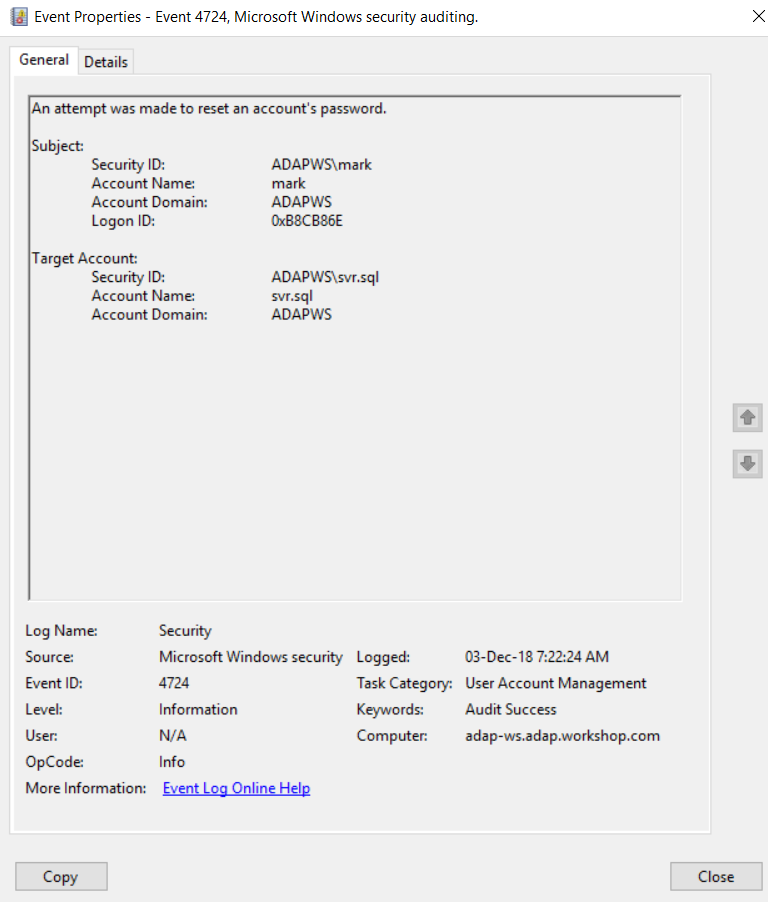
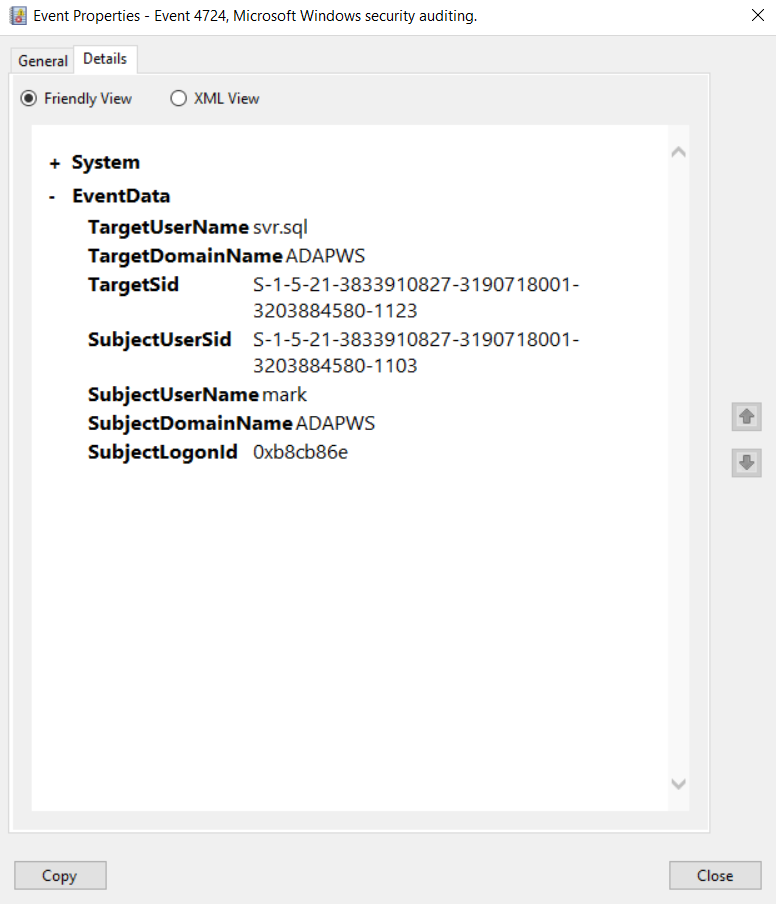
Figure 2. Event ID 4724 — Details tab under Event Properties.
Security ID: The SID of the account that made an attempt to reset the Target Account's password.
Account Name: The name of the account that made an attempt to reset the Target Account's password
Account Domain: The Subject's domain or computer name. Formats could vary to include the NETBIOS name, the lowercase full domain name, or the uppercase full domain name. For well-known security principals, this field is "NT AUTHORITY," and for local user accounts, this field will contain the computer name that this account belongs to.
Logon ID: The logon ID helps you correlate this event with recent events that might contain the same logon ID (e.g. event ID 4624).
Security ID: The SID of the account for which the password reset was requested.
Account Name: The name of the account for which the password reset was requested.
Account Domain:The Target Account's domain or computer name. Formats could vary to include the NETBIOS name, the lowercase full domain name, or the uppercase full domain name. For well-known security principals, this field is "NT AUTHORITY," and for local user accounts, this field will contain the computer name that this account belongs to.
Monitoring event ID 4724.
- Rogue administrators trying to reset passwords to get access to confidential resources that they normally don't have access to.
- Accounts that have a Security ID that corresponds to high-value accounts, including administrators, built-in local administrators, domain administrators, and service accounts.
- Accounts that have to be monitored for every change. This list can vary between enterprises and industries.
- Local accounts, because their passwords usually don't often change, and this could serve as an indicator of malicious activity.
The need for an auditing solution.
Auditing solutions like ADAudit Plus offer real-time monitoring, user and entity behavior analytics, and reports; together these features help secure your AD environment.
24/7, real-time monitoring.
Although you can attach a task to the security log and ask Windows to send you an email, you're limited to simply getting an email whenever event ID 4724 is generated. Windows also lacks the ability to apply more granular filters that are required to meet security recommendations.
For example, Windows can send you an email every time event ID 4724 is generated, but it can't tell the difference between regular and high-value accounts. Receiving alerts specifically for high-value accounts reduces the chance of missing out on critical notifications amongst the heap of false-positive alerts.
With a tool like ADAudit Plus, not only can you apply granular filters to focus on real threats, you can get notified in real time via SMS, too.
User and entity behavior analytics (UEBA).
Leverage advanced statistical analysis and machine learning techniques to detect anomalous behavior within your network.
Compliance-ready reports.
Meet various compliance standards, such as SOX, HIPAA, PCI, FISMA, GLBA, and the GDPR with out-of-the-box compliance reports.