

- Free Edition
- Quick Links
- Active Directory Auditing
- Active Directory auditor
- Active Directory monitoring
- Account lockout analyzer
- Login monitoring software
- Active Directory change notifier
- User logon audit reports
- AD logon logoff tracker
- User logon failure auditing
- Login history tracking tool
- AD change auditor
- Insider threat detection software
- Permissions change auditing
- Entra ID reporting
- Privileged user monitoring
- User behavior analytics tool
- Active Directory security monitoring
- Group Policy auditing tool
- GPO change auditor
- Entra ID auditing
- Audit user account management
- OU change auditor
- Audit group membership changes
- Active Directory auditing and reporting tool
- GPO reporting tool
- Remote desktop monitoring software
- PowerShell logging and auditing
- Azure password protection auditing
- Azure sign-in risk detection
- File Server Auditing
- Windows Server Auditing
- Employee Tracking
- Workstations Auditing
- Compliance Auditing
- Other features
- SIEM Integration
- Windows DNS - Schema Auditing
- Windows security event log monitoring
- SIEM audit solution
- Schedule Active Directory change reports
- Reports from Archived Data
- Aggregated summary reports
- AD new/old attribute changes
- Audit trail
- Audit Active Directory LAPS
- Scheduled Reports & Alerts
- Account lockout examiner
- Industry
- Documents
- Success Stories
- Related Products
- Log360 (On-Premise | Cloud) Comprehensive SIEM and UEBA
- ADManager Plus Active Directory Management & Reporting
- ADAudit Plus Real-time Active Directory Auditing and UBA
- ADSelfService Plus Identity security with MFA, SSO, and SSPR
- DataSecurity Plus File server auditing & data discovery
- Exchange Reporter Plus Exchange Server Auditing & Reporting
- M365 Manager Plus Microsoft 365 Management & Reporting Tool
- RecoveryManager Plus Enterprise backup and recovery tool
- SharePoint Manager Plus SharePoint Reporting and Auditing
- AD360 Integrated Identity & Access Management
- AD Free Tools Active Directory FREE Tools
File system auditing with ADAudit Plus
Track every file system operation
ADAudit Plus captures every read, write, create, delete, move, rename, and copy-paste event across Windows file servers and several NAS device types. Each event records the user, machine, IP address, file path, and the process that performed the operation.
Audit folder permission changes
Every NTFS permission change, SACL modification, and folder ownership transfer is captured with before-and-after values. You can trace exactly what changed, who changed it, and when, across every monitored server from a single console.
Detect ransomware and anomalous file activity
ADAudit Plus applies machine learning to each user's baseline file activity volume. A sudden spike in file modifications or deletions triggers an alert automatically, before a ransomware spreads to other servers or data destruction is complete.
Audit 13+ file server and NAS types
Windows File Server, NetApp, EMC Isilon, Synology NAS, Amazon FSx, Azure File Share, Nutanix Files, Qumulo NAS, and more are audited. Every platform feeds into the same audit console, so you never have isolated coverage gaps.
Real-time alerts on critical file events
Alert profiles fire the moment a high-risk file event—such as bulk deletions, permission changes on sensitive folders, or failed access attempts by accounts that should not be reaching a resource— occur. Alerts can be configured to trigger email, text message, or a service ticket.
Pre-configured compliance reports
Out-of-the-box file audit reports map directly to SOX, HIPAA, PCI-DSS, GDPR, FISMA, GLBA, and ISO 27001 requirements. Custom report profiles let you combine specific users, file paths, and operation types into saved views for recurring compliance workflows.
Process-level file audit trail
Beyond the user identity, ADAudit Plus captures which process performed each file operation. This matters when a legitimate user account is being used by malicious software, because the process name reveals what native user-level logging cannot.
Failed access attempt monitoring
Every denied read, write, and delete attempt is logged with the user, machine, and target file. Patterns of repeated failures against the same path, or across multiple paths, surface quickly in pre-configured reports.
Track file access, changes, and deletions in your file systems
Every file operation on a monitored server generates an audit record in ADAudit Plus. Deletions, moves, renames, and copy-paste operations each have their own dedicated report.
- You can view aggregated reports on all file operations by processes so you can identify which applications account for the bulk of file activity on each server.
- Track every file deletion with the user, machine, and file path, giving you enough detail to answer an incident question in a single query.
- Capture successful read actions with the name of the process that opened the file.
- Failed access attempts are tracked separately for read, write, and delete operations, so patterns across multiple failed attempts against sensitive paths are visible without manual correlation.
- You can review everything a specific user or administrator has accessed within a time window to track down rogue activity.
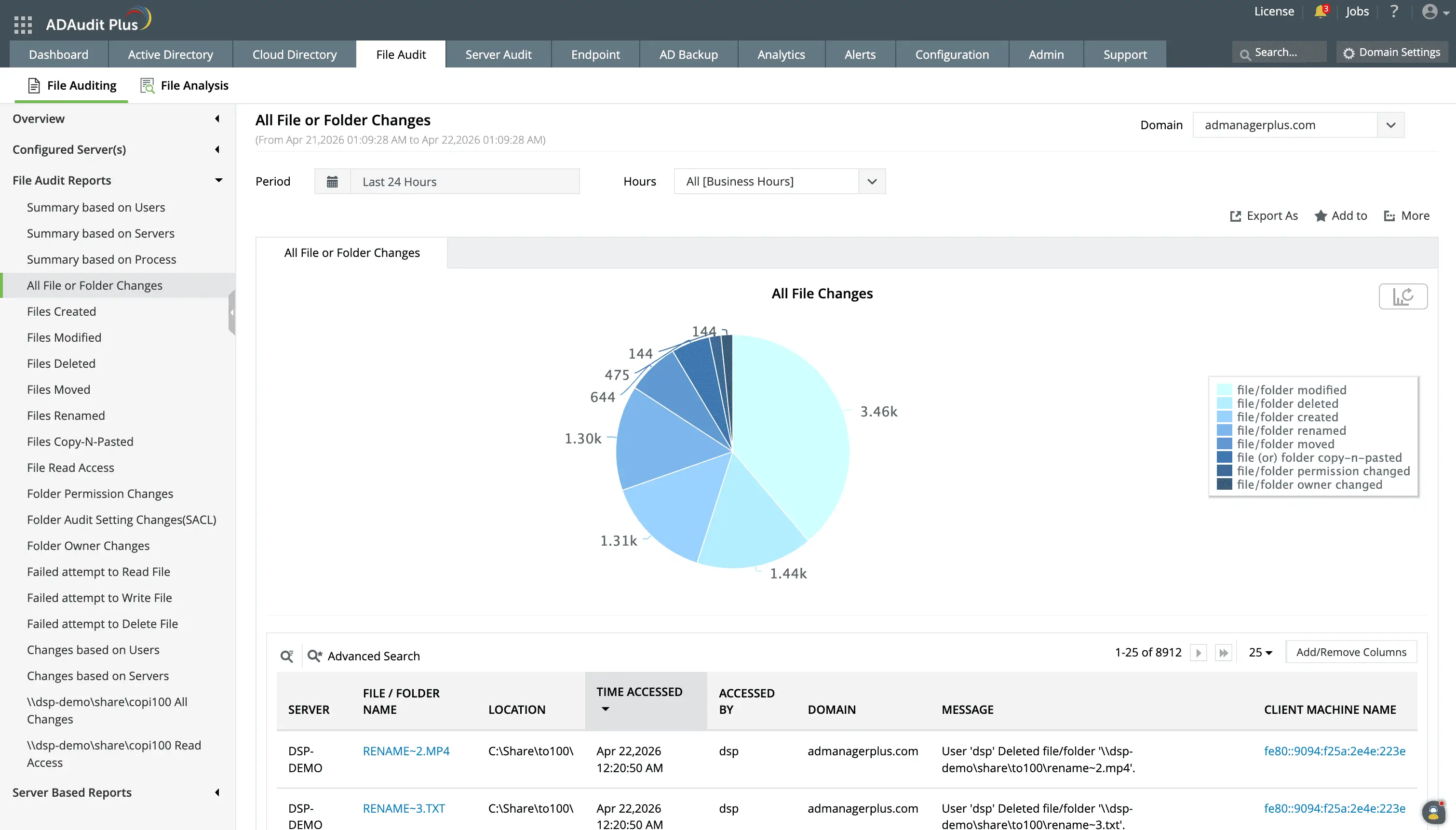
Know who changed what in your file systems in real-time.
Track every file creation, modification, deletion, move and rename, copy and paste, permission change, and owner change event in your file systems.
Audit file and folder permission changes
ADAudit Plus captures every NTFS permission change with the old and new permission values. This means that:
- SACL modifications are tracked separately so you have a record if someone suppresses future audit events by changing audit settings on a path.
- Folder ownership transfers are also captured with details on who the ownership has been transferred from and to.
- Every DACL change records what the permissions were before and what they became
- Folder ownership changes are recorded with the previous owner and the new owner
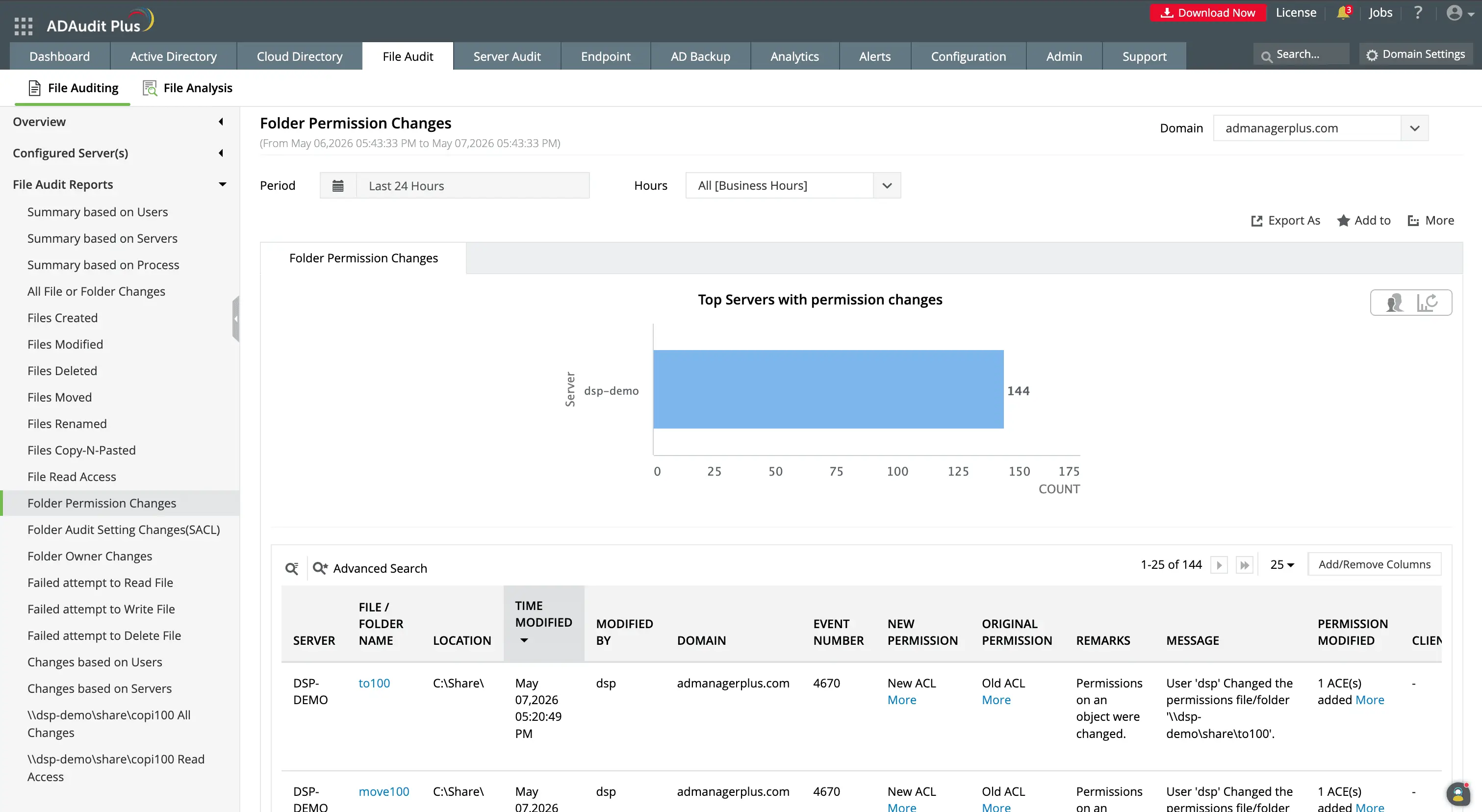
Track file system permission changes with old and new ACL values.
Know when users are assigned higher permissions to files and check if it is required for their jobs.
Detect ransomware and anomalous file activity
Ransomware encrypts files by modifying them at high volume in a short window. Destructive attacks delete files in bulk. Both patterns look similar in raw event logs: a large number of file modification or deletion events from a single user account in a compressed timeframe.
Without a baseline, distinguishing a ransomware attack from a legitimate batch operation requires static event thresholds or manual investigation after the fact.
ADAudit Plus uses machine learning to establish a per-user baseline for normal file activity volume. When a user's modification or deletion count exceeds their learned threshold, the anomaly is flagged and an alert fires. Because the baseline is dynamic and unique, a user who normally processes large file batches is not flagged for doing so. The anomaly detection responds to deviations from each user's own pattern, not a domain-wide average. With this capability, you can detect:
- Users whose file modification count significantly exceeds their baseline, which is the primary signal for ransomware activity.
- Bulk deletion spikes, which can indicate ransomware activity, deliberate data destruction, or exfiltration followed by deletion.
- Spikes in denied access attempts, which can indicate an account trying to reach file paths it has no permission to access.
- File operations outside a user's normal working hours, relevant when account credentials are being used by an attacker in a different time zone
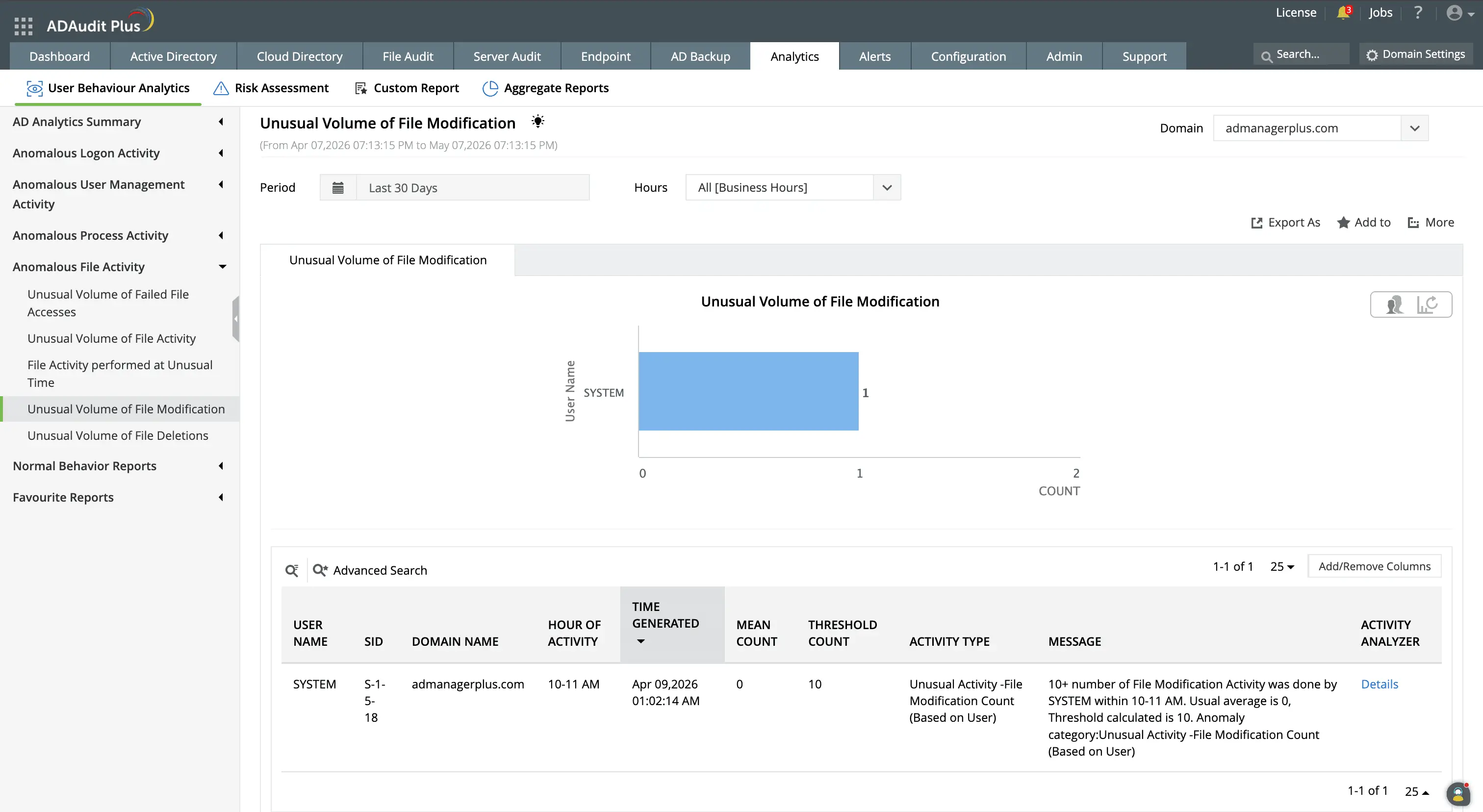
Set dynamic behavioral baselines for each user to know their usual activity volume and time, and know when deviations from this occur.
Get real-time alerts on critical file system events
ADAudit Plus ships with default alert profiles for the most critical file system events, and each profile is configurable to match your environment's specific thresholds and notification requirements.
- Alerts are delivered by email or SMS to the responsible team or individual stakeholder.
- You can configure automated responses to be executed when an alert is triggered.
- When integrated with a supported ITSM tool, a ticket is auto-created so the event enters your standard incident response workflow immediately.
Meet compliance requirements with file system audit reports
SOX, HIPAA, PCI-DSS, GDPR, FISMA, GLBA, and ISO 27001 each require organizations to demonstrate that access to sensitive data is controlled, changes are tracked, and audit records are retained and retrievable. ADAudit Plus includes pre-configured compliance report sets for all seven standards, plus custom profiles that combine specific users, file paths, operation types, and time filters into saved views. These can also be scheduled for automatic delivery at desired intervals.
Why native tools fall short on file system auditing
Windows Security Event logs record file access events locally on each server. This has several disadvantages:
- To investigate a file incident across multiple file servers, you retrieve logs from each machine separately. There is no native aggregation layer and no native alerting capability.
- A deletion that originated on one server and affected a file share mounted from another requires log queries on two different systems, with no built-in way to correlate the results.
- Security event logs on Windows file servers must be sized manually per server; overflows overwrite the oldest records, which creates compliance gaps when log retention is audited.
- Native auditing on NAS devices like NetApp, EMC, or Synology has no equivalent to Windows Event Viewer. Each vendor has its own log format, with no common interface for querying across platforms.
- Windows provides no native mechanism for process-level attribution in file events. You can see which user account performed an operation, but not which application or service initiated it.
ADAudit Plus aggregates file events from all monitored platforms into a single store, applies behavioral baselines to surface anomalies, and delivers real-time alerts with automated ITSM ticket creation.
4 compelling reasons to choose ADAudit Plus
Widely recognized
ADAudit Plus has been recognized as a Gartner Peer Insights Customers' Choice for Security Incident & Event Management (SIEM) for four consecutive years.
Easy deployment
Go from downloading ADAudit Plus to receiving predefined reports and alerts in under 30 minutes, without any professional help.
Competitive pricing
ADAudit Plus is licensed per-server, unlike other IT auditors which are licensed per-user. With per-server licensing, even with a growing number of users each year, you can continue to ingest log data without additional costs.
Unified visibility
ADAudit Plus consolidates auditing, security, and compliance across Active Directory, Entra ID, Windows servers, workstations, and file servers into a single pane of glass, eliminating the need to juggle multiple tools.
Frequently asked questions
File system auditing is the process of recording every operation performed on files and folders: reads, writes, creations, deletions, moves, and permission changes, along with the identity of the user or process that performed each action, the machine it originated from, and a precise timestamp.
For IT teams managing Windows environments, this record is the primary mechanism for investigating data incidents, satisfying compliance auditors, and catching unusual activity before it becomes a full-blown breach.
ADAudit Plus is a dedicated file system auditor for Windows file servers, a broad range of NAS devices, and cloud file storage platforms. It aggregates file events from every monitored source into a single console, applies user behavior analytics to surface deviations from normal activity, and delivers pre-configured compliance reports alongside real-time alerts.
Windows file auditing works through the Security Event Log and object-level SACL settings. When auditing is enabled on a folder via Group Policy and a SACL is applied to the object, Windows records matching file events as Security events on the server where the files reside.
Windows file system audit events are written to the Security event log on the file server where the files are stored. Each server maintains its own local log. There is no native central repository, so aggregating events across multiple file servers requires a dedicated audit tool like ADAudit Plus.
A file system auditing tool collects file system events from one or more servers, stores them centrally, and provides reporting and alerting on top. ADAudit Plus adds behavioral anomaly detection, process-level attribution, and coverage for 13+ Windows, NAS, and cloud file storage platforms.
ADAudit Plus includes pre-configured compliance report sets for SOX, HIPAA, PCI-DSS, GDPR, FISMA, GLBA, and ISO 27001, each mapped to relevant control requirements. Custom report profiles let you combine users, file paths, and operation types into saved views that run on a schedule.