Configuring Cisco FMC REST API Credentials for Firepower Rule Management
Firewall Analyzer allows you to retrieve and analyze Cisco Firepower security policies through the Cisco Firepower Management Center (FMC) REST APIs. Instead of connecting to individual Firepower devices, Firewall Analyzer communicates with the FMC server to obtain the rule configuration of all managed Firepower devices and populates the Rule Management database.
After the configuration is validated, you can generate Rule Management reports such as Policy Analysis, Rule Optimization, Security Audit, Change Tracking, and other policy compliance reports for the managed Firepower devices.
Prerequisites
Before configuring the credentials, ensure that:
- The Cisco Firepower devices are managed by Cisco Firepower Management Center (FMC).
- REST API access is enabled on the FMC server.
- A user account with sufficient privileges to access Firepower device policies is available.
- Firewall Analyzer uses only the FMC REST APIs to retrieve the rule configuration. Individual Firepower devices do not need to be configured separately when they are managed through Cisco FMC.
How It Works
When the Managed by FMC option is enabled, Firewall Analyzer performs the following actions:
- Connects to the specified Cisco FMC server using REST APIs.
- Authenticates using the configured credentials.
- Retrieves the security policy and rule configuration of the managed Firepower devices.
- Imports the retrieved configuration into the Rule Management database.
- Makes the imported policies available for Rule Management analysis and reporting.
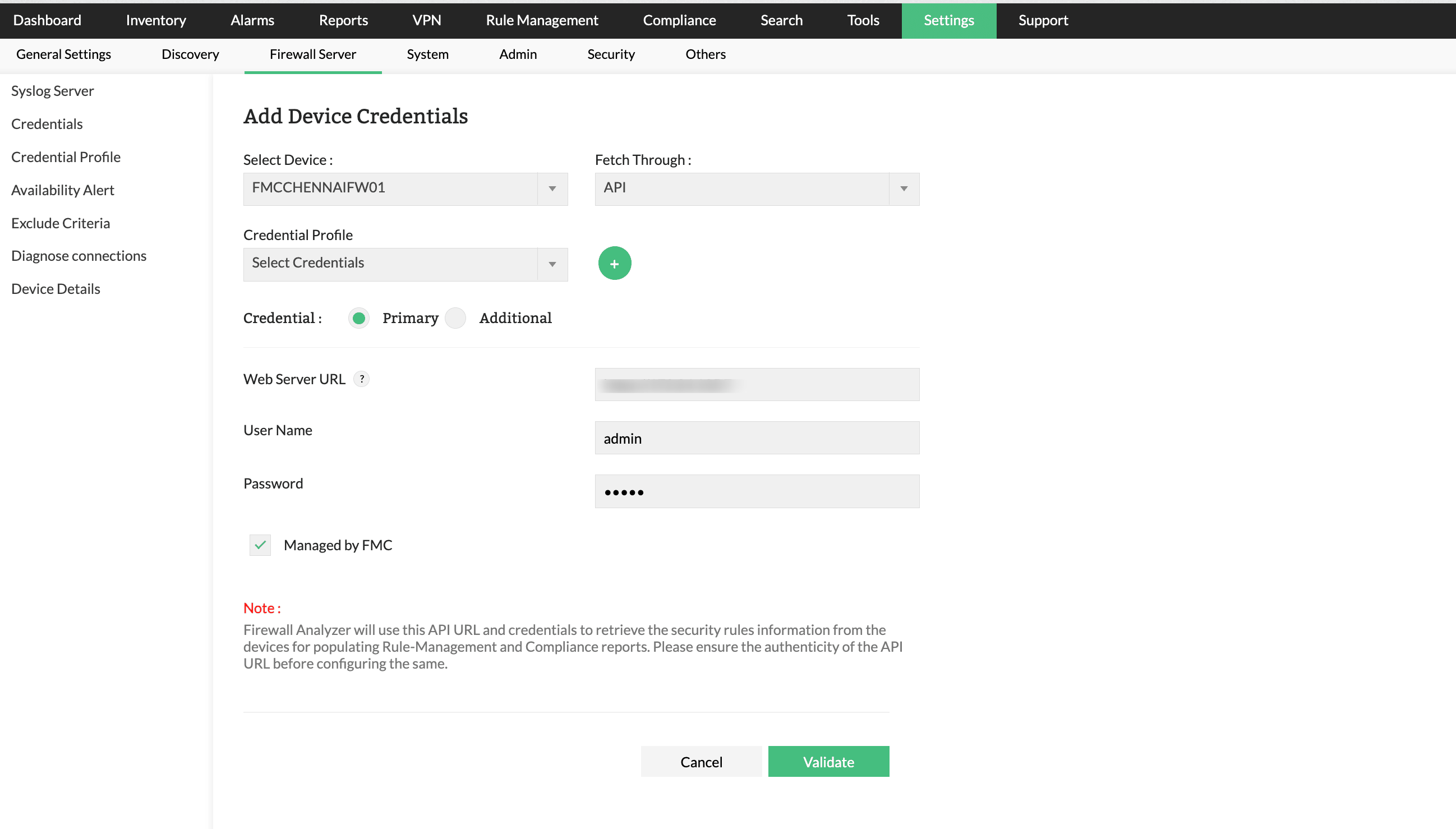
Configuring Cisco FMC Credentials
To configure Cisco FMC REST API credentials:
- Navigate to Settings > Firewall Server.
- Click Add Device Rule.
- Select the required Cisco Firepower device.
- Under Fetch Through, select API.
- (Optional) Select an existing Credential Profile or create a new one by clicking the + icon.
- Select the credential type as Primary or Additional, based on your requirement.
- Enter the following details:
- Web Server URL — Enter the Cisco FMC server URL.
Example:https://<FMC-IP-or-Hostname> - User Name — Enter the FMC administrator or API user name.
- Password — Enter the corresponding password.
- Web Server URL — Enter the Cisco FMC server URL.
- Enable the Managed by FMC option.
- Click Validate.
If the validation is successful, Firewall Analyzer authenticates with the FMC server using the REST APIs and retrieves the configuration of all Firepower devices managed by the selected FMC instance.