How to restore Endpoint Central Server file system?
Description
Endpoint Central takes a backup of your database to prevent the loss of business-critical data. In case your hard disk crashes, you can use the last backup to restore all the required information. You cannot restore backup files from older versions of Endpoint Central to new versions directly. If tried, an error message Endpoint Central Server is not compatible will be displayed on screen.
This document provides steps for restoring your Endpoint Central setup when the server crashes or to restore backup files from an older version of Endpoint Central to its latest version. Refer this document for restoration of database under normal circumstances.
Prerequisites
- You should have a copy of at least one backup file created by Endpoint Central.
- Endpoint Central server should be uninstalled. All the folders pertaining to the existing setup should be cleared.
Steps
Even before restoring the database, a few steps need to be carried out for initiating the restoration.
The below-mentioned steps are to followed for the initial restoration setup of PGSQL and MSSQL database.
For PGSQL Database
- Copy the latest backup file to the desktop.
- Download and install Endpoint Central EXE. The build number of backup and downloaded EXE should be the same. In case you are unable to find your build number, contact Endpoint Central Support.
- If you are downloading a Endpoint Central EXE version below 10.0.678, then follow the additional instructions given in this document.
For MSSQL Database
- Copy the latest backup file to the desktop.
- Download and install Endpoint Central EXE. The build number of backup and downloaded EXE should be the same. In case you are unable to find your build number, contact Endpoint Central Support.
- If you are downloading a Endpoint Central EXE version below 10.0.678, then follow the additional instructions given in this document before continuing to the next step.
- Upon completion of the startup, stop the Endpoint Central server.
- Delete desktopcentral database from SQL server. Ensure desktopcentral.mdf and desktopcentral_log.ldf files are deleted in DATA folder of SQL Server installation folder.
- Within server installation directory, access \bin>, execute changeDBserver.bat.
- Once the Database Setup Wizardis invoked, perform the following steps :
- Select Database Type as SQL Server.
- Specify the Host Name where SQL server is installed.
- Choose the mode of authentication.
- Specify the domain name, user name and password.
- Ensure that the option for migrating data from existing database is enabled.
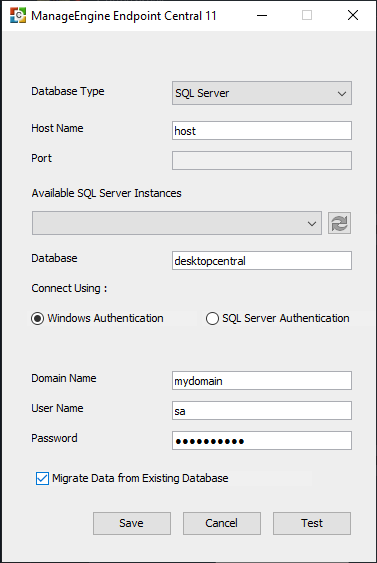
Fig: Database Setup Wizard
- On clicking Save, Endpoint Central server startup will be initiated.
Follow the steps mentioned below for restoration of the database :
- Upon completion of the startup, stop the Endpoint Central server.
- Navigate to the server installation directory, access \bin>and invoke backuprestore.bat file. This will open the Backup and Restore window.
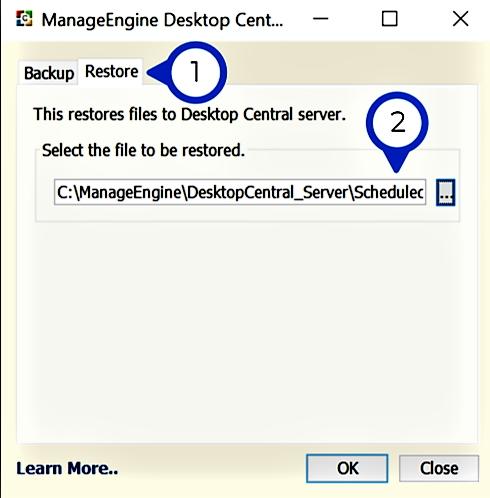
Fig: Backup and Restore Window
- If you have encrypted your backup using a password, the same password needs to be furnished for restoration of the backup.
- Start the server after restoration of the database.
- Provide the FQDN name/machine name/IP address of the existing server to the new server, so that agents can communicate with the new server seamlessly.
The patch repository and software repository should be reachable from the system where the restoration takes place. Alternatively, execute changeShareAccess.bat SWRepository=default,PatchStore=default from the command prompt to change the default location in the new setup.
You have successfully restored Endpoint Central setup using database backup.
Note: If you are restoring backup from an older version of Endpoint Central, upgrade to the latest build.
Applies to: Backup, Restore
Keywords: Backup-restore failure, Version incompatbility, Backup file,

 Free Edition