Integrating Trusted Third-Party Certificate Authorities with Key Manager Plus Cloud
Key Manager Plus Cloud facilitates end-to-end life cycle management of certificates issued by public Certificate Authorities (CAs). This functionality powered through seamless API integration with third-party CAs allows administrators to request, acquire, consolidate, deploy, renew, and track the life cycles of certificates, directly from Key Manager Plus Cloud. It currently supports complete life cycle management of certificates issued by the following CAs.
Select the required CA below to view a detailed, step-by-step guide on managing the complete certificate life cycle directly from the Key Manager Plus Cloud interface:
Public CA Integrations | ACME Integrations | Other Integrations |
Additional Details
- Key Manager Plus Cloud leverages the open APIs of the third-party CAs to manage the SSL certificates through integration.
- You can augment Key Manager Plus Cloud with custom ACME providers alongside established third-party certificate authorities like Let's Encrypt, Buypass Go SSL, and ZeroSSL, enabling automated certificate life cycle management.
Workflow of SSL Certificate Management with Third-Party CAs
The diagram below illustrates how Key Manager Plus Cloud integrates with third-party Certificate Authorities (CAs) to automate SSL certificate management. Users can request certificates directly from Key Manager Plus Cloud, after which the CA verifies the request and issues the certificate. Once received, Key Manager Plus Cloud deploys the certificate to the target domain servers, ensuring secure HTTPS communication.
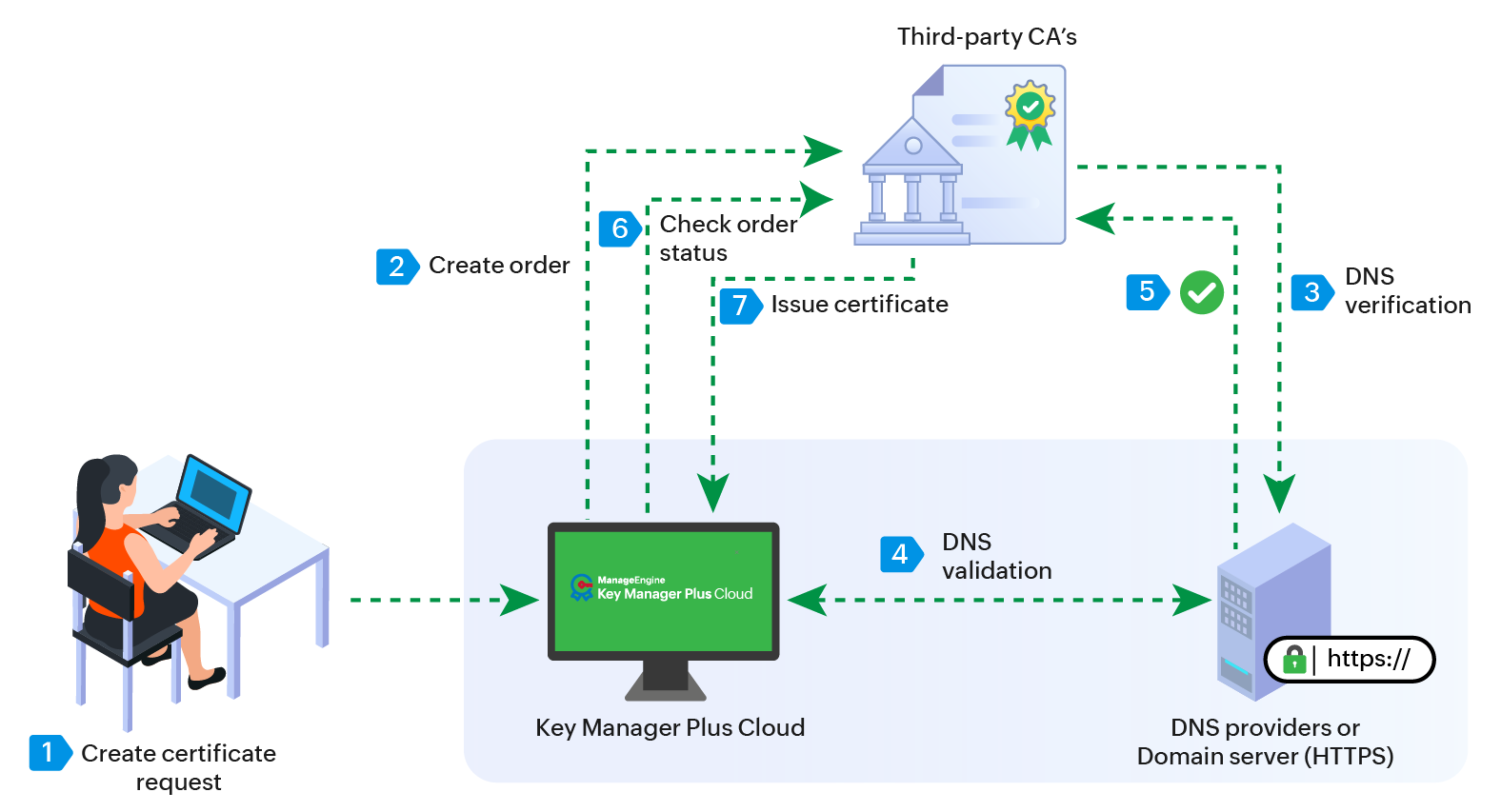
The integration process involves the following steps:
- Once the public CA is configured in Key Manager Plus Cloud with the appropriate credentials, users can initiate the certificate request process (certificate ordering) by providing the required Certificate Signing Request (CSR) details through Key Manager Plus Cloud.
- Key Manager Plus Cloud creates a certificate order and submits the request to the configured Certificate Authority.
- The Certificate Authority processes the request and performs the necessary domain validation to verify domain ownership as part of its approval workflow.
- After the domain ownership is successfully validated, the Certificate Authority approves the request and issues the certificate to Key Manager Plus Cloud.
- When the order status is checked, the certificate is automatically added to the Key Manager Plus Cloud inventory and can be managed from the Certificates tab.
- Administrators can then deploy the certificate to the appropriate domain servers directly from Key Manager Plus Cloud and manage them accordingly.
This streamlined workflow simplifies the acquisition, management, and deployment of public CA-issued certificates within your infrastructure.