Why enterprises need ManageEngine Firewall Analyzer?

ManageEngine Firewall Analyzer provides deep visibility into multi-vendor firewall activity by analysing firewall logs, helping teams investigate suspicious traffic, identify risky rules, monitor VPN access, and maintain compliance through continuous auditing and reporting.

Firewalls generate enormous volumes of logs that contain valuable security and network insights, but without a centralised analysis platform, security teams struggle to investigate incidents, detect risky configurations, or understand how firewall policies impact network activity.

Key capabilities of ManageEngine Firewall Analyzer

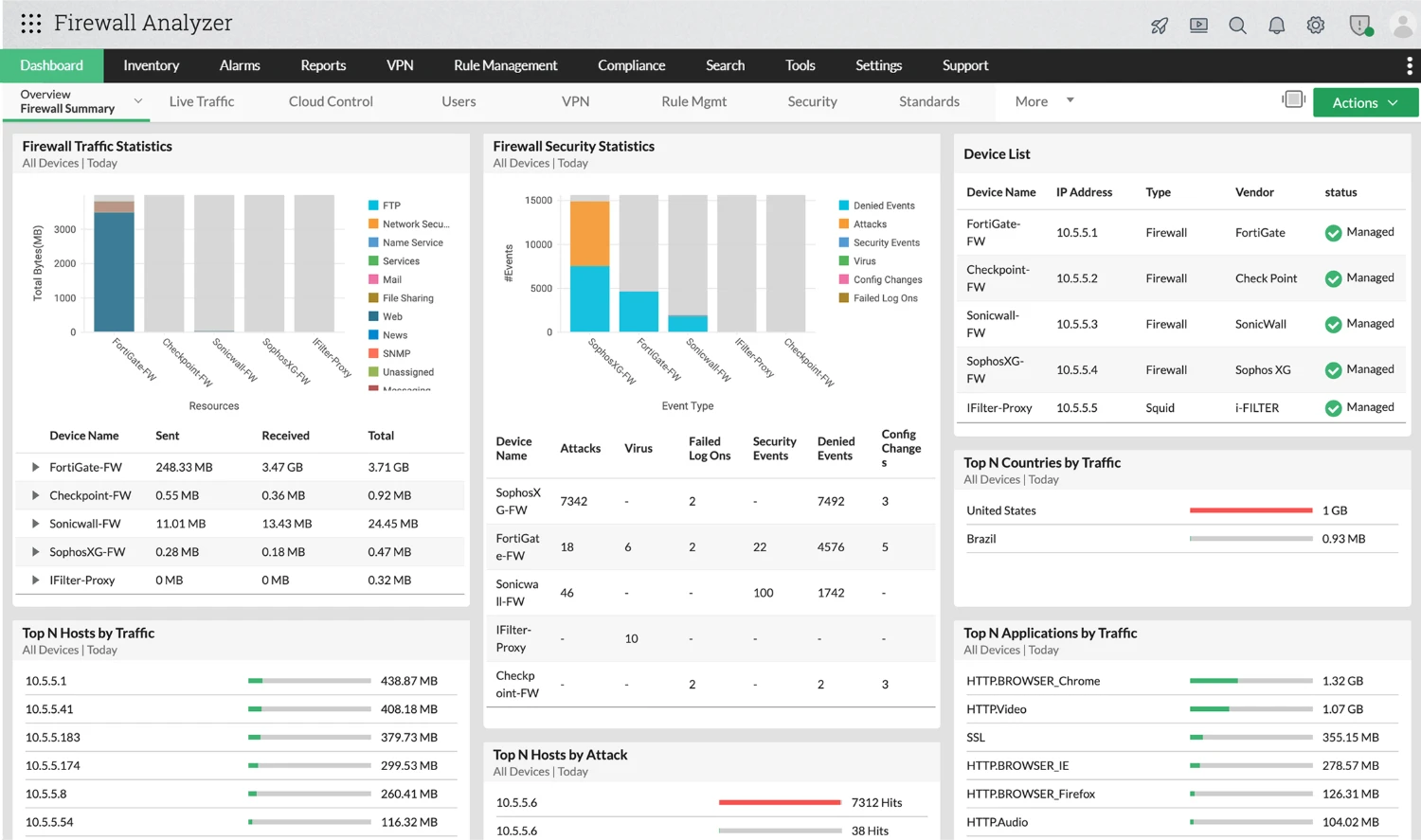
Analyse firewall traffic and investigate suspicious network activity through continuous firewall log and security event monitoring

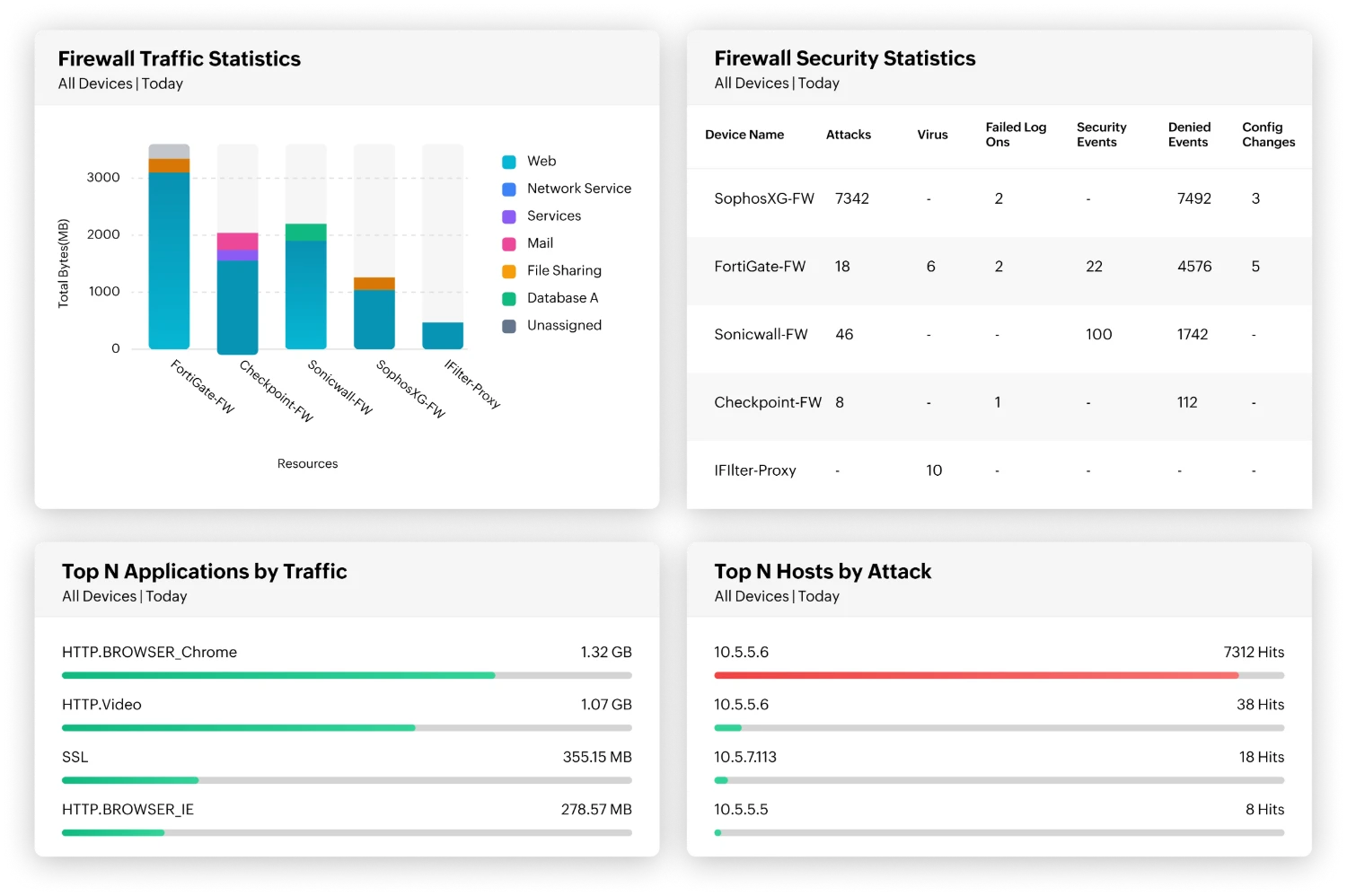
  • Identify top traffic sources and destinations: Discover which hosts generate the most inbound and outbound traffic to quickly detect compromised systems, data exfiltration attempts, or unauthorized communication.
  • Understand protocol and application usage: Analyse traffic by protocol groups such as web, database, mail, and name services to identify unusual application behaviour or unexpected protocol usage within the network.
  • Track user-level network activity: Monitor which users are generating the most traffic across the firewall to detect suspicious user behaviour, excessive bandwidth usage, or potential account misuse.
  • Detect abnormal traffic patterns: Visual traffic reports highlight sudden spikes, unusual traffic flows, or unknown traffic sources that may indicate suspicious network activity or potential security issues.
  • Investigate firewall security events: Correlate firewall traffic with generated security events and alerts to investigate potential threats quickly and understand the context behind suspicious network activity.
Optimize firewall rules and reduce policy complexity with intelligent firewall rule optimization recommendations

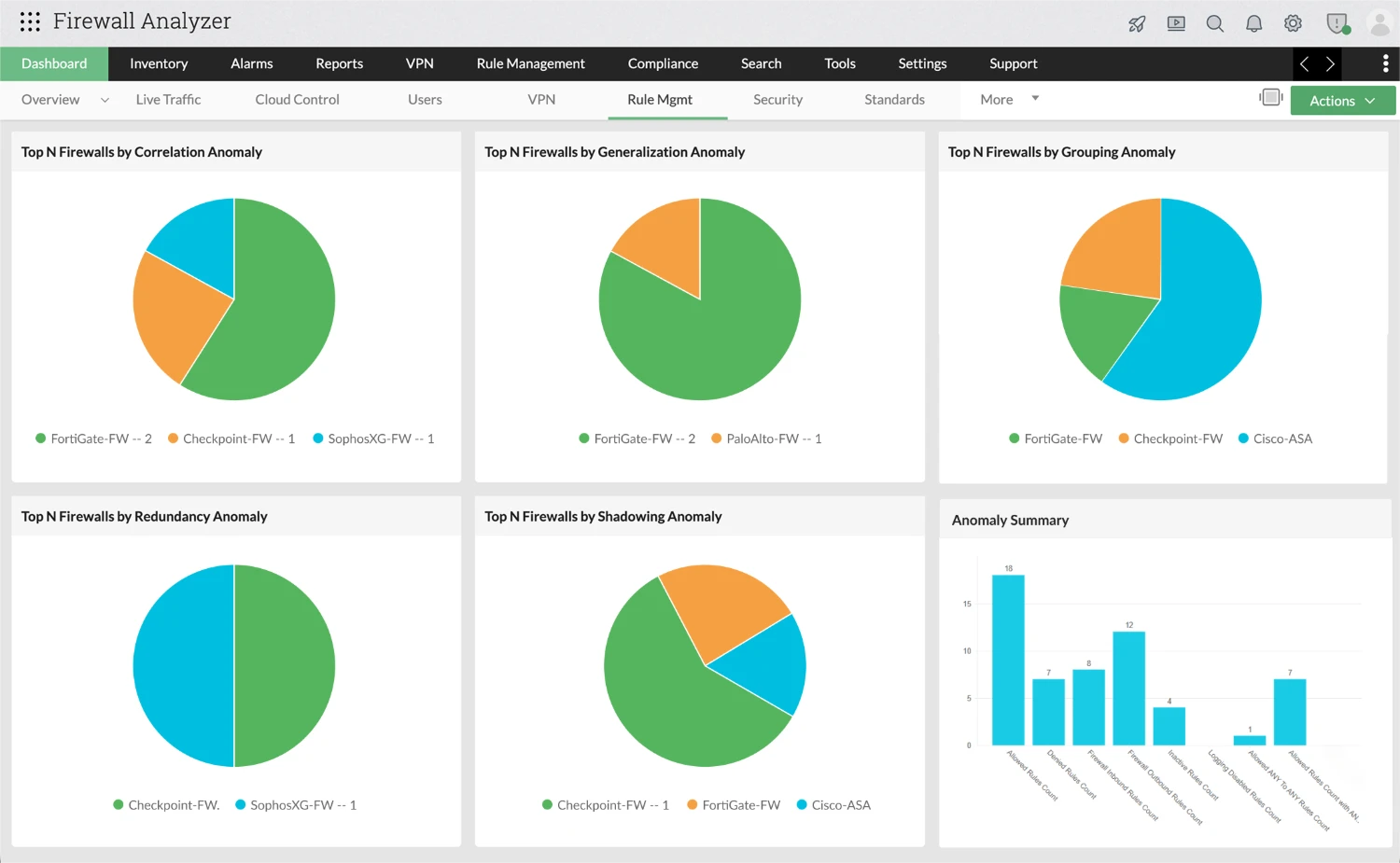
  • Identify redundant and overlapping firewall rules: Detect rule anomalies such as redundancy, generalisation, and correlation that may exist within the firewall policy. These insights help administrators understand how rules interact and eliminate unnecessary or overlapping entries.
  • Discover unused firewall rules and objects: Identify rules that have not been triggered over a selected time period, along with unused network objects and unassigned interfaces. Removing inactive rules helps reduce policy clutter and improves firewall performance.
  • Analyse rule structure and policy composition: Gain visibility into rule distribution, including allowed and denied rules, inbound and outbound policies, and overly permissive configurations such as ANY-to-ANY rules or rules allowing ANY services.
  • Reorder rules to improve firewall efficiency: Evaluate firewall rule ordering and generate recommendations to place frequently used rules higher in the policy, helping firewalls process traffic more efficiently.
  • Detect policy risks and configuration weaknesses: Identify risky firewall rules and monitor their severity levels through built-in risk analysis dashboards, allowing teams to prioritise remediation and reduce potential attack surfaces.

Monitor VPN access and remote user activity while analysing IDS and IPS intrusion events to detect threats early

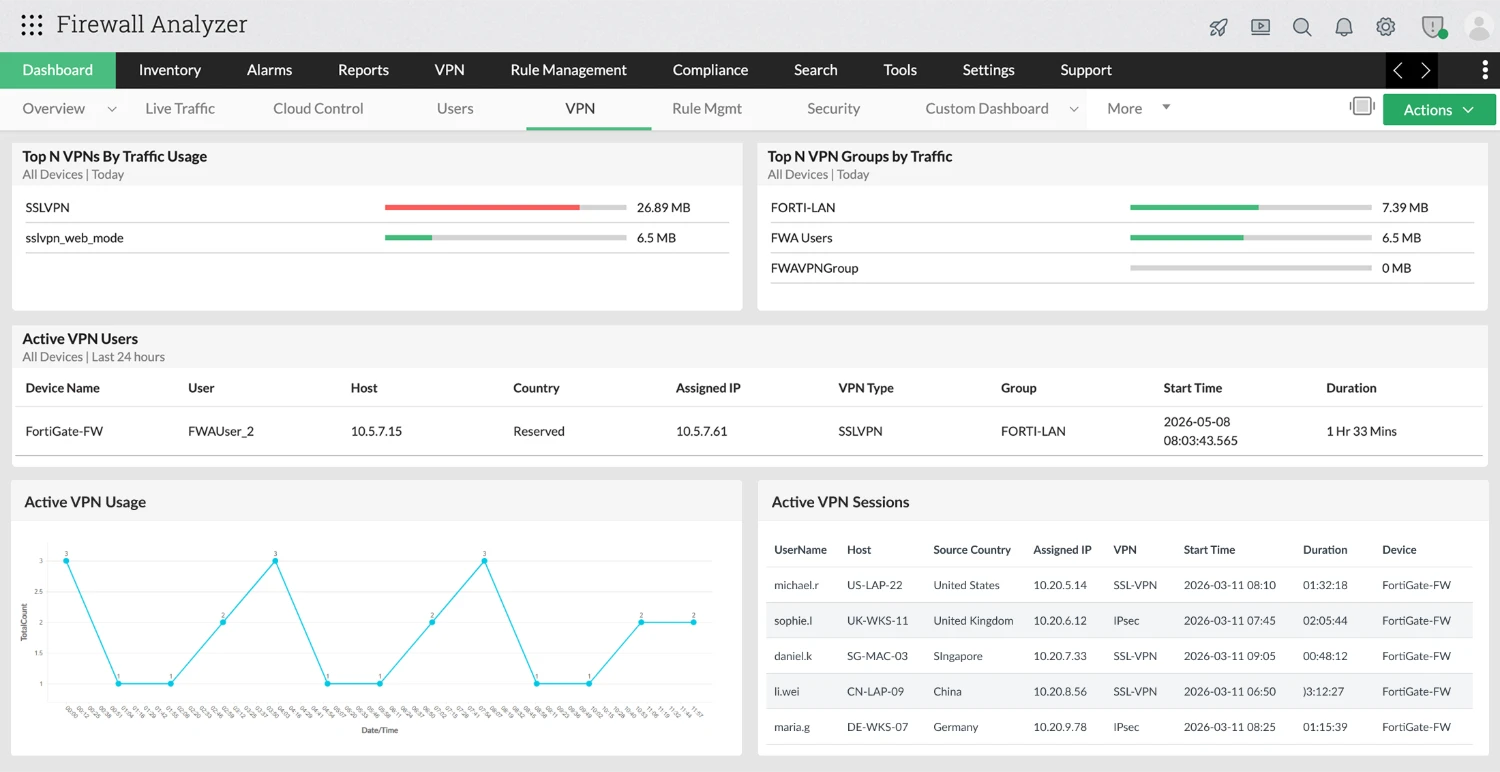
  • Track active VPN users and session activity: Gain complete visibility into both live and historical VPN activity, including user details, host details, assigned IP, session timelines, and duration. Understand how users access the network over time and quickly detect unusual or suspicious remote activity from a single, consolidated view.
  • Identify abnormal VPN usage and failed connection attempts: Analyse failed VPN connections and repeated login attempts that may indicate unauthorized access attempts or misconfigured user accounts.
  • Investigate firewall and IDS/IPS security events: Analyse security events reported by firewall intrusion detection and prevention systems, including attack types and security alerts generated in firewall logs.
  • Identify top attackers and targeted hosts: Use attack reports to identify the most frequent attackers, targeted internal hosts, and the number of distinct targets involved in an attack, helping security teams quickly understand the scope of security incidents.
  • Analyse attack trends, protocols, and event severity: Review reports showing attack types, protocols used during attacks, and event severity levels such as warnings or alerts to prioritise investigation and response.

Audit firewall configurations, detect misconfigurations, and track every configuration change across firewall devices

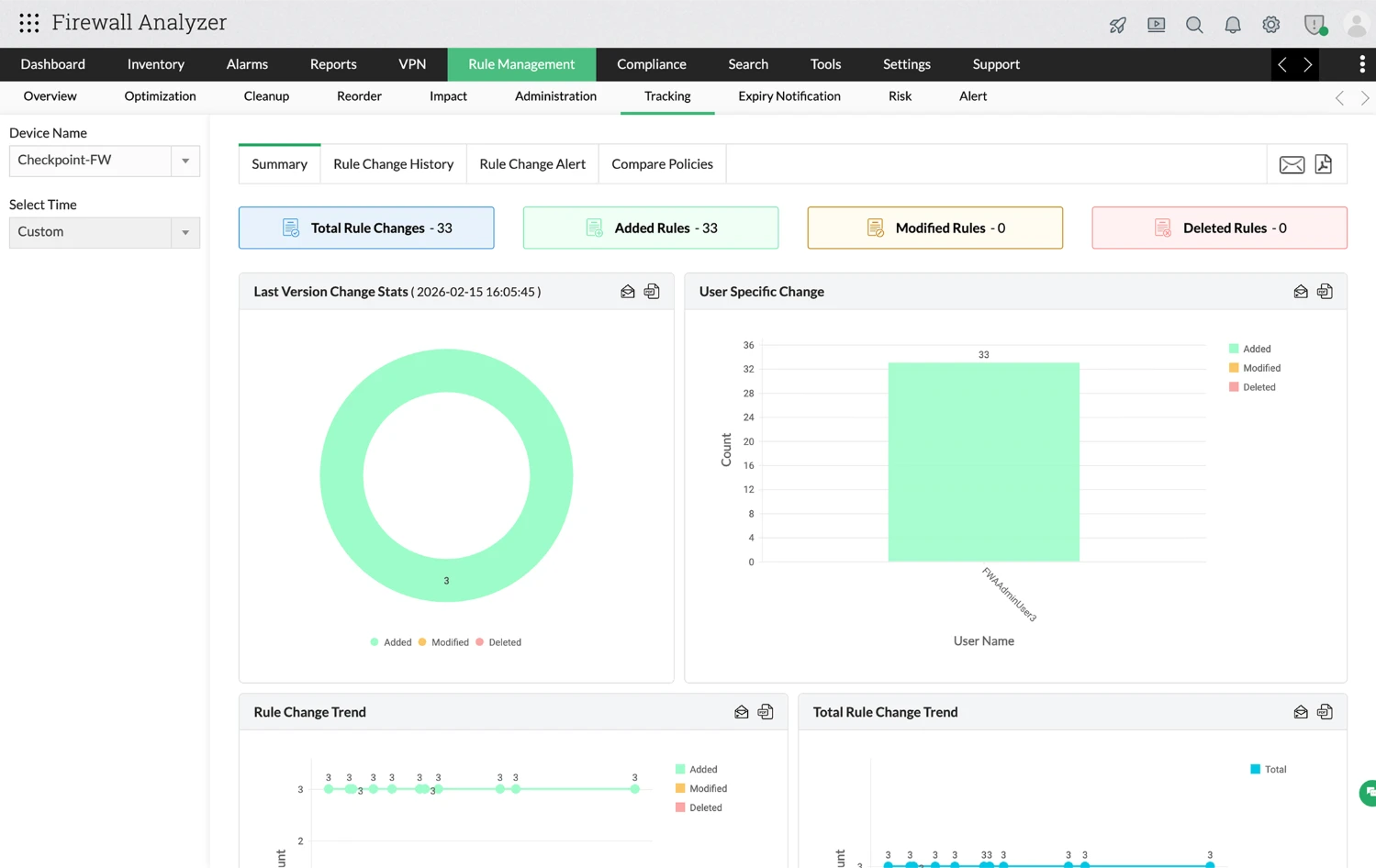
  • Track and audit firewall rule changes: Monitor firewall rule changes across devices, including additions, modifications, and deletions, with a complete, time-stamped history of what changed and when. This enables administrators to maintain accountability and quickly investigate configuration changes.
  • Identify user-specific configuration changes: Track which administrators or users made specific rule changes to maintain accountability and improve operational transparency.
  • Receive alerts for firewall rule modifications: Configure rule change alerts to notify administrators whenever firewall rules are added, modified, or deleted, helping teams quickly respond to unexpected configuration changes.
  • Compare firewall policy versions: Compare firewall configuration files or running configuration versions to identify differences between policy versions and understand exactly what changed.
  • Maintain configuration backups for audit and recovery: Schedule automated configuration backups for firewall devices and maintain historical versions to support audits, troubleshooting, and configuration recovery when required.

Maintain compliance with firewall security standards through continuous firewall configuration auditing and reporting

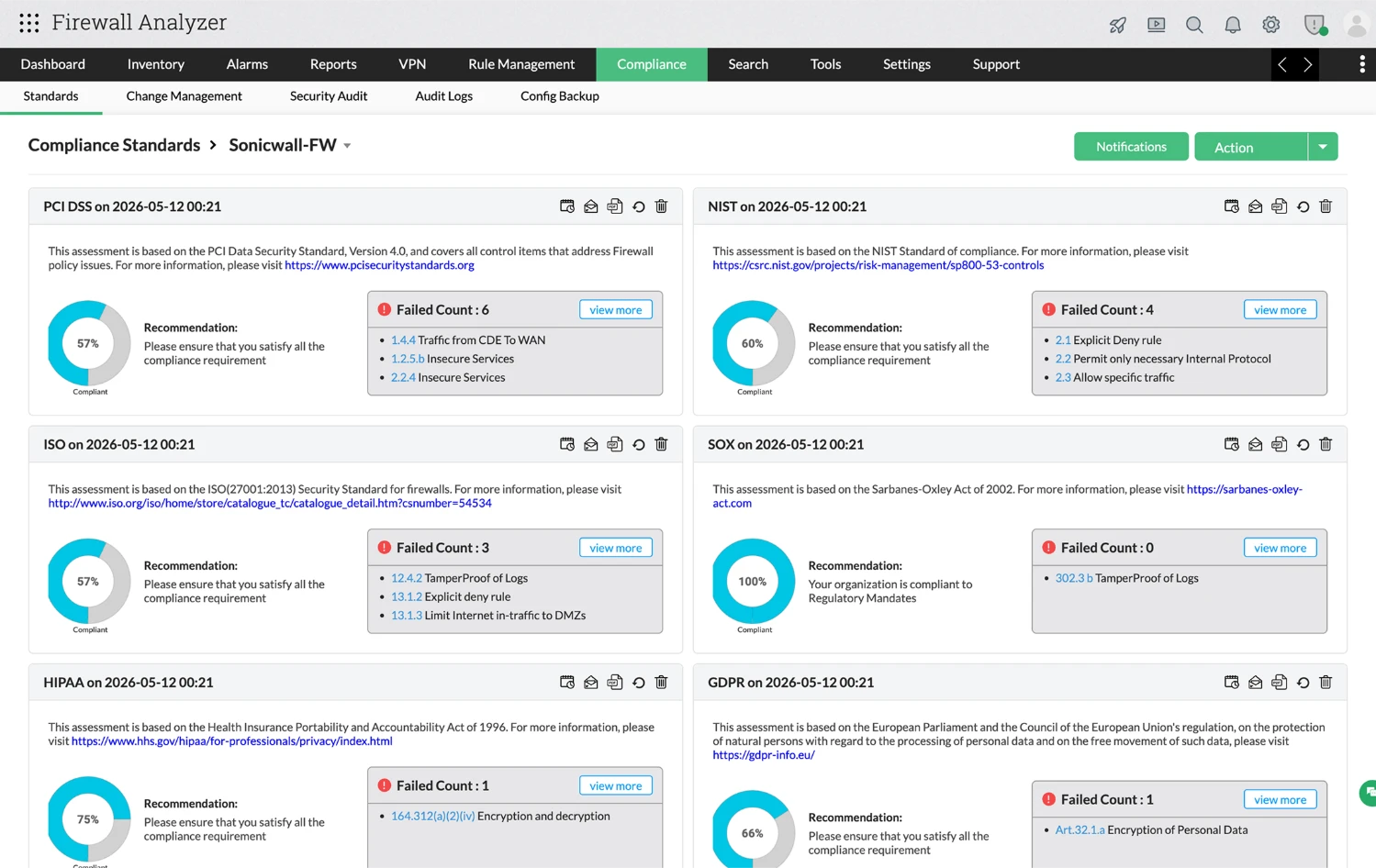
  • Assess firewall configurations against industry security standards: Evaluate firewall configurations against widely recognized compliance frameworks such as PCI DSS, ISO 27001, NIST, HIPAA, SOX, and other regulatory standards. These assessments help organizations determine whether firewall policies and configurations align with required security controls.
  • Identify configuration issues that impact compliance: Detect configuration weaknesses and policy violations that may cause compliance failures, such as overly permissive access rules, insecure services, or missing security controls. These insights help administrators quickly identify and address potential compliance gaps.
  • Analyse security audit findings and recommendations: Security audit reports highlight identified risks, categorise issues by severity levels such as critical, high, medium, or low, and provide recommendations to help administrators remediate configuration weaknesses.
  • Generate compliance and audit reports for security reviews: Export detailed audit and compliance reports that can be used during internal security reviews, external audits, or regulatory assessments to demonstrate firewall security posture.
  • Monitor audit logs and administrative activities: Track administrative actions such as login attempts, configuration access, and user activity through audit logs, helping organizations maintain accountability and support forensic investigations when required.

Real-world security issues that can be solved using
Firewall Analyzer

Log spike investigation
Rule tracing
Suspicious IPs
Change tracking
Unused rules

How to investigate firewall log spikes?

Unexpected spikes in firewall log volumes can signal security incidents or misconfigured systems that require immediate investigation.

Use case

Investigating unexpected spikes in firewall logs.

Scenario

  • Your firewall suddenly begins generating significantly more logs than usual.
  • The logs show a large number of denied connections targeting multiple internal systems.
  • Security teams need to quickly determine whether this spike is caused by automated scanning, misconfigured systems, or a potential attack.

How Firewall Analyzer helps

Firewall Analyzer analyses firewall log activity and highlights the top sources generating traffic, the most frequently targeted destinations, and the protocols involved. Security teams can quickly identify patterns behind the log spike and investigate the underlying cause.

Result

Administrators can rapidly identify abnormal traffic activity and respond to potential threats before they escalate.

How to find which firewall rule allowed traffic?

Firewall rules can inadvertently allow unexpected access if configurations are too permissive or have not been reviewed after infrastructure changes.

Use case

Investigating unexpected access to internal systems.

Scenario

  • A server receives traffic from an external IP address that should not normally have access.
  • The security team needs to determine which firewall rule allowed the connection and whether the rule configuration is too permissive.

How Firewall Analyzer helps

Firewall Analyzer analyzes firewall rule usage and traffic logs to identify which rules are being triggered and which traffic they allow or deny. Administrators can quickly trace traffic flows back to the responsible firewall rule.

Result

Security teams gain clear visibility into firewall rule behaviour and can modify overly permissive rules to reduce security risks.

How to detect internal hosts communicating with suspicious IPs?

Unauthorized outbound connections from internal systems can indicate compromised devices, malware activity, or rogue applications that have gone undetected.

Use case

Detecting unusual outbound communication from internal systems.

Scenario

  • An internal device begins communicating with external IP addresses that are not normally contacted by the organization.
  • These connections occur repeatedly and may indicate compromised systems or unauthorized applications.

How Firewall Analyzer helps

Firewall Analyzer analyses outbound traffic patterns to identify which internal hosts are communicating with external destinations, which services are used, and how frequently the communication occurs.

Result

Security teams can quickly identify suspicious outbound connections and investigate potentially compromised systems.

How to check who changed a firewall rule?

Untracked configuration changes can introduce security risks or break network connectivity, making it essential to maintain a clear audit trail of all firewall policy modifications.

Use case

Tracking configuration changes to firewall policies.

Scenario

  • A firewall rule suddenly allows broader access than before.
  • During troubleshooting, the team realizes that the rule was recently modified, but it is unclear who made the change or when it occurred.

How Firewall Analyzer helps

Firewall Analyzer tracks firewall configuration changes and records when rules are added, modified, or deleted, along with the user responsible for the change.

Result

Administrators gain complete visibility into firewall policy changes and can quickly identify unauthorized or risky modifications.

How to check which firewall rules are actually being used?

Firewall policies that accumulate over time become complex and difficult to manage, often containing rules that no longer serve any active purpose.

Use case

Identifying unused or redundant firewall rules.

Scenario

  • Over time, firewall policies grow as new rules are added to support applications and infrastructure changes.
  • Many of these rules may no longer be used, making firewall policies complex and harder to manage.

How Firewall Analyzer helps

Firewall Analyzer analyses rule usage and identifies rules that are actively triggered as well as those that remain unused over time.

Result

Security teams can safely remove unused rules, simplify firewall policies, and reduce configuration complexity.

Multi-vendor firewall support for your enterprise

Enterprise firewalls

  • Cisco
  • Check Point
  • Palo Alto Networks
  • Fortinet
  • Juniper Networks
  • Huawei
  • Hillstone

Open-source firewalls

  • pfSense
  • OPNsense
  • IPCop
  • FreeBSD (iptables-based firewalls)

Next-generation & UTM firewalls

  • Sophos
  • SonicWall
  • WatchGuard
  • Cyberoam
  • Clavister

Additional firewall and security platforms

  • Barracuda
  • Blue Coat / ProxySG
  • CyberGuard
  • D-Link
  • Funkwerk
  • Ingate
  • Inktomi
  • Gnatbox
Learn more about supported firewalls

Why choose ManageEngine Firewall Analyzer

ManageEngine Firewall Analyzer delivers enterprise-grade firewall visibility, policy control, and configuration auditing without the cost and complexity typically associated with security analytics platforms.

Accessible pricing without enterprise overhead

Get advanced firewall analytics and reporting without the high licensing costs or heavy infrastructure requirements of enterprise-only solutions, making it practical for both mid-sized and large environments.

Broad multi-vendor support without tool sprawl

Analyse and manage firewall activity across a wide range of firewall vendors from a single platform, avoiding the need for multiple specialist tools that only support limited device ecosystems.

Integrated ManageEngine ecosystem advantage

Seamlessly integrate with other ManageEngine solutions to extend visibility across network, security, and IT operations workflows, enabling more connected monitoring, analysis, and response.

Unified visibility across environments

Monitor firewall activity and network traffic across distributed environments through a single interface, improving operational efficiency and reducing context switching.

Actionable insights for policy and security optimisation

Identify unused, redundant, or risky rules and improve firewall policy hygiene while maintaining strong security posture.

Faster investigation and response

Correlate firewall activity, security events, and configuration changes to quickly investigate issues and reduce time to resolution.

Ready to gain deeper visibility into your firewall environment?

See how ManageEngine Firewall Analyzer helps security teams investigate traffic, identify risky rules, and improve firewall security.

Awards & Honors

  • Gartner peerinsightsRecognized in the Capterra Shortlist 2023 for the category Network Security Software.
  • Gartner peerinsightsRecognized in the Software Advice Front Runners report 2023 on Network Security Software.
  • Gartner peerinsights Recognized in the GetApp Category Leaders 2023 for Network Security Software.
  • Gartner peerinsights ManageEngine named a 2023 Gartner Peer Insights Customers’ Choice for SIEM
 
A single platter for comprehensive Network Security Device Management