Windows Updates on Security Patches
Windows updates are important releases like software updates, Windows security patches, Windows patch updates, hotfixes, and security updates done by Microsoft periodically to fix Operating System (Windows 7, 10, Windows Server 2016 etc.) or Windows Software/Application related issues. The Windows systems and applications in any enterprise need to install these windows security patches and software updates to secure themselves. Software vulnerabilities can create security weakness, corrupt critical system data or cause system unavailability that can be a nightmare to Network administrators. An automated solution that can update patches as and when they are released with minimal human interference can make a huge difference in the security and productivity of the organization. So, Administrators are constantly looking out for a solution that scans for vulnerabilities, identify missing Microsoft updates, apply security patches for Windows and mitigate risk.
Why chose Endpoint Central for managing Windows updates?
Endpoint Central's patch management solution handles every aspect of Microsoft update deployment like System discovery, identifying the required Windows Microsoft updates, Windows patch updates, Windows security patches, deploying relevant updates and reports to make network administrators job simpler. Administrators can also opt for a completely automated solution and don't have to worry about updating windows systems ever. It supports managing Microsoft updates & Microsoft patches of various Windows OS and Applications. The updates include software updates, XP updates, OS updates, application updates, and security updates.
Endpoint Central's network-neutral architecture helps administrators to install Microsoft updates, Windows patch updates, Windows security patches, Windows updates & Microsoft patches to computers in Active Directory, Workgroup, and Novell eDirectory based networks. The computers to be updated can be in the same LAN or distributed across WAN. It can also update the desktop of roaming/ mobile users.
Windows Update Deployment Features in Endpoint Central
- Uses a hosted Patch Database at ManageEngine site to assess the vulnerability status of the network and apply security patches for windows.
- Complete automated Update Deployment Solution from detecting the missing Microsoft updates to deploying the updates.
- Patch based deployment - Deploy an update to all the Windows systems applicable
- System based update deployment - Deploy all the missing Microsoft updates for a windows desktop/server
- Automatic handling of update interdependencies and sequencing
- Reports on Windows System vulnerabilities, Updates, OS, etc.
- Provides an update of the deployment status
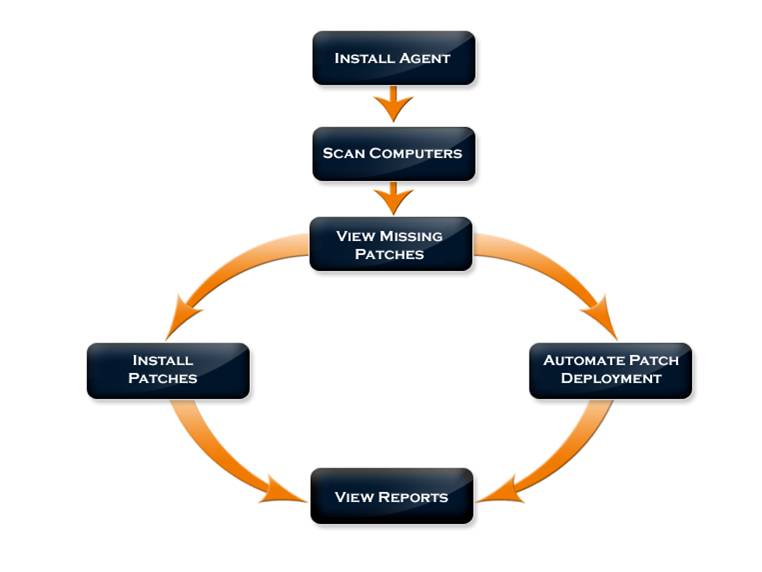
Fig:The Patch Management Process
Security Patch update process
- Endpoint Central requires a light-weight, non-intrusive agent to be installed in all the managed computers to carry out the patch management functions.
- The Online vulnerability Database is a portal in the ManageEngine site, which hosts the latest Windows Updates, Security patches for Windows, Windows security patch update database that has been published after a thorough analysis. This contains the list of all Microsoft Windows updates that are available, which includes Microsoft patches, software updates, application updates, xp updates, windows security updates, windows patch updates and so on.
- The Endpoint Central Server updates itself with the details of the available Microsoft patches and Windows software updates from the Online Vulnerability Database periodically.
- It scans all the windows desktops/servers in the network to check for the missing Microsoft Windows updates.
- Downloads the Windows updates from the Microsoft and stores them locally.
- These Windows updates are then pushed to all the windows desktops/servers in network either automatically or manually as you wish.
- The status of the Microsoft update installation is updated in the Endpoint Central Server.
Supported OS and Applications for Patch Management
- Windows 11
- Windows 10
- Windows 8.1
- Windows 8
- Windows 7 (Enterprise, Professional, Ultimate)
- Windows Server 2019 (Standard, Web & Small Business ServerEditions)
- Windows Server 2016
- Windows Server 2012 R2
- Windows Server 2012
- Windows Server 2008 R2(Datacenter, Enterprise & Standard)
- Microsoft Office 2016
- Microsoft Office 2013
- Internet Explorer
- Visual Studio
- Exchange Server
- .NET Framework
- SQL Server
- Sharepoint Server (View Complete List)
FAQs
1. What are windows updates?
Windows updates are important releases like software updates, Windows security patches, Windows patch updates, hotfixes, and security updates done by Microsoft periodically to fix Operating Systems and Software related issues.
2. How do I check for Windows updates?
Endpoint Central's patch management solution ensures that you do not have to check for Windows updates by performing actions such as System discovery, identifying required Windows updates and deploying relevant Windows patch updates and Windows security patches.
3. How to automatically update a Windows security patch?
Endpoint Central's patch management feature affords you with a vast degree of flexibility and customization to deploy patches either manually or automatically.




