In this article, we’ll explore how to identify unused or over-provisioned databases, why it matters for both cost and performance, and how a tool like Applications Manager can make this process smarter and more systematic.
Why unused and over-provisioned databases are a problem
1. Hidden costs in cloud and on-premises environments
- Cloud databases: Every provisioned resource: CPU, memory, storage, or instance size translates directly to recurring costs. Idle databases or oversized configurations quietly inflate cloud bills month after month.
- On-premises databases: Even when licenses and hardware are already purchased, unused databases consume administrative overhead, backups, monitoring, and patching efforts. Over-provisioning locks up valuable resources that could be allocated to critical workloads.
2. Security and compliance risks
Databases that are forgotten but still active pose a security liability. Unmonitored and unpatched instances are prime targets for attackers. Additionally, storing data unnecessarily may increase exposure to compliance risks under regulations like GDPR or HIPAA.
3. Operational complexity
The more databases you maintain, the harder it becomes to track dependencies, apply patches, and ensure consistent performance. Reducing sprawl streamlines operations and improves manageability.
Common causes
- Project lifecycle leftovers: Teams often spin up new databases for development, testing, or short-term projects. Once the initiative ends, these instances are rarely decommissioned.
- Overly cautious provisioning: To avoid performance issues, admins sometimes allocate far more CPU, memory, or storage than needed. Without regular review, these inflated allocations persist indefinitely.
- Cloud migration duplicates: During cloud adoption, databases may be duplicated (one on-prem, one in cloud) to minimize downtime. The old environment often lingers long after migration is complete.
- Departmental silos: In large organizations, different teams provision their own databases without central oversight. This leads to redundant or underutilized deployments.
- Lack of visibility: Without effective database monitoring, idle databases remain hidden.
Signs of unused databases
- No query activity over weeks or months.
- Zero active connections recorded during business hours.
- Unchanged data volumes: tables remain static.
- Stale backups: no recent backups triggered.
- Absent from dependency maps: unused by apps/services.
Signs of over-provisioned databases
- Consistently low CPU and memory utilization (below 20%).
- Storage usage far below allocated capacity.
- Connection pools rarely maxed out.
- Alert thresholds never breached.
- Performance stable even under smaller test allocations.
Business impact of ignoring the problem
- Wasted spend: Cloud bills balloon unnecessarily, and on-premises resources remain locked up.
- Reduced agility: Infrastructure teams struggle to provision resources quickly when much of it sits unused.
- Higher attack surface: Forgotten databases become vulnerable entry points.
- Audit headaches: Compliance officers face difficulty justifying why unused databases continue to store sensitive data.
Steps to identify unused or over-provisioned databases
- Inventory all databases
- Start with a full discovery of databases across cloud providers, on-premises servers, and containerized environments.
- Include development, testing, and production databases.
- Monitor key database metrics
- Track connections, queries per second, transactions, and data changes.
- Look for instances with negligible or zero activity over extended periods.
- Analyze resource utilization
- Compare allocated CPU, memory, and storage against actual consumption.
- Identify databases running at consistently low utilization.
- Review application dependencies
- Map which applications and services connect to each database.
- Flag databases that aren’t tied to any active workloads.
- Check backup and replication logs
- Stale or empty logs often indicate inactivity.
- Replication pipelines that no longer deliver data are another sign.
- Evaluate cost impact
- Use cloud billing reports to calculate the monthly spend for unused or oversized databases.
- Prioritize instances that generate the highest waste.
- Engage application owners
- Before decommissioning, confirm with business stakeholders whether the database is still needed for compliance, archiving, or seasonal workloads.
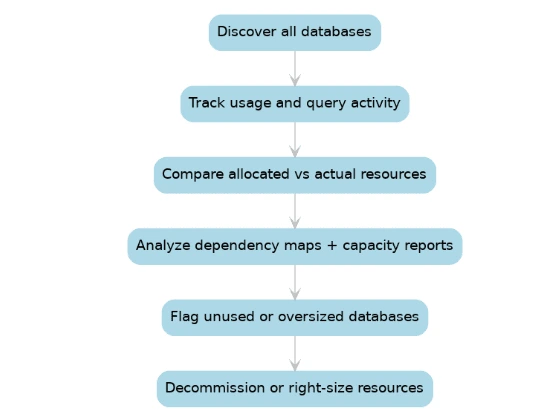
Identifying unused or oversized databases with Applications Manager
Finding unused or over-provisioned databases doesn’t have to be a manual process. Applications Manager offers purpose-built features that automate much of the heavy lifting:
- Automated discovery: Detect all databases across on-premises, cloud, and hybrid environments. This ensures no hidden or forgotten instances slip through the cracks.
- Usage analytics: Monitor query counts, active connections, and transaction throughput to flag databases with negligible activity.
- Resource utilization monitoring: Track CPU, memory, disk I/O, and storage usage in real time. Databases running consistently under 20% utilization are flagged as over-provisioned.
- Dependency mapping: Identify which applications and services connect to each database, helping you confirm whether a low-activity database is truly unused.
- Capacity Planning Reports: Compare provisioned vs. actual usage, highlighting unused or oversized instances.
- Custom reports and alerts: Notify teams about idle databases or underutilized resources.
What to do after identification
- Decommission unused databases
- If confirmed unnecessary, archive data if required for compliance, then safely shut down and remove the instance.
- Right-size over-provisioned databases
- Resize cloud instances or adjust on-premises resource allocations to match actual workload demands.
- Implement auto-scaling wherever possible.
- Establish governance policies
- Create policies for regular reviews of database utilization.
- Enforce tagging standards so databases are tied to projects or departments.
- Automate cleanup workflows
- Use automation scripts or orchestration tools to flag, notify, and decommission unused databases systematically.
- Monitor continuously
- Database utilization should be reviewed on an ongoing basis to prevent sprawl from re-emerging.
The bigger picture: Efficiency and sustainability
Optimizing database usage isn’t just about cutting costs—it’s about building a lean, agile, and secure IT environment. By reducing database sprawl and right-sizing resources, organizations:
- Improve infrastructure efficiency.
- Reduce their carbon footprint by avoiding unnecessary compute and storage.
- Free up IT teams from managing redundant resources.
- Ensure databases that remain are well-secured, monitored, and compliant.
Applications Manager for smarter database optimization
Unused and oversized databases are silent drains on IT budgets and security postures. Identifying and addressing them requires visibility across environments, deep usage analytics, and actionable reporting. Applications Manager delivers the key features in a database monitoring tool while adding advanced optimization capabilities. It helps you:
- Discover every database in your ecosystem.
- Pinpoint idle or over-provisioned resources.
- Optimize costs by right-sizing instances.
- Reduce risks from forgotten or underutilized systems.
Don’t let unused databases silently drain your resources. Try Applications Manager today and take control of your database ecosystem.

