
Inicio> Del centro de datos al punto de atención
From datacenter to point of care

Gestione todos los endpoints sin preocuparse por la falta de personal cualificado

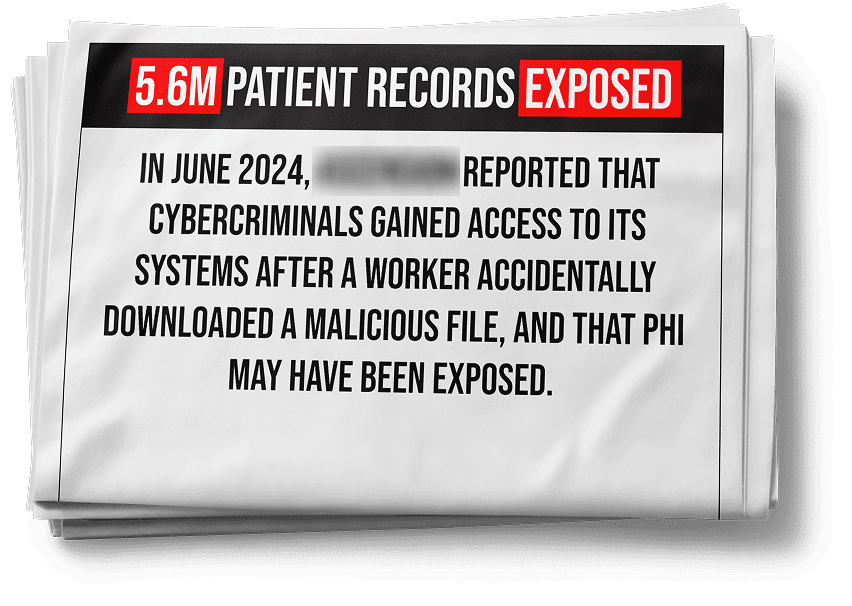
Health IT is feeling the heat—ransomware, rapid M&As, HISAA, HHS CPG and growing EHR access via mobile. And endpoints remain the weakest link in this chain. On top of this, IT teams see short-tenures and skill gaps. IT directors are under pressure to find product-agnostic talent that works with multiple client platform engineers, and intuitive products to onboard new staff quickly.

Endpoint Central is easily the intuitive platform on the endpoint management space. Empower system engineers of any skill level to manage and secure endpoints—patient iPhones, shift-worker iPads, clinical workstations, barcode scanners, and back-end server. So your team spends less time learning the product and focus on enabling clinical workflows and patient care and building cybersecurity programs. It’s easy to set up on your own. But if you need a hand, you'll never hear us say "Go to an external consultant". Our experts are always ready, offering implementation, and hands-on training through the first patching cycle— even if it means we’ve to come there to see it through personally!

HEAR FROM YOUR PEERS DIRECTLY!

Healthcare remains a notoriously
under-resourced and highly-targeted industry

We've heard the concerns of health IT leaders and practitioners, which underscore the key problems in healthcare today.

#-

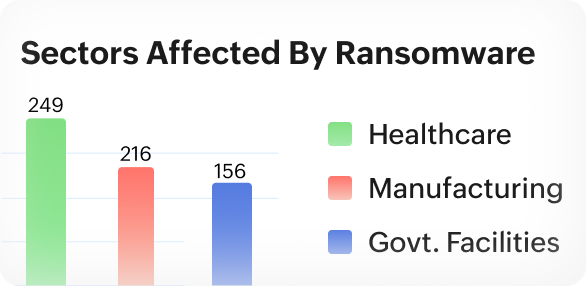
target of ransomware is healthcare

Source: FBI Internet Crime Report 2023

-%

of hospitals are operating with end-of-life operating systems or software with known vulnerabilities.

Source: HHS Hospital Resiliency Landscape Analysis

Too many regulations, too many frameworks, including the NIST CSF, the HICP, CPGs and the upcoming HISAA act.

Rapid M&A leads to accumulation of legacy systems.

-%

of healthcare organizations are already using mobile to access EHR.

Source: HHS Hospital Resiliency Landscape Analysis

$-M

is the average breach cost for healthcare

Source: IBM Cost of a Data Breach Report 2024

Decrease in IT talent and need for cost-effective solutions

-%

of health IT leaders say their organizations are understaffed.

Source: HHS Hospital Resiliency Landscape Analysis

But with us, over 28,000 businesses are in safe hands

Improved ransomware detection by

-%

Learn more

Reduced device provisioning costs by

$-k

Learn more

Improved vulnerability remediation time by

-%

Learn more

Reduced mean time to patch from 90 days to

-Days

Learn more

28.000+ empresas confían en nosotros en todo el mundo

  • logo1
  • logo2
  • logo3
  • logo4
  • logo5
  • logo1
  • logo2
  • logo3
  • logo4
  • logo5
  • logo3
  • logo4
  • logo5
  • logo5
  • logo5
  • logo1
  • logo2
  • logo3
  • logo4
  • logo5
  • logo1
  • logo2
  • logo3
  • logo4
  • logo5
  • logo3
  • logo4
  • logo5
  • logo5
  • logo5

Reducción de los costos de aprovisionamiento de dispositivos por

$22K

A Philadephia NPO's success story

Improved vulnerability remediation time by

85%

Director of IT security at a leading hospital in New Jersey, U.S.

Automatización del parcheo y reducción del tiempo del

95%

Forrester's Total Economic Impact™ study

Retiro de las herramientas heredadas para ahorrar

$1.1M

Forrester's Total Economic Impact™ study

Reducción del tiempo medio de parcheo de 90 días a

14 días

Director of IT security at a leading hospital in New Jersey, U.S.

Principales casos de uso en la salud

  • Cumplir el mandato de 15 días de parcheo de la HIPAA
  • Gestionar BYOD
  • Inventariar dispositivos y generar informes
  • Evitar el ransomware con la seguridad del navegador
  • Reducir los costos de aprovisionamiento de dispositivos
  • Distribuir clientes de EHR
  • Ayuda remota en múltiples sitios
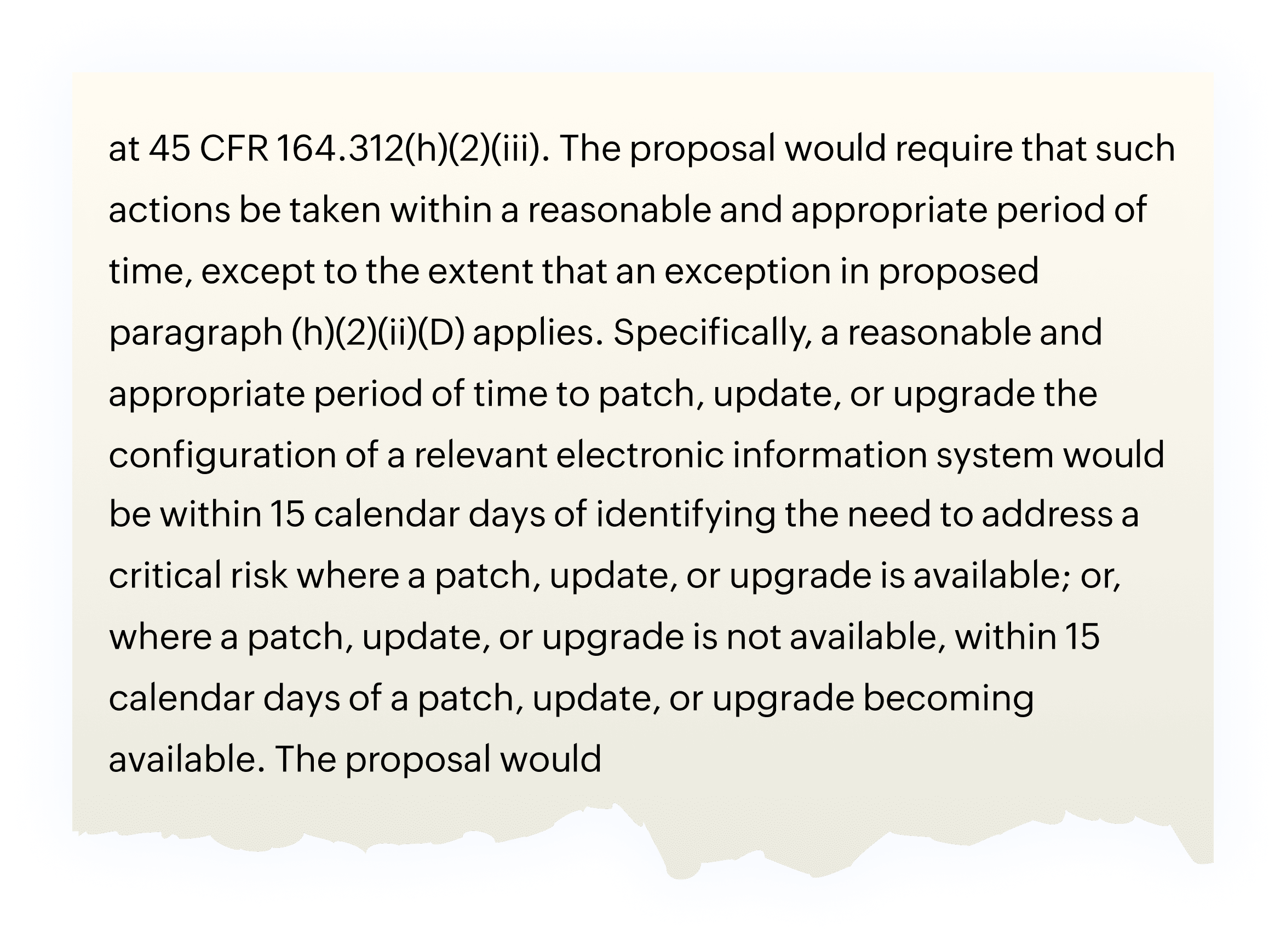
    • 15-day mandate from HIPAA

      The new proposal to HIPAA security rule mandates healthcare organizations to patch their systems within 15 days of identifying a critical vulnerability

      day
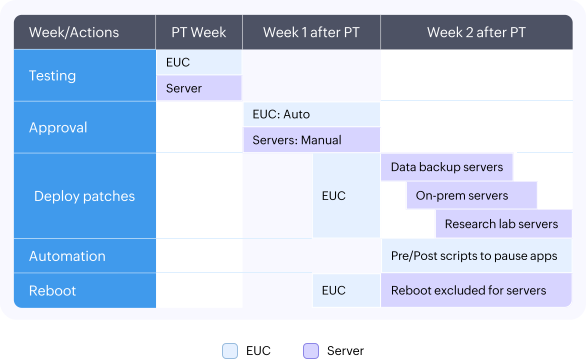
    • Example patching playbook from one of our customers

      • N-1 patching for critical servers, customizable reboots, self-service portal for server admins to decide patching and reboot timelines
      • Create custom cohorts based on devices and departments, like radiology, and clinical informatics for creating test beds for patches.
      View full playbookarrow
      example
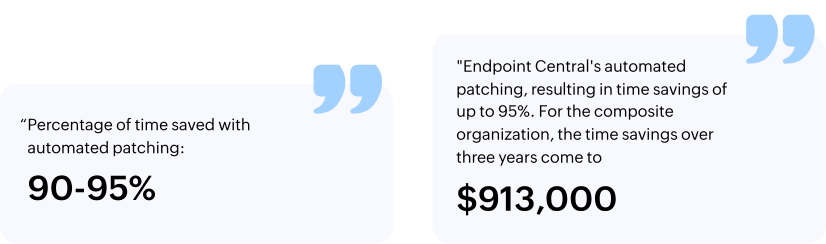
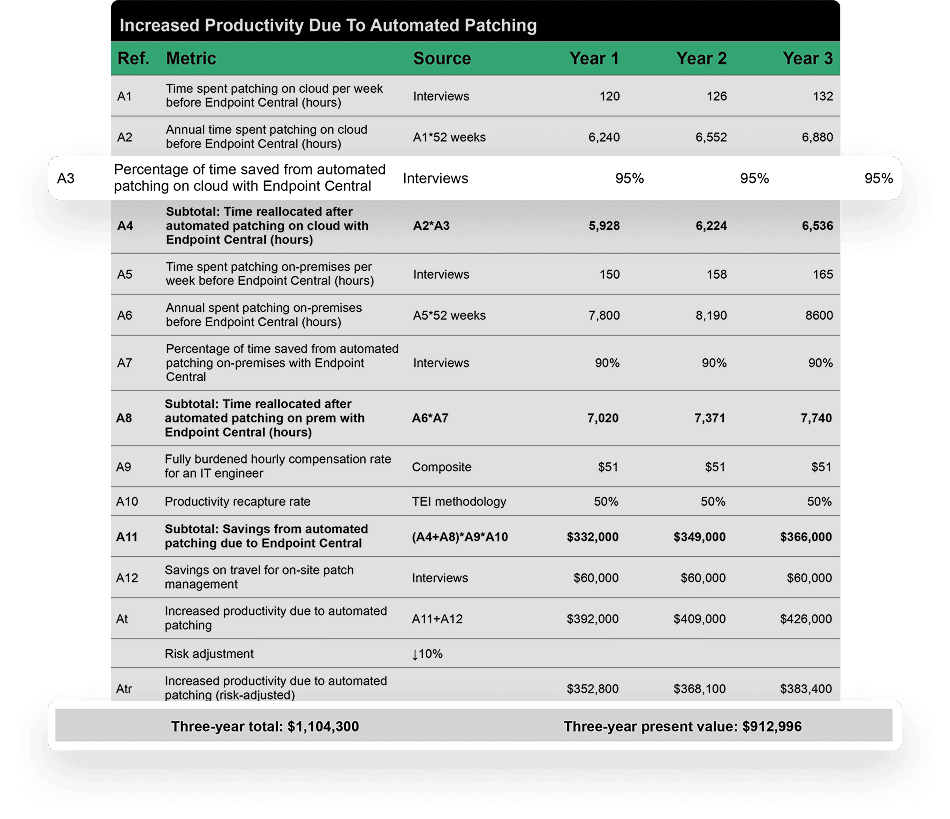
    • Forrester acknowledges the cost and time saved by patch automation

      "Endpoint Central's automated patching, resulting in time savings of up to 95%. For the composite organization, the time savings over three years come to"

      $913,000

      Cost savings of up to a million dollars and time reduction of 95% from patch automation using ManageEngine Endpoint Central
      quotes
    • Cost savings of up to a million dollars and time reduction of 95% from patch automation using ManageEngine Endpoint Central
      Learn morearrow
      cost
    • BYOD visibility

      • See how many personal devices are being used for work related apps with an extensive device inventory.
      • Manage licenses for business apps in BYOD and distribute them to work profiles.
      vulnerability
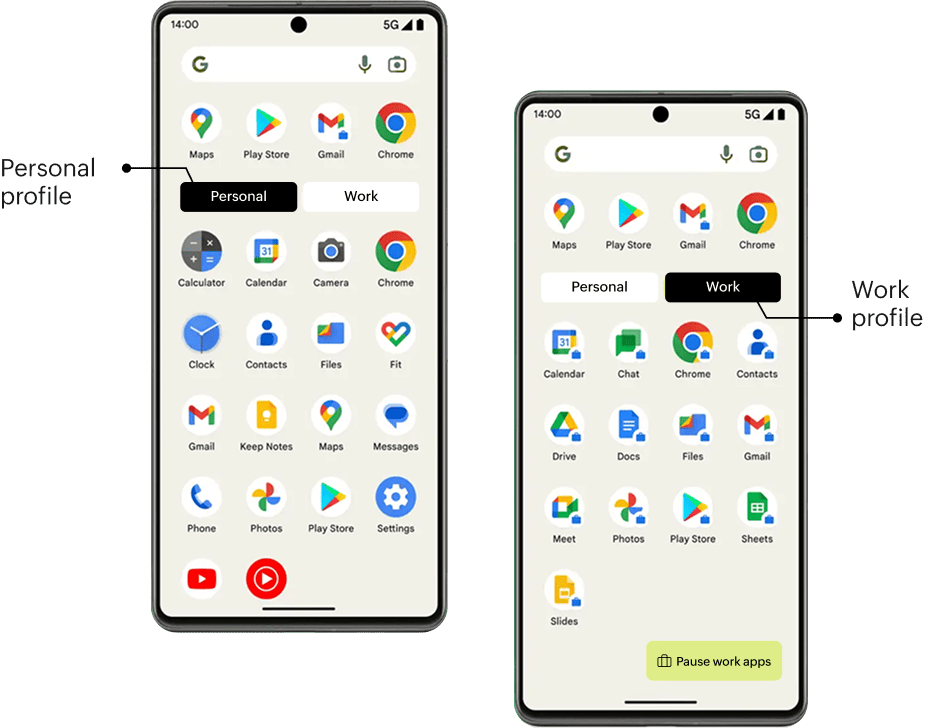
    • Data containerization and security

      • Isolate and manage only work data on BYOD without violating physician's privacy.
      • Enforce strong passcode policies for work profiles to eliminate the chances of brute force attack in case of stolen devices.
      • Distribute sensitive content securely with screen shot and clipboard restrictions via MDM.
      data
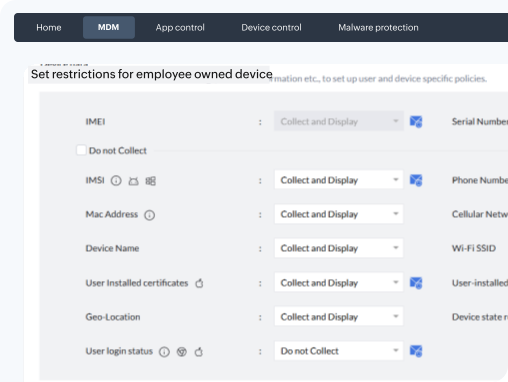
    • Privacy

      • Set restrictions on the information collected from BYODs and publish your privacy policy to these devices to keep clinicians informed.
      • Lock devices and remove business app access and PHI when devices are lost.
      • Wipe devices when affiliate hospitals leave your organization due to bankruptcy and contract expiry.
      privacy
    • Secure access to business apps

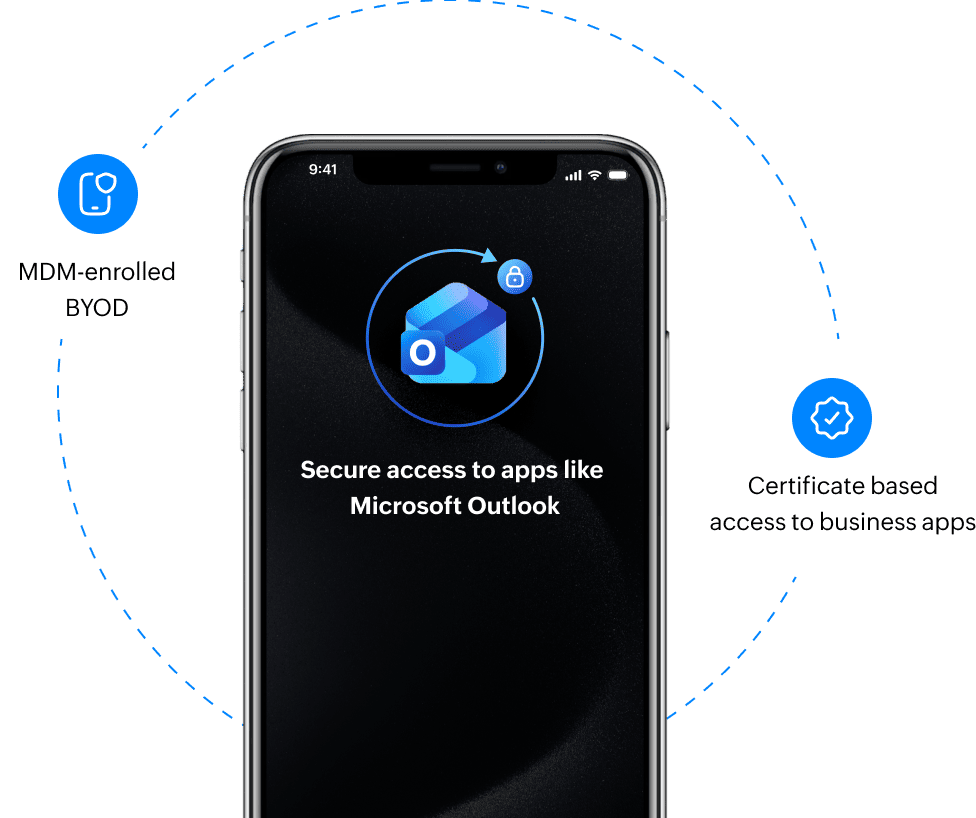
      • Restrict access to business apps like Outlook and Office 365 for only MDM-registered BYODs.
      • Remove access to business apps from rooted and jailbroken devices.
      • Ensure version control for OS to ensure that devices with outdated OSes do not access business apps.
      • Enable certificate-based sign ins for apps like Epic Haiku and Canto, by distributing certificates via MDM.
      test
    • When employees permanently leave, wipe just work data from BYODs.

      "My biggest concern was not being able to wipe everything work-related from their phone once they've permanently left the organization, and having that workspace container created with Endpoint Central is great for that."

      Network system administrator,

      Port Townsend-based community care in Washington, U.S.

      Learn morearrow
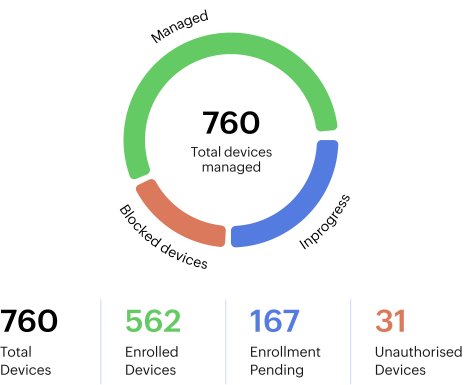
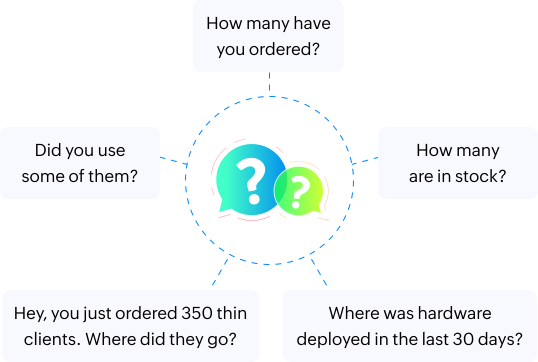
    • Does your IT team rely on spreadsheets to track assets?

      With the procurement team usually raising concerns before bulk device purchases, an asset inventory spread across spreadsheets would be inefficient.
      directors
    • Keep inventory at a single spot and generate DIY reports

      "Asset tracking and accountability is a major challenge in healthcare IT, especially with constant acquisitions. ManageEngine provides a consolidated view of asset and endpoint data, allowing me to track assets from delivery to deployment, including location, department, and user. I can now pull reports myself in seconds, without relying on my team."

      " ManageEngine provides a consolidated view of asset and endpoint data, allowing me to track assets from delivery to deployment, including location, department, and user. I can now pull reports myself in seconds, without relying on my team."

      Senior director of IT infrastructure,

      leading New Jersey based healthcare system in the U.S

      Learn morearrow
    • Visibility & security across diverse browsers to prevent ransomware entry on endpoints proactively

      • In most cases, a ransomware attack starts with an innocuous browser download, which could have been nipped in the bud. directors
      • In most cases, a ransomware attack starts with an innocuous browser download. Lock down browsers using Endpoint Central
      • Lock down browsers using Endpoint Central

        “We adopted Browser Security Plus, an add-on to Endpoint Central, to close a major visibility gap in Edge and Chrome. It gives us the controls to allow only approved extensions, monitor potentially malicious sites, and restrict certain risky downloads that previously bypassed our EDR."

        "Endpoint Central's browser security module gives us the controls to allow only approved extensions, monitor potentially malicious sites, and restrict certain risky downloads that previously bypassed our EDR."

        Director of IT security,

        Parasmus-based healthcare, New Jersey, U.S.

    • Preventing patient records from leaking through personal Gmail accounts

      challenges

      Challenges

      • Employees storing notes in personal Google Drives
      • Blocking personal Gmail accounts would impact employees' bookmark storage
      solutions

      Solutions

      • Leadership buy-in: The IT director plans to create a detailed policy for approval by the chief patient health and quality officer.
      • Operational alignment: The help desk will write guides for employees on how to migrate their bookmarks to their work profile.
      • Technology enablement: IT will use Endpoint Central to remove personal Gmail accounts from all browsers.
      • Clinicians often save notes on personal Google Drives, which can put PHI outside the EHR systems.
      • Remove personal Gmail accounts from all browsers using Endpoint Central to prevent PHI storage on personal accounts.
      • Make this transition from personal accounts to work profile easy for users, by circulating migration guides via managed mobile devices, to migrate important bookmarks and extensions.
    • Monitor web activity for litigable and forensic investigations

      Why is it done?

      Litigable investigations

      When a physician sues your company, have visibility into what they were searching for or what data they were exchanging on the web.

      Forensic investigations

      During a security incident, risk assessment partners want visibility into the web activity of all employees on that day.

      During a security incident, provide visibility into the web activity of all employees for risk assessment partners.

      How was it done?
       

      With Endpoint Central

      “With Endpoint Central, I get to see at an end-user level what employees are doing, why, and what browsers they are leveraging, even for remote workers. I can also control the extensions that are being installed, which is ideal for me. People like to install random stuff that they shouldn't.”

      Director of IT security,

      Parasmus-based healthcare, New Jersey, U.S.


      Without Endpoint Central

    • Reduce attack surface beyond browsers

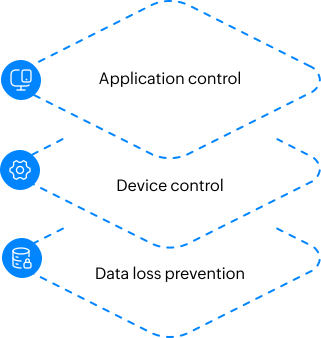
      Ensure that security goes beyond the browser layer, with application control, device control and data loss prevention from Endpoint Central.
      attack
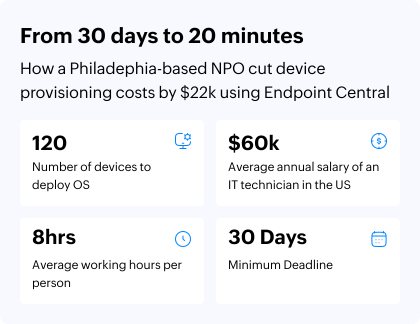
    • Cut down on time and cost for device provisioning during EHR adoption, IT asset overhaul and staff turnover.

      • Purchase, image, and provision assets to the acquired practices to instantly bring them under the parent firm's IT policies.
      • Create a golden image with the organization's IT policies and layer person-specific apps on top of it
      • Proven Results: Saved $22k and cut device setup time from 30 days to just 20 minutes for a Philadelphia-based NPO using Endpoint Central.
      Read the case studyarrow
      reduce
    • Reducing time and complexity in EHR client app distribution

      challenges

      Challenges

      • Client apps interacting with Epic's EHR needing special scripts during installation
      • Manually running the scripts on every machine using the Command Prompt
      solutions

      Solutions

      • With Endpoint Central, the company configured 11 post-deployment automations in sequence to customize software deployment, like changing registry keys, setting up the client to point to the server, and auto-populating desk icons.
      • Share asset inventory data with Epic to distribute Epic clients to employee devices.
      • Run post deployment automations while distributing Epic clients at scale and enable interoperability.

      "Endpoint Central enables me to run 11 post-deployment scripts in sequence to customize software deployment, like changing registry keys, and setting up the client to point to the server. This saves me a lot of time"

      Network system administrator,

      Port Townsend-based community care in Washington, U.S.

    • Secure mobile workflows to Epic EHR

      challenges

      Gain asset visibility for managing Epic deployments

      Healthcare organizations with multiple clinics struggle to collect device information to deploy Epic apps like Haiku and Canto, and end up doing it manually. Consolidate data from mobile phones and tablets into one platform.

      Consolidate device data from mobile phones and tablets across multiple clinics to manage Epic app deployments.

      challenges

      Secure BYOD for clinicians by partitioning from personal information

      Physicians using personal devices to access EHR? Containerize Epic apps on physician devices, and have control over these containers without touching their personal space in the device

      Containerize Epic apps on physician devices, and have control over these containers without touching their personal space in the device

    • Manage shift worker devices accessing EHR

      challenges

      Location tracking and lost mode for mobile devices

      Mobile devices are often lost or misplaced by physicians during emergencies and rounds. Implement location tracking, lost mode, and data protection (camera/screenshot restrictions), or even wipe lost devices, all from a single console

      Implement location tracking, lost mode, or remote wipe for devices that are lost or misplaced by physicians during emergencies and rounds.

      challenges

      Set-up devices in shared mode for shift workers, based on their departments

      Enable multiple departments like renal transplant, pediatric care, rehabilitation services and pharmacy, with easy device handover after shifts. Set-up devices in shared mode with department-specific profiles.

      Enable multiple departments, like renal transplant, pediatric care, rehabilitation services, and pharmacy, to use shared devices with department specific profiles.

    • Remote help across your multi-site clinics, with RBAC to empower department-specific teams

      • Clock icon

        A physician from the affiliate organization has multiple files open with a troubleshooting session scheduled.

      • Building icon

        The parent organization's IT team should ensure all files stay organized and accessible post session.

      • File search icon

        IT remotely views the PC, guiding the physician via chat to save and minimize the files.

      • Lock icon

        Once ready, the physician grants consent, and IT takes remote control to troubleshoot.

      • Check circle icon

        After the session, the physician seamlessly resumes work with all files intact and in place.

      "Earlier, we used UltraVNC for remote control, but it posed a massive security risk, especially when resolving issues related to electronic medical records. We wanted something more secure. Endpoint Central's remote control is HIPAA compliant and integrated natively into the existing agent. We love the role-based access control, which empowers Clinical Informatics and Imaging teams to troubleshoot EMR and PACS systems without relying on IT."

      "Endpoint Central's remote control is HIPAA compliant and integrated natively into the existing agent. We love the role-based access control, which empowers Clinical Informatics and Imaging teams to troubleshoot EMR and PACS systems without relying on IT."

      Network system administrator,

      Port Townsend-based community care in Washington, U.S.

Empodere a cada persona

Diagnóstico e imagen

Diagnóstico e imagen

Devices:
iPad
Embedded PCs
App:
MUSE NX
MagView
Ikonopedia
  • Set up role-based access on our platform for different teams to troubleshoot issues with their own services. For instance, when physicians have trouble with accessing EHRs or PACS, respective teams can remote into EHR or PACS systems.
  • Provide radiologists access to PACS applications like MUSE NX alongside Epic to interpret medical images. Our solution ensures these PACS apps talk to Epic using post-deployment scripts as part of app deployment. This enables radiologists to view images directly within Epic without switching between applications.
  • Bring visibility into diagnostic devices tied to modality that still run on Windows 7 or 8. We help them be patched against critical vulnerabilities, minimizing frequent device replacements and associated costs.

Telehealth and remote patient monitoring

Telemedicina y monitoreo remoto de pacientes

Devices:
iPhone
iPad
Apps:
Epic MyChart Bedside
Zoom
Google Meet
  • Give telehealth practitioners the communication tools they need for consultation. Enable remote physicians with communication apps for video calls, video conferences, and Epic Haiku and Canto, without needing to be on the network.
  • Onboard wearables such as smartwatches and fitness trackers for patients to support remote patient monitoring. To keep these devices secure and available when collecting PHI, we enable IT teams to keep firmware up-to-date and troubleshoot any problems remotely.
  • Deploy configurations and policies for telehealth workers who are not connected to the domain or VPN, replacing GPO dependency.

Enfermeras

Enfermeras

Devices:
iPhone
Shared devices
Barcode scanners
Laptops
Workstations
Apps:
Epic MyChart Bedside
Epic Rover
  • Make it easy for nurses to share iPads to access Epic Haiku, Canto, and Rover for patient assessments and developing care plans. We give them a personalized experience with a simple tap and login. When their shift is over, the device is automatically wiped clean and reset for the next shift.
  • Enable nurses to perform secure barcode medication administration (BCMA) with Zebra Devices. Nurses perform BCMA at the point of care using Epic Rover on Zebra devices. We facilitate this by capturing inventory of all Zebra devices and sharing the device ID to the EMR host so they can associate license for EPIC Rover. To stay HIPAA compliant while performing BCMA, use our solution to harden the device configurations and update them to the latest firmware. Leverage iPhones for real-time patient communication and optimize telecom costs. Replace traditional DECT devices with iPhones distributed with communication apps to keep nurses in touch with patients in isolation wards. Analyze usage patterns to optimize telecom charges. Adhere to state health department requirements for a traceable path to prove that nurses are carrying out home health visits. The ability to turn on locations in bulk and track them with MDM and Epic Rover strengthens our commitment to patient and staff safety.

Pacientes hospitalizados

Pacientes hospitalizados

Devices:
iPhone
Shared devices
Barcode scanners
Laptops
Workstations
Apps:
Epic MyChart Bedside
  • Incoming patients use self-service kiosks to access the MyChart portal. We enable these terminals to be securely configured in kiosk mode and deploy the MyChart app for quick access.
  • Simplify patient check-in at the lobby with a shared mobile kiosk. These are ready for patient use with preconfigured, generic profiles, reducing wait times.
  • Personalize the inpatient experience. Deliver bedside iPads and tablets set up with Apple TV and personalized device configurations. These allow patients to view their medical records, control room temperatures, close blinds, and call a nurse.

Médicos

Médicos

Devices:
iPhone
iPad
Workstations
AR/VR
Laptops
Apps:
Epic Rover
Epic Canto
Epic Haiku
3M M*Modal Fluency Direct
  • Keep clinical workstations automatically logged on a generic, secured profile so doctors can share and access EHRs throughout the day. Automate the life cycle, from onboarding the device to deploying software and updates to remote wiping.
  • Equip physicians' with iPads and iPhones with apps like Epic Canto and 3M M*Modal Fluency Direct to review patient charts and dictate notes on the go. We help deploy and manage these apps and keep them updated.
  • During emergencies, give physicians uninterrupted access to EHR systems and critical clinical apps. Our DEX capabilities leverage drag-and-drop workflow orchestrations to self-heal commonly recurring device issues.

Instalaciones para la tercera edad

Instalaciones para la tercera edad

Devices:
iPad
Apps:
PointClickCare
Zoom
Google Meet
  • Keep residents connected with their families while ensuring they don't install unwanted apps on their devices. Our solution sets up shared devices in kiosk mode distributed with communication apps for easy access.
  • Restore access to residents that forget device passwords. When residents accidentally lock themselves out of the devices, our system swiftly resets them, ensuring device availability for all users.
  • Stop relying on paper-based charting for elderly care. With EHR adoption mandated by the HITECH Act, we secure charting on mobile devices through apps like Point Click Care.
  • Avoid the devastating cost of a data breach. We help harden shared devices through app and Wi-Fi restrictions and device encryption. If a device is lost, lock it and display the contact number to facilitate its return.

Trabajadores por turnos

Trabajadores por turnos

Devices:
iPhone
iPad
Workstations
  • Enable multiple departments, like speech therapy, physical therapy, housekeeping, and pharmacy, with easy device handover after shifts. Set-up kiosk devices in shared mode with department-specific profiles.
  • In care settings involving users from multiple departments, set up general iPads in kiosk mode with multiple profiles. Based on which user signs in, the device becomes specific to their department.
  • From the moment the shift worker signs in, personalize the device for their role and identity. Once their shift is finished, wipe, reset, and ready the device for the next worker.
  • Once a shift worker signs in to the device, enable SSO so they are signed in to apps automatically. Integrate with IdP and enable SSO to avoid redundant typing of credentials for each application.

Servicios de cuidados paliativos y a domicilio

Servicios de cuidados paliativos y a domicilio

Devices:
iPhone
iPad
  • Meet requirements from state health departments that there be a traceable path that proves a nurse's home health visits. Use our solution to turn on locations in mass and track them with MDM and Epic Rover, ensuring patient and staff safety.
  • Help hospital employees who have lost their devices to locate them efficiently. With RBAC, enable the home care department to manage their individual pools of devices so they can track a device's location and remotely wipe it if it's lost or stolen.
  • Secure home care laptops taken off site that hold offline copies of PHI. With our solution, comply with HIPAA by enabling the encryption of all endpoints with local data storage.
  • Leverage iPhones for real-time patient communication and optimize telecom costs. Analyze usage patterns to optimize telecom charges.

Gestione cada endpoint

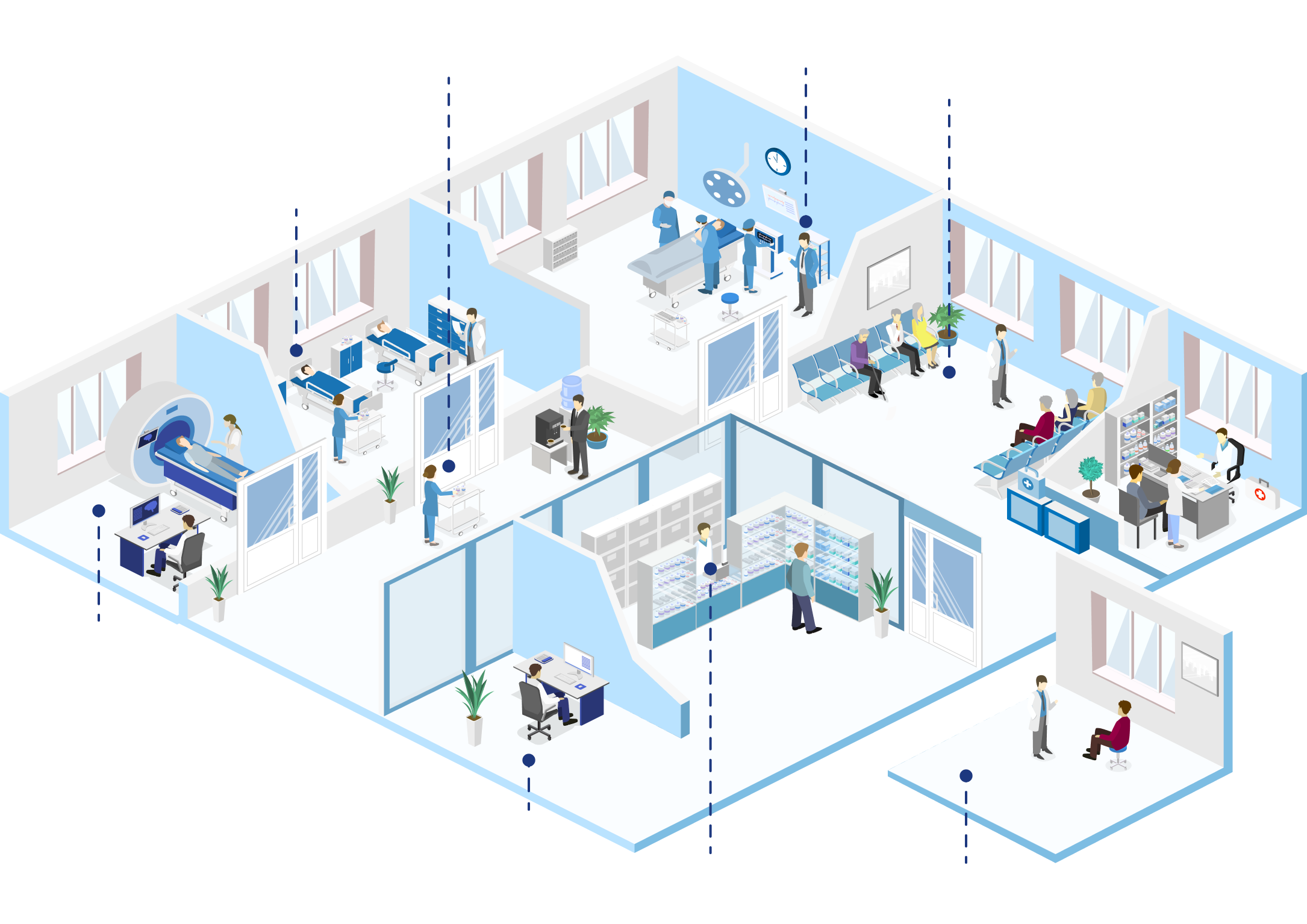
Estaciones de trabajo clínicas

Dispositivos compartidos
Infraestructura de servidor

PC integrados

Escáneres médicos basados en códigos de barras


AR/VR

Wearables

Mini PC

Adopción de EHR y movilidad

  • Modernice y aprovisione los endpoints del personal y de los puntos de atención con Windows 11 cuando vincule EPIC
  • Implemente prácticas seguras de acceso móvil a EHR a partir del NIST SP 1800-1
  • Personalice la distribución de Imprivata, Citrix y otras aplicaciones de cliente con scripts, para que pueda garantizar la interoperabilidad con EPIC a escala
  • BYOD seguro para los médicos y dispositivos compartidos para los trabajadores por turnos
  • Habilite los clientes de Epic y las actualizaciones de aplicaciones de salud
EXPLORE NUESTRAS SOLUCIONES
  • Responda con confianza al comité de capital durante las compras de activos con la gestión integrada de ITAM y endpoints, y los informes que puede elaborar usted mismo.
  • Reduzca el tiempo de aprovisionamiento de los dispositivos a 20 minutos y someta los activos de las filiales a la directiva de TI de la empresa matriz.
  • Borre remotamente la PHI al finalizar el contrato de un afiliado.
  • Proteja los mini PC en los quirófanos o los PC integrados en las redes biomédicas adquiridas.
  • Vea a distancia los activos de los afiliados, obtenga el consentimiento de los médicos, tome el control remoto, grabe y registre las sesiones, con un control remoto conforme a la HIPAA. Integrado con su mesa de ayuda preferida.
EXPLORE NUESTRAS SOLUCIONES
  • Ayude a los pacientes ingresados a consultar sus historias clínicas con iPads personalizados, configurados con EPIC MyChart Bedside.
  • Ayude a las estaciones de trabajo clínicas a acceder de forma segura a la EHR sin credenciales. Los dispositivos pueden acceder con un perfil genérico seguro y Citrix se puede configurar para aceptar la autenticación con smart card.
  • Permita al personal de enfermería realizar la administración de medicación mediante códigos de barras con los dispositivos Zebra aplicando EPIC Rover y actualizando el firmware.
  • Facilite a los trabajadores por turnos (logopedia, limpieza y farmacia) entregar los dispositivos al finalizar los turnos. Establezca dispositivos de quiosco en modo compartido con perfiles específicos para cada departamento.
  • Evite el agotamiento del equipo de TI. Establezca RBAC para la informática clínica y radiología para solucionar problemas a distancia en EHR o PACS respectivamente.
LEA EL RESUMEN DE LA SOLUCIÓN
  • Bloquee los navegadores, ponga aplicaciones en la lista blanca para reducir la superficie de ataque.
  • Detecte el ransomware usando análisis patentados con una precisión del 99,99%.
  • Recupere datos con la protección anti-manipulación patentada.
  • Monitoree la actividad de la web para investigaciones judiciales y forenses.
  • Deje de abrumar a TI con interminables CVE. Utilice la agrupación y el enriquecimiento inteligente de datos para convertir los datos en acción. Aproveche la remediación integrada para cerrar la brecha entre TI-SecOps.
  • Parchee Windows, macOS, Linux, iOS, servidores y más de 850 aplicaciones de terceros.
  • Cifre los dispositivos de los cuidadores a domicilio y rastree su ubicación a gran escala.
  • Evite la TI invisible y capacite a los proveedores de asistencia con las aplicaciones adecuadas.
EXPLORE NUESTRAS SOLUCIONES
  • Cumpla los objetivos esenciales y mejorados de los CPG.
  • Prepárese para la HISAA y cumpla los objetivos esenciales y mejorados de los GPC del HHS.
EXPLORE NUESTRAS SOLUCIONES

Una plataforma para cada flujo de trabajo de endpoint

Gestión del endpoint

Experiencia digital del empleado

Seguridad del endpoint

Inteligencia

Endpoint Central

Extensibilidad

Más de 1.000 puntos de recopilación de telemetría en todo el mundo
Windows
macOS
iOS
Android
Linux OS
Servidor
OT/IOT
Computación para usuario final
I&O para servidor
Equipos de seguridad y riesgo
GRC

Si es una empresa del sector de la salud, vea lo que podemos hacer por usted.

Aprenda y explore

Si es demasiado pronto en su proceso de compra para hablar con nuestro especialista en el producto, le recomendamos que visite nuestros recursos. Podrá encontrar contenidos de liderazgo intelectual sobre cómo conseguir la aprobación de la alta dirección, estudios de casos similares y vídeos de demostración sobre casos prácticos relevantes para usted.

-

Connect with our healthcare solution experts

Please enter the valid name.Please enter a name.
Please enter a valid email.Please enter a email.
-
Please enter the valid phone.Please enter the phone.
Please enter the valid name.Please enter a name.
Please enter the valid details.
By clicking 'Submit', you agree to processing of personal data according to the Privacy Policy.

Thanks for sharing your details.

Our healthcare solution experts will contact you soon.

faq

Preguntas frecuentes

01. ¿Cómo una solución para la gestión del endpoint puede ayudar a cumplir la normativa (HIPAA, HHS, etc.)?

+-

Una solución para la gestión del endpoint ayuda a las organizaciones sanitarias a cumplir mandatos como la HIPAA, la HITECH y las directrices de seguridad del HHS, aplicando estrictos controles de acceso, directivas de cifrado y documentación lista para la auditoría. ManageEngine Endpoint Central automatiza las verificaciones de cumplimiento, garantiza que la información de salud protegida (PHI) permanezca segura en todos los endpoints y mantiene logs de actividad detallados para las auditorías. También aplica configuraciones estandarizadas y un monitoreo continuo para prevenir los comportamientos no conformes del dispositivo y proteger los datos sensibles del paciente.

Más información

02. ¿Endpoint Central puede gestionar los dispositivos móviles y compartidos que usan los médicos y pacientes?

+-

Sí. Endpoint Central gestiona de forma unificada todo tipo de dispositivos sanitarios, incluidas las estaciones de trabajo de los médicos, las tabletas de los pacientes y los quioscos médicos compartidos. Permite a los administradores configurar, proteger y monitorear a distancia tanto los dispositivos móviles que son propiedad de la empresa como los compartidos. Con funciones como el modo quiosco, la implementación segura de aplicaciones y el seguimiento en tiempo real, Endpoint Central ayuda a garantizar que las aplicaciones clínicas y las interfaces del paciente permanezcan seguras, cumplan las directivas y estén disponibles cuando se necesiten.

Más información

03. ¿Cuáles son los componentes clave de una solución para la gestión de endpoints sanitarios?

+-

Una solución integral para la gestión de endpoints sanitarios que incluye la gestión del ciclo de vida del dispositivo, la automatización del parcheo, la detección de amenazas, el cifrado de datos, la solución remota de problemas y la elaboración de informes de cumplimiento. Endpoint Central reúne estos componentes en una misma consola, ofreciendo a los equipos de TI sanitarios una visibilidad completa del estado del dispositivo, el estado del software y la postura de seguridad. Este enfoque centralizado garantiza la continuidad operativa, minimiza los riesgos de seguridad y respalda la gobernanza de datos alineada con la HIPAA en toda la red sanitaria.

Más información

04. ¿Qué tipos de endpoints sanitarios se pueden gestionar con la UEM?

+-

Una solución para la gestión unificada de endpoints (UEM) como Endpoint Central puede gestionar una amplia gama de endpoints sanitarios, como computadores portátiles de médicos, puestos de enfermería, carros hospitalarios móviles, tabletas médicas, sistemas de laboratorio, dispositivos IoT médicos e incluso equipos de campo robustos. Garantiza que cada dispositivo conectado, ya sea dentro de un hospital o en un centro asistencial remoto, se adhiera a las directivas de seguridad y reciba las actualizaciones oportunas, manteniendo la conformidad y la fiabilidad del sistema.

Más información

05. ¿Cómo la gestión del endpoint protege contra el ransomware y las amenazas a los endpoints sanitarios?

+-

Endpoint Central ayuda a las organizaciones del sector de la salud a defenderse contra el ransomware y las amenazas avanzadas mediante la aplicación continua de parches, el monitoreo de amenazas en tiempo real y el control de acceso basado en directivas. Detecta rápidamente los dispositivos vulnerables, aplica actualizaciones de seguridad y aísla los endpoints infectados para evitar la propagación lateral. Las funciones integradas de prevención de pérdida de datos y cifrado garantizan que, incluso en caso de intento de ataque, los datos del paciente permanezcan protegidos y los sistemas se recuperen rápidamente.

Más información

06. ¿Cuáles son las funciones clave en una solución efectiva para la gestión del endpoint para las organizaciones sanitarias?

+-

Una solución eficaz para la gestión de endpoints sanitarios debe combinar las funciones de visibilidad centralizada, control de acceso de confianza cero, parcheo automatizado, cifrado del endpoint, garantía de cumplimiento y soporte remoto. Con ManageEngine Endpoint Central, los equipos de TI del sector de la salud pueden unificar los flujos de trabajo de seguridad y gestión en todos los dispositivos clínicos y administrativos, proteger la PHI y mantener el tiempo de actividad mientras se satisfacen las exigencias normativas y operativas de los entornos de salud modernos.

Más información
 
 
Solución de gestión y automatización de endpoints UEM/AEM

Para una gestión de activos fácil y efectiva en la que confían las siguientes empresas