
In today’s networks, not all threats look like attacks. Many security risks now hide within normal-looking traffic, making them difficult to detect using traditional monitoring methods.
Conventional tools rely on predefined rules, static thresholds, and known signatures. While this approach works for familiar issues, it often misses subtle, behavior-based threats that evolve over time or blend into everyday network activity.
Modern IT environments introduce additional challenges:
Without continuous behavioral analysis, these hidden risks can remain undetected until they cause performance degradation, data exposure, or security incidents.
To identify threats that hide within normal-looking traffic, organizations need more than static rules or predefined thresholds. NetFlow Analyzer uses flow-based traffic data and machine learning-driven behavioral analysis to understand how your network actually operates.
By continuously learning normal traffic patterns across devices, applications, and time periods, the solution establishes dynamic baselines for expected behavior. Any significant deviation from these baselines is flagged as a potential anomaly.
Instead of evaluating traffic in isolation, NetFlow Analyzer analyzes traffic volume and direction to identify unusual spikes or drops, source and destination behavior to detect unexpected communication patterns, application and protocol usage to spot suspicious or unauthorized activity, time-based patterns to highlight activity outside normal business hours and more.
When abnormal behavior is detected, the system provides clear, contextual insights such as a newly observed destination IP, a five times increase in outbound traffic from the baseline, or the use of an unusual protocol for a specific host. These details show what changed, where it happened, and why it matters, helping teams quickly determine whether the issue is a performance anomaly, a misconfiguration, or a potential security threat.
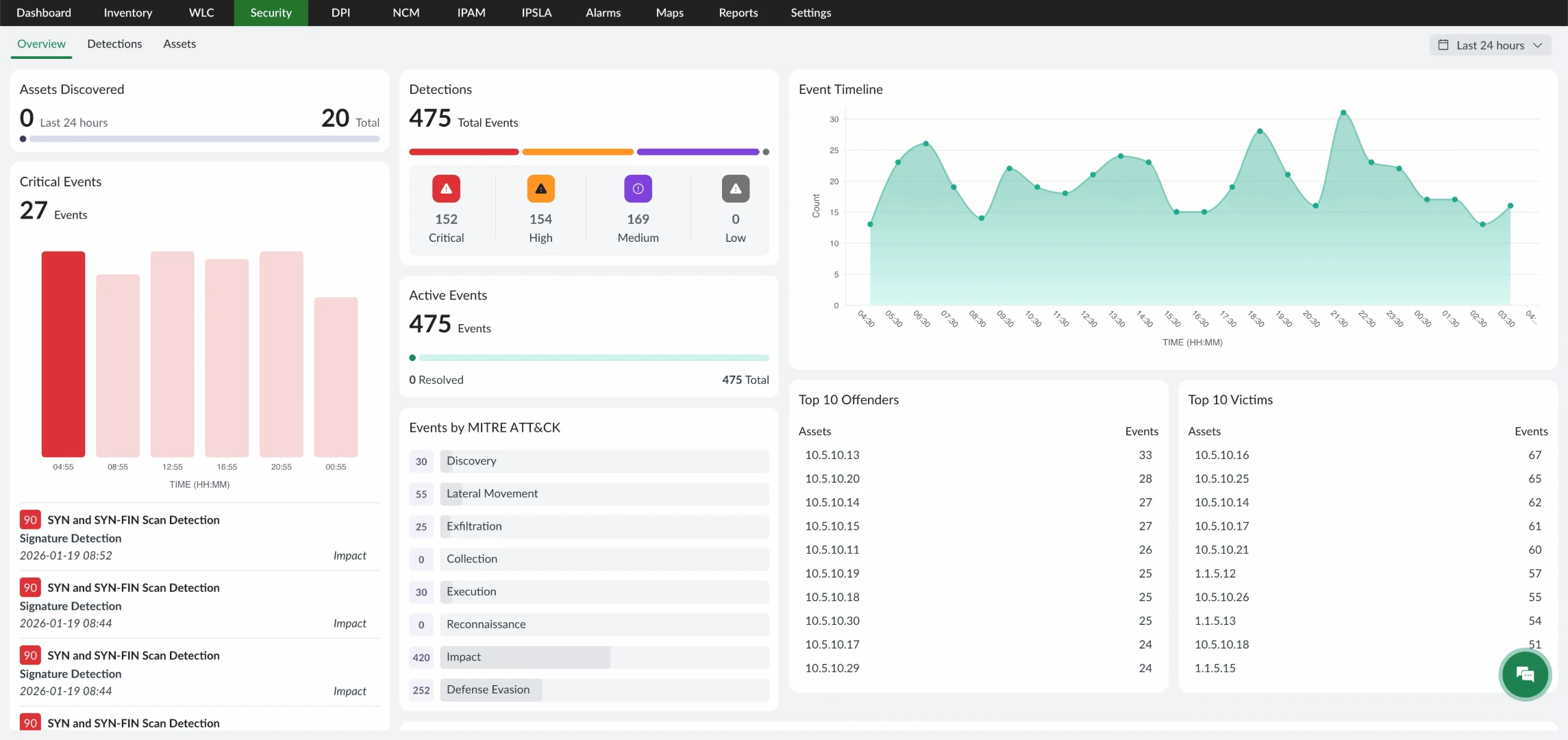
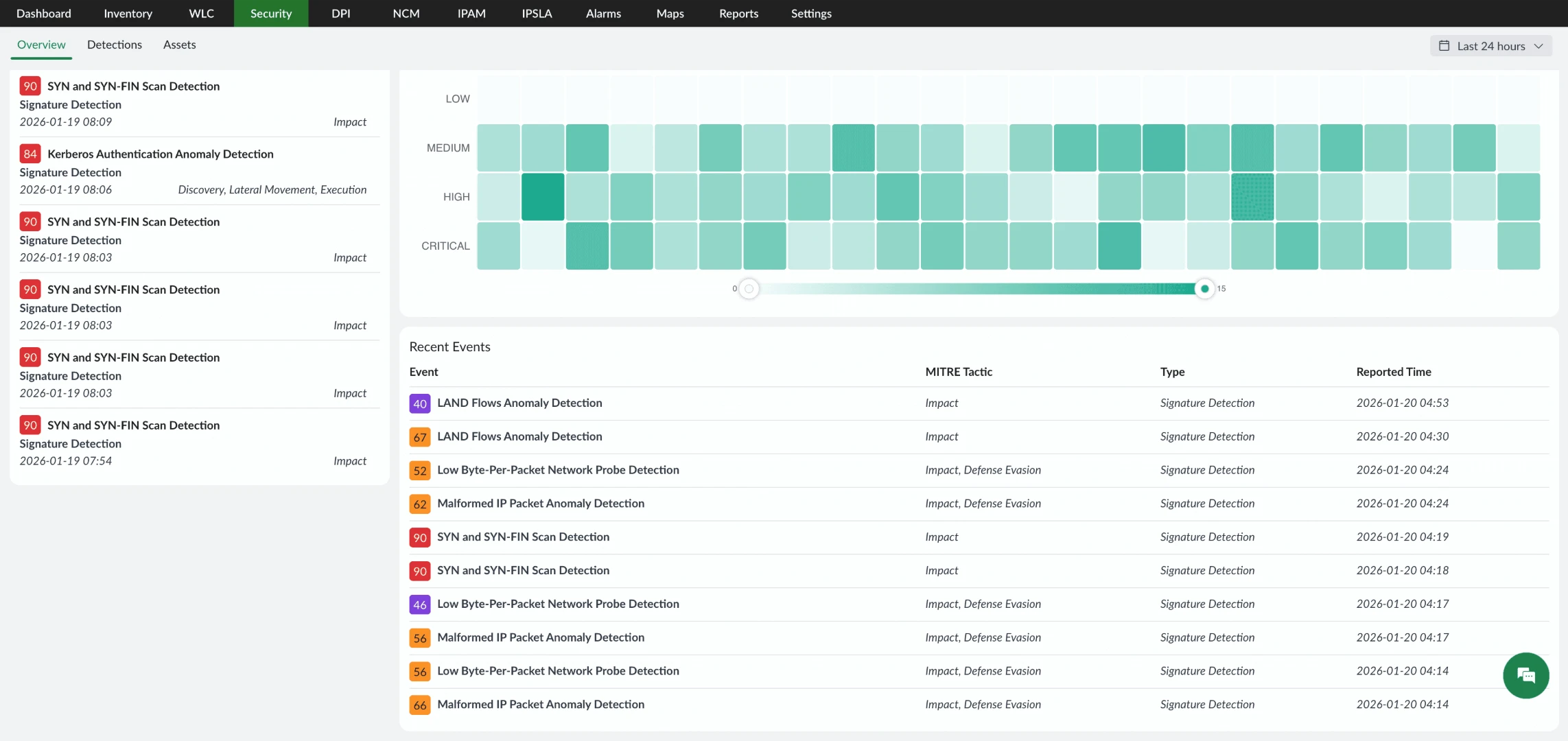
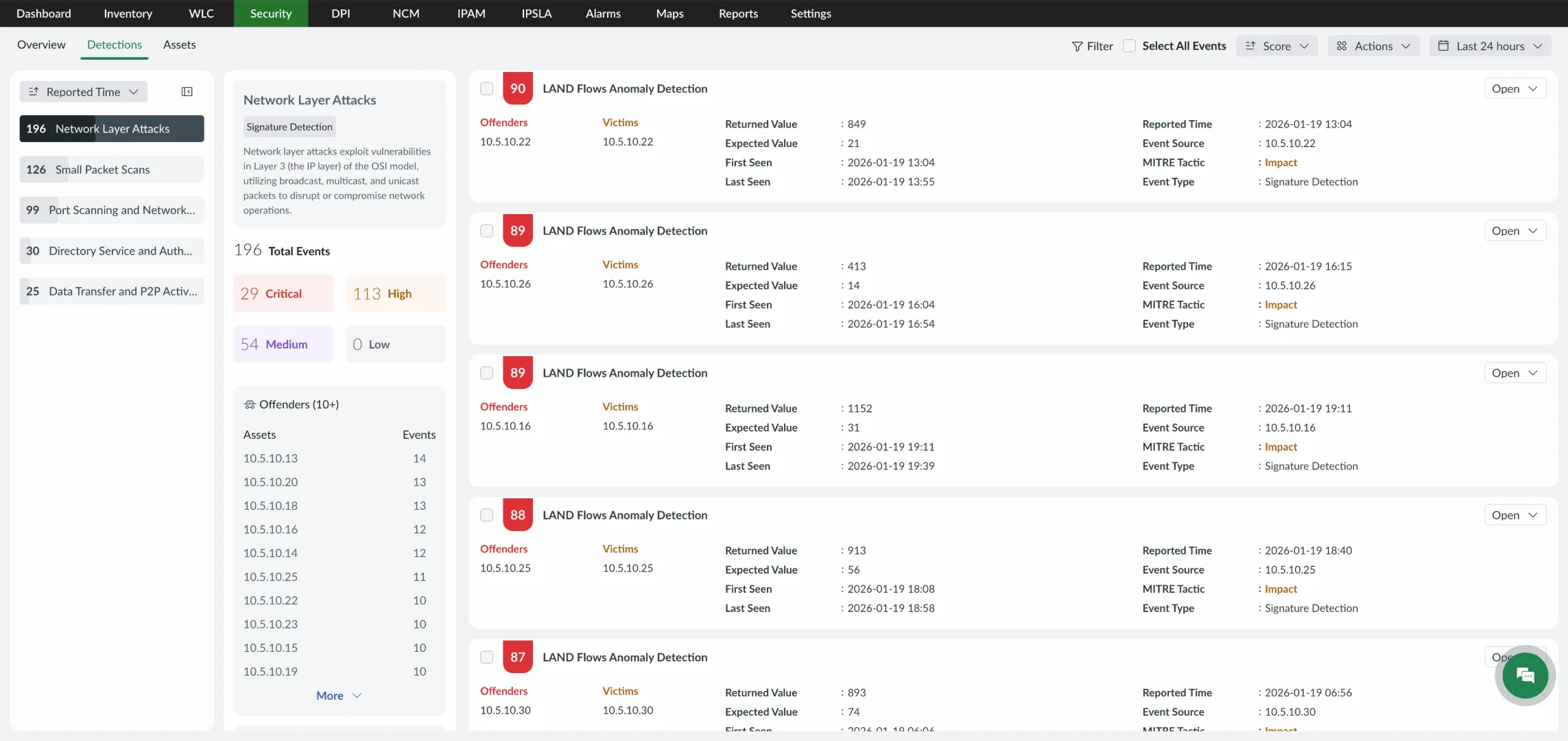
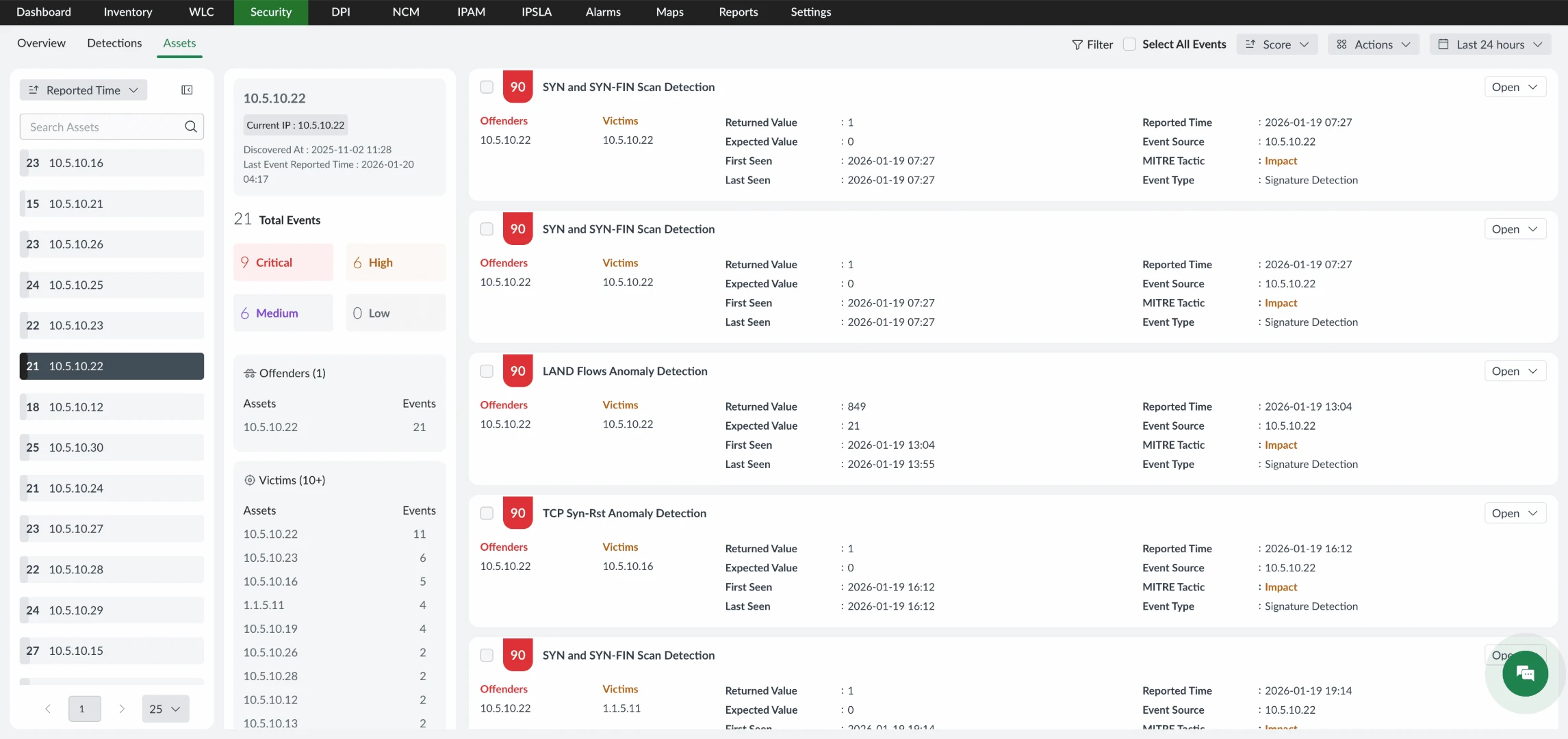
Detecting abnormal behavior is only the first step. To understand whether an anomaly represents a real security risk, teams need deeper context, threat classification, and investigation support.
NetFlow Analyzer’s Security Analytics module enhances anomaly detection with advanced traffic intelligence, built-in security rules, and behavioral analysis.
Powered by machine learning and a comprehensive set of security rules, the module helps teams:
To provide meaningful security insight, detected threats are mapped to the MITRE ATT&CK framework. This helps security teams understand the attacker’s tactics, techniques, and potential objectives behind suspicious activity.
By combining behavior-based anomaly detection , rule-based threat analysis, and MITRE ATT&CK mapping, NetFlow Analyzer transforms raw traffic data into actionable security intelligence. This enables faster investigations, clearer threat visibility, and more confident response decisions.
By combining behavioral analysis, traffic intelligence, and threat classification NetFlow Analyzer helps in detecting, understanding, and responding to suspicious network activity with confidence.
Behavior anomaly detection
Identifies unusual network behavior by comparing real-time traffic against established usage patterns. Example: A sudden surge in outbound traffic from a single device may indicate data exfiltration or a misconfigured system.
Traffic baselining
Continuously learns what normal traffic looks like across your network to improve detection accuracy and reduce false positives. Example: A sharp drop in traffic to a critical endpoint could point to routing issues or ISP instability rather than a security threat.
Threat classification
Categorizes abnormal activity based on behavior, severity, and potential risk. Example: Repeated internal scanning or unexpected device-to-device communication can indicate lateral movement.
Context-rich insights
Provides detailed visibility into affected devices, applications, and traffic flows to support faster investigation. Example: Teams can quickly assess whether unusual data transfers involve sensitive systems or critical applications.
The steps include,
1. Collect flow data
NetFlow Analyzer collects traffic data from routers, switches, firewalls, and wireless controllers using flow protocols such as NetFlow, sFlow, IPFIX, and J-Flow. This gives visibility into source and destination IPs, applications, protocols, traffic volume, and communication patterns across the network.
2. Analyze traffic behavior
Traffic is analyzed based on time of day, individual devices, applications, and usage trends. NetFlow Analyzer builds behavioral profiles for hosts and applications, helping establish what normal activity looks like in different network conditions.
3. Detect abnormal activity
When traffic patterns deviate from expected behavior, such as sudden volume spikes, unusual destinations, or unexpected protocol usage, NetFlow Analyzer flags them as anomalies. Historical trends and contextual comparisons are used to reduce false positives.
4. Enrich with security context
Each anomaly is enriched with details such as source and destination, application, protocol, traffic direction, and mapped MITRE ATT&CK techniques. This helps teams understand whether the activity relates to potential threats, misconfigurations, or performance issues.
5. Support faster response
From the anomaly dashboard, teams can investigate traffic flows, identify affected devices, and correlate events with performance metrics. This enables faster root cause analysis, quicker decision making, and more targeted responses.
Effective threat detection depends on understanding how your network behaves and recognizing when something changes. With machine learning-driven behavioral analysis, built-in security rules, and MITRE ATT&CK mapping, NetFlow Analyzer brings clarity to anomalies and accelerates investigation. Its flow-based visibility and advanced security analytics help teams analyze incidents faster, make informed decisions quickly, and maintain a stronger security posture.

NetFlow analyzer, it speaks for itself. It gives us a good insight into what's happening on the network. The security team and network team use it quite extensively. It's a great product, easy to use.
Community Media
NetFlow Analyzer boasts a rich set of features that align well with its intended purpose. The ability to collect, monitor, and analyze NetFlow, sFlow, J-Flow, and other flow data from various devices. The tools provide in-depth traffic analysis, top talkers, application protocols, and overall network performance helping identify bandwidth hogs and potential bottlenecks.
IT Services Industry
The tool best for real-time monitoring of network traffic to view bandwidth usage and network performance. Monitor traffic by protocol, allowing understanding of how different protocols are affecting the network. Source/Destination Analysis visibility into traffic patterns by source and destination IP addresses, aiding in identifying network congestion source.
IT Services Industry