- Free Edition
- What's New?
- Key Highlights
- Suggested Reading
- All Capabilities
-
Log Management
- Event Log Management
- Syslog Management
- Log Collection
- Agent-less Log Collection
- Agent Based Log collection
- Windows Log Analysis
- Event Log Auditing
- Remote Log Management
- Cloud Log Management
- Security Log Management
- Server Log Management
- Linux Auditing and Reporting
- Auditing Syslog Devices
- Windows Registry Auditing
- Privileged User Activity Auditing
-
Application Log Management
- Application Log Monitoring
- Web Server Auditing
- Database Activity Monitoring
- Database Auditing
- IIS Log Analyzer
- Apache Log Analyzer
- SQL Database Auditing
- VMware Log Analyzer
- Hyper V Event Log Auditing
- MySQL Log Analyzer
- DHCP Server Auditing
- Oracle Database Auditing
- SQL Database Auditing
- IIS FTP Log Analyzer
- IIS Web Log Analyzer
- IIS Viewer
- IIS Log Parser
- Apache Log Viewer
- Apache Log Parser
- Oracle Database Auditing
-
IT Compliance Auditing
- ISO 27001 Compliance
- HIPAA Compliance
- PCI DSS Compliance
- SOX Compliance
- GDPR Compliance
- FISMA Compliance Audit
- GLBA Compliance Audit
- CCPA Compliance Audit
- Cyber Essentials Compliance Audit
- GPG Compliance Audit
- ISLP Compliance Audit
- FERPA Compliance Audit
- NERC Compliance Audit Reports
- PDPA Compliance Audit reports
- CMMC Compliance Audit
- Reports for New Regulatory Compliance
- Customizing Compliance Reports
-
Security Monitoring
- Threat Intelligence
- STIX/TAXII Feed Processor
- Threat Whitelisting
- Real-Time Event Correlation
- Log Forensics
- Incident Management System
- Automated Incident Response
- Linux File Integrity Monitoring
- Detecting Threats in Windows
- External Threat Mitigation
- Malwarebytes Threat Reports
- FireEye Threat Intelligence
- Application Log Management
- Security Information and Event Management (SIEM)
- Real-Time Event Alerts
- Privileged User Activity Auditing
-
Network Device Monitoring
- Network Device Monitoring
- Router Log Auditing
- Switch Log Monitoring
- Firewall Log Analyzer
- Cisco Logs Analyzer
- VPN Log Analyzer
- IDS/IPS Log Monitoring
- Solaris Device Auditing
- Monitoring User Activity in Routers
- Monitoring Router Traffic
- Arista Switch Log Monitoring
- Firewall Traffic Monitoring
- Windows Firewall Auditing
- SonicWall Log Analyzer
- H3C Firewall Auditing
- Barracuda Device Auditing
- Palo Alto Networks Firewall Auditing
- Juniper Device Auditing
- Fortinet Device Auditing
- pfSense Firewall Log Analyzer
- NetScreen Log Analysis
- WatchGuard Traffic Monitoring
- Check Point Device Auditing
- Sophos Log Monitoring
- Huawei Device Monitoring
- HP Log Analysis
- F5 Logs Monitoring
- Fortinet Log Analyzer
- Endpoint Log Management
- System and User Monitoring Reports
-
Log Management
- Product Resources
- Related Products
- Log360 (On-Premise | Cloud) Comprehensive SIEM and UEBA
- ADManager Plus Active Directory Management & Reporting
- ADAudit Plus Real-time Active Directory Auditing and UBA
- ADSelfService Plus Identity security with MFA, SSO, and SSPR
- DataSecurity Plus File server auditing & data discovery
- Exchange Reporter Plus Exchange Server Auditing & Reporting
- M365 Manager Plus Microsoft 365 Management & Reporting Tool
- RecoveryManager Plus Enterprise backup and recovery tool
- SharePoint Manager Plus SharePoint Reporting and Auditing
- AD360 Integrated Identity & Access Management
- AD Free Tools Active Directory FREE Tools
What is event log archive?
The event log archive is the raw log data captured and stored for future forensic analysis and compliance requirements. By default, Windows event logs are set to overwrite when full. Every channel, application, security, system, and various custom channels have a size cap, and once that cap is reached, older events are dropped to make room for new ones.
Windows offers two archive-related paths: archive the log when full, do not overwrite events and manual export from Event Viewer. However, both options leave you with a pile of ENTX files sitting in a system directory, with no search, indexing, or a way to prove logs haven't been altered, making event log management difficult.
EventLog Analyzer solves the problem. It collects logs from Windows, UNIX, firewalls, routers, and switches to a central server, archives them on a configurable schedule, and encrypts the archived files for tamper protection. It also lets you reload any past archive into the search index when an audit or investigation calls for it, eliminating the manual EVTX shuffling native Windows leaves you with.
Where are event log archives stored and in what format?
Windows writes archived logs to %SystemRoot%\System32\winevt\Logs\ by default — usually C:\Windows\System32\winevt\Logs\.
Archived files follow a fixed naming pattern: Archive-<LogName>-<yyyy-MM-dd>-<HH-mm-ss-fff>.evtx.
EVTX is Microsoft's binary XML event log format. It replaced the older text-based EVT format used through Windows XP and Server 2003. Each event is stored as a structured record—fields for event ID, provider, level, task category, and payload—which makes parsing faster and more precise than the older format.
EventLog Analyzer reads EVTX files natively during log import. No conversion step or external parser required. Archived logs land in the index with their original event structure intact and are immediately queryable through the built-in search.
How to archive Windows event Logs
Windows offers two native ways to archive event logs. Each writes files in EVTX format, the native binary container Microsoft has used since Windows Vista and Server 2008, so archives from any of the paths remain readable by the same tools.
1. Manual archive from Event Viewer
- Open Event Viewer (
eventvwr.msc). - Right-click the log channel (Application, Security, System, or any channel under Applications and Services Logs), and choose Save All Events As.
- Pick EVTX to preserve the native format, or CSV/XML for external tools.
Windows writes the archive file to the location you choose. This is only useful for forensics on a single machine.
2. Automatic "archive when full" via Group Policy
- For domain-joined machines, enable Back up log automatically when full under
Computer Configuration → Administrative Templates → Windows Components → Event Log Service → [Channel]. - Set Retention method to Archive the log when full, do not overwrite events under
Security Settings → Event Log.
Windows then saves the log as an EVTX file to %SystemRoot%\System32\winevt\Logs\ whenever it fills, and starts a fresh log with no gap.
Centralized log archiving
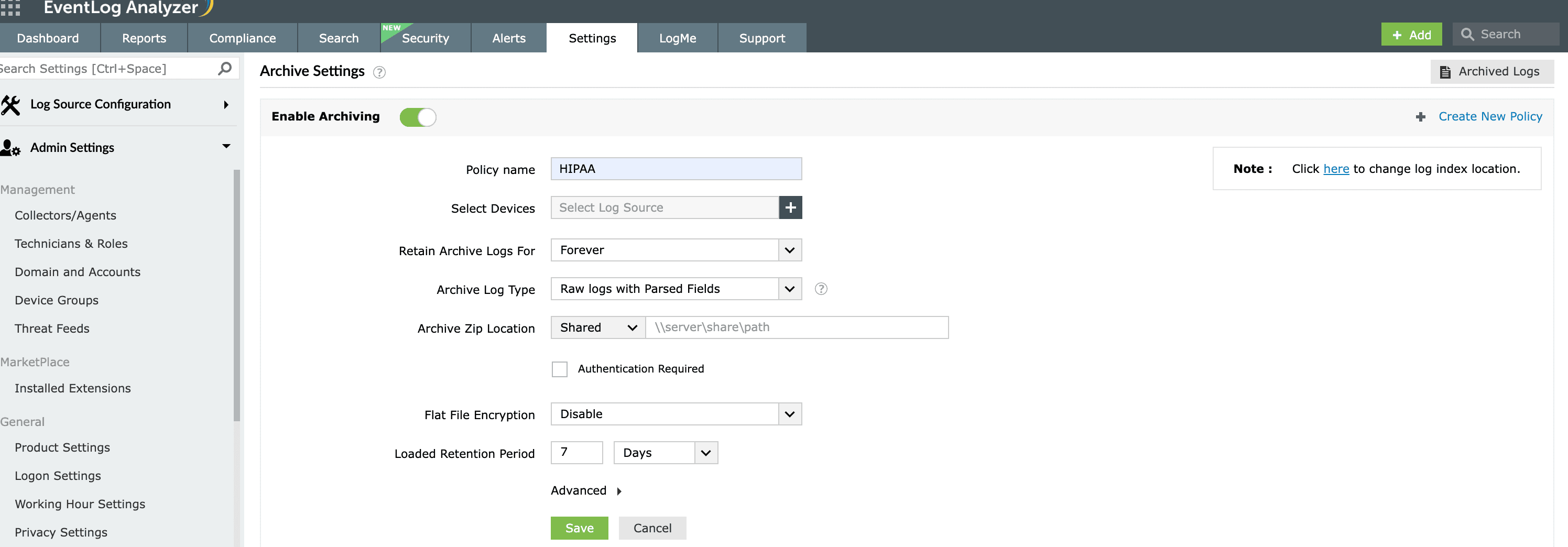
Manual and GPO archiving leave EVTX files scattered across every endpoint with no search, encryption, or life cycle management. EventLog Analyzer collects logs from every configured device: Windows, UNIX, routers, and switches, then archives them centrally on a configurable schedule. Files are encrypted, hashed, and timestamped as they're written, and any archive can be reloaded into the search index on demand.
Tamper-proof log archiving
An event log archive is only useful to an auditor or investigator if you can prove nothing in it has been changed. That's why auditing event log archive integrity is called out explicitly in PCI DSS Requirement 10.5 (protect audit trails from unauthorized modification) and mirrored across HIPAA's audit-control requirements.
EventLog Analyzer applies a three-layer compliance control set to archived files:
Encryption at rest: Archive files are encrypted so the raw log data isn't readable by anyone with file-system access alone. Encryption is applied as part of the archival process; the file that lands on disk is already protected.
Hashing: Each archive is hashed at creation. If the file is opened, altered, and closed again, the hash breaks and the tampering is flagged the next time the archive is loaded or verified.
Timestamping: Every archive is bound to the exact time it was created, establishing when the data existed in its captured form.
Combined with hashing, timestamping is what makes an archive defensible as chain-of-custody evidence. Layered on top of the three, role-based access control restricts which console users can view, export, or delete archived files.
Archive log retention policy
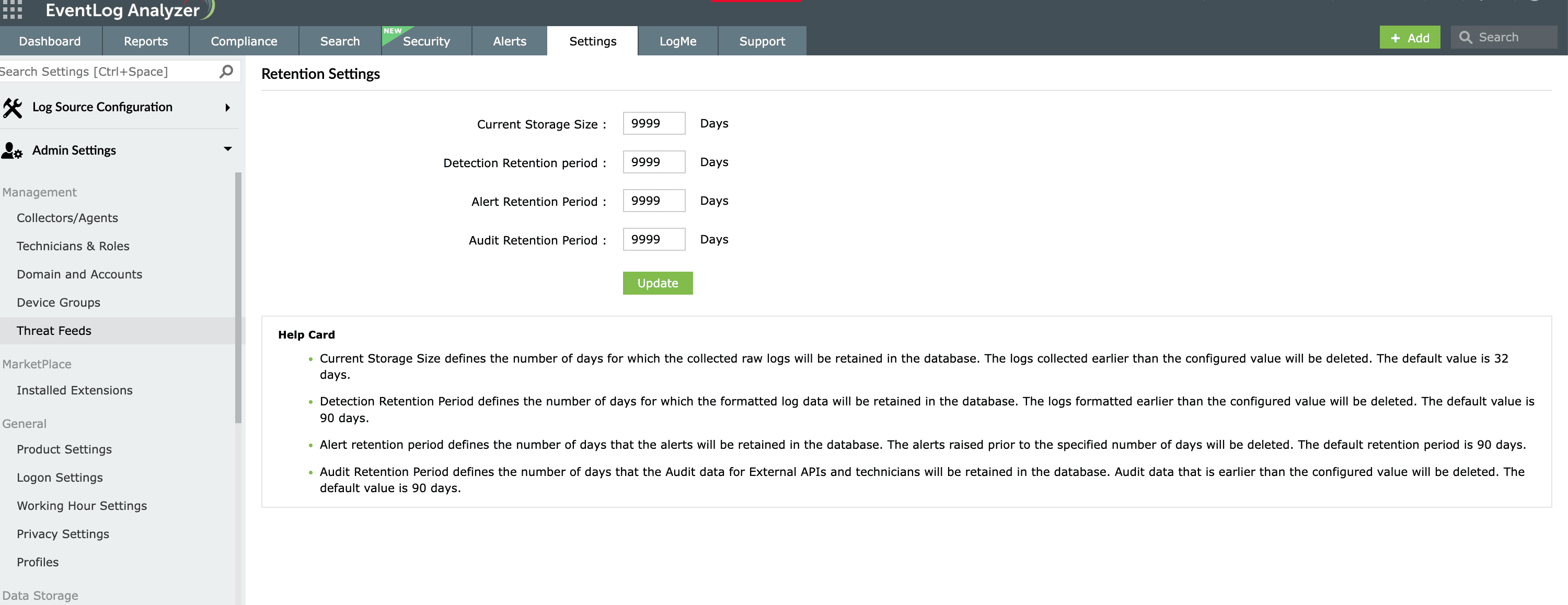
A log retention policy answers three questions: which logs to keep, for how long, and in what state—searchable, cold archive, or destroyed. Windows defaults answer none of them in a way an auditor would accept.
Windows keeps writing until the file hits the cap, then starts dropping the oldest entries. On a busy Security log, the retention window collapses to hours. The three native Windows retention options are:
1. Overwrite events as needed (default): Oldest events discarded when the log fills. No preservation guarantee.
2. Archive the log when full, do not overwrite events: Windows saves the current log as an EVTX file and starts a fresh log. Nothing is lost, but the archived files pile up in winevt\Logs and need external management.
3. Do not overwrite events (clear logs manually): Logging stops when the file fills. Requires operator action to resume. Risky in production.
Only the second option preserves history without stalling logging, and only if something is picking up the archived files.
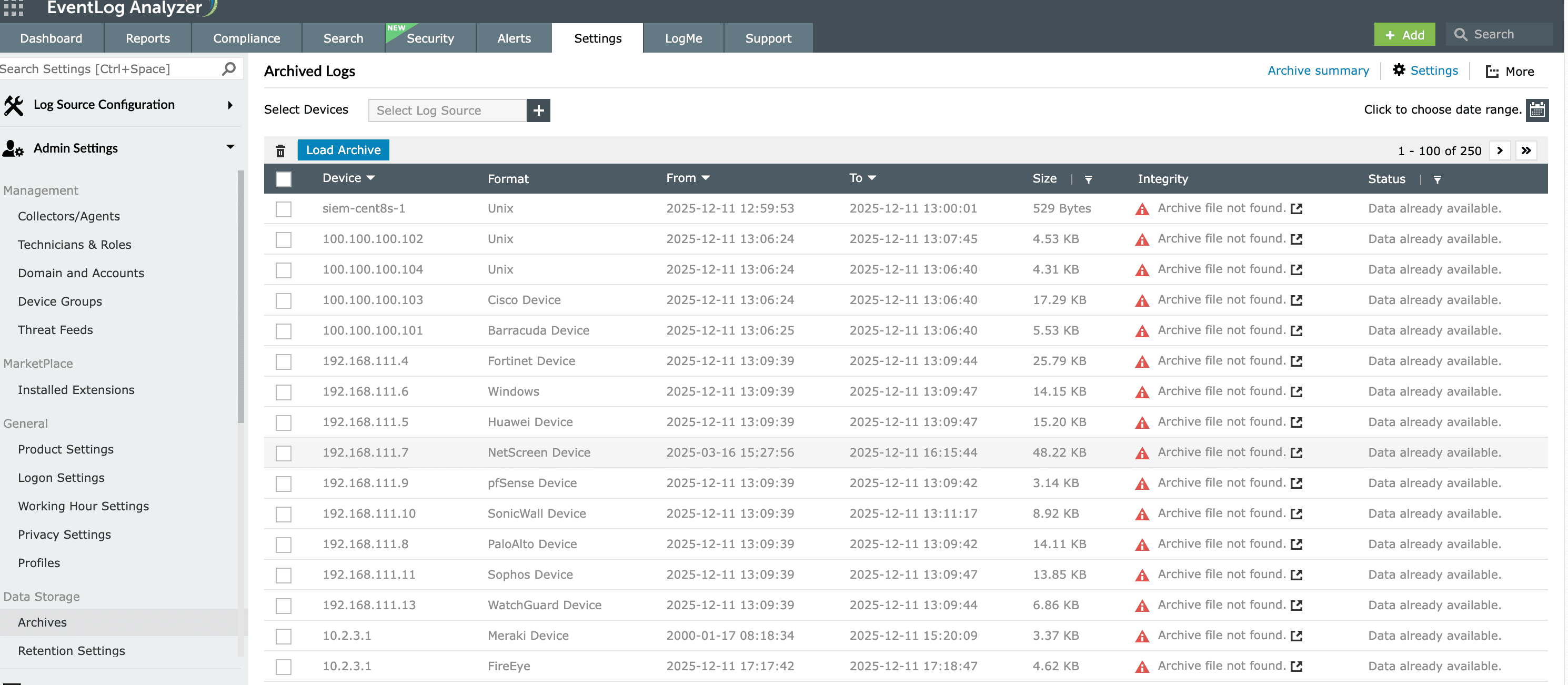
EventLog Analyzer's default schedule creates a new archive file from received raw logs every 24 hours, then compresses the file into a ZIP every seven days to conserve disk space. Archived files carry their own metadata: creation time, size, and source device, which makes them easy to load back into the database for on-demand event log reporting or log forensics. If you need an immediate archive outside the normal interval, an instant-archive option captures every log collected so far without waiting for the next scheduled run.
Archive log export and storage
Archiving is one stage of a life cycle. What happens to archives after they age past active investigation matters as much as how they're created. EventLog Analyzer's scheduler handles the full pipeline: event log collection, compression, encryption, retention, reload so archives don't quietly consume storage forever, and audit-critical data doesn't get discarded before its retention window closes.
Compressed archive files can be exported to network shares or external storage destinations for long-term retention. The audit copy can be preserved on cheaper storage tiers and remains available to reload into the EventLog Analyzer database when a report or investigation calls for it.