Free Edition
By checking your Exchange Server mailbox database sizes, you can gain valuable insights into storage restrictions and requirements. These insights allow you to make informed decisions regarding mailbox management and storage allocation, helping you avoid storage bottlenecks and enhance organizational efficiency.
ManageEngine Exchange Reporter Plus, an extensive tool used for reporting on, auditing, monitoring, and creating alerts for critical activities in your Exchange environment, simplifies this task with its Mailbox Databases report.
Supported Exchange Server versions:
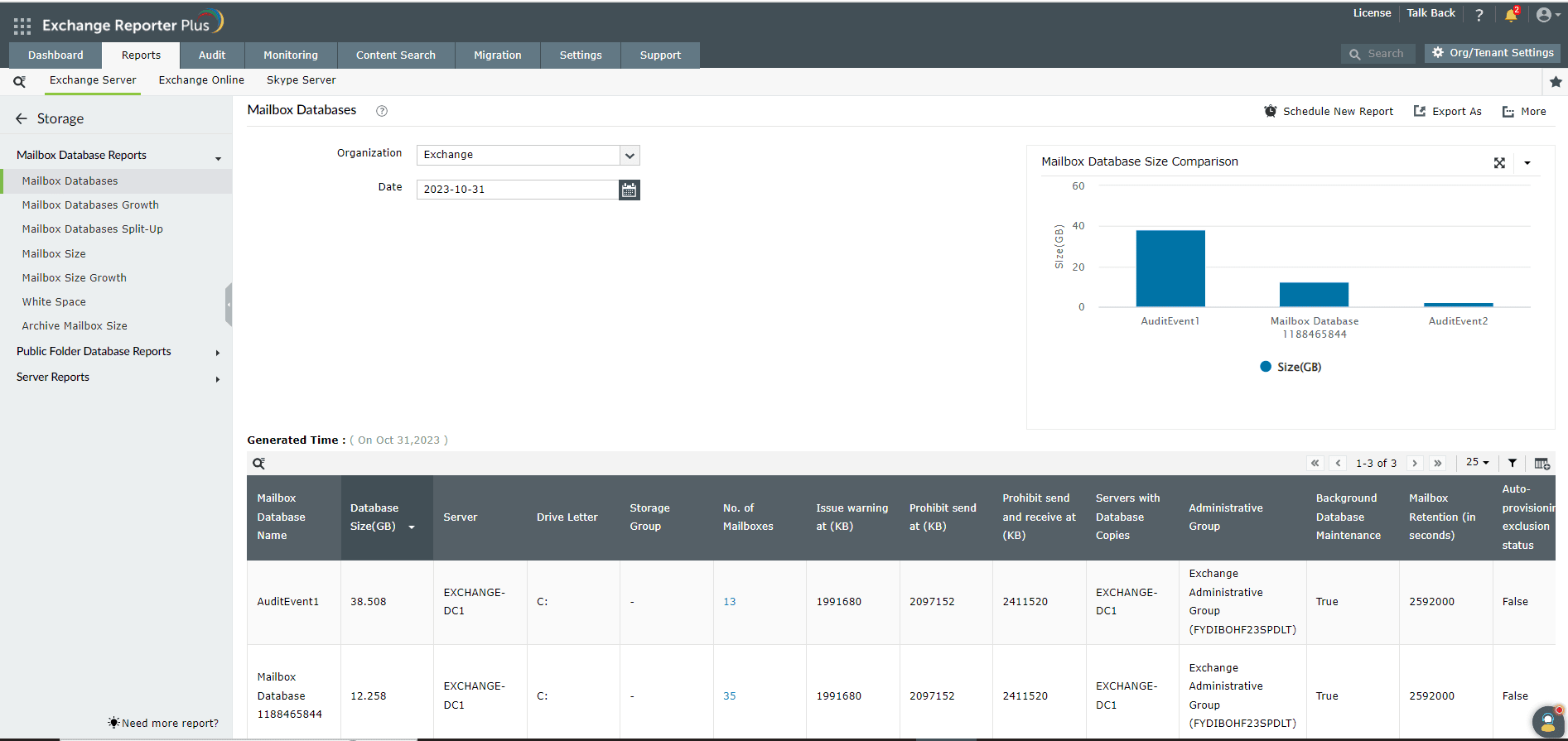
The report displays a list of all the mailbox databases in your Exchange organization along with their sizes (in gigabytes), the names of the servers on which they are located, their drive letters, and the number of mailboxes present within each.
This report also allows you to check the database size limit for each mailbox database. This information is presented under the Issue warning at (KB), Prohibit send at (KB), and Prohibit send and receive at (KB) columns.
In addition, this report displays a graph that shows the sizes of different mailbox databases within your organization in descending order for the date you select.
Fill this form, and we'll contact you rightaway.
Our technical support team will get in touch with you at the earliest."