How to check Exchange mailbox GUID

In Microsoft Exchange, each mailbox is uniquely identified by a Global Unique Identifier (GUID). Learning how to check the mailbox GUID is essential for administrators to verify that they are working with the right mailbox, which helps in preventing potential data loss and simplifies the management of user mailboxes.

ManageEngine Exchange Reporter Plus, an extensive tool used for reporting, auditing, monitoring, and creating alerts for critical activities in your Exchange environment, simplifies this task with the Mailbox Enabled Users report.

Exchange Reporter Plus supports these Exchange Server versions:
  • Exchange Server 2019
  • Exchange Server 2010
  • Exchange Server 2016
  • Exchange Server 2007
  • Exchange Server 2013
  • Exchange Server 2003

Steps to check the Exchange mailbox GUID using Exchange Reporter Plus

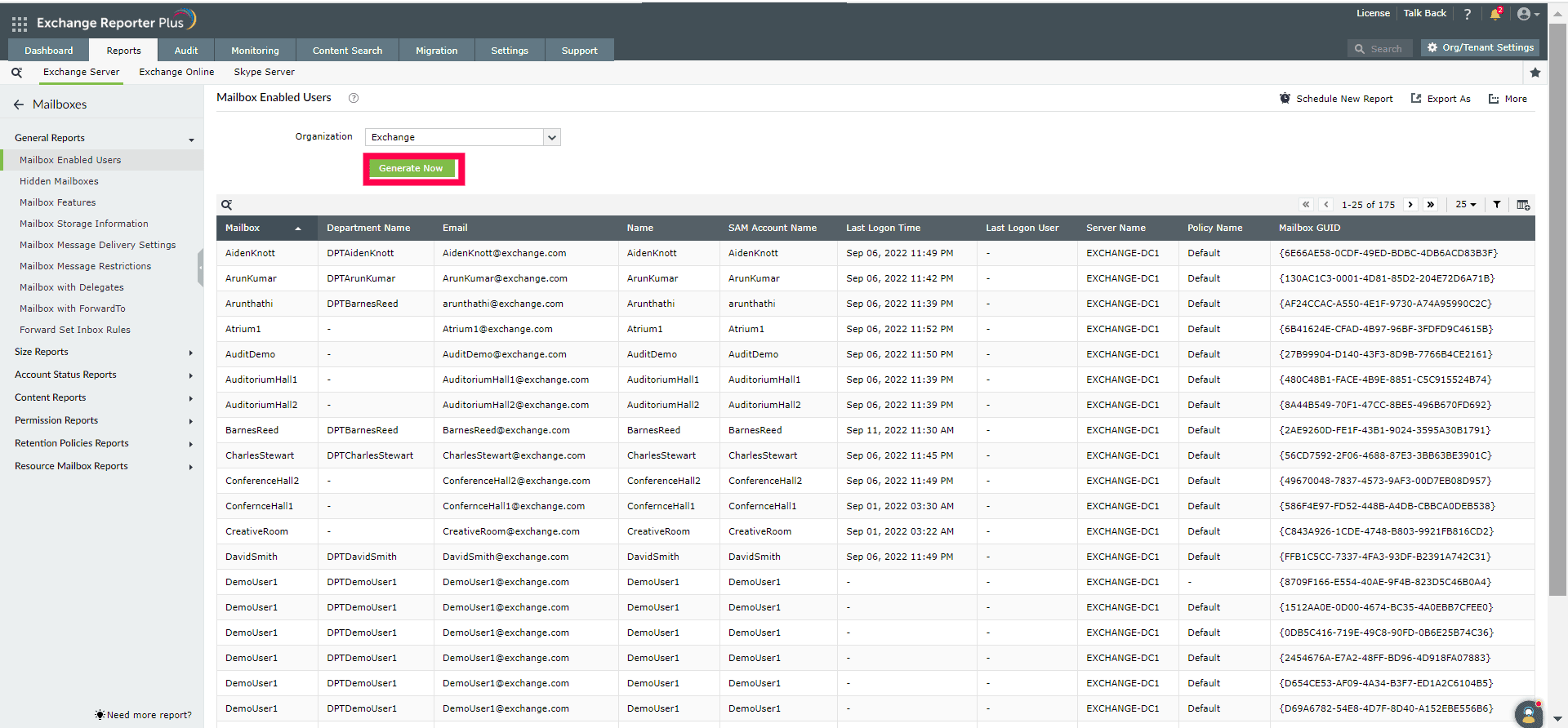
  1. Navigate to Reports > Exchange Server > Mailboxes.
  2. Under the General Reports category, select Mailbox Enabled Users.
  3. Select the Exchange organization where the mailbox, whose GUID you're looking for, is located, and click Generate.
  4. A list of every mailbox in your Exchange organization will be displayed along with the Mailbox GUID.

    The Mailbox Enabled Users report displays the Mailbox GUID in Exchange Reporter Plus.

Need further assistance?

Fill this form, and we'll contact you rightaway.

Request Support

  •  
  • *
     
  • *
     
  • *
     
  • By submitting you agree to processing of personal data according to the Privacy Policy.

"Thank you for submitting your request.

Our technical support team will get in touch with you at the earliest."

Exchange Reporter Plus trusted by

A single pane of glass for Exchange Server Monitoring, Reporting and Auditing