- Free Edition
- Quick Links
- Exchange Mailbox Reports
- Mailbox Size Reports
- Mailbox Properties Reports
- Mailbox Status Reports
- Mailbox Permission Reports
- Mailbox Content Reports
- Mailbox Logon by Users
- Inactive Mailboxes Reports
- Mailbox Enabled Users
- Office 365 Mailbox Reports
- Room Mailbox Reports
- Shared Mailbox Reports
- Exchange Mailbox Permissions
- Shared Mailbox Permissions
- Calendar Permission Reports
- Export Mailbox Permissions Reports
- Export Mailbox Size Reports
- Export Exchange Mailbox Reports
- Export Public Folder Lists
- Exchange Server Monitoring
- Client Access Server Health
- Exchange Server Monitoring Tool
- Exchange Server Monitoring Reports
- Exchange Service Health Monitoring
- DAG Monitoring Reports
- Connectivity Monitoring Reports
- Mail Flow Health Monitoring
- Exchange Database Monitoring
- Storage Monitoring Reports
- Email Queue Monitoring
- Replication Health Monitoring
- Exchange Audit Reports
- Exchange Server Auditing
- Exchange Server Auditing and Alerting
- Exchange Server Compliance Reporting
- Exchange Audit and Compliance Tool
- Exchange Admin Audit Logging
- Non-Owner Mailbox
Logon Reports - Mailbox Permission Changes Reports
- Mailbox Property Changes Reports
- Exchange Database Changes Reports
- Server Configuration Changes Reports
- Exchange Mailbox Audit Logging
- Exchange Traffic Reports
- Exchange Office 365 Reports
- Other Reports
- Mailbox Content Search
- Skype for Business server reporting
- Outlook Web Access Reports
- ActiveSync Reports
- Mailbox and Public Store Reports
- Distribution Lists Report
- Server Storage Tracking Reports
- Public Folder Reports
- Public Folder Content Report
- Email Non-Delivery Reports
- Retention Policy Reports
- Email Non Delivery Reports
- Exchange Migration
- Resources
- Related Products
- ADManager Plus Active Directory Management & Reporting
- ADAudit Plus Hybrid AD, cloud, and file auditing and security
- ADSelfService Plus Identity security with MFA, SSO, and SSPR
- EventLog Analyzer Real-time Log Analysis & Reporting
- M365 Manager Plus Microsoft 365 Management & Reporting Tool
- SharePoint Manager Plus SharePoint Reporting and Auditing
- DataSecurity Plus File server auditing & data discovery
- RecoveryManager Plus Enterprise backup and recovery tool
- AD360 Integrated Identity & Access Management
- Log360 Comprehensive SIEM and UEBA
- AD Free Tool Active Directory Free Tool
Understanding your Exchange Server mailbox databases is crucial for efficient email management. By utilizing the Exchange database size reports, you can gain valuable insights into email usage patterns and storage requirements. These insights enable informed decisions regarding mailbox management and storage allocation, helping you avoid storage bottlenecks and enhance organizational efficiency.
Supported Exchange Server versions:
- Exchange Server 2019
- Exchange Server 2016
- Exchange Server 2013
- Exchange Server 2010
- Exchange Server 2007
- Exchange Server 2003
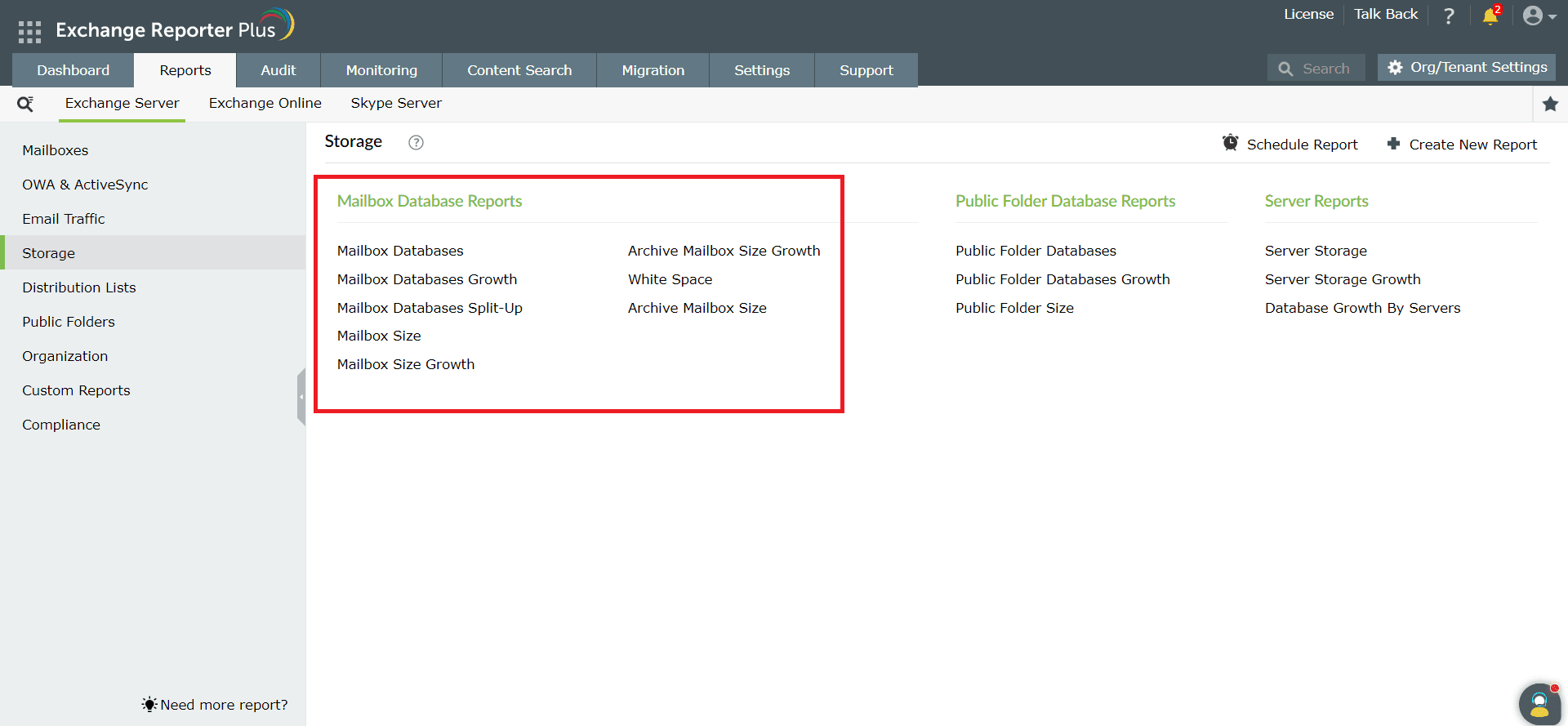
Exchange Reporter Plus provides eight reports on mailbox databases.
- Mailbox Databases
- Mailbox Databases Growth
- Mailbox Databases Split Up
- Mailbox Size
- Mailbox Size Growth
- White Space
- Archive Mailbox Size
- Archive Mailbox Size Growth
Mailbox Databases
Get a list of all the mailbox databases in your Exchange organization using this report. This report allows you to identify:
- Mailbox database names, servers, and administrative groups.
- The number of mailboxes within each database.
- Which servers hold copies of your mailbox databases.
- Storage limits for each mailbox database.
Mailbox Databases Growth
Get insights into the growth of all the mailbox databases in your Exchange organization using this report. This report allows you to identify:
- The growth of mailbox databases from their initial size to their current size over a specified time frame for all mailbox databases.
- The top five mailbox databases with the most significant growth in size.
Mailbox Databases Split-Up
Get insights into the space consumption of all the mailbox databases in your Exchange organization. This report allows you to identify:
- The total size of each mailbox database along with the number of mailboxes in each mailbox database.
- The size consumed collectively by all the mailboxes present in each mailbox database.
- The top five mailbox databases with the highest storage consumption.
Mailbox Size
Get insights into all mailbox sizes in your Exchange organization using this report. This report allows you to:
- Check the current size of all Exchange user mailboxes.
- View a graphical representation of the top Exchange mailboxes based on size.
- List details about mailboxes based on email count as well as size.
Mailbox Size Growth
Get insights into the growth of all the mailboxes in your Exchange organization using this report. This report allows you to identify:
- How mailbox size has grown from its initial size to its current size over a specified time frame.
- The top five mailboxes with the most significant growth in size.
Archive Mailbox Size
Get insights into the size of all the archived mailboxes in your Exchange organization using this report. You can:
- Check the current size of all archived mailboxes.
- View a graphical representation of the top archived mailboxes based on size.
- See details listed about archived mailboxes based on email count and size.
Archive Mailbox Size Growth
Get insights into the growth of all the archived mailboxes in your Exchange organization using this report. This report allows you to identify:
- How archived mailbox size has grown from its initial size to its current size for all archived mailboxes.
- The top five archived mailboxes with the most significant growth in size.
White Space
Get insights into the space available in all the mailbox databases in your Exchange organization using this report. This report allows you to identify:
- The free space available in each of the mailboxes in your Exchange organization.
- The name of the server in which the mailbox database is present.
- The number of mailboxes stored within each database.
Reporting
Monitoring