
The primary purpose of DNS (Domain Name System) servers is to convert simple domain names into IP addresses that can be processed by computers. If the DNS server that supports your business is down, multiple services such as websites, mail servers or proxy servers may be inaccessible to the outside world. Not only that, quick response times of your DNS server to process the millions of requests handled on a daily basis are essential in order to deliver a good user experience. This makes DNS monitoring an integral part of any network and application ecosystem.
Applications Manager offers comprehensive DNS monitoring with real-time alerts to make sure your DNS server performance is always maximum and no issues that can impact the performance of your business applications go unnoticed. Our tool for DNS server management helps you make sure your critical services are up and running at all times, ensure constant connectivity to your websites and servers, and quickly identify DNS issues.
Some of the parameters our DNS performance monitor uses to track DNS server operations are:
Response time: One of the primary DNS performance metrics to keep an eye on when you monitor DNS performance is the response time of your DNS server. Monitoring DNS response time can help identify problems from a glimpse leading to further drill down into the cause. 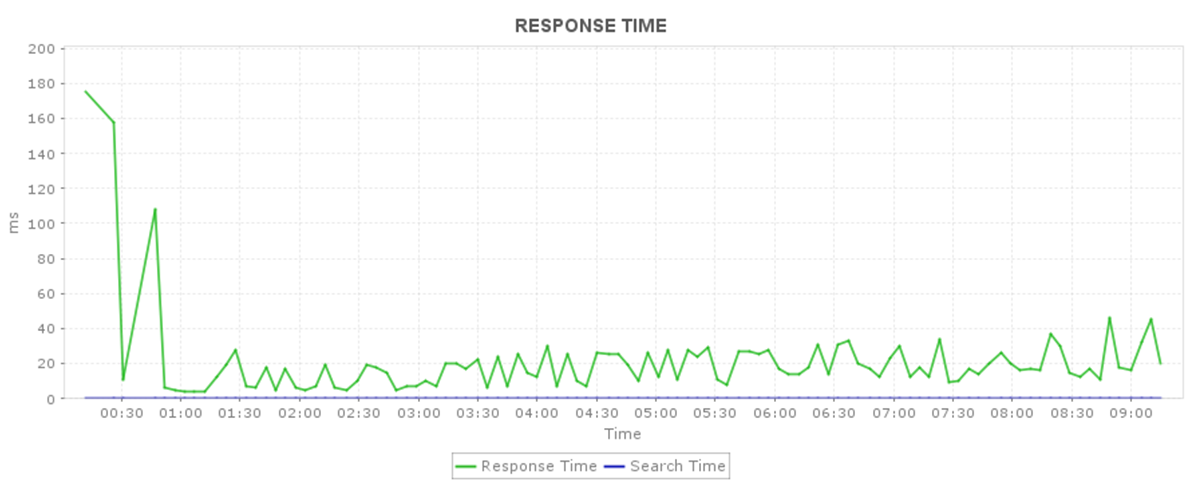
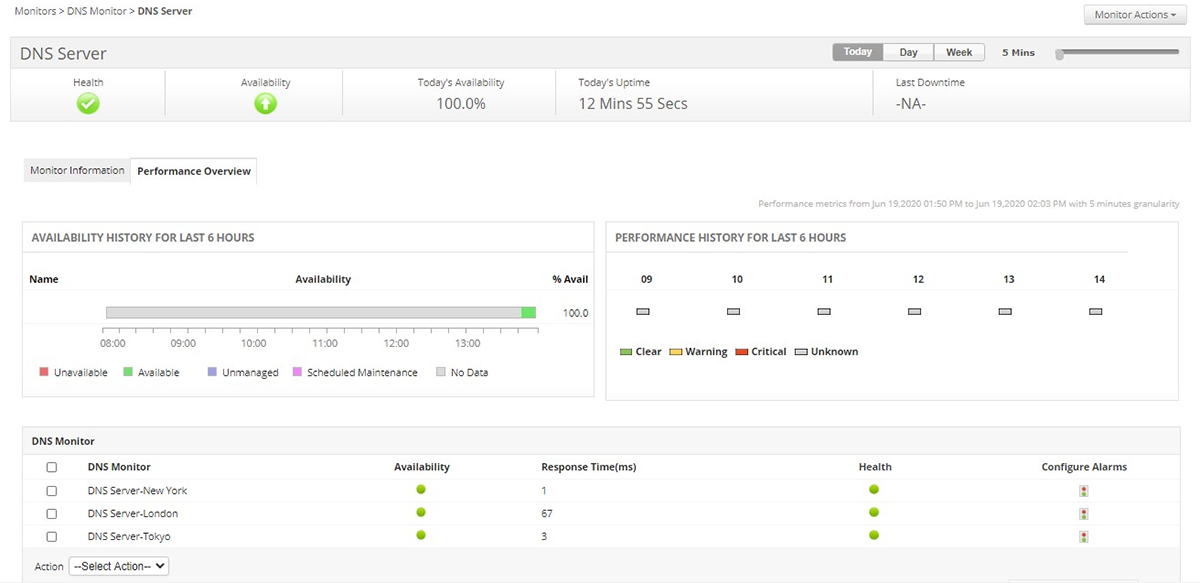
DNS Server Availability: Monitor DNS server health and availability to maintain the server at optimum performance level which inevitably leads to fast processing of incoming DNS server requests.
Record Type: DNS servers create and rely on things called 'Records' for important information about the hostname or the domain. These records are classified into many types based on their functions. Some examples include Address Mapping record (A record), IP Version 6 Address record (AAAA record), Canonical Name record (CNAME record), etc. The record type parameter that is available with DNS monitoring can help you understand which record type has a delayed response time and troubleshoot accordingly.
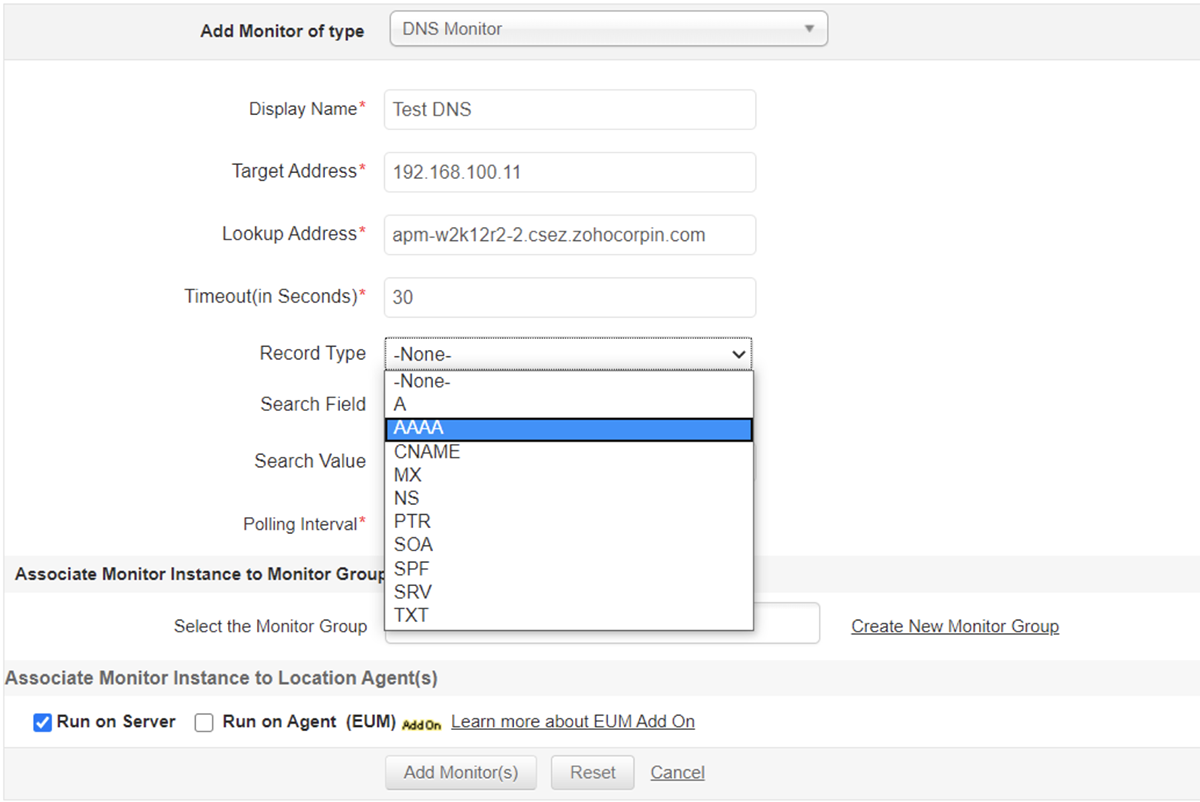
Search Field: The type of field the DNS server is currently looking up into. Examples include record name, address, target, admin, host, port, priority, etc. Again, easier to identify where the issue could be.
Search Value: This denotes the value of the field type chosen for the request above. These parameters can be associated with thresholds to get notified if there is any anomaly.
Search Time: This denotes the time taken for a search to be executed in the DNS server. Keeping an eye on this parameter using our DNS monitor can help pinpoint the searches that take more execution time and tune the performance accordingly.
A DNS monitoring system is designed to track DNS requests and servers, so that performance issues are identified and resolved on time. Applications Manager's DNS monitoring helps you proactively identify common causes for DNS server failure including improper configuration, network issues, dynamic updates, inaccessibility of root servers, etc. DNS server monitoring instantly alerts you in case of any deviations from ideal performance and helps you resolve service disruptions and avoid latency.
Applications Manager enables DNS monitoring from various geographies to measure end user experience across the globe. Our DNS management software helps understand the response time of your distributed DNS servers from global monitoring locations, troubleshoot domain name resolution, and ensure minimum look up times for all users.
With detailed monitoring, intelligent alerts and reports to analyse performance trends, Applications Manager could be the ideal value for money DNS monitoring tool that you are looking for. You can take a 30-day free trial of our DNS server monitoring tool today!

It allows us to track crucial metrics such as response times, resource utilization, error rates, and transaction performance. The real-time monitoring alerts promptly notify us of any issues or anomalies, enabling us to take immediate action.
Reviewer Role: Research and Development

"I like Applications Manager because it helps us to detect issues present in our servers and SQL databases."
Carlos Rivero
Tech Support Manager, Lexmark
Trusted by over 6000+ businesses globally