
Windows Server Operating system is designed to run on servers which operate within a client-server architecture. These servers are usually designed to handle heavy workloads and serve as the backbone of most software operations involved in businesses. Therefore, Windows server monitoring is crucial to businesses in order to prevent any loss of service due to performance issues and to maintain the seamless flow of operations. Using Windows server monitoring tool, you can increase the performance and availability of Windows by fast detection and troubleshooting of errors and error patterns preceding system failure.
ManageEngine Applications Manager's Windows server monitoring tool provides an agentless approach to Windows service monitoring with its out of the box monitoring capabilities. Monitor Windows server performance and ensure that key performance attributes such as CPU, memory, disk utilizations are within permissible usage and ensure that applications hosted on these servers always run at peak performance.
With Applications Manager's Windows server monitor, you'll be able to maintain an optimal overall health and availability of your Windows server by monitoring all the key Windows performance counters including details pertaining to all the Windows processes and services running on the system. Applications Manager's Windows monitor ensures that your server performance issues do not become a cause for business downtime.
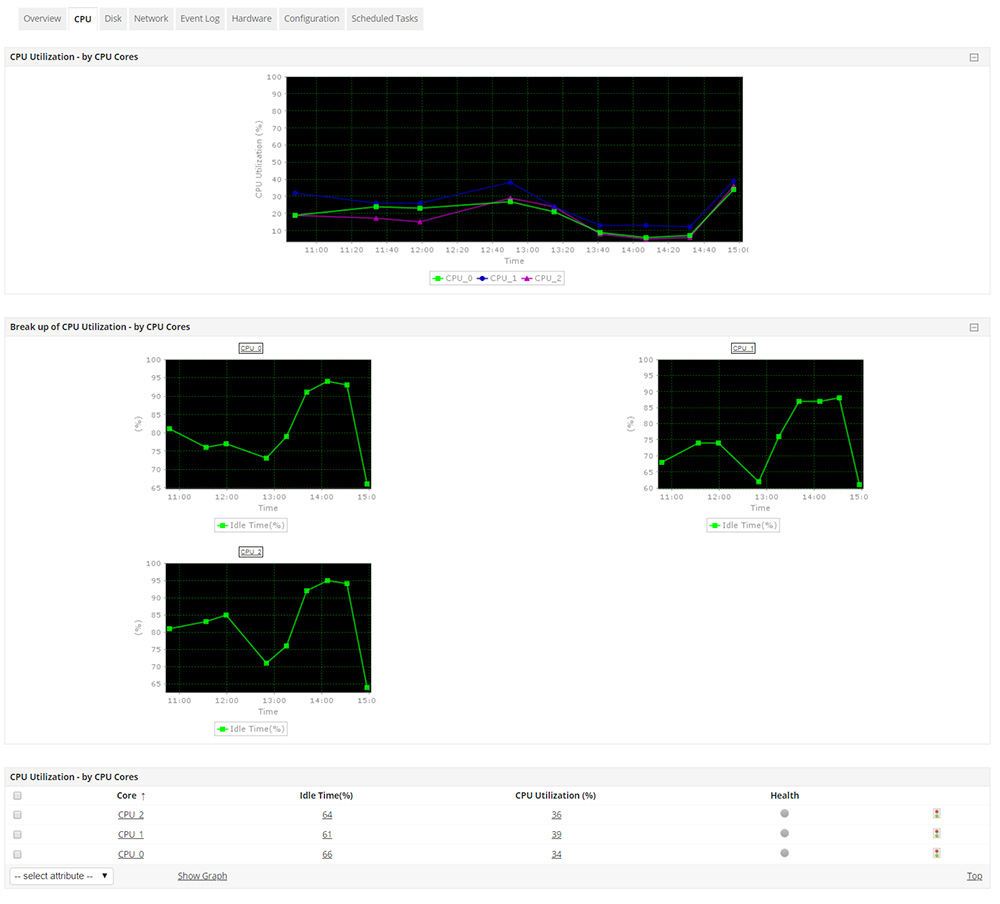
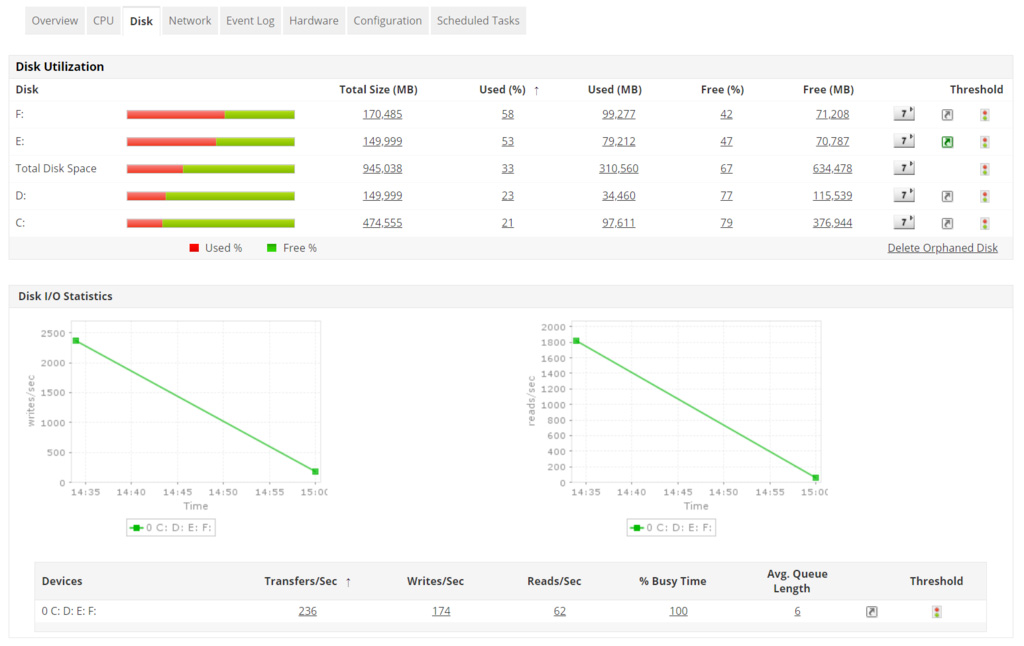
Tracking CPU and Disk utilizations is very important because they reveal power consumption stats and also play a crucial role in measuring the load and analyzing performance issues. A processor package usually consists of multiple cores with dynamically changing frequencies and shared caches. Applications Manager's Windows server performance monitoring tool extensively shows the CPU utilization with the break up of individual core utilizations and their status. Regulate the disk usage by closely monitoring disk utilization with disk wise break-up and I/O statistics and ensure that performance bottlenecks are nipped in the bud.
Applications Manager Windows server performance monitor also collects network performance stats such as input traffic, output traffic, network errors , speed, etc. For all round Windows performance monitoring, users can also add Windows processes, services and scripts to monitor within Applications Manager.
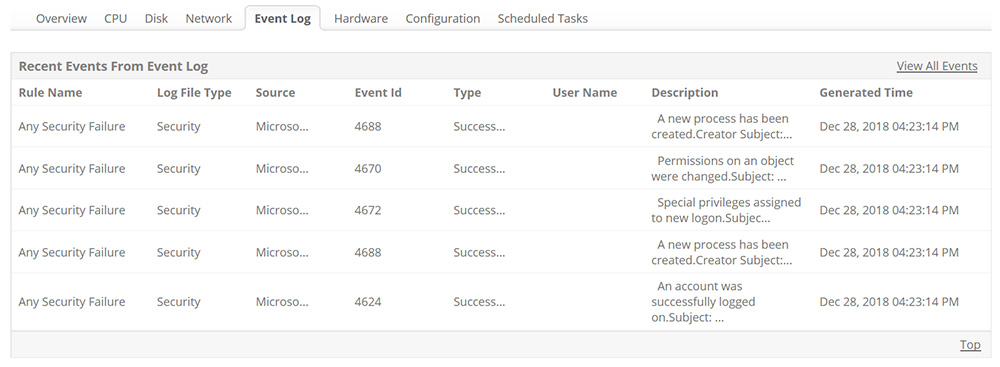
Applications Manager's Windows server performance monitoring capability also extends to monitoring the event logs of your Windows server. Monitoring windows server event log data is the most accurate way to detect network anomalies, data breach attempts and tracking network intruders. Configure event log rules and trigger alerts for Windows events from application, system, security, file replication service, DNS server and directory service log files.
Learn more about Windows Event Log Monitoring.
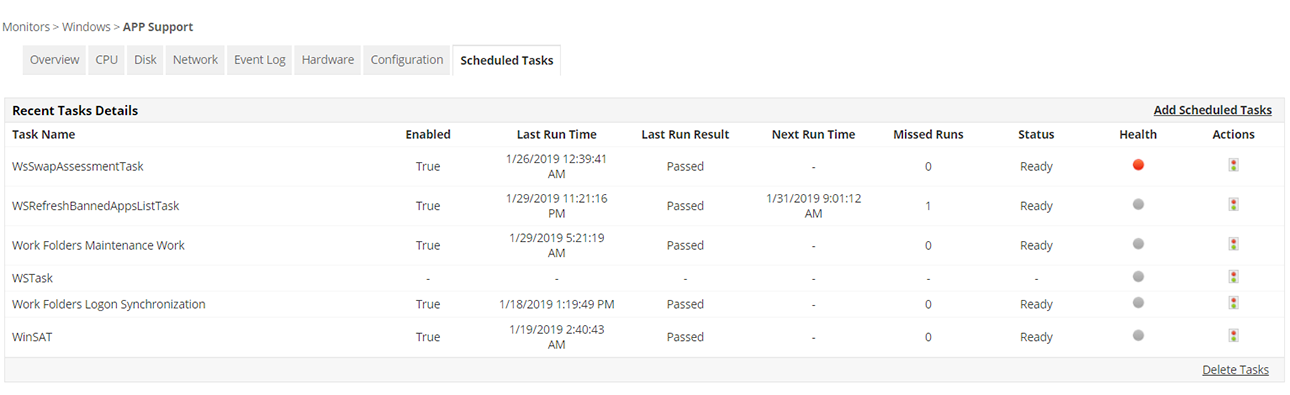
Your Windows server might always have numerous tasks configured to run at scheduled times and manually checking the status of important tasks among the crowd could be quite cumbersome. With Applications Manager's Windows monitoring software, monitor critical scheduled tasks in your Windows server and view task details such as whether the task is enabled or not, last run time, last run result, next run time, missed runs, etc. and make informed decisions. In addition to monitoring Windows server, you can also add Windows services, processes and scripts to monitor with the Windows monitoring module. Associate automated actions to be performed based on the order of severity of the tasks to reduce manual intervention for troubleshooting whenever possible.
Very few Windows server performance monitoring tools like Applications Manager's Windows server performance monitor proactively monitors details like health of processors, failure of any physical or logical drive, cooling units/fans and current voltage, etc. for hardware servers (HP Proliant and Dell Power Edge) and VMware ESX/ESXi servers, to identify issues caused by a malfunctioning hardware component. Monitoring Windows server hardware components such as power supply rating, CPU fan speed, temperature, disk & array, memory, processor, etc. can significantly help reduce performance issues due to hardware anomalies.
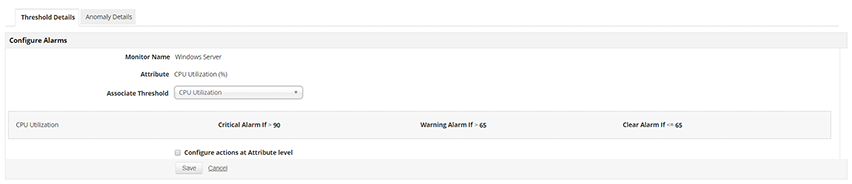
Using Windows monitoring tools provided by Applications Manager, set threshold values for various Windows server performance attributes to identify performance bottlenecks. Trigger alarms upon violation of these thresholds and get notified via e-mail or SMS incase it requires immediate attention. Set up automatic Windows service actions such as restarting or stopping the server as an instant troubleshooting measure to resolve issues faster and ensure 24/7 Windows server monitoring.
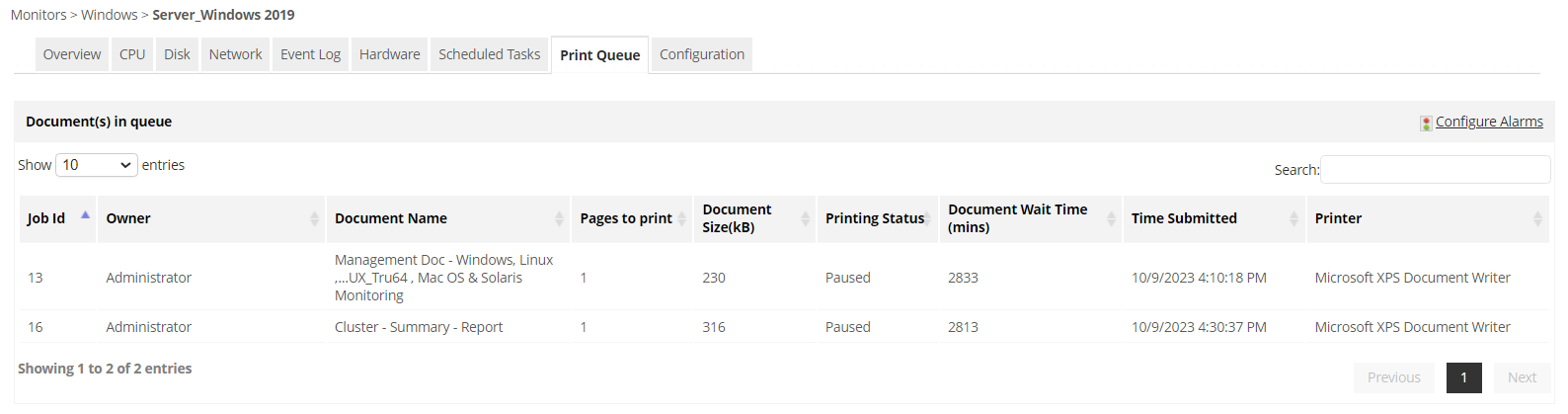
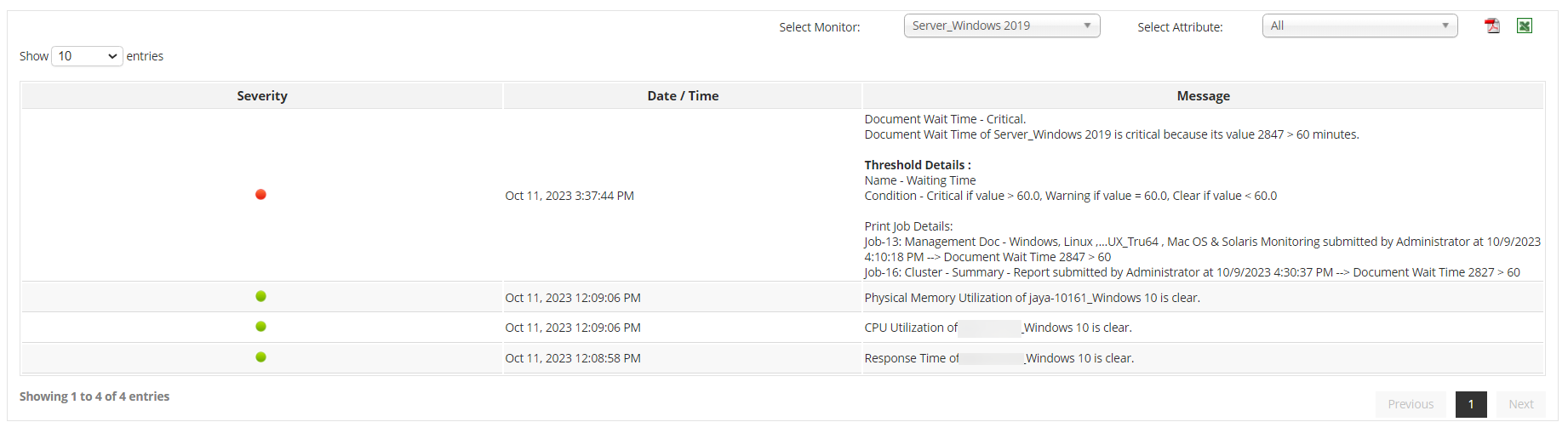
With Applications Manager, you gain complete control and visibility over your printing operations, ensuring seamless and efficient print management. The print queue monitoring feature allows you to keep a close eye on all print jobs, their status, the printers involved, and get alerts on print jobs waiting for long time— all from a centralized dashboard. You can track print job progress in real-time, identify and resolve issues, and prioritize critical print tasks, minimizing downtime of the print servers and improving productivity. Whether you're in a corporate environment or a small business, our print queue monitoring feature will streamline your printing processes, reduce waste, and help you maintain an uninterrupted workflow.
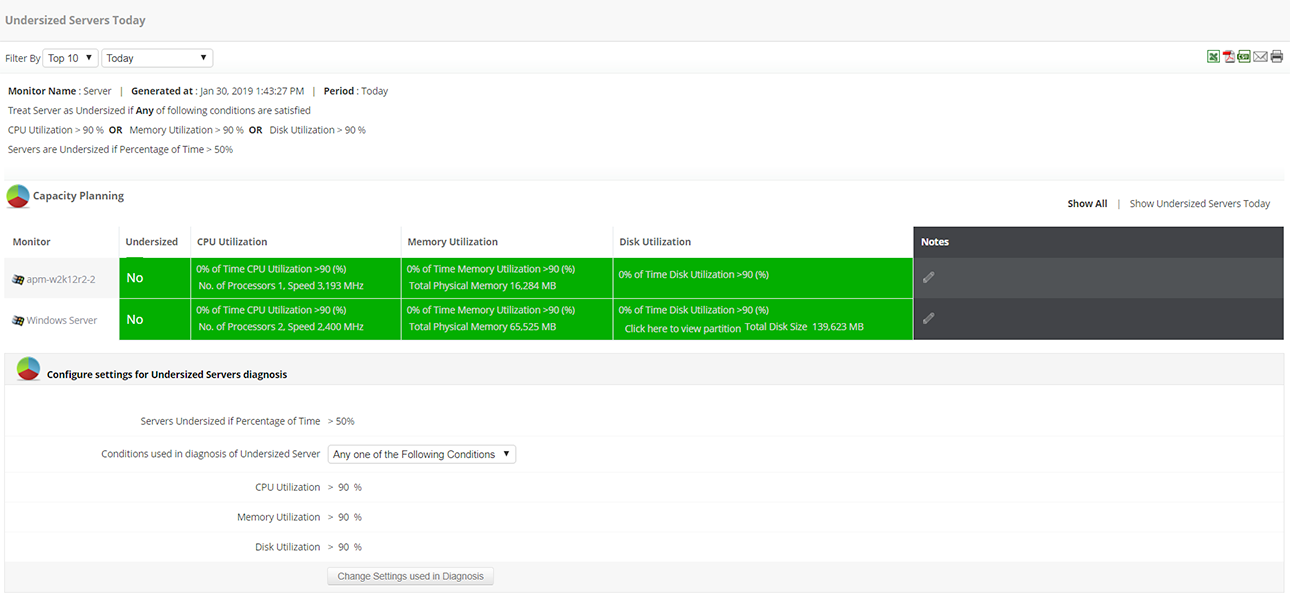
Windows monitoring in Applications Manager allows users to not only analyse and compare the attribute wise historical performance trends of their Windows servers but also enables them to forecast the future growth and utilization trends of the server based on machine learning powered analytics. Additionally, the capacity planning reports help admins see which servers are overutilized, which are underutilized or idle and distribute load accordingly in order to prevent a server overload or crash.
ManageEngine Applications Manager's Windows server monitoring supports all versions of Windows- Windows server 2000, 2003, 2008, 2008 R2, 2012, 2016, 2019, 2022, Windows Vista, XP, NT, 7, 8, 10.
Start Windows performance monitoring with ManageEngine Applications Manager now!

It allows us to track crucial metrics such as response times, resource utilization, error rates, and transaction performance. The real-time monitoring alerts promptly notify us of any issues or anomalies, enabling us to take immediate action.
Reviewer Role: Research and Development

"I like Applications Manager because it helps us to detect issues present in our servers and SQL databases."
Carlos Rivero
Tech Support Manager, Lexmark
Trusted by over 6000+ businesses globally