UDP Port Monitoring
As networks expand, ensuring efficient device communication becomes increasingly vital for optimal network functionality. Ports play a fundamental role in this process, serving as physical connectors that enable the integration of external devices. By facilitating seamless data transfer and interaction, ports contribute to the smooth operation of the network infrastructure. Ports enable communication between the devices where data is exchanged over the internet.
Numerous protocols are utilized to support different operations across the internet. However, for time-sensitive activities like video streaming, voice/video calls over IP, and DNS lookups, the preferred choice is User Datagram Protocol (UDP). This is due to UDP's ability to establish low-latency connections, ensuring efficient data transmission for these tasks. Ports generally use either Transmission Control Protocol (TCP) or UDP protocol. Before understanding what UDP is all about, let's learn more about the difference between TCP and UDP protocols as they are often confused.
Before that, here is what you will be reading henceforth.
- Differences between the TCP and UDP protocols
- Structure of UDP
- What network services are reliant on UDP?
- Benefits in using UDP
- Challenges with UDP
- UDP port monitoring with OpManager
Differences between the TCP and UDP protocols
Both TCP and UDP are transport layer protocols, that is, in the OSI 7 layer model they appear between the network and application layers. It is often said that UDP is faster, but TCP is more reliable. Let's find out why. TCP, being a transport layer protocol, utilizes an automated TCP handshake process to establish a connection between the sender and receiver. This ensures that the source and destination are correctly associated before data transfer occurs.
This connection-oriented approach is considered reliable as it sequentially sends individual packets and facilitates host-to-host communication. In contrast, UDP operates differently by directly transmitting data to the receiver without establishing a connection. This eliminates the time required for a connection establishment and makes UDP faster than TCP. However, this lack of a connection establishment also implies that UDP is less reliable compared to TCP.
To dig deeply into UDP functionalities, it is important to understand the structure of UDP.
Structure of UDP
Picture UDP as a turtle. The head region is made up of eight bytes, and is divided into four compartments of two bytes each. It contains information about the source port, destination port, length and checksum. The shell region of the turtle contains the data to be transported.
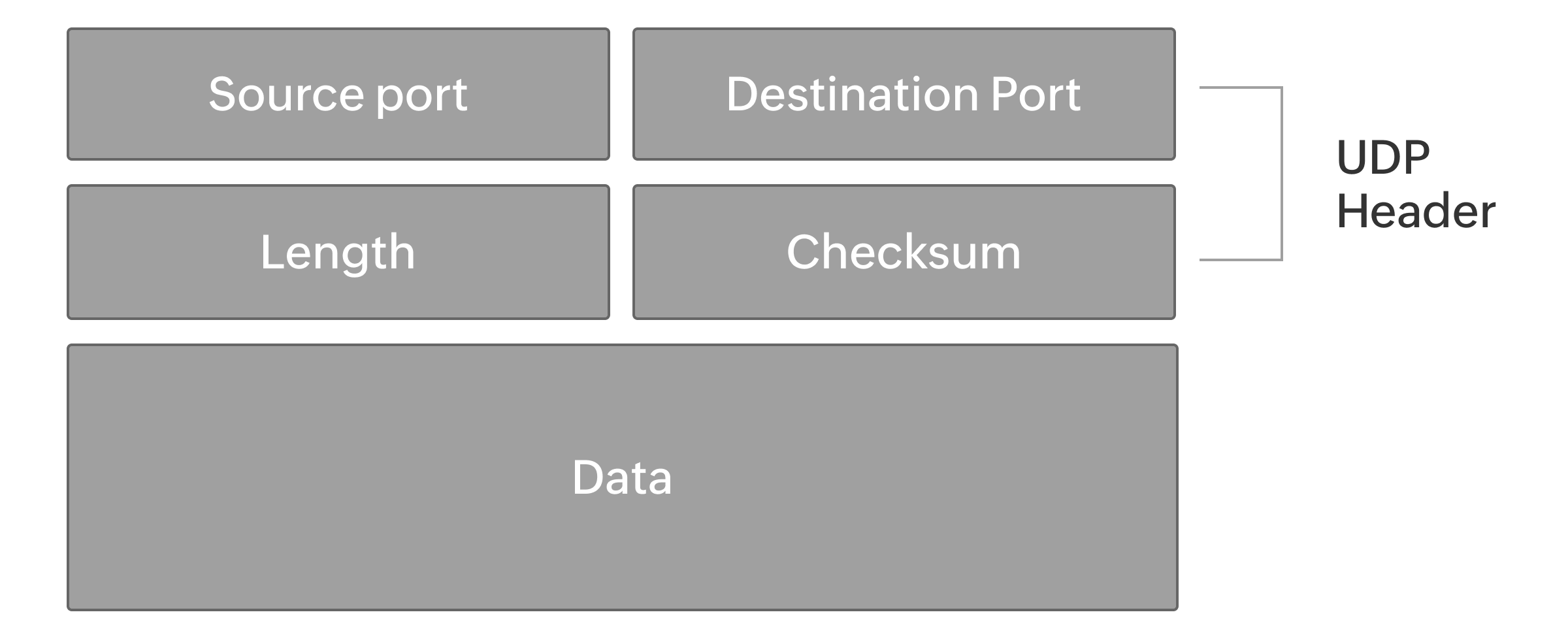
Here is some more information about the UDP header.
Source port:
The first compartment of the UDP header is the source port. As the name suggests, it contains details to identify the port of the source device transmitting data.
Destination port:
The second compartment is the destination port, containing the details to identify the destination port.
Length:
This compartment specifies the total length of the UDP, including both the header and body. The header is made of two bytes that cannot be altered, unlike the UDP's body. However, the total length of the UDP depends on the number of bytes the data is made of.
Checksum:
The checksum compartment allows the destination device to verify the integrity of the UDP. However, this is not compulsory in UDP as there is no error control in UDP.
It's important to know that UDP packets are encased in IP packets, and the communication to the destination happens over the IP.
What network services are reliant on UDP?
UDP is usually used for time conscious operations, since it helps establish low latency connections. The connection established by UDP is unreliable, and applications requiring just a quick data transfer without reliability will find UDP to be very advantageous. Since human eyes can capture only 36 to 60 frames per second (FPS) in a motion picture, videos made with an increased FPS, that is, greater than 60 FPS, provide a greater picture quality. However, a minor loss in this data will not impact the user until the video begins buffering. Buffering happens because of high latency, but UDP works its way to establish low latency connections. UDP is ideal for video conferencing, video streaming, online gaming, DNS lookups, voice over IP calls, and more. Any network operation requiring less reliability and quicker data transfer might use UDP protocols.
Benefits in using UDP
Here are some of the advantages of UDP:
- UDP generates fewer operational expenses and is ideal for projects that are time sensitive.
- UDP often is employed in simple request-response communications where the error rate doesn't create an impact.
- With a growing need for better video streaming and calling quality, high latency is often a major obstacle. Switching to UDP helps resolve issues by ensuring low latency operations.
- UDP can be used in any application where the rate of data transfer is more important than the reliability of data transfer.
- With UDP's ability to switch packets, multi-casting applications is possible where multiple destination devices are involved.
- UDP can be used as an alternative to TCP in streaming high-quality videos through VPN because it efficiently establishes low-latency connections.
Challenges with UDP
- One of the biggest challenges in using UDP is its unreliability. As a result, information can be lost or duplicated in the process of a transmission.
- There is no proper flow controlling mechanism in UDP, so it can forward information until there is actual network congestion.
- It is possible for an attacker to stream a network with UDP packets, meaning UDP is prone to DDoS attacks.
- Applications wanting a reliable connection, such as file transfers or mails, cannot choose UDP.
UDP port monitoring with OpManager
ManageEngine OpManager is an integrated network monitoring tool that will efficiently monitor and manage your entire network. It helps track the availability, health, and performance of all the network devices—including routers, switches, firewalls, load balancers, wireless LAN controllers, servers, VMs, printers, and storage devices—and every other device that is able to connect to the network using an IP address. With OpManager, you can monitor all the services running in the UDP port by associating it with a service monitor. OpManager by default supports Web, HTTPS, FTP, IMAP, LDAP, Telnet, Oracle, POP, MySQL, SMTP, WebLogic, Finger, Echo, DNS, and NNTP services. However, OpManager enables you to configure new services that are not available in the list based on your network needs. While OpManager does not natively monitor UDP ports, you can achieve this on Windows devices by installing PortQry and using a script monitor.
Additionally, you can also leverage the power of ManageEngine OpUtils, which integrates seamlessly with OpManager, to efficiently scan TCP and UDP ports for network switches and systems, explore comprehensive insights into operational history, status, and more. Utilizing OpUltils, you are empowered to better manage UDP ports.
Get started with OpManager by taking advantage of a free, 30-day trial today. Or, you can schedule a free personalized demo with a solution expert to receive answers to your product-related questions.