A network monitoring system is a combination of software and hardware tools designed to oversee various aspects of a computer network continuously, such as traffic, bandwidth utilization, and device status. It provides real-time insights, automated fault detection, and proactive alerts to prevent downtime and ensure seamless network operations. OpManager’s network monitoring system goes beyond basic monitoring by offering AI-driven intelligence, automation, and advanced fault management, making it a one-stop solution for IT teams.
OpManager's network monitoring system comes with a plethora of features to offer:
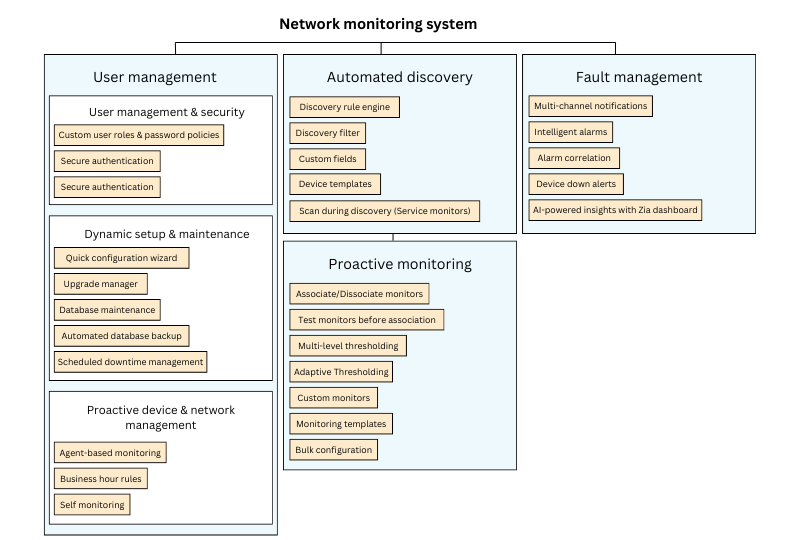
Seamless user management & hassle-free maintenance with our network monitoring system
OpManager's network monitoring system makes user management, authentication, and product maintenance effortless, ensuring secure access, smooth upgrades, and optimized performance.
User management & security
Custom user roles & password policies: Control access by defining user roles and setting up strong password policies, ensuring only authorized users can access OpManager.
Secure authentication: You can choose from Active Directory (AD) authentication, SAML, or Two-Factor Authentication (2FA) for enhanced data security and seamless user login experiences.
Dynamic setup & maintenance
Quick configuration wizard: Make bulk configuration updates in minutes! Easily manage device templates, custom fields, and device settings across multiple devices with just a few clicks.
Upgrade manager: Keep your network monitoring system up-to-date with one-click service pack upgrades—just upload the latest version and you're good to go!
Database maintenance: Optimize performance by automatically cleaning up old logs and stats while retaining only essential data for analysis.
Automated database backup: Securely schedule PostgreSQL backups on a weekly or monthly basis, complete with password protection for added security.
Scheduled downtime management: Prevent false alarms during planned maintenance by scheduling downtime in advance for your network devices.
Proactive device & network management
Agent-based monitoring: Deploy lightweight agents on Windows servers to enable deeper insights and enhanced device monitoring.
Business hour rules: Need more precise insights? Customize monitoring reports to match your organization's business hours—filter alerts, track trends, and focus on the most relevant data during key time periods.
Self monitoring: Monitor the health and performance of the machine hosting OpManager to ensure uninterrupted service. Visualize server data through intuitive graphs on the system performance dashboard.
Intelligent & automated device discovery with OpManager's network monitoring system
With OpManager's network monitoring system, you can simplify device discovery with intelligent automation and customizable rules.
Discovery rule engine: Automatically associate monitors and business views with devices during discovery—no manual setup needed! If a device meets predefined conditions, OpManager links the right monitors, saving you time and effort. You can easily assign process, service, file, folder, and URL monitors to your devices.
Discovery filter: Need to focus on specific devices? Discovery Filters let you include or exclude devices based on predefined conditions. Perfect for managing a wide variety of devices—for example, adding only Windows devices from a scanned range.
Custom fields: Want more details on your devices? Custom fields let you store additional device info—like serial number, building, department, floor, zip code, and model—helping you keep a well-organized inventory and network database.
Device templates: These pre-loaded XML templates come packed with device-specific details, like device type, vendor, and system description, plus essential performance monitors based on Object Identifiers (OIDs). This means OpManager's network monitoring system can auto-classify and monitor devices right from discovery, speeding up deployment significantly.
Scan during discovery (Service monitors): During device discovery or re-discovery, OpManager scans port availability and automatically assigns service monitors to devices—ensuring continuous, seamless monitoring.
Leverage network monitoring system to facilitate end-to-end monitoring
OpManager takes network monitoring system to the next level with multi-level thresholds, adaptive intelligence, and powerful automation to keep your infrastructure running smoothly.
Associate/Dissociate monitors: Add or remove network monitors from devices whenever needed, giving you full control over what gets tracked.
Test monitors before association: Ensure network monitors are working correctly before associating them with devices, preventing configuration issues.
Multi-level thresholding: Set up custom alerts based on severity levels:
- Attention – Low severity
- Trouble – Medium severity
- Critical – High severity
- Rearm – Automatically resets the monitor back to normal when conditions improve.
- Consecutive Violations or Failure threshold – Control how many times a threshold can be crossed before an alert is triggered.
Adaptive Thresholding: No more manual guesswork! Using AI-powered predictive algorithms, OpManager automatically adjusts performance thresholds based on real-time network behavior—ensuring accurate, dynamic alerts for changing conditions.
Custom monitors: Need more control? Create your own monitoring parameters for SNMP-enabled devices. Simply update the device template, and our network monitoring system will apply it across all matching devices.
Monitoring templates: Standardize monitoring by pre-configuring threshold values in default templates—any device associated with the template gets automatically updated.
Smart grouping: Organize devices into custom groups to:
- View overall availability at a glance.
- Auto-add devices to groups upon discovery.
- Apply threshold settings to entire groups, regardless of interface type.
Bulk configuration: Save time by pushing bulk monitoring configurations across multiple devices effortlessly.
General polling: Choose between DNS or IP-based polling for your devices.
Hardware monitoring: Keep track of essential hardware components like battery, fan, memory, power, processor, storage, and temperature in real time.
Alarm suppression: Mute specific hardware alerts (e.g., power, battery, temperature) when needed.
Hardware change alerts: Get notified instantly if key device details change—like RAM, HDD, serial number, MAC address, model, OS version, or service tag.
IPMI sensor alerts: OpManager can flag failed IPMI sensors and automatically remove inactive ones after a set period.
Multi-channel notifications: Get alerts your way! Choose from SMS, Email, web alarms, syslog messages, SNMP traps, or even integrate with third-party tools via webhooks—so you never miss a critical update.
Intelligent alarms: The key to quick troubleshooting is real-time, prioritized alerts. Filter alarms by severity or color codes, focus on critical issues first, and manage alerts efficiently.
Alarm correlation: Say goodbye to alert fatigue! OpManager groups related events into a single, meaningful incident, reducing unnecessary notifications and helping you focus on what matters most.
Device down alerts: Get notified only when it matters! Configure alerts based on the number of failed polls and set custom availability messages for clarity.
AI-powered insights with Zia dashboard: Let Zia AI analyze alerts, predict potential impact, and provide actionable recommendations to resolve issues faster!
- Recognized as a May 2019 Gartner Peer Insights Customers' Choice for Network Performance Monitoring and Diagnostics Software
- Recognised as an April 2019 Gartner Peer Insights Customers' Choice for IT Infrastructure Monitoring Tools.
- Network Management and Monitor Vendor of the Year 2018, 2019
- Entered the 2019 Gartner NPMD Magic Quadrant.
- Ranked #2 in the Infotech Research Software Reviews Data Quadrant 2018.
Advanced monitoring settings:
Modular network monitoring system for active fault management
OpManager's powerful network monitoring system ensures faster fault detection, smarter alerts, and reduced noise, so you can resolve issues before they impact your business.
Get started with OpManager's network monitoring system today!
ManageEngine OpManager stands out as a comprehensive network monitoring system, offering a suite of advanced features designed to ensure optimal network performance and reliability. Intelligent alerts to AI-powered insights help elevate automated network monitoring and reduce administrative overhead.
FAQs on network monitoring system
What is network monitoring system?
+What are some open-source network monitoring system tools?
+What are some examples of network monitoring systems?
+Monitor network systems, fail-proof and fault-free with OpManager.
Download 30-day free trialCustomer reviews

Case Studies - OpManager
Awards & Honors